Hello and welcome back!
In our last lesson, we focused on optimizing your LLM application by implementing a semantic cache to reduce redundant API calls, saving both time and money. That was a strategy of avoidance. Today, we'll address the inevitable: what happens when the API calls you must make don't succeed?
As a backend engineer, you know that any service built on network communication must be resilient to failure. LLM APIs are no exception. They can experience transient server issues, network glitches, or, most commonly, enforce rate limits. A production-grade application cannot simply crash or drop a user's request when these errors occur.
This lesson directly addresses that challenge. Your goal is to implement robust error handling for API calls, including retries with exponential backoff. We will explore why API calls fail and how to build an intelligent, automatic recovery mechanism that makes your application more stable and reliable.
The Problem: Transient Errors and Rate Limits
When you make a call to an external API like OpenAI's, it can fail for several reasons. Some errors are permanent (like an invalid API key, 401 Unauthorized), but many are transient—temporary issues that are likely to be resolved if you simply wait and try again.
Common transient errors include:
- Network issues: Temporary connectivity problems between your server and the API provider (
ConnectionError,Timeout). - Server-side overload: The API provider's servers might be temporarily overloaded and unable to process your request (e.g.,
503 Service Unavailable). - Rate limit errors: You've sent too many requests in a given period, and the API is temporarily blocking you to ensure fair usage for all clients (
429 Too Many Requests).
For LLM applications, RateLimitError is one of the most common issues you will encounter, especially as you scale.
To understand why these limits exist and what the error looks like in practice, please read the first few sections of the OpenAI Cookbook article on this topic.
Read the introduction, the 'Why rate limits exist' section, and the 'Example rate limit error' section. This will provide the context on why APIs enforce these limits and show you a concrete example of the RateLimitError you get from the openai Python library.
Simply catching the error and giving up isn't a robust solution. The best practice for handling transient errors is to retry the request. However, how you retry is critically important.
The Solution: Retrying with Exponential Backoff and Jitter
A naive retry strategy would be to immediately re-send the request in a loop until it succeeds. This is a bad idea, as it can overwhelm the already struggling service (or your own rate limit), a situation sometimes called a "thundering herd" problem.
A much better approach involves two key concepts: backoff and jitter.
- Exponential Backoff: Instead of retrying immediately, you wait for a short period. If the request fails again, you double the waiting period before the next retry, and so on. This gives the remote service (and your rate limit budget) time to recover.
- Jitter: If many clients are all using the same exponential backoff logic, they might all retry at the exact same moments, causing coordinated spikes in traffic. To prevent this, you add a small, random amount of time ("jitter") to each wait interval.

The combination of exponential backoff and jitter is the industry standard for building resilient clients. It dramatically improves the chances of a request succeeding without overwhelming the API.
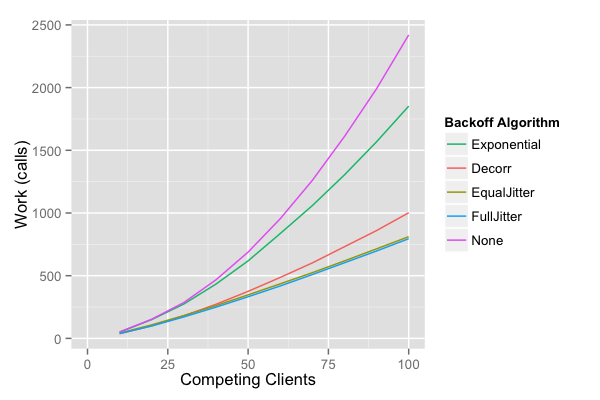
Practical Implementation in Python
While you could write this logic yourself, the best practice is to use a well-tested library. For Python, Tenacity is an excellent and widely-used choice. It allows you to add robust retry behavior to any function with a simple decorator.
Let's see how to use it to make our OpenAI API calls more resilient.
Installing Tenacity
First, you'll need to add it to your environment:
pip install tenacity
Using the @retry Decorator
The core of Tenacity is the @retry decorator. You can configure it to handle specific errors, define how long to wait, and when to finally give up.
The OpenAI Cookbook provides a great starting point for using tenacity. Let's look at their example.
Read the section 'Retrying with exponential backoff' and focus on 'Example #1: Using the Tenacity library'. This shows the basic pattern of wrapping an API call function with the @retry decorator.
The example from the cookbook is a good start:
from tenacity import retry, stop_after_attempt, wait_random_exponential
import openai

# Assume 'client' is an initialized OpenAI client
# client = openai.OpenAI(api_key="YOUR_API_KEY")

@retry(wait=wait_random_exponential(min=1, max=60), stop=stop_after_attempt(6))
def completion_with_backoff(**kwargs):
    return client.chat.completions.create(**kwargs)

# Now, instead of calling client.chat.completions.create directly, you call this wrapper
# completion_with_backoff(model="gpt-4o-mini", messages=[{"role": "user", "content": "Tell me a story."}])
Let's break down the decorator's arguments:
wait=wait_random_exponential(min=1, max=60): This tells Tenacity to use an exponential backoff strategy with jitter. It will wait at least 1 second and at most 60 seconds between retries.stop=stop_after_attempt(6): This tells Tenacity to give up after 6 total attempts (1 initial call + 5 retries).
Targeting Specific Exceptions
The example above will retry on any exception. A more robust implementation retries only on the transient errors we expect. For permanent errors (like a 400 Bad Request from a malformed prompt), you want the program to fail fast, not waste time retrying.
We can configure Tenacity to only retry on specific exception types.
Python Retry Logic with Tenacity and Instructor
For more fine-grained control, let's explore how to configure retries for specific errors like RateLimitError and network issues. The useinstructor article has excellent, clear examples of this pattern.
Read through the article, focusing on 'Method 2: Conditional Retries for Specific Errors', 'Rate Limit Specific Retry', and 'Network Error Retry'. Observe how the retry_if_exception_type argument is used to target the retry logic precisely.
By combining these concepts, we can create a highly robust decorator for our LLM calls. Here's a production-ready example that handles common API and network errors:
import openai
import requests
from tenacity import retry, stop_after_attempt, wait_exponential, retry_if_exception_type

# Define which exceptions are transient and should be retried
transient_errors = (
    openai.RateLimitError,
    openai.APIConnectionError,
    openai.APITimeoutError,
    openai.InternalServerError,
    requests.exceptions.ConnectionError,
    requests.exceptions.Timeout,
)

@retry(
    # Only retry on the specific transient errors we've defined
    retry=retry_if_exception_type(transient_errors),
    # Use exponential backoff, starting at 2s, doubling up to 60s
    wait=wait_exponential(multiplier=2, min=2, max=60),
    # Stop after 5 attempts
    stop=stop_after_attempt(5)
)
def robust_completion(**kwargs):
    """
    A wrapper around OpenAI's completion endpoint that automatically
    retries on transient errors using exponential backoff.
    """
    print("Attempting API call...")
    return client.chat.completions.create(**kwargs)

# Example usage:
# try:
#     response = robust_completion(
#         model="gpt-4o-mini",
#         messages=[{"role": "user", "content": "Why is the sky blue?"}]
#     )
#     print("Success:", response.choices[0].message.content)
# except Exception as e:
#     # This will be triggered if all 5 attempts fail
#     print(f"API call failed after multiple retries: {e}")
This robust_completion function is now your go-to method for making API calls. It encapsulates the resilience logic, keeping the rest of your application code clean.
Test your understanding!
Imagine you're debugging an issue where your application is still hitting rate limits, even with the retry logic. A colleague suggests changing the wait strategy in your @retry decorator from wait_exponential to wait_fixed(3).
Based on what you've learned, why is this likely a poor suggestion for dealing with rate limit errors? What two key elements are missing from wait_fixed(3)?
Show answer
This is a poor suggestion because it removes two critical components of a robust retry strategy:
- Exponential Backoff:
wait_fixed(3)waits for a constant 3 seconds between every retry. If the API is heavily loaded or you've significantly exceeded your rate limit, a short, fixed wait may not be long enough for the service (or your rate limit window) to recover. Exponential backoff is superior because it automatically increases the wait time after repeated failures, giving the system more breathing room when it's under stress. - Jitter: A fixed wait time increases the risk of the "thundering herd" problem. If multiple instances of your application (or other services) all fail at the same time, they will all retry after exactly 3 seconds, then 6 seconds, etc., creating synchronized waves of traffic that can perpetuate the overload.
wait_random_exponentialor adding jitter manually prevents this by spreading out the retry attempts over a small time window.
Switching to wait_fixed(3) would make the retry logic less adaptive and more prone to contributing to system-wide load issues.
Conclusion
You have now learned how to transform a fragile API call into a resilient, production-ready one. By understanding the nature of transient errors and applying the pattern of retries with exponential backoff and jitter, you can build applications that gracefully handle the unreliability of network services.
Key Takeaways:
- API calls to LLMs can fail due to transient issues like network errors, server overload, and especially rate limits.
- The best practice for handling these failures is to retry the request with exponential backoff to give the system time to recover and jitter to avoid synchronized retries.
- Python's
tenacitylibrary provides a powerful and convenient decorator (@retry) to implement this logic cleanly. - For a robust implementation, you should configure the decorator to retry only on specific, transient exception types, while letting permanent errors fail fast.
What's Next?
So far in this module, we have learned to optimize API usage with parallelism and caching, and now we've made our API calls resilient to failure. We've focused heavily on reacting to RateLimitError. In the final lesson of this module, we will shift from a reactive to a proactive strategy. You will learn to apply techniques for managing API rate limits and quotas in a production environment, helping you stay within your budget and avoid hitting these error conditions in the first place.