Hello! Welcome back to your course on mastering AI video creation.
In our last lesson, you assembled a powerful toolkit of free and trial-based AI applications for each stage of the video production pipeline. We identified Google Gemini or ChatGPT as our go-to tool for scripting.
Today, we're putting that tool to work. Our goal is to generate a script for a UGC-style video using an LLM, focusing on a clear hook and a strong call-to-action. This is a fundamental skill for creating the realistic marketing videos you're aiming for. By the end of this lesson, you'll understand the structure of a high-converting UGC script and be able to guide an AI to write one for you.
1. The Anatomy of a Winning UGC Script
Before we can tell an AI what to write, we need to understand the ingredients of a script that grabs attention and persuades viewers. Unlike traditional ads, User Generated Content (UGC) feels authentic and personal, like a recommendation from a friend. However, the best UGC videos are not unstructured; they follow a proven formula designed for direct response marketing—getting the viewer to take a specific action.
To learn this formula, let's start with an excellent breakdown from a professional UGC creator.
How to create a Killer UGC video (THE ONLY VIDEO YOU NEED)
In this video, 'How to create a Killer UGC video', creator Sydney Mohni explains the essential components of a high-converting ad. This will give you the foundational blueprint for any UGC script you write.
Watch the section from 03:25 to 07:11. As you watch, pay close attention to the seven components she outlines and the purpose of each one.
As you saw, a powerful UGC script isn't just a random monologue. It's a carefully structured narrative. We can simplify this into a core 6-step formula:
Hook → Problem → Solution → Value Propositions → Social Proof → Call-to-Action (CTA)
Let's quickly define each step:
- Hook: The first 3 seconds. Its only job is to stop the scroll and make the viewer curious.
- Problem: The relatable pain point your target audience experiences. This makes them think, "That's me!"
- Solution: The introduction of the product as the answer to the problem.
- Value Propositions: The 2-3 key benefits or features that make this product the best solution.
- Social Proof: Evidence that other people love the product (e.g., mentioning reviews, its viral status). This builds trust.
- Call-to-Action (CTA): A clear, direct instruction telling the viewer exactly what to do next.
These two images provide a simple visual summary of this structure.
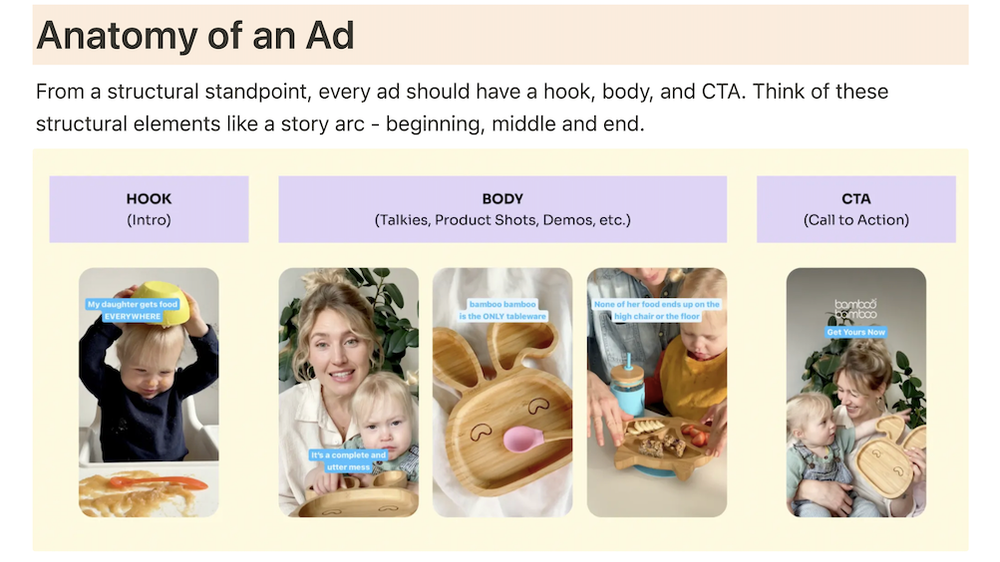

While all parts are important, the learning outcome for today highlights the two most critical elements for driving results: the Hook and the CTA.
2. Mastering the Hook and Call-to-Action
If you lose the viewer at the start, the rest of your script doesn't matter. If you don't tell them what to do at the end, your video won't lead to action.
Crafting an Unskippable Hook
Let's dive deeper into what makes a hook effective.
How to create a Killer UGC video (THE ONLY VIDEO YOU NEED)
Let's return to Sydney Mohni's video. This next section is entirely dedicated to the art of the hook.
Watch from 13:01 to 16:04. Notice the different types of hooks (textual, verbal, visual) and the four characteristics of a 'winning hook' she mentions at the end.
Key Takeaways for a Great Hook:
- Use Multiple Hook Types: Combine a verbal hook (what you say), a textual hook (text on screen), and a visual hook (an interesting action) in the first few seconds.
- A Winning Hook Is:
- Emotional: Sparks curiosity, humor, empathy, or even shock.
- Direct & Specific: Immediately tells the target audience why they should care.
- Urgent or Curious: Creates FOMO (fear of missing out) or asks a question.
- Brief: Delivers its impact in under 3-5 seconds.
Writing a High-Converting Call-to-Action
A CTA isn't a polite suggestion; it's a firm, clear instruction. It should be urgent and direct.
How to Write UGC Scripts for Ads That Convert in 2025 - Motion
This article, 'How to Write UGC Scripts for Ads That Convert,' provides excellent examples of strong CTAs. We'll focus on that specific section.
Read just the section titled '6. Call-to-action: Drive action, create urgency'. Note the examples provided.
Examples of strong, urgency-driven CTAs include:
- "Get yours today before they sell out AGAIN!"
- "Use code SAVE20 for 20% off, but only until tomorrow!"
- "Link in bio to get yours delivered by Friday!"
3. Prompting an LLM to Write Your Script
Now you know the theory. Let's make the AI do the work. The key is not to accept the first thing it gives you. You need to guide it, refine its output, and shape it to your needs.
This process of "talking" to the AI is called prompt engineering. Let's see it in action.
The CORRECT Way to Write YouTube Scripts with ChatGPT (6 RULES)
This video, 'The CORRECT Way to Write YouTube Scripts with ChatGPT', demonstrates the iterative process of prompting. While it's about YouTube scripts, the techniques are directly applicable to our UGC script.
Watch from 01:23 to 08:33. Focus on the process: how the creator starts with a simple prompt, then asks the AI to 'dig a little further', 'simplify your response', 'make the text more intriguing', and finally, 'make my intro better'. This back-and-forth is how you get great results.
To guide the AI effectively, you need to give it clear instructions from the very beginning. The following resource gives a perfect checklist for your initial prompt.
How to Script Better UGC Videos: Tips to Nail Your Next Creation
The article 'How to Script Better UGC Videos' contains a fantastic, practical guide on how to prompt ChatGPT for a natural-sounding script. This is your recipe for the first prompt.
Read the section titled 'How to Get a Natural, Not Copy-Paste Script from ChatGPT'. Pay attention to the six numbered points—they are the exact components you should include in your prompt.
4. Practical Exercise: Let's Write a Script
Let's put it all together. We'll generate a script for a fictional product.
- Product: "FocusFlow," a new sparkling water infused with natural nootropics (ingredients that support brain function).
- Target Audience: Students and young professionals who want to avoid sugary energy drinks but need help staying focused.
- Key Benefit: Clean energy and focus without the jitters or crash.
Open your preferred LLM (like Google Gemini or ChatGPT) and let's build your prompt using the checklist from the Usetwirl article.
Step 1: Craft Your Master Prompt
Combine all the necessary context into one detailed prompt. Here is a template you can use:
PROMPT TEMPLATE:
Act as an expert UGC video scriptwriter. I need a 30-second video script for a new product.
1. Context: The product is "FocusFlow," a sparkling water with natural nootropics for focus. It's for students and young professionals who dislike sugary energy drinks.
2. Tone: The tone should be conversational, relatable, and authentic, like I'm recommending it to a friend. It should not sound like a polished ad.
3. Personalization: The scenario is me sitting at my desk, feeling that afternoon slump and struggling to study/work. I then discover FocusFlow.
4. Format: Structure the script using the "Hook -> Problem -> Solution -> Value Props -> CTA" framework. Please label each section.
5. Variations: Please provide three different options for the Hook.
6. Output: The final script should be concise and easy to read aloud.
Step 2: Generate the First Draft
Paste your completed prompt into the LLM. It might give you something like this:
AI DRAFT 1:
Hook Options:
- "It's 3 PM and you're staring at a screen? I know the feeling."
- "I'm breaking up with my coffee. Here's why."
- "If you need to focus but hate energy drinks, you need to see this."
[SCRIPT]
(Problem)
Ugh, I've hit that wall. I have so much to do, but my brain just feels fuzzy. I can't look at another coffee or sugary energy drink.(Solution)
But then I found this: FocusFlow. It’s sparkling water, but it’s packed with natural nootropics that help you focus.(Value Props)
The best part is there's no sugar and no weird chemicals, so you get that clean energy without any jitters or a horrible crash later. It just helps you get in the zone.(CTA)
If you want to try it, check out the link in my bio.
Step 3: Iterate and Refine
This is a good start, but we can make it better using the iterative techniques from the Wilcock video. Let's pick Hook #3 and refine the script.
Follow-up Prompt 1 (Make it more emotional):
"This is good. Let's use Hook #3. Can you rewrite the 'Problem' section to be more emotional and descriptive of the 'brain fog' feeling?"
Follow-up Prompt 2 (Add Social Proof):
"Great. Now, can you add a line of social proof right before the CTA? Something about how I've seen it all over my feed."
Follow-up Prompt 3 (Strengthen the CTA):
"Perfect. Lastly, give me three stronger, more urgent CTA options."
By the end of this process, you will have a much more polished and effective script that feels personal and is engineered to convert.
Conclusion
Congratulations! You've moved from simply knowing about AI tools to actively directing them to perform a creative and strategic task.
Key Takeaways:
- Effective UGC scripts follow a Hook → Problem → Solution → CTA framework to feel authentic while still driving action.
- The Hook must grab attention in the first 3 seconds, while the Call-to-Action (CTA) must be direct and create urgency.
- Generating a great script with an LLM is an iterative conversation. You must provide detailed context in your initial prompt and then refine the output with specific feedback.
Next Lesson Preview:
We've mastered the script for a short-form marketing video. In the next lesson, we'll tackle a different creative challenge: creating a text-based storyboard with visual descriptions for an animated story. This will be our first step towards building a narrative-driven video from scratch.