Hello! Welcome back to your course on mastering AI video creation.
In our last lesson, you learned how to direct an LLM to write a compelling script for a UGC-style marketing video. We focused on crafting a strong hook and a clear call-to-action to drive results. You practiced the essential skill of refining AI-generated text through an iterative conversation.
Today, we shift from marketing to storytelling. Our goal is to create a text-based storyboard with visual descriptions for an animated story using an LLM. This is the creative blueprint for the short animated stories you're interested in making. Think of yourself as a director planning out every shot before the cameras roll.
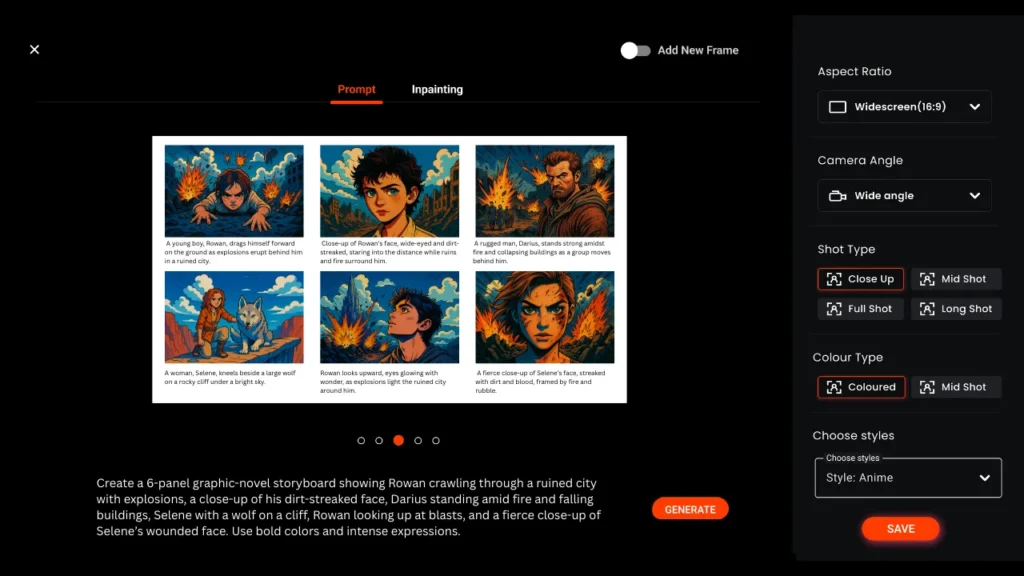
1. From Script to Storyboard
In the last lesson, the script was mostly about the words—what the person says. For an animated story, especially one with little or no dialogue, the visuals do all the talking. This is where a storyboard comes in.
A storyboard is a sequence of drawings, or in our case, detailed text descriptions, that represent the shots planned for a video. It's a visual outline that maps out:
- What happens in each scene.
- The camera's perspective (angles and shots).
- Character actions and expressions.
- The overall mood and pacing.
This text-based plan will guide the AI image and video generators we'll use in later lessons.

2. The Language of Visual Storytelling
To instruct an LLM to create a visual plan, we need to provide it with the right vocabulary. A vague prompt like "a robot is sad" is not enough. We need to describe how to show that sadness visually.
Let's break down the key elements you'll use in your prompts.
Character "Visual DNA"
For a story, you need your characters to look consistent from one shot to the next. The best way to achieve this is to define a clear "visual DNA" for them right from the start. This includes core shapes, colors, and key features.
Cinematic Language: Angles and Shots
How you frame a character dramatically changes how the audience feels.
- Low Angle (looking up): Makes a character feel powerful, intimidating, or heroic.
- High Angle (looking down): Can make a character seem small, vulnerable, or isolated.
- Dutch Angle (tilted): Creates a sense of unease, tension, or disorientation.
- Shot Types:
- Wide Shot: Shows the entire environment, establishing the scene.
- Medium Shot: Shows a character from the waist up, good for conversations.
- Close-Up: Focuses on a character's face, emphasizing emotion.
The following video brilliantly explains how to define character DNA and use camera angles to control the emotional tone of a story.
I Built a Gemini Workflow to Automate Cinematic Storyboards & Angles
This video from AI Madame demonstrates an advanced workflow for creating animated stories. We'll focus on two key concepts: creating 'visual DNA' for character consistency and using camera angles to tell the story emotionally.
First, watch from 01:22 to 02:42 to understand how defining a character's core shapes and colors helps with consistency. Then, watch from 03:46 to 05:08 to see how different camera angles (low, high, Dutch) can convey power, vulnerability, and tension.
By mastering this visual language, you can give an LLM precise instructions to build a storyboard that has a real cinematic feel.
3. Prompting Your AI Storyboard Artist
Now, let's combine these concepts into a structured prompt that will guide an LLM like ChatGPT or Gemini to generate a complete storyboard. We won't just ask for a story; we will ask for a detailed production plan.
This article provides a simple, step-by-step guide to crafting the perfect storyboard prompt.
Prompt Guide for Storyboarding: Step-by-Step with Real Examples
The article 'Prompt Guide for Storyboarding' by Murphy.inc breaks down how to structure your request to an LLM. It's a fantastic recipe for turning a simple idea into a detailed visual plan.
Read the sections 'What Is a Storyboarding Prompt?', 'Step-by-Step Prompt Guide for Storyboarding', 'Wrong vs. Perfect Prompts', and 'Tips for Better Prompts'. Focus on the 7-step process and the 'Wrong vs. Perfect' examples, as they clearly show the level of detail needed.
As you read, you saw that a great storyboard prompt includes:
- Story Idea: The core concept.
- Scene Breakdown: Dividing the story into manageable shots.
- Visual Descriptions: What happens, where, and how it feels (lighting, emotion).
- Camera Details: Specifying angles and shot types.
- Audio/Text: Any sound cues or on-screen text.
- Art Style: A consistent visual theme (e.g., "3D cartoon," "Studio Ghibli style").
- Output Format: How you want the AI to structure its response.
The following video shows a custom GPT in action that is built specifically for this task. It takes a simple idea and automatically generates a structured storyboard with scene descriptions and even ready-to-use image prompts.
How To Create AI Animated Stories with ChatGPT!
In this clip from Captain AI, you'll see a practical demonstration of using a specialized AI tool to generate an animated story script that is essentially a text-based storyboard.
Watch from 00:51 to 03:12. Notice how the AI asks clarifying questions and then outputs a perfectly formatted storyboard with descriptions for narration, shots, and prompts for both image and video generation tools. This is the exact kind of output we are aiming for.
4. Practical Exercise: Storyboard Your First Animation
Let's put theory into practice. Your task is to use an LLM to generate a text-based storyboard for a short, silent animated story.
The Story Idea: A curious little robot named 'Sparky' discovers a single, glowing flower in a vast, gloomy junkyard and decides to protect it from a looming storm.
Instructions:
- Open your preferred LLM (ChatGPT, Google Gemini, etc.).
- Copy the prompt template below and paste it into the chat.
- Review the AI's output. Does it follow your instructions? Is it detailed enough?
PROMPT TEMPLATE:
Act as a storyboard artist and animation director. I need a text-based storyboard for a short, silent animated story.

**Story Idea:** A curious little robot named 'Sparky' discovers a single, glowing flower in a vast, gloomy junkyard. Sparky decides to protect it from a looming storm.

**Character "Visual DNA":**
- Sparky: Small robot, boxy body made of rusty, mismatched scrap metal. Moves on a single wheel like a unicycle. Has one big, expressive camera lens for an eye.
- The Flower: A single bioluminescent plant with delicate, pulsing blue petals. It is the only source of bright color and light in the scene.

**Art Style & Mood:** 3D animation style inspired by the movie 'WALL-E'. The mood should start as gloomy and lonely, then become hopeful, then tense, and finally peaceful.

**Task:** Create a 4-scene storyboard. For each scene, provide:
1.  **Scene Number & Title**
2.  **Shot Description:** Detail the camera angle, shot type (e.g., wide shot, close-up), character actions, and setting.
3.  **Image Generation Prompt:** A detailed text-to-image prompt that could be used to generate the visual for this scene, including the art style.
4.  **Emotion/Mood:** The key feeling this scene should evoke.
Example of Expected Output (for Scene 1):
- Scene 1: The Lonely Wanderer
- Shot Description: Wide shot. Sparky, the small robot, trundles slowly through a massive, gloomy junkyard filled with mountains of scrap metal under an overcast sky. The camera is positioned low to the ground, emphasizing the scale of the junkyard and Sparky's smallness.
- Image Generation Prompt:
3D animation, WALL-E style, wide shot, a tiny, lonely robot with a boxy body and one camera-lens eye moves through a vast junkyard under a grey, overcast sky, mountains of rusted metal scrap, cinematic, gloomy atmosphere. - Emotion/Mood: Loneliness, isolation.
Feel free to modify the story idea or character descriptions to make it your own! The goal is to practice translating a creative idea into a structured, visual plan.
Conclusion
Excellent work! You've successfully moved beyond simple scripting and into the role of a director, planning the visual and emotional journey of an animated story.
Key Takeaways:
- A text-based storyboard is the essential blueprint for an animated video, detailing the visuals, action, and emotion of every shot.
- To get a useful storyboard from an LLM, you must provide a detailed prompt including character designs ("visual DNA"), art style, and cinematic language (camera angles, shot types).
- The final output should be more than a story; it should be a set of actionable instructions, including ready-to-use prompts for AI image generators.
Next Lesson Preview:
You now have a complete visual plan for an animated story, including specific text-to-image prompts for each scene. In our next lesson, we will begin the "asset generation" phase. You will learn how to generate background images and B-roll visuals using text-to-image AI tools, turning the words from your storyboard into the first actual visuals for your animation.