Hello! Welcome back to our course on AI video creation.
In the last lesson, we created a "Shot Spec Card" for each of your storyboard frames. This card acts as a detailed blueprint, capturing your directorial decisions about cinematography, action, style, and sound.
Today, we transition from planning to execution. We'll take those detailed blueprints and learn how to translate them into the language AI understands: the prompt. This lesson is all about mastering the art of writing the instructions that will bring your vision to life, directly addressing the learning outcome: to write detailed, multi-part prompts specifying character, setting, style, and action.
From Blueprint to Command: The Anatomy of a Prompt
A common mistake when starting with AI is to write a short, descriptive sentence and hope for the best. To achieve the control needed for storytelling, we need to think more like a programmer or a technical director. A powerful prompt is not a single request; it's a structured set of instructions.
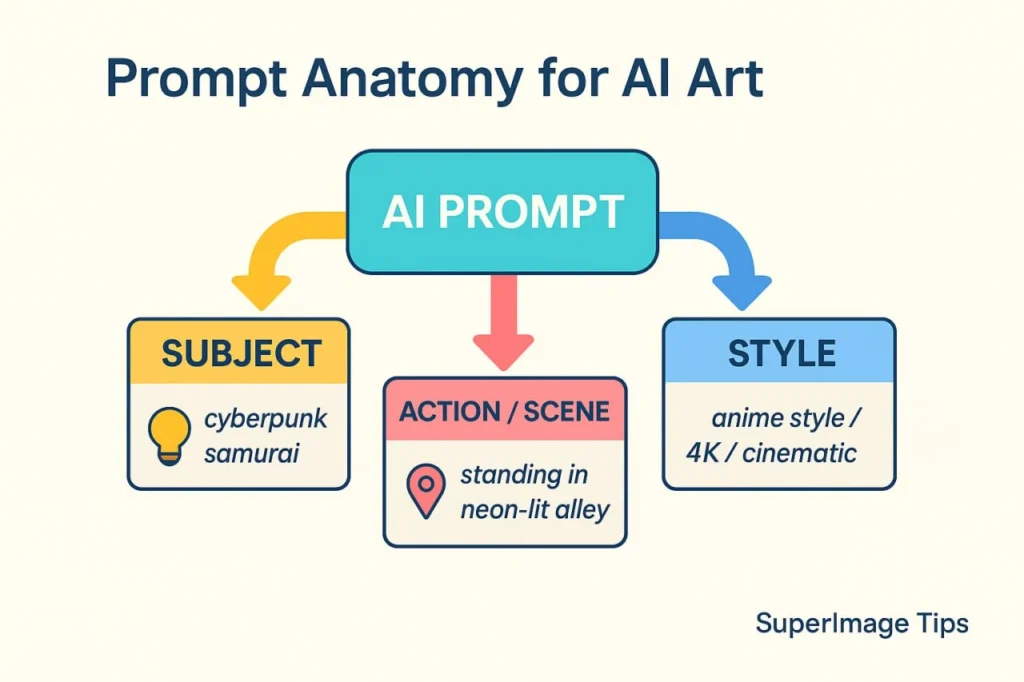
To give our prompts a robust and predictable structure, we'll adopt a five-part formula that works well across many AI video models.
Veo 3.1 Prompt Guide: Best Veo 3.1 Prompts
Let's start by learning a universal formula that will be the backbone of our prompting strategy. The 'Veo 3.1 Prompt Guide' from LTX Studio provides an excellent framework that breaks a prompt into five essential elements.
Please read the section 'The Veo 3.1 Prompt Formula'. Focus on the five core elements: Camera, Subject, Action, Setting, and Style & Audio. Notice how this structure directly mirrors the 'Shot Spec Card' we created in the last lesson.
As you can see, this [Camera] + [Subject] + [Action] + [Setting] + [Style & Audio] formula is a perfect match for the information we've already gathered in our Shot Spec Cards.
Translating Your 'Shot Spec Card' into a Prompt
Let's take the example from our last lesson for the first shot of our story about the robot, Bolt.
Shot Spec Card (Recap):
- Cinematography:
Medium Shot, slow dolly in. - Action:
Bolt walks into frame, stops abruptly. His head tilts down slowly, and a small blue light on his antenna begins to blink with curiosity. - Style & Ambiance:
Inspired by 'WALL-E'. Shot as if on Panavision Millennium DXL2 with Zeiss Prime lens. Gritty, dusty atmosphere. Late afternoon golden light. - Audio:
SFX: soft 'whirr-click' sound. Ambient: distant wind howling.
Now, let's combine these elements into a single, structured text prompt. We simply string the clauses together, often using commas or periods to separate the distinct ideas.
Resulting Prompt:
Medium shot, slow dolly in. A small, lonely robot named Bolt walks into frame and stops abruptly in a junkyard aisle. His head tilts down slowly as a small blue light on his antenna begins to blink with curiosity. The setting is a gritty, dusty junkyard in the late afternoon golden light. Style is cinematic, inspired by WALL-E, shot as if on a Panavision Millennium DXL2 with a Zeiss Prime lens. Audio: SFX of a soft 'whirr-click', ambient distant wind howling.

Refining the Components for Maximum Control
A basic translation is a great start. Now, let's see how we can make each part of the prompt even more powerful.
1. Specifying the Subject (Character)
To maintain character consistency—a major challenge in AI video—your description of the subject needs to be incredibly detailed and consistent in every prompt.
Secrets to Creating Stunning AI Videos! Expert Prompts
Let's focus on the 'Subject' component. Being vague about your character leads to inconsistency. To get the same character in multiple clips, you need an extremely detailed description. This video from Tao Prompts demonstrates this technique perfectly.
Watch from the beginning until 01:55. Pay close attention to how a long, detailed paragraph describing the character's facial features, hair, and clothing is used as a consistent block in every prompt for different scenes.
For our robot Bolt, instead of just "a small, lonely robot," we might create a detailed block:
Subject: A small, weathered robot named Bolt, about 2 feet tall. His chassis is made of dented, rusted orange metal plates. He has large, expressive binocular-style eyes that glow a soft blue. He moves on two worn-out caterpillar tracks. A single, thin antenna protrudes from his head.
You would then include this entire block in every prompt related to Bolt.
2. Specifying Action and Camera (Technical Direction)
Modern AI models are becoming less like image finders and more like physics simulators. This means we can direct them using technical language about forces, physics, and camera movements.
How to Actually Control Next-Gen Video AI: Runway, Kling ...
Now let's refine our 'Action' and 'Camera' descriptions. The article 'How to Actually Control Next-Gen Video AI' explains that we should act as technical directors. It provides powerful techniques for models like Sora, which you have access to.
Please read two key sections: Start at 'Runway Gen 4.5: Mastering Motion and Camera Control' and read through 'Camera Control Tokens'. Although it says Runway, these tokens (pan, tilt, dolly) are widely understood by many models. Then, read the section 'Sora 2: Physics-Based World Simulation', focusing on 'The Causal Chain Technique'. This is crucial for prompting Sora. Notice how it explains why things happen, not just what happens.
Using the "Causal Chain" technique for Sora, an action like "a cup falls" becomes:
"A stray elbow knocks a cup. Causality: The cup tips on its fulcrum, liquid sloshes, and the impact force shatters the glass."
This gives the AI logical steps to simulate, resulting in much more realistic motion.
Advanced Structures for Veo and Sora
Since you have access to Veo and Sora, you can use prompting structures specifically designed for their capabilities. These are the ultimate form of multi-part prompting.
How to Actually Control Next-Gen Video AI: Runway, Kling ...
Let's look at prompting strategies tailored for Veo and Sora. The same article provides excellent, structured formats that give you an even greater degree of control.
This time, focus on these two parts: 'Veo 3.1: Programmatic Control': Look closely at 'The JSON Schema Approach'. This highly structured format gives you incredible precision by separating every element. 'Sora 2: Physics-Based World Simulation': Review the 'Causal Chain Technique' and also look at 'Scaffolding for Multi-Shot Sequences' as a way to outline a longer clip in a single prompt. These are advanced but powerful ways to apply the multi-part prompting principle.
The Veo JSON Schema is particularly powerful. It forces you to be specific about every single element, from camera lens to lighting contrast, preventing "concept bleed" where describing the mood accidentally changes the subject.
Test your understanding!
Let's use the second shot from our story, which we discussed in the last lesson.
Shot Spec Card:
- Shot ID: 02
- Cinematography:
Extreme Close-Up (ECU), slow rack focus from the sprout to the pot. - Action:
A single drop of water falls from off-screen, lands on a leaf of a tiny green sprout, causing the leaf to tremble slightly. - Setting:
The sprout is growing from the dry, cracked earth inside an old, rusty cooking pot. - Style & Ambiance:
Maintain Panavision/Zeiss look. Very shallow depth of field. Vibrant green sprout against muted, rusty background. - Audio:
SFX: A single, clear 'drip' sound. A faint, gentle musical note begins to swell.
Your task is to write two prompts for this shot:
- A standard multi-part prompt using the five-element formula.
- An advanced structured prompt using the Veo JSON schema you just read about.
Show answer
Here are example answers. Your wording might be different, but the structure and level of detail are what matter.
1. Standard Multi-part Prompt:
Extreme close-up of a tiny green sprout growing in a rusty pot. A single drop of water falls from off-screen, landing on a leaf and making it tremble. The camera performs a slow rack focus from the sprout to the texture of the old pot. Style: very shallow depth of field, vibrant green against muted rust, shot as if on a Panavision camera with Zeiss lens. Audio: SFX of a single clear water 'drip', a faint musical note begins.
2. Veo JSON Schema Prompt:
{
  "project": "Bolt's Discovery",
  "aspect_ratio": "16:9",
  "cinematography": {
    "shot_type": "Extreme Close-up",
    "movement": "Slow rack focus from foreground to background",
    "lens": "Zeiss Prime, f/1.4",
    "focus": "Starts on sprout, ends on pot rim"
  },
  "subject": {
    "description": "A single, tiny green sprout with two leaves, growing from cracked earth",
    "action": "A water droplet lands on one leaf, causing it to tremble slightly"
  },
  "environment": {
    "location": "Inside an old, rusty cooking pot in a junkyard",
    "lighting": "Late afternoon golden light, high contrast"
  },
  "style": {
    "aesthetic": "Cinematic, hopeful but gritty",
    "color_palette": "Vibrant green, rusty orange, dusty brown"
  },
  "audio": {
    "sfx": "Single, clear water drip sound",
    "music": "A faint, gentle musical note begins to swell"
  }
}
Conclusion
You have now learned to translate your creative vision from a planner's blueprint into a director's command. By structuring your prompts with deliberate, multi-part detail, you gain significant control over the AI's output, laying the foundation for a coherent narrative.
Key Takeaways:
- Effective prompts are structured and multi-part, not a single vague sentence.
- The
[Camera] + [Subject] + [Action] + [Setting] + [Style & Audio]formula provides a reliable universal framework. - Extreme detail in your Subject description is a key strategy for character consistency.
- Modern AIs respond to technical direction, such as specific camera movements and physics-based "causal chains."
- Tools like Veo and Sora offer advanced, structured prompting formats (like JSON) that provide maximum control.
We've focused on writing a detailed prompt for a single shot. But how do we guarantee that Bolt looks identical from the shot where he discovers the plant to the next shot where he interacts with it?
In our next lesson, we will tackle this challenge head-on. We'll learn how to use anchor images and character reference sheets to maintain visual consistency across multiple clips, ensuring your story's world and its inhabitants remain stable and believable.