Hello! Welcome to the second module of our course, "Modern Architecture with MVVM."
In our last module, we honed our skills in identifying and fixing performance issues, culminating in using Swift's modern concurrency to move expensive work off the main thread. A natural question that arises is: where should this complex logic—like asynchronous network calls or data processing—live in our app? A well-defined architecture provides the answer.
This lesson kicks off our exploration of architecture by focusing on a foundational pattern for modern iOS development. Our learning outcome is to explain the separation of concerns in MVVM and its advantages over traditional MVC. We'll start by diagnosing the common problems with the Model-View-Controller (MVC) pattern you've likely encountered, and then introduce Model-View-ViewModel (MVVM) as a powerful solution. For a professional developer, understanding these patterns is key to building apps that are scalable, maintainable, and testable.
1. The Pursuit of Good Architecture and the Trouble with MVC
Before diving into specific patterns, it's worth asking: what makes an architecture "good"? A well-structured application isn't just about organizing files; it's about managing complexity.
iOS Architecture Patterns. Demystifying MVC, MVP, MVVM and VIPER
This article, 'iOS Architecture Patterns', provides an excellent introduction to why we should care about architecture. It establishes three core principles of a good architecture that we'll use to evaluate MVC and MVVM.
Read the first part of the article, from the beginning down to the section titled 'MV(X) essentials'. Focus on the three features of a good architecture: Distribution, Testability, and Ease of use.
As you've seen in your own experience, it's easy for projects to become difficult to manage. Often, the default architecture provided by Apple, known as "Cocoa MVC," is a contributing factor.
Let's watch a segment that explains how Apple's version of MVC works and where it often goes wrong.
Clean iOS Architecture pt.5: MVC, MVVM, and MVP (UI Design Patterns)
The video 'Clean iOS Architecture pt.5' from the Essential Developer channel clearly explains the responsibilities and data flow in Apple's MVC. It then pinpoints exactly how this pattern leads to a common anti-pattern.
Watch from 03:32 to 07:41. Pay close attention to: How the UIViewController acts as a mediator between the Model and the View. The list of responsibilities (networking, formatting, routing) that often get crammed into the UIViewController. The concept of the 'Massive View Controller' and why it happens.
The core issue with Apple's MVC is poor separation of concerns. The UIViewController is tightly coupled with the UIView's lifecycle and often becomes a dumping ground for any logic that doesn't cleanly fit into the Model. This leads to the infamous "Massive View Controller" problem, which has several negative consequences:
- Difficult to Test: The business logic and presentation logic are tangled with UIKit-dependent view code, making isolated unit testing nearly impossible.
- Hard to Maintain: A single, giant file with thousands of lines of code is difficult to navigate, understand, and debug.
- Poor Reusability: Logic is trapped inside a specific controller and can't be easily shared or repurposed.
Visually, the relationships in Apple's MVC look like this, with the Controller being the central, overburdened component.
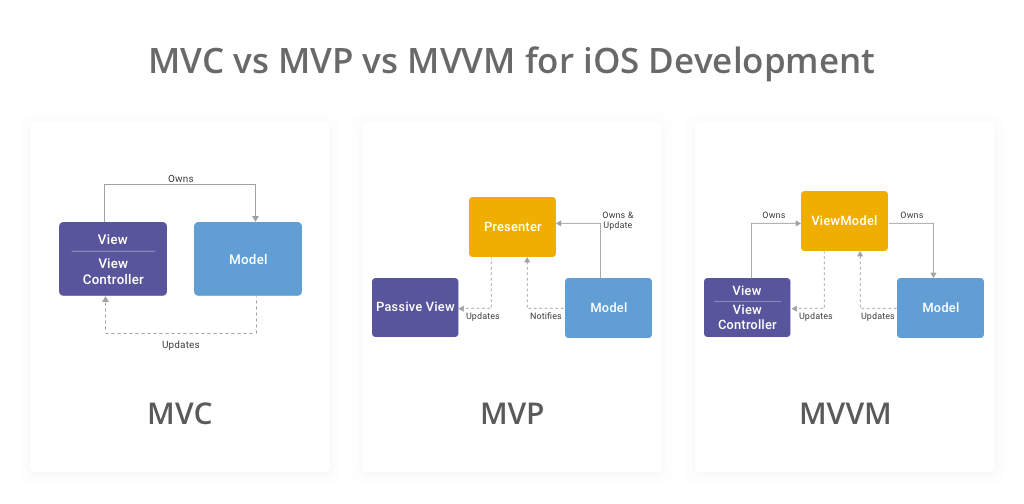
2. Introducing MVVM: A Better Separation of Concerns
MVVM (Model-View-ViewModel) was introduced to directly address the shortcomings of MVC. It introduces a new component, the ViewModel, to create a clearer separation of responsibilities.
Here are the roles of each component in MVVM:
- Model: Unchanged from MVC. It represents the raw data and business logic of your application (e.g., a
Userstruct, aProductclass). It knows nothing about the UI. - View: In iOS, this is your
UIViewControllerand itsUIViews. Its sole job is to present data on screen and capture user input. It is "dumb" and should not contain any presentation logic. It owns the ViewModel. - ViewModel: This is the new intermediary. Its name is a great description: it is a model for the view. It takes data from the Model and transforms it into values that the View can display directly. For example, it might turn a
Dateobject into a formatted string like "Joined 2 years ago," or aBoolinto a specificUIColor. It also handles commands from the View (like a button tap) and updates the Model. Critically, the ViewModel has no knowledge of the UI framework (noimport UIKit).
This diagram shows the new relationship:
Let's see how this new structure helps.
MVC Swift vs MVVM on iOS: Key Differences With Examples
This article, 'MVC Swift vs MVVM on iOS', clearly defines the roles of each component in MVVM and explains how it improves upon MVC.
Read the section titled 'MVVM Pattern'. Focus on the distinct responsibilities of the Model, View, and especially the new ViewModel layer.
3. A Practical Example: Migrating from MVC to MVVM
Theory is great, but seeing the refactor in action makes the concept click. Let's watch a demonstration where presentation logic is moved from the view layer (an MVC UITableViewCell) into a new ViewModel.
Swift: How to Migrate MVC to MVVM & Intro Unit Testing
In this video from 'Lets Build That App', you'll see a concrete example of a simple app built with MVC and then refactored to MVVM. This perfectly illustrates the separation of concerns.
First, watch from 01:56 to 06:48 to understand the initial MVC setup. Pay close attention to the logic inside the CourseCell.swift file (starting around 03:25), where it decides what text and icons to show based on the model's data. \nThen, watch from 13:07 to 17:52. This is the core of the lesson. See how that same conditional logic is moved out of the cell and into the CourseViewModel. The view (the cell) now becomes much simpler and only knows how to display properties from the ViewModel.
As you saw in the video, the CourseCell no longer knows about the Course model. It doesn't care if numberOfLessons is greater than 35. Its responsibility is reduced to simply displaying the detailTextString and accessoryType provided by the CourseViewModel. All that presentation logic now resides in a testable, UIKit-independent CourseViewModel struct.
This is the essence of separation of concerns in MVVM.
4. The Advantages of MVVM
By introducing the ViewModel, we directly solve the problems of the Massive View Controller and gain several significant advantages.
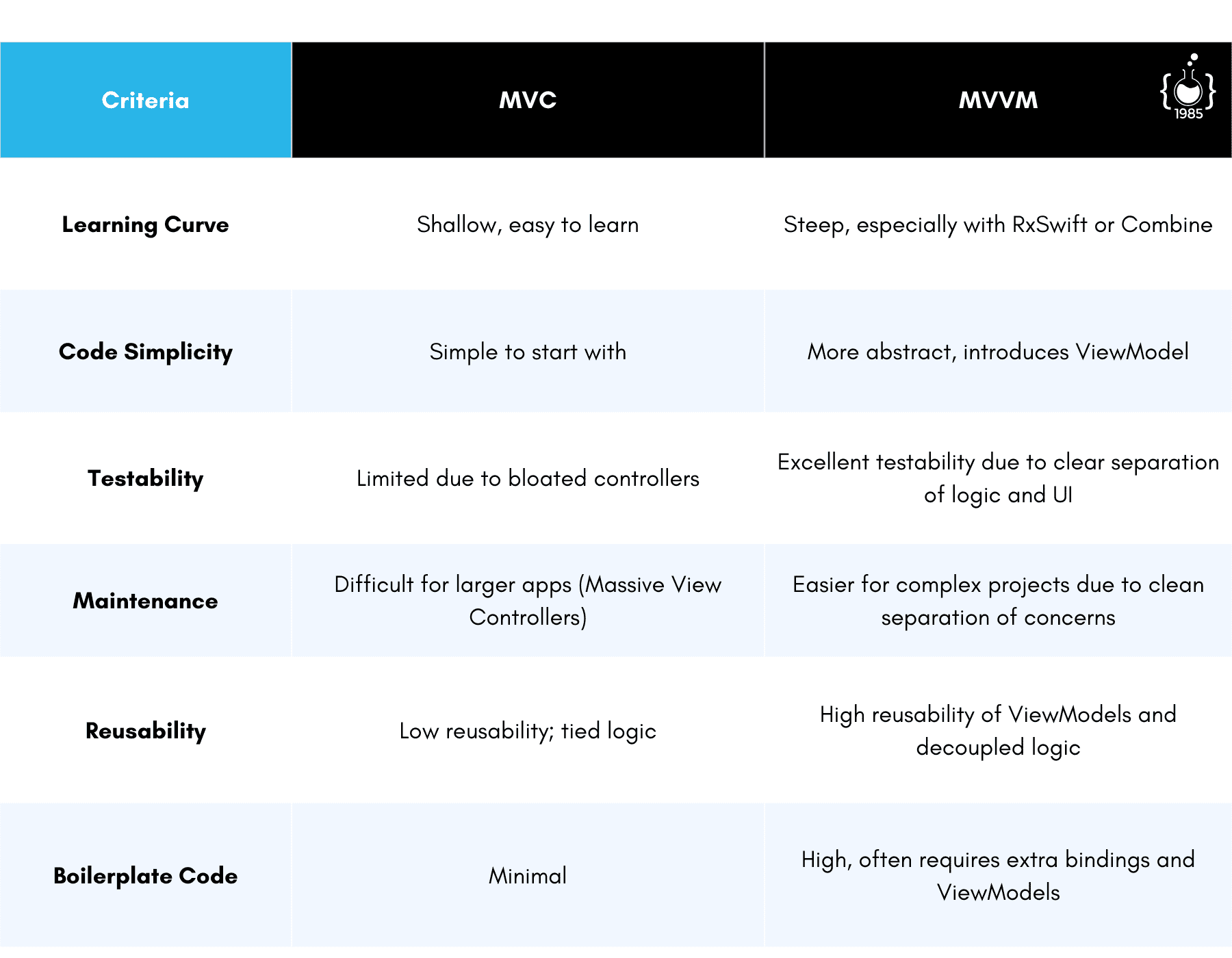
Let's break down these benefits:
-
Improved Testability: This is arguably the biggest win. Since the ViewModel is a plain Swift object with no dependency on UIKit, you can instantiate it in a unit test, pass it mock data, and assert that its output properties are correct. Testing presentation logic becomes simple and fast.
-
Thinner View Controllers: The
UIViewControlleris drastically simplified. It's now only responsible for setting up views and binding them to the ViewModel's properties. It no longer contains presentation logic, state management, or network calls. -
Clearer Separation of Logic:
- Model: Raw data and core business rules.
- ViewModel: Presentation logic, state management, and data formatting.
- View: UI layout and user input.
This clear division makes the codebase much easier to navigate, understand, and for new developers to onboard.
-
Increased Reusability: A ViewModel can potentially be shared by multiple Views (e.g., one for an iPhone screen and another for an iPad screen) if they display the same logical data, further reducing code duplication.
MVC Swift vs MVVM on iOS: Key Differences With Examples
Let's return to the Netguru article to read a summary of the benefits of MVVM. It directly links the introduction of the ViewModel to solving MVC's key problems.
Read the 'Conclusion from MVC and MVVM implementations' and 'Summary' sections. Notice how they emphasize that the controller is streamlined and testing becomes much easier with the MVVM approach.
Conclusion
In this lesson, we've established a strong "why" for moving beyond Apple's default MVC. We've dissected the "Massive View Controller" problem and introduced MVVM as a structured solution that promotes a clear separation of concerns.
Key Takeaways:
- Apple's MVC often leads to Massive View Controllers because the
UIViewControllerbecomes overloaded with responsibilities like data formatting, state management, and routing. - This tight coupling makes the code difficult to test, maintain, and reuse.
- MVVM introduces a ViewModel layer to mediate between the Model and the View.
- The ViewModel is responsible for presentation logic—transforming model data into values ready for display. It is independent of UIKit.
- The primary advantages of MVVM are vastly improved testability, thinner view controllers, and a clearer separation of concerns.
Preview of the Next Lesson:
We've defined the roles of the View and ViewModel, but how do they actually communicate? In our next lesson, we'll dive into the "how" by implementing data binding. We'll start with fundamental techniques using closures and property observers to make our View react automatically to changes in the ViewModel.