Introduction
Welcome to the first lesson of our second module, "Memory Hierarchy and Cache Systems." In the previous module, we traced the journey of source code through compilation and linking to produce a final, runnable executable. Now, we shift our focus to what happens when that program runs. Specifically, how does the computer's hardware efficiently manage the flow of data and instructions between the CPU and storage?
The core challenge in modern computer architecture is the vast speed difference between the processor and main memory. This is often called the "memory wall." If a CPU had to wait for the relatively slow main memory (RAM) every time it needed data, it would spend most of its time idle, and our powerful processors would be wasted.
This lesson tackles the fundamental solution to this problem. Our learning outcome is to explain the memory hierarchy (registers, cache, RAM, disk) and its latency trade-offs. We will explore the layered structure of computer memory, designed to ensure the CPU has fast access to the information it needs, precisely when it needs it. Understanding this hierarchy is the first and most critical step toward writing high-performance code.
The Memory Hierarchy: A Tiered Approach
The solution to the memory wall isn't to make all memory as fast as the CPU—that would be prohibitively expensive. Instead, computer architects use a tiered system of memory, known as the memory hierarchy. The core principle is simple: keep a small amount of the most frequently used data in very fast, expensive memory that is physically close to the CPU, and store the bulk of the data in larger, slower, and cheaper memory farther away.
This structure is often visualized as a pyramid.
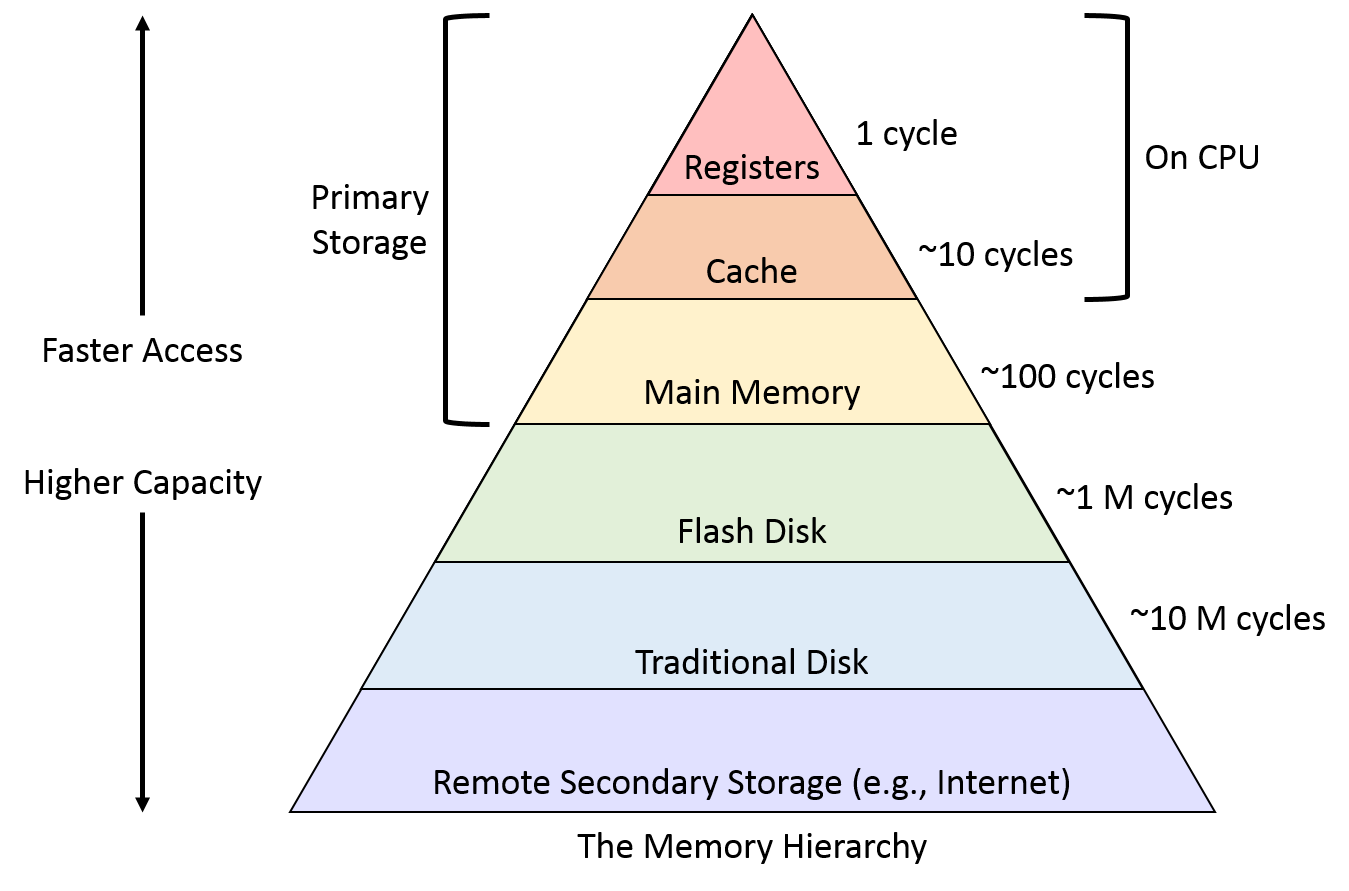
To get a clear overview of these levels and the reasoning behind them, let's start with a short video.
Ep 067: Introduction to the Memory Hierarchy
The video 'Introduction to the Memory Hierarchy' provides a clear, conceptual walk-through of each layer of the hierarchy, from the processor's registers down to long-term storage.
Please watch the segment from 03:24 to 07:57, which describes each of the main levels: registers, cache, main memory (RAM), and long-term storage (like SSDs and HDDs).
As the video explained, the main levels of the hierarchy are:
-
Registers: These are the fastest memory units, located directly inside the CPU. They hold the data that the CPU is actively manipulating at any given moment—for example, the two numbers being added or the current loop counter. Access to registers is nearly instantaneous, occurring within a single CPU clock cycle.
-
CPU Cache: This is a small, extremely fast layer of memory (typically using SRAM technology) that sits between the CPU and the main memory. It acts as a buffer, storing copies of data from RAM that the CPU is likely to need again soon. Modern CPUs have multiple levels of cache:
- L1 Cache: The smallest and fastest cache, dedicated to a single CPU core.
- L2 Cache: Larger and slightly slower than L1, often also dedicated to a single core.
- L3 Cache: The largest and slowest of the caches, typically shared by all cores on the CPU chip.
-
Main Memory (RAM): This is the computer's "working memory" (usually DRAM technology). When you run a program, its code and data are loaded from the disk into RAM. It is much larger than the cache but also significantly slower. RAM is volatile, meaning its contents are lost when the power is turned off.
-
Secondary Storage (Disk): This is your non-volatile, long-term storage, such as a Solid-State Drive (SSD) or a Hard Disk Drive (HDD). It's where your operating system, applications, and files are permanently stored. Accessing the disk is orders of magnitude slower than accessing RAM.
-
Tertiary Storage: This optional level includes removable media like magnetic tapes or optical disks, used primarily for data backup and archiving. It is the slowest and cheapest form of storage.
The Fundamental Trade-offs: Speed, Capacity, and Cost
The memory hierarchy is built on a set of fundamental trade-offs. As you move down the pyramid, from registers to disk:
- Access Time (Latency) Increases: It takes longer for the CPU to get data.
- Storage Capacity Increases: Each level can hold much more data than the one above it.
- Cost per Byte Decreases: It becomes much cheaper to store data.
The following resource provides a concise explanation of these relationships.
Memory Hierarchy In Computer Architecture
The article 'Memory Hierarchy In Computer Architecture' clearly outlines the relationship between speed, cost, and capacity. It also includes a helpful summary table.
Please read the sections 'Relationship Between Speed, Cost, and Storage Capacity' and the two FAQs at the end: 'Why does memory hierarchy exist in computer architecture?' and 'What is the relationship between speed, cost, and storage capacity...'. The table in the first section provides a great summary.
To make this trade-off more intuitive, the Intermation video you watched earlier uses a great analogy of looking for milk in a house. Let's revisit it to see how it illustrates the increasing "distance" and "size" of each memory level.
Ep 067: Introduction to the Memory Hierarchy
This segment uses a practical analogy to illustrate the experience of accessing different memory levels and then provides a real-world cost comparison.
Please watch from 07:45 to 14:51. The first part (until 11:06) presents the analogy of finding milk in your kitchen fridge, basement fridge, or the grocery store. The second part provides a concrete calculation comparing the cost-per-gigabyte of RAM versus a hard drive.
The video's cost analysis is a powerful, real-world demonstration of the economic trade-offs that drive the entire design of the memory hierarchy. It's simply not feasible to build a computer with terabytes of memory that is as fast as an L1 cache.
Quantifying the Latency Trade-offs
Understanding that disk is slower than RAM, and RAM is slower than cache, is one thing. The truly eye-opening part is grasping the scale of these differences. We are not talking about small percentages; we are dealing with differences of many orders of magnitude.
The video below, from ByteByteGo, walks through the typical latency numbers for various computer operations. As you watch, pay close attention to the jump in time as we move from CPU-local operations (registers, cache) to off-chip operations (main memory, disk).
Latency Numbers Programmer Should Know: Crash Course System Design #1
This video, 'Latency Numbers Programmer Should Know,' gives concrete timings for accessing each level of the memory hierarchy. This will help you build a mental model of the performance costs.
Please watch the following segments, focusing on the time it takes to access different memory and storage types: 01:09 - 01:37: Accessing CPU registers. 01:37 - 02:28: Accessing L1, L2, and L3 cache, and Main Memory (RAM). 03:36 - 06:06: Reading from SSD and HDD, and network operations for comparison.
The numbers can be hard to internalize—nanoseconds and microseconds are outside our everyday experience. To make these vast differences in latency tangible, let's use a popular analogy. Imagine one CPU cycle, the fastest operation, takes one second of human time.

Let's break down the implications of this scaling:
- L1 Cache Reference (0.5 ns): If this takes ~1 second.
- Branch Mispredict (5 ns): A pipeline penalty costs you 10 seconds.
- L2 Cache Reference (7 ns): Accessing L2 takes 14 seconds.
- Main Memory (RAM) Reference (100 ns): Getting data from RAM takes over 3 minutes.
- SSD Random Read (16 µs): Reading from a fast SSD takes about 9 hours.
- HDD Seek (10 ms): The mechanical action of seeking on a hard drive takes ~8 months.
This analogy starkly illustrates why the memory hierarchy is so critical. A "cache miss" that forces the CPU to fetch data from main memory is not a minor delay; it's the difference between an action taking a few seconds and the same action taking minutes. A page fault that requires fetching data from disk is a catastrophic delay in this context. As a programmer, especially in C++, optimizing your code to keep data in the cache is one of the most effective ways to improve performance.
Conclusion
In this lesson, we introduced the computer memory hierarchy as the architectural solution to the massive speed gap between the CPU and main memory. We explored its layered structure and the fundamental trade-offs that govern its design.
Key Takeaways:
- The memory hierarchy is a tiered system of storage, from a small amount of ultra-fast registers and caches to large, slow, and cheap disk storage.
- The hierarchy is governed by three key trade-offs: as you move further from the CPU, memory becomes slower, larger in capacity, and cheaper per byte.
- The latency differences between levels are not minor; they span many orders of magnitude. Accessing main memory can be hundreds of times slower than accessing the L1 cache, and accessing a disk is millions of times slower.
- The goal of the hierarchy is to create the illusion of a very large, very fast memory by keeping the most frequently needed data in the fastest tiers.
Preview of the Next Lesson:
We've established what the memory hierarchy is and why it exists. The next logical step is to understand how its most important component for performance—the CPU cache—actually works. In the next lesson, we will dive into the mechanics of CPU caches, covering concepts like cache lines, tags, and indexing to see how data is stored, found, and managed.