Introduction
Hello! Welcome to our next lesson in the "Foundations of Parallel Architectures" module. In the previous lesson, we explored distributed-memory systems, where independent nodes with private memory communicate over an interconnection network. This architecture excels at scaling to thousands of processors, but requires explicit message passing for communication.
Today, we delve into a third, highly influential parallel architecture: the Graphics Processing Unit (GPU). Originally designed for rendering 3D graphics, GPUs have evolved into powerful, general-purpose parallel processors that are at the heart of modern AI and scientific computing.
Our goal in this lesson is to explain the basic architecture of a GPU. We will dissect its key components, including streaming multiprocessors (SMs), the concept of a warp, and the specialized GPU memory hierarchy. You'll discover how a GPU's design is radically different from a CPU's, prioritizing massive throughput over low-latency execution.
CPU vs. GPU: A Tale of Two Philosophies
To understand GPU architecture, we must first contrast it with the CPU architecture you are more familiar with. A CPU is designed for versatility and speed on a wide range of tasks. It has a few very powerful, complex cores that excel at executing sequential instructions or a small number of parallel threads as quickly as possible.
A GPU, on the other hand, is a specialist. It contains thousands of simpler, smaller cores designed to execute the same operation on massive amounts of data simultaneously. This makes it a throughput-oriented machine.
A common analogy is to think of a CPU as a jumbo jet and a GPU as a cargo ship.
- CPU (Jumbo Jet): Carries a small amount of cargo (data) but gets it to its destination very quickly (low latency). It's flexible and can handle many different types of trips.
- GPU (Cargo Ship): Carries an enormous amount of cargo (data) but takes longer for any individual piece to arrive (higher latency). It is highly efficient for bulk transport (high throughput).
How do Graphics Cards Work? Exploring GPU Architecture
The following video from Branch Education provides a clear visual explanation of this fundamental difference between CPUs and GPUs.
Please watch the segment from 02:11 to 04:50. Pay close attention to the trade-off described between calculation capacity and calculation speed.
This design makes GPUs exceptionally good at solving what are called "embarrassingly parallel" problems, where a large task can be broken down into many smaller, independent sub-tasks—like processing every pixel in an image or updating every element in a large matrix.
The GPU Architectural Blueprint
At a high level, a modern GPU is a collection of processing units laid out on a single chip. This organization is hierarchical.
- The entire GPU die consists of several Graphics Processing Clusters (GPCs).
- Each GPC contains a set of Streaming Multiprocessors (SMs).
The Streaming Multiprocessor (SM) is the true workhorse and fundamental processing unit of the GPU. A GPU's power comes from having many SMs working in parallel.

To see how these components are physically arranged on a chip, the next short video segment shows a real-world example.
How do Graphics Cards Work? Exploring GPU Architecture
This segment from the same video visually breaks down a physical GPU chip into its GPCs and SMs.
Watch the segment from 05:10 to 07:45. This will help you visualize the hierarchy from the full chip down to the SMs and the different types of cores within them.
The Engine Room: Streaming Multiprocessors and Warps
Now, let's zoom into a single SM to understand how it executes code. An SM is designed to manage and execute hundreds or even thousands of threads concurrently. In the CUDA programming model, which we'll explore later, threads are organized by the programmer into thread blocks.
A key architectural constraint is that an entire thread block is always scheduled to run on a single SM. The SM then further organizes these threads for execution.
This is where the concept of a warp comes in. A warp is a group of 32 threads that are scheduled and executed together by the SM. The SM's hardware is built to issue one instruction to all 32 threads in a warp at the same time. This execution model is called Single Instruction, Multiple Threads (SIMT).
SIMT is a crucial concept. It's similar to the SIMD (Single Instruction, Multiple Data) model, but with more flexibility.
- All 32 threads in a warp are always at the same point in the program (they share a program counter, conceptually).
- The hardware dispatches one instruction that is executed by all 32 threads on their own private data.
- If the code contains a branch (
if/else), and threads within a warp diverge, the hardware handles it by executing each path serially while "masking off" the threads that are not active on that path. This divergence can reduce efficiency, so a key aspect of GPU programming is to have threads in a warp follow the same execution path as much as possible.
The following resource from NVIDIA's official documentation provides a concise definition of warps and SIMT.
Warps and SIMT — CUDA Programming Guide
Let's read the official definition of a warp and the SIMT execution model.
Read the section titled 'Warps and SIMT'. Focus on understanding that a warp is a group of 32 threads, they execute in a SIMT paradigm, and what 'warp divergence' means.
To truly grasp how this works under the hood, we'll watch a segment from a Stanford parallel computing course. It's advanced, but given your background, you'll find the detailed explanation of the hardware implementation insightful.
Stanford CS149 I Parallel Computing I 2023 I Lecture 7 - GPU architecture and CUDA Programming
This lecture provides a deep dive into the architecture of an NVIDIA SM, explaining how it schedules and executes warps.
Watch the segment from 50:02 to 1:08:10. This is a detailed section, so focus on these key ideas: Implicit SIMD: How the hardware groups 32 threads (a warp) and executes a single instruction across them using vector-like ALUs, even though the programmer only wrote scalar code for a single thread. Many Execution Contexts: The SM has hardware storage for many more threads than it can execute at once. This massive multi-threading is used to hide memory latency. When one warp is stalled waiting for data, the SM scheduler can instantly switch to another ready warp. SM Structure: Get a feel for the overall structure of an SM, with its fetch/decode units, schedulers, and multiple types of execution units (for floating-point, integer math, etc.).
The key takeaway is that an SM is a massively multi-threaded processor that executes groups of 32 threads (warps) in lockstep. It keeps a large number of warps "in flight" so that it can always find work to do and keep its execution units busy, a strategy known as latency hiding.
The GPU Memory Hierarchy
To feed its thousands of processing cores, a GPU requires an enormous amount of data bandwidth. This is achieved through a specialized memory hierarchy with different memory spaces, each with unique characteristics of size, speed, and scope.
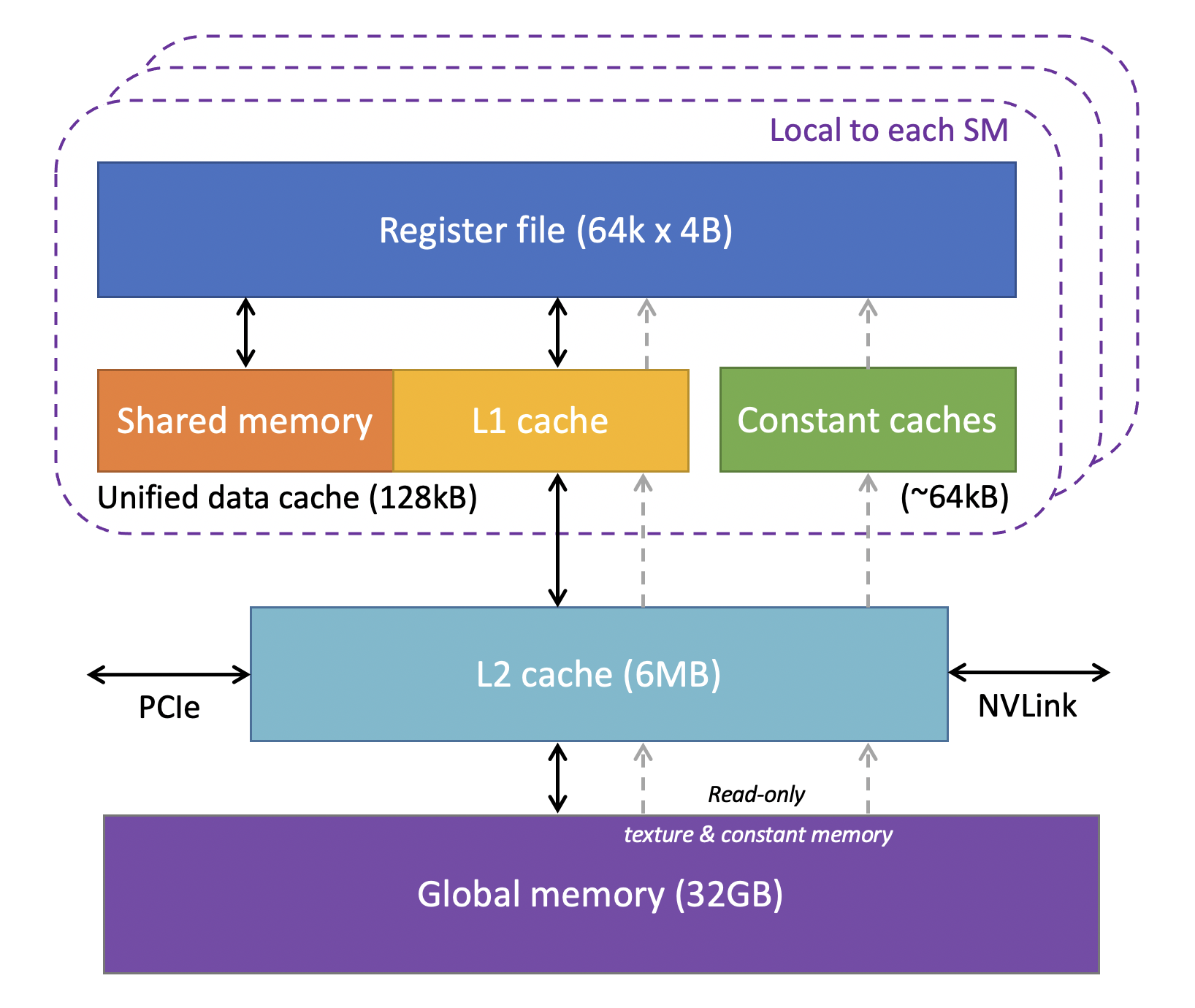
Let's break down these memory spaces, starting from the fastest and moving to the slowest.
Understanding GPU Architecture: Basics and Key Concepts
The following article provides a clear, high-level overview of the GPU memory hierarchy.
Please read the section titled 'Memory Hierarchy in GPUs'. This will introduce you to SRAM, DRAM, and the different levels like Registers, L1/L2 cache, and VRAM.
Here's a summary of the main memory types and their scope:
-
Registers:
- Scope: Private to a single thread.
- Location: On-chip, inside the SM.
- Characteristics: The fastest memory available. Each SM has a large register file shared by the threads running on it. The compiler tries to store most of a thread's local variables here.
-
Shared Memory:
- Scope: Accessible by all threads within a single thread block.
- Location: On-chip, inside the SM.
- Characteristics: Extremely fast, almost as fast as registers. It acts as a user-managed scratchpad for threads in a block to cooperate and share data, significantly reducing slow trips to global memory.
-
L1 and L2 Caches:
- Scope: L1 is per-SM; L2 is shared across all SMs on the GPU.
- Location: On-chip.
- Characteristics: Hardware-managed caches that automatically store frequently used data from global memory to speed up access.
-
Global Memory (DRAM):
- Scope: Accessible by all threads on the GPU (and the CPU via explicit copies).
- Location: Off-chip, on the graphics card (this is the VRAM).
- Characteristics: The largest memory space by far, but also the slowest with the highest latency. All input data for a computation typically starts here, and final results are written back here.
The distinction between CPU memory (host) and GPU memory (device) is also important. The following video segment clarifies this and introduces the concept of shared memory from a programming perspective.
Stanford CS149 I Parallel Computing I 2023 I Lecture 7 - GPU architecture and CUDA Programming
This final video clip explains the separate CPU (host) and GPU (device) memory spaces and introduces the concept of shared memory from the CUDA programming model's point of view.
Watch the segment from 25:59 to 34:01. Focus on the idea of separate address spaces and the need for explicit cudaMemcpy operations to move data. Also, note the introduction of the per-block shared memory space.
Efficient GPU programming is largely a game of managing this memory hierarchy: staging data in shared memory and maximizing the use of registers to avoid the high latency of global memory as much as possible.
Conclusion
In this lesson, we have peeled back the layers of GPU architecture. We've seen that it's a purpose-built parallel machine designed for massive throughput.
Key Takeaways:
- GPU vs. CPU: GPUs are throughput-oriented, with thousands of simple cores, while CPUs are latency-oriented, with a few powerful cores.
- Streaming Multiprocessor (SM): The SM is the core processing unit of a GPU. A GPU contains many SMs.
- Warps and SIMT: An SM executes threads in groups of 32 called warps, using a Single Instruction, Multiple Threads model. All threads in a warp execute the same instruction in lockstep.
- Memory Hierarchy: GPUs feature a critical memory hierarchy. Performance hinges on maximizing the use of fast on-chip memory (registers, shared memory) to avoid the high latency of slow off-chip global memory.
Preview of the Next Lesson
We have now explored shared-memory, distributed-memory, and GPU architectures. In our final lesson for this module, we will synthesize this knowledge. We will directly compare the primary trade-offs between these three major parallel systems, helping you understand their respective strengths, weaknesses, and the types of problems for which each is best suited.