Hello! Welcome to your next lesson in the "Infrastructure for Scalable Systems" module.
In our last lesson, we established the physical foundation of large-scale computing: the commodity cluster, composed of nodes and high-speed interconnects. We now have a picture of the raw hardware that powers data centers. Today, we'll move one level up the stack to explore how this powerful hardware is made flexible and useful.
This lesson focuses on virtualization, the technology that allows us to carve up a single physical machine into multiple, isolated software-based computers. Our learning outcome is to explain virtualization and the role of hypervisors in enabling Infrastructure as a Service (IaaS). Understanding this is fundamental to grasping how modern cloud platforms like AWS, Azure, and Google Cloud operate.
1. The Core Idea: What is Virtualization?
Imagine one of the powerful compute nodes from the clusters we discussed in the last lesson. It has dozens of CPU cores and hundreds of gigabytes of RAM. Running a single operating system on it for just one task would be incredibly wasteful. What if we could divide this single physical server into several smaller, independent, virtual servers? Each could run its own operating system and applications, completely isolated from the others.
This is the essence of virtualization: the process of creating a software-based, or virtual, version of something, such as a server, storage device, or network.
The magic behind virtualization is a piece of software called a hypervisor, or Virtual Machine Monitor (VMM). The hypervisor is a layer that sits between the physical hardware and the virtual machines, acting like a traffic cop for hardware resources. It intercepts requests from the virtual machines and manages their access to the underlying CPU, memory, and I/O devices.
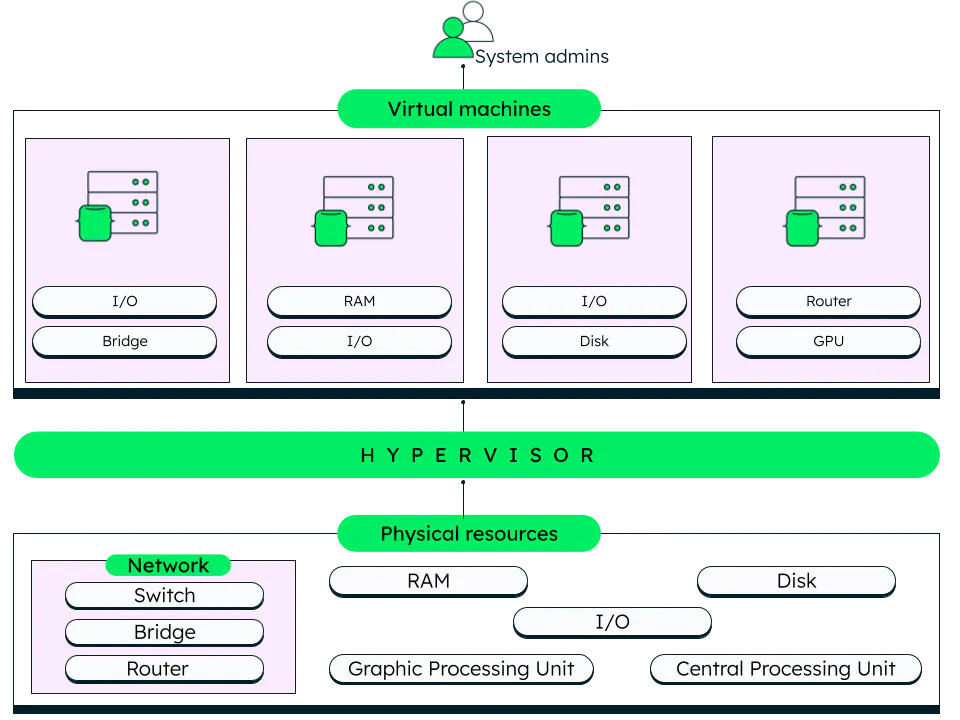
To get a clear and concise introduction to these concepts, let's watch a short video.
This video from IBM Technology provides an excellent overview of virtualization, defining the key terms like hypervisor and Virtual Machine (VM).
Please watch the following segments: From the beginning until 01:04. This part introduces virtualization and defines the hypervisor. Skip ahead and watch from 02:12 to 03:24. This section explains what a Virtual Machine (VM) is and highlights its key properties.
As the video explained, each Virtual Machine (VM) is a self-contained software computer, complete with its own operating system (called a "guest OS") and applications. Because they are isolated, a crash or issue in one VM does not affect the others running on the same physical host. This isolation, combined with the ability to move VMs between physical machines, provides three key benefits:
- Cost Savings: By consolidating many VMs onto fewer physical servers, organizations drastically reduce their hardware footprint, along with power and cooling costs.
- Agility and Speed: Spinning up a new VM is a matter of minutes, far faster than procuring and racking a new physical server.
- Reduced Downtime: VMs can be moved live from one physical host to another, allowing for hardware maintenance or failure recovery with minimal disruption.
2. Types of Hypervisors
The hypervisor is the heart of virtualization, and it comes in two main flavors. The distinction lies in where the hypervisor runs relative to the host machine's hardware.
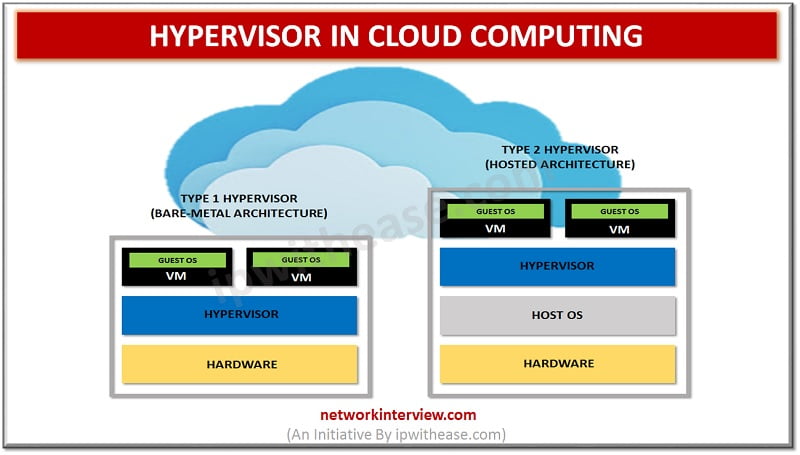
Let's return to the video to see a breakdown of these two types.
The same IBM video also clearly explains the difference between Type 1 and Type 2 hypervisors.
Please watch the segment from 01:04 to 02:12. Focus on the architectural difference and the typical use cases for each type.
To summarize the key differences:
-
Type 1 (Bare-Metal) Hypervisor:
- Runs directly on the physical hardware, taking the place of a host operating system.
- Examples: VMware ESXi, Microsoft Hyper-V, KVM.
- High performance and security because it has direct access to hardware.
- This is the type used in enterprise data centers and cloud computing environments.
-
Type 2 (Hosted) Hypervisor:
- Runs as an application on top of a conventional host operating system (like Windows, macOS, or Linux).
- Examples: Oracle VirtualBox, VMware Workstation/Fusion, Parallels Desktop.
- Easier to set up and manage for individual users but suffers from higher latency and overhead because it must go through the host OS to access hardware.
- Ideal for developers or users who need to run a different OS temporarily (e.g., running a Linux environment on a Windows laptop).
Given your background with compilers and low-level programming, you might find it interesting that modern Type 1 hypervisors rely heavily on hardware-level support. CPU manufacturers have built virtualization-specific instructions (like Intel's VT-x and AMD's AMD-V) directly into the processor. These features allow the hypervisor to efficiently "trap" and handle privileged operations from guest VMs without the significant performance penalty of pure software emulation.
3. The Link to IaaS
Now, let's connect the technology of virtualization to the business model of cloud computing. How does a hypervisor enable Infrastructure as a Service (IaaS)?
IaaS is a cloud computing service model where a provider offers fundamental computing, storage, and networking resources on-demand. Instead of buying physical servers, you rent virtual ones.
The connection is direct: IaaS is essentially virtualization on a massive scale, offered as a utility.
Cloud providers like AWS, Azure, and Google Cloud operate enormous data centers filled with the commodity clusters we've discussed. They install Type 1 hypervisors on this sea of physical servers. This creates a gigantic, fungible pool of computational resources.
When you go to a cloud provider's console and request a virtual server, their management platform automatically:
- Finds a physical host with available capacity.
- Instructs the hypervisor on that host to create a new VM with your specified CPU, RAM, and storage.
- Provisions a virtual network interface, storage volumes, and other associated resources.
- Boots the operating system you selected.
Within minutes, you have a fully functional virtual server that you can access over the internet. You are renting a slice of the provider's physical infrastructure. This is IaaS in action.
The following video explains this from the perspective of an Azure user, demonstrating the shared responsibility model and the virtual components that constitute an IaaS product.
Azure Virtual Machine (VM) Tutorial | Infrastructure as a Service (IaaS) intro
This tutorial by Adam Marczak on Azure Virtual Machines provides a practical look at IaaS. It clarifies what the cloud provider manages versus what you manage.
Watch the section from 00:11 to 02:02. Pay close attention to the diagram that illustrates the 'Shared Responsibility Model,' as it clearly defines the role of an IaaS provider.
As the video highlighted, in the IaaS model, the cloud provider manages the physical hardware and the virtualization layer. You, the customer, are responsible for everything inside the VM: the guest operating system, middleware, and your application data. The hypervisor is the critical technology that creates this clean separation, allowing the provider to abstract away the physical hardware and sell it as a service.
Conclusion
In this lesson, we have peeled back the first layer of software that runs on the physical hardware of a scalable system. We saw how virtualization is a powerful abstraction that provides flexibility, efficiency, and resilience.
Key Takeaways:
- Virtualization uses a software layer called a hypervisor to create and run multiple, isolated Virtual Machines (VMs) on a single physical server.
- Type 1 (bare-metal) hypervisors run directly on the hardware and are the foundation of data centers and cloud computing due to their high performance and security.
- Infrastructure as a Service (IaaS) is a cloud service model built directly on virtualization. Cloud providers use hypervisors to partition their massive physical infrastructure into virtual resources that customers can rent on demand.
- The hypervisor is the core enabling technology for IaaS, responsible for the resource management, isolation, and abstraction that makes the cloud model possible.
We've seen how we can slice up a single physical machine into multiple, complete operating systems. But what if we need something even more lightweight? In our next lesson, we will explore containerization. We'll learn how it differs from virtualization and why it has become another essential tool in building scalable applications.