Hello! Welcome to the first lesson in our new module, Infrastructure for Scalable Systems.
In the previous modules, we've explored parallelism on a single machine, culminating in the deep dive into CUDA programming for GPUs. You learned to optimize a single kernel to wring out every last drop of performance from a single, powerful device. Now, we're going to "zoom out." What happens when a problem is too big even for a top-of-the-line server with multiple GPUs?
This is where scalable systems come in. This module shifts our focus from the architecture of a single computer to the architecture of systems built from many computers. Today's lesson tackles the foundational building block of modern high-performance computing (HPC): the commodity cluster. Our goal is to describe the architecture of a commodity cluster, including its nodes and interconnects. This is the hardware bedrock upon which technologies like OpenMP, MPI, and Hadoop—which we'll study later—are built.
1. From Supercomputer to Cluster
The need for massive computational power is not new. For decades, scientists and engineers have tackled problems in fields like aerodynamics, materials science, and climate modeling that require more power than any single desktop could provide. Your own work in EV development might involve complex simulations for battery chemistry, structural analysis, or fluid dynamics that fall into this category.
Initially, the solution was to build massive, monolithic, and extremely expensive custom machines called supercomputers. However, a more cost-effective and flexible approach has come to dominate the field: connecting many standard, "commodity" computers together to work as one.
To understand this evolution, let's start with a short video.
What is HPC? An introduction to High-Performance Computing
This video from Canonical Ubuntu gives a concise history of high-performance computing, explaining the shift from traditional supercomputers to the cluster-based model we use today.
Please watch from 01:07 to 02:22. Focus on the concepts of 'distributed memory' and how multiple commodity servers, connected by a high-speed network, form a modern HPC cluster.
As the video explains, a cluster is a group of interconnected, standalone computers that work together and can be viewed as a single system. This approach provides two primary benefits:
- Scalability: If you need more computing power, you can add more computers (or "nodes") to the cluster.
- Availability/Fault Tolerance: If one node fails, the rest of the cluster can continue to operate.
These principles are the foundation of everything from the supercomputers used in scientific research to the massive data centers that power Google and Amazon.
2. The Anatomy of a Cluster: Nodes
The basic building block of a cluster is the node. A node is essentially a self-contained computer, typically without its own keyboard or monitor, mounted in a large rack with many other nodes.
While all nodes are computers, they are often specialized for different tasks within the cluster ecosystem. To explore this, we'll use a fantastic real-world guide from the Lawrence Livermore National Laboratory (LLNL), one of the world's leading HPC centers.
Livermore Computing Commodity Clusters Overview Part One
This document, 'Livermore Computing Commodity Clusters Overview Part One', describes the architecture of the clusters used at LLNL. It provides an authentic look at how large-scale systems are designed.
Please read the section titled 'Cluster Configurations and Scalable Units', focusing on the subsections 'Basic Components' and 'Nodes'. Pay attention to the four different types of nodes described and their specific functions.
As you read, the core takeaway is that a cluster is not just a homogenous collection of computers. It's a heterogeneous system with different types of nodes, each with a specific role:
- Login Nodes: These are the gateway to the cluster. You connect to a login node via SSH to edit files, compile your code, and submit jobs to the cluster's scheduler. They are shared resources and are not meant for heavy computation.
- Compute Nodes (or Batch Nodes): These are the workhorses. They make up the vast majority of the cluster and are dedicated to running the actual computational jobs. You typically don't log in to them directly; a resource manager allocates them to your job when you submit it.
- Interactive/Debug Nodes: A subset of nodes reserved for debugging, profiling, and testing your parallel code on a smaller scale before launching a large production run.
- I/O and Service Nodes: These nodes manage access to the parallel file system, run cluster management services, and perform other administrative tasks. They are generally not directly accessible by users.
This architectural separation is crucial for stability and performance. It prevents a user compiling code on a login node from interfering with a massive simulation running on the compute nodes.
The following diagram illustrates this common architecture perfectly.
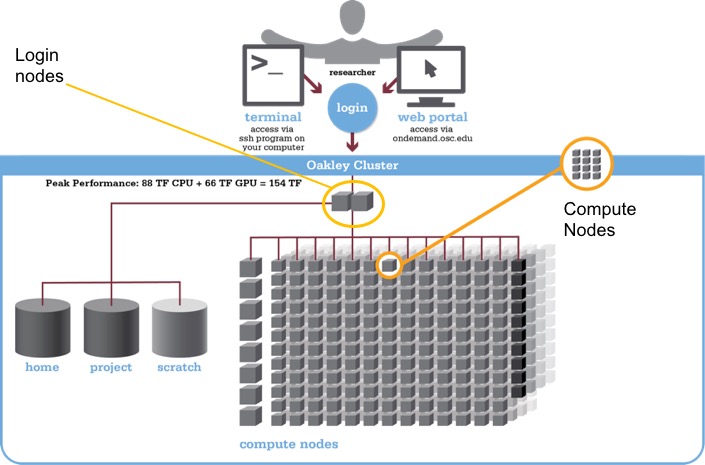
To get a sense of scale, the tables in the LLNL document show that a single modern compute node can have over 100 CPU cores and hundreds of gigabytes of RAM. A large cluster like Dane has over 1,500 such nodes.
3. Tying It All Together: The Interconnect
Having powerful nodes is only half the story. The interconnect—the high-speed network that links the nodes—is just as critical. For a parallel program running across hundreds of nodes, slow communication can completely cripple performance.
Two key metrics define an interconnect's performance:
- Bandwidth: The maximum data transfer rate (e.g., in gigabytes per second). This is analogous to the width of a pipe.
- Latency: The time it takes for a single, small message to get from one node to another (e.g., in microseconds). This is the time it takes for the first drop of water to travel through the pipe.
For many scientific applications that exchange frequent, small messages (a pattern common in MPI programs), low latency is often more important than raw bandwidth.
Cluster Computing - The University of Melbourne
Let's explore the different types of interconnects and their performance characteristics. This paper from the University of Melbourne provides an excellent overview.
Please read the beginning of Section 2, 'Interconnection Technologies and Communication Software', up to but not including the performance graphs (Figures 2 and 3). Pay close attention to Table 1 and Table 2, which summarize and compare technologies like Gigabit Ethernet and Infiniband.
From this reading, you'll see a clear distinction:
- Commodity Interconnects (e.g., Gigabit Ethernet): Inexpensive and widely available. However, their higher latency and reliance on the OS kernel for processing network traffic make them unsuitable for tightly-coupled parallel jobs.
- HPC Interconnects (e.g., InfiniBand, Omni-Path): Specifically designed for HPC. They offer extremely high bandwidth and ultra-low latency, often by bypassing the OS kernel to allow applications to communicate more directly with the hardware (a technique known as Remote Direct Memory Access or RDMA).
Interconnect Topology
Simply connecting every node to every other node is not feasible in a large cluster. Instead, a specific network structure, or topology, is used. The most common topology in modern clusters is a fat-tree.
Let's return to the LLNL document to see how this is implemented.
Livermore Computing Commodity Clusters Overview Part One
Now we'll see how a high-performance interconnect like InfiniBand is physically constructed in a real cluster.
Please read the section titled 'Infiniband Interconnect Overview'. Focus on the 'Primary components' (Adapter Card, Switches) and the 'Topology' subsection. The diagram of the two-stage fat-tree is particularly important.
A fat-tree topology is hierarchical. Nodes connect to a "leaf" switch. Leaf switches then connect to a higher level of "spine" switches. The key feature of a fat-tree is that the bandwidth increases as you move up the hierarchy towards the core of the network. This design ensures there are many paths between any two nodes and prevents the upper-level switches from becoming a bottleneck, which is crucial for maintaining high performance as the cluster scales in size. It guarantees what is known as "full bisectional bandwidth," meaning any half of the cluster's nodes can communicate with the other half at full speed.
Conclusion
In this lesson, we have constructed a mental model of a commodity HPC cluster. You've moved from thinking about a single computer to a large, integrated system designed for scalable performance.
Key Takeaways:
- A commodity cluster is a collection of standard computers (nodes) connected by a network (interconnect) to act as a single, powerful resource.
- Nodes within a cluster are specialized by function: login nodes for user access, and compute nodes for running jobs.
- The interconnect is a critical component. High-performance clusters use specialized, low-latency technologies like InfiniBand or Omni-Path.
- The network topology, most commonly a fat-tree, is engineered to provide high, non-blocking communication bandwidth across the entire cluster, enabling massive parallel applications to run efficiently.
We have just described the physical infrastructure. In our next lesson, we will begin to explore the software layers that run on top of this hardware. We'll start with virtualization, a technology that allows us to abstract this physical hardware into flexible, virtual machines, forming the basis of modern cloud computing and Infrastructure as a Service (IaaS).