Hello! Welcome to your next lesson in the "Infrastructure for Scalable Systems" module.
In our last lesson, we saw how virtualization allows us to partition a single physical server into multiple, fully isolated Virtual Machines (VMs), each running its own complete operating system. This is made possible by a hypervisor.
Today, we'll explore a different, more lightweight approach to virtualization called containerization. This lesson addresses the learning outcome: Explain containerization and contrast its approach and overhead with virtualization. We will unpack what containers are, how they differ from VMs, and what trade-offs exist between the two, which is crucial for understanding modern application deployment.
1. From Virtual Machines to Containers
Virtualization with VMs solved a major problem: it allowed for efficient use of hardware by running multiple isolated environments on one server. However, each VM still carries the significant overhead of a full guest operating system. This consumes gigabytes of storage, substantial memory, and takes minutes to boot.
This raises a question: What if you just want to isolate a single application and its dependencies, without the burden of an entire OS?
This is precisely the problem that containerization solves. It is a form of OS-level virtualization where an application and its entire runtime environment (libraries, binaries, configuration files) are packaged into a single, isolated unit called a container.
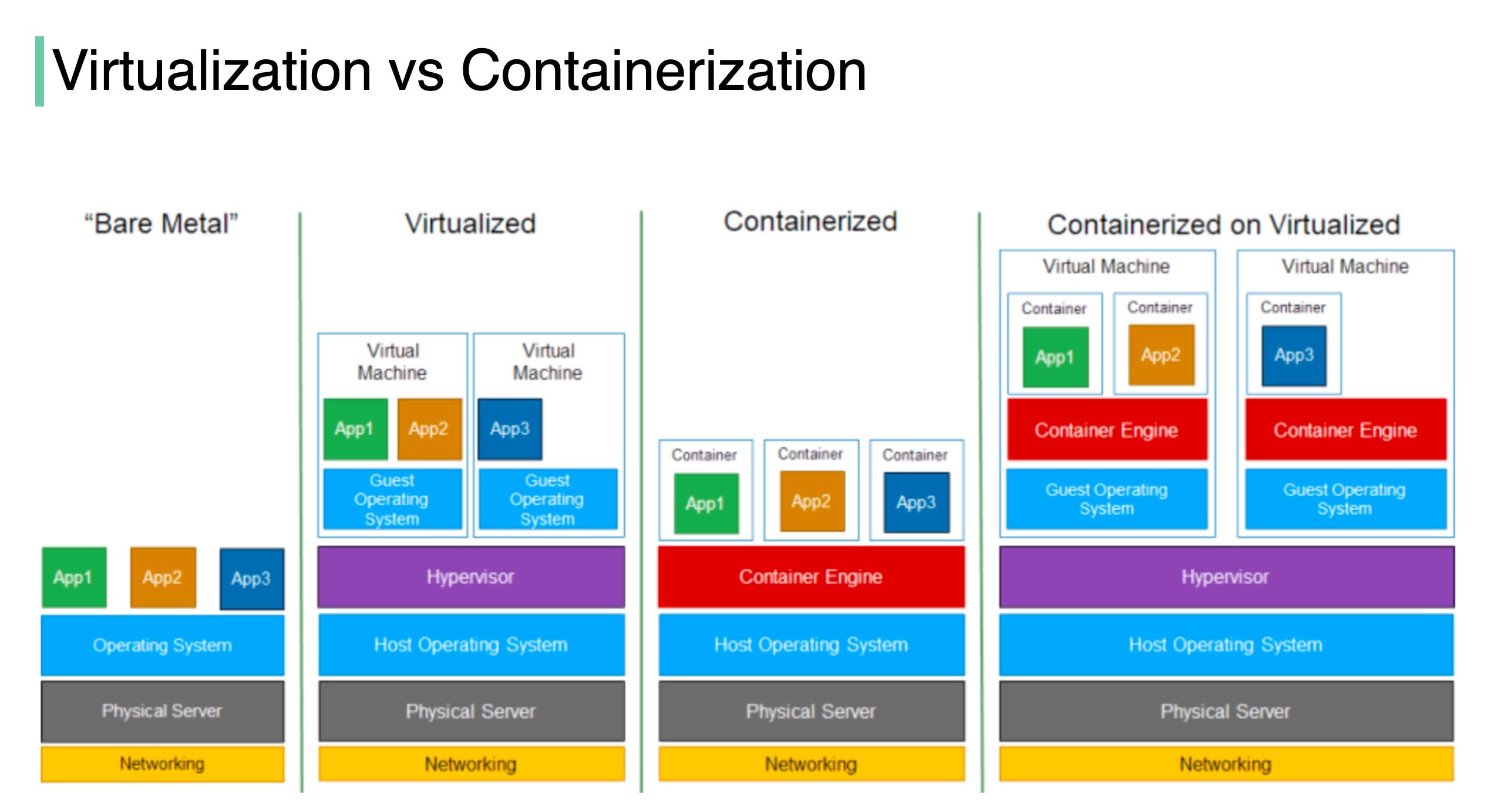
The most critical difference is this: unlike VMs, all containers on a host machine share the host operating system's kernel. There is no guest OS, which makes containers incredibly lightweight and fast.
To visualize this fundamental architectural difference, consider the following diagram:

A popular analogy is to think of VMs as houses and containers as apartments:
- A Virtual Machine is like a house. It's fully self-contained with its own infrastructure: plumbing, electrical, heating, etc. (the guest OS). It provides strong isolation but is resource-intensive to build and maintain.
- A Container is like an apartment. It is also a private, isolated space, but it shares the building's core infrastructure—the main water lines, power grid, and foundation (the host OS kernel). This makes apartments much faster and more efficient to build and occupy.
The most widely used containerization platform today is Docker. The Docker Engine is the software that builds, runs, and manages containers.
Let's watch a video that explains these concepts and introduces the "house vs. apartment" analogy in more detail.
Docker vs VM: What's the Difference, and Why You Care!
This video from Dave's Garage provides a great introduction to the 'why' behind containers and contrasts their architecture with that of VMs.
Please watch the following segments: 00:00 - 01:05: This introduces the core problem and the high-level difference between VMs and containers. 05:43 - 07:25: This part explains how applications are packaged into containers using Docker. 08:49 - 10:25: This segment explains the excellent 'house vs. apartment' analogy.
2. How Do Containers Actually Work?
You might be wondering how it's possible for multiple applications to share a single OS kernel without interfering with each other. This is accomplished using two powerful features built into the Linux kernel, which your background in low-level systems might make you appreciate.
-
Namespaces: This feature provides isolation. Namespaces partition kernel resources such that each container gets its own isolated view of the system. For example, a process running inside a container has its own private set of process IDs (PIDs), network interfaces, and filesystem mounts. It can't see or interact with processes or network interfaces outside its namespace, creating the illusion of a private OS.
-
Control Groups (cgroups): This feature manages resource allocation. Cgroups allow the host to limit and monitor the amount of resources—such as CPU time, system memory, and network bandwidth—that a container can use. This ensures that a single, misbehaving container cannot exhaust the host's resources and starve other containers.
The same video we just watched has an excellent explanation of these two concepts.
Docker vs VM: What's the Difference, and Why You Care!
Let's dive a bit deeper into the underlying technology. This segment explains how namespaces and cgroups work together to make containers possible.
Please watch from 10:25 to 12:53. Focus on how namespaces provide isolation ('what containers can see') and how cgroups manage resources ('what containers can use').
Together, namespaces and cgroups allow containers to run as isolated, resource-controlled processes on a shared kernel, achieving most of the benefits of virtualization without the overhead of a hypervisor and guest OS.
3. Contrasting Virtualization and Containerization
Now, let's systematically contrast the two approaches by examining their respective overheads and characteristics.
To do this, we'll use a resource that provides a detailed tabular comparison. Please study the table in the following reading, as it directly addresses the core of this lesson's learning outcome.
Differences between Docker and Virtual Machines
This article from KnowledgeHut provides an excellent side-by-side analysis of Docker containers and Virtual Machines across many important parameters.
Please read the section titled 'Difference between Dockers and Virtual machines', focusing specifically on the 'Tabular differences on various parameters' table. Pay close attention to the rows for architecture, performance, storage, and security.
As you saw in the table, the trade-offs can be summarized across several key dimensions:
| Characteristic | Virtual Machines (VMs) | Containers | Reason for Difference |
|---|---|---|---|
| Overhead | High | Low | VMs bundle a full guest OS; containers share the host OS kernel. |
| Startup Time | Minutes | Seconds or milliseconds | VMs must boot a full OS; containers just start a process on the already-running host OS. |
| Size | Large (Gigabytes) | Small (Megabytes) | VM images contain an entire OS; container images only contain the application and its dependencies. |
| Performance | Near-native, but with hypervisor overhead. | Near-native with minimal overhead. | Containers have fewer layers of abstraction between the application and the hardware. |
| Isolation | Strong: Hardware-level isolation. A failure or exploit is contained within the guest OS. | Weaker: OS-level (process) isolation. A host kernel vulnerability could potentially affect all containers. | VMs virtualize the hardware, creating a strong boundary. Containers share the kernel, creating a "softer" boundary. |
| Portability | Less portable. VM images are large and can be tied to specific hypervisors. | Highly portable. A container image runs identically on any host with a container engine (e.g., Docker). |
4. Use Cases and Combining Technologies
So, when should you use one over the other?
-
Use Virtual Machines when:
- You need to run different operating systems (e.g., a Windows application on a Linux server).
- You require strong security isolation, such as in a multi-tenant cloud environment where different customers' code runs on the same hardware.
- You have legacy applications that expect to run on their own dedicated machine.
-
Use Containers when:
- You are building applications based on a microservices architecture, where each service can be packaged and scaled independently.
- You need fast, reproducible deployments for Continuous Integration/Continuous Deployment (CI/CD) pipelines.
- You want to maximize the number of applications running on a single server to improve resource density.
It's also important to note that VMs and containers are not mutually exclusive. A very common pattern in cloud computing is to run containers inside a virtual machine. This approach combines the strong security and isolation of VMs with the agility and portability of containers.
Conclusion
In this lesson, we've explored containerization as a lightweight alternative to full hardware virtualization. By sharing the host OS kernel, containers offer significant advantages in speed, size, and resource efficiency, at the cost of slightly weaker isolation compared to VMs.
Key Takeaways:
- Containerization packages an application and its dependencies into an isolated container that runs on a shared host OS kernel.
- Virtualization creates a complete virtual machine with its own dedicated guest OS, isolated by a hypervisor.
- The primary overhead of VMs comes from running a full guest OS for each instance, resulting in larger size, slower startup, and higher resource consumption.
- Containers have minimal overhead, leading to near-native performance and high density, but rely on the security of the shared host kernel.
- The choice between VMs and containers is a trade-off between isolation/security (VMs' strength) and efficiency/portability (containers' strength).
In our previous lesson, we saw how to partition hardware with VMs. Today, we saw how to package software with containers. In our next lesson, we will shift our focus to how distributed components communicate, starting with two foundational patterns: the client-server model and the peer-to-peer model.