Introduction
Welcome back! In our previous lesson, we got acquainted with the essential tools for our project: the MetaTrader 5 (MT5) platform and the MetaEditor. You now know how to navigate their interfaces and understand their respective roles—MT5 is where our program will run, and MetaEditor is where we will build it.
Today, we'll answer a fundamental question: "What exactly are we building?" The MQL5 language allows you to create several different types of programs. Your overall goal is to build an automated trading system, but to do that, you need to know which type of program is right for the job.
This lesson focuses on distinguishing between the three main types of MQL5 programs: Expert Advisors, custom indicators, and scripts. Understanding their unique purposes and limitations is a critical step before we write any code, as it ensures we start our project with the correct framework.
The Different Tools in Your MQL5 Toolkit
Think of MQL5 programs as different kinds of specialized equipment in a lab. Each is designed for a specific task. A machine that automatically runs a full diagnostic protocol is very different from a sensor that just monitors a single vital sign, which is again different from a tool used for one specific, single action.
In MQL5, these specialized tools are our program types. Let's explore what each one does. The following article from the official MQL5 documentation provides an excellent overview.
Program types and their construction features - MetaTrader ... - MQL5
This article, titled 'Program types and their construction features', describes the purpose of Expert Advisors, technical indicators, and scripts. It explains how each program type interacts with the MT5 platform.
Please read the three sections titled 'Expert Advisors (EAs)', 'Technical indicators', and 'Scripts'. Focus on understanding the primary purpose of each program type and what they can and cannot do.
Let's break down the key characteristics based on that reading.
1. Expert Advisors (EAs)
- Purpose: The core of automated trading. An EA can analyze market data according to a pre-programmed strategy and, most importantly, execute and manage trades on its own.
- Execution: An EA is attached to a specific chart and runs continuously. It is "event-driven," meaning it reacts to market events. The most common event is
OnTick(), which triggers the EA's logic every time a new price quote arrives. - Analogy: This is the fully automated diagnostic machine. It constantly monitors the sample (the market), runs its analysis (your strategy), and automatically takes action (places a trade) based on the results.
2. Custom Indicators
- Purpose: Analysis and visualization. An indicator's job is to perform calculations on price data and display the results graphically on a chart. Common examples are Moving Averages or RSI. The Heikin Ashi candles we aim to use are, in their purest form, an indicator.
- Execution: Like an EA, an indicator is attached to a chart and runs continuously, updating its calculations with each new tick via the
OnCalculate()event. - Key Limitation: Indicators cannot place trades. Their role is strictly analytical.
- Analogy: This is like a patient monitor (e.g., an EKG). It continuously measures and displays vital signs (price data) but does not administer any treatment (trades).
3. Scripts
- Purpose: Executing a single, one-time task. A script runs from start to finish once and then is immediately removed from memory.
- Execution: You manually run a script, it performs its function, and it stops. It is triggered by the
OnStart()event. While a script can be programmed to place a trade, it would only do so once at the moment you run it; it does not monitor the market. - Analogy: This is a single-use tool, like a micropipette used to dispense a specific reagent once, or a command to start a single centrifuge cycle. It does its job and is done.
A Side-by-Side Comparison
To help solidify these differences, the following resource provides another clear set of definitions and a very helpful comparison table.
Master MQL5 from beginner to pro (Part I): Getting started with ...
This article, from the 'Master MQL5 from beginner to pro' series, offers concise definitions and presents a table that directly compares the capabilities of each program type.
Read the sections 'Main types of MQL5 programs' and 'Comparison of program types available in MQL5'. Pay close attention to the table, as it's an excellent summary of the differences in how these programs operate.
The table in that article highlights key operational differences, such as:
- Which programs are linked to a chart.
- Which can trade.
- Which ones run continuously (
Executed on every tick).
Choosing the Right Tool for Our Goal
Now, let's bring it back to your objective: creating an automated Heikin Ashi trading system.
Based on the definitions above, it should be clear that the Expert Advisor is the correct choice. Here’s why:
- We need a program that runs continuously to monitor the market for trading opportunities. A script is not suitable for this.
- We need the program to automatically execute trades when the Heikin Ashi signals are met. A custom indicator cannot do this.
Therefore, we will be building an Expert Advisor. We may eventually create a separate custom indicator for Heikin Ashi to help visualize the data, but the core logic for trading must reside within an EA.
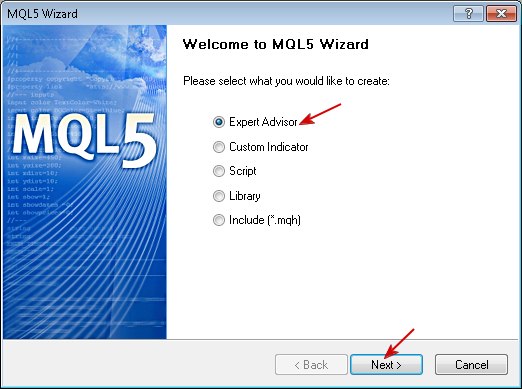
When we begin our first project in the next lesson, MetaEditor's MQL5 Wizard will prompt us to make this choice upfront.
Conclusion
You now have a clear understanding of the fundamental building blocks of MQL5 development. This knowledge ensures we start on the right path and use the right tool for our trading bot.
Key Takeaways:
- Expert Advisor (EA): Runs continuously on a chart to analyze and trade. This is the tool for building automated trading systems.
- Custom Indicator: Runs continuously to analyze and display data visually on a chart. It cannot trade.
- Script: Runs only once to perform a specific, pre-defined task and then stops.
Preview of the Next Lesson:
Now that we know we need to build an Expert Advisor, our next logical step is to create the project file itself. In the next lesson, we will use the MQL5 Wizard to create a new Expert Advisor project, which will generate the basic template file where we will start writing our code.