Hello! Welcome to the final lesson in our module on Evaluation Context.
In our last lesson, you developed the crucial skill of predicting a measure's result by mentally running through the three-stage DAX evaluation process. This was a huge step in learning to "think like DAX."
Today, we address a fundamental question: what happens when your prediction doesn't match what Power BI shows you? This lesson focuses on why a deep understanding of evaluation context is not just a theoretical exercise, but the single most important skill for debugging formulas and writing correct, reliable DAX code.
This lesson solidifies the "why" behind everything we've covered in this module. It's the conceptual foundation you'll need before we move on to the next module, where we'll learn to actively manipulate the context with the CALCULATE function.
Why Evaluation Context is the Key to Debugging
In your journey as a data analyst, you will frequently encounter DAX formulas that produce unexpected results: a total that's too high, a percentage that's over 100%, or a value that's just blank. The natural first instinct is often to blame the formula itself. However, in DAX, the formula is only half the story.
The vast majority of "bugs" in DAX are not errors in the formula's syntax, but a misunderstanding of the context in which that formula is being evaluated.
Evaluation Contexts in DAX - Filter and Row Contexts
Let's read a short blog post from endjin that perfectly captures this idea.
Read the 'Conclusion' section of this article. It's a concise summary that directly addresses our learning outcome for today. Focus on the final sentence.
As the article states, "if your formula is correct but you are not getting the result you expect, you might be forgetting about the evaluation context!" This is the central principle of DAX debugging.
Your ability to predict a result, which you practiced in the last lesson, is your primary debugging tool. When the actual result differs from your prediction, it means your mental model of the context was wrong. The task then becomes figuring out how the actual context is different from what you assumed.
To see a practical demonstration of using this mental model for debugging, let's watch a short video.
In the video '5 DAX Debugging Tricks!', the presenter from Goodly explains how the 'three-step evaluation rule' is the key to debugging.
Watch from the beginning to 03:06. Notice how this process is identical to the prediction method from our last lesson, but here it's framed explicitly as a way to 'check' and 'debug' a calculation you are unsure about. This confirms that prediction and debugging are two sides of the same coin.
Common Pitfalls: Where Context Understanding Breaks Down
Most debugging challenges arise from a few common but critical misunderstandings of evaluation context. Let's tackle the most important ones.
Pitfall 1: Confusing a Visual's Row with a Row Context
This is perhaps the most common mistake for DAX learners. When you see a table or matrix visual, it's natural to think that each row in the visual creates a "row context." This is incorrect and leads to major confusion.
A row in a visual does not create a row context; it defines a filter context.
Let's hear this explained by an expert.
In this clip from SQLBI, Alberto Ferrari addresses this exact misconception.
Watch from 06:07 to 07:10. Pay close attention to the distinction made between a 'row of a matrix' and a 'row context'.
Each cell in a visual is the result of your measure being evaluated within a filter context created by the row headers, column headers, and slicers. It is not iterating through a table one row at a time.
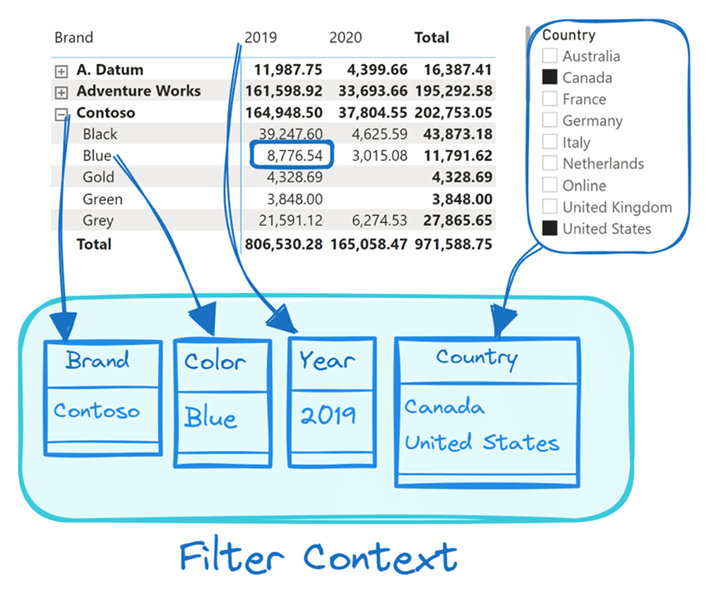
Understanding this is critical. If you try to debug a matrix value thinking it's a row context, you'll be looking for a single row in your data table when you should be thinking about a set of filters applied to the entire model.
Pitfall 2: Using the Wrong Function for the Context
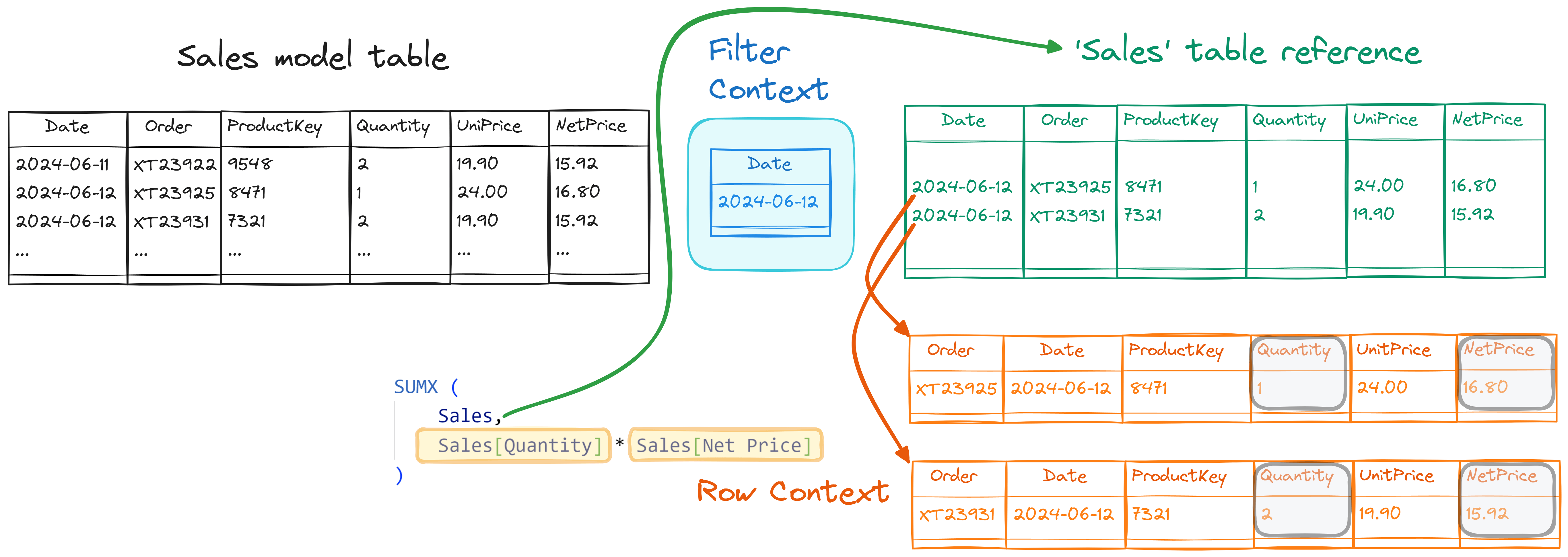
Another major source of errors is using a function that doesn't respect the context you think it's in. The classic example is the difference between simple aggregators (SUM, AVERAGE) and iterator functions (SUMX, AVERAGEX).
- Simple Aggregations (
SUM,COUNT,AVERAGE) operate on a single column and only respect the filter context. - Iterator Functions (
SUMX,AVERAGEX) operate on a table, creating a row context for each row in that table, allowing for row-by-row calculations.
Let's read about a scenario where this distinction leads to a completely wrong result.
Notes: The Definitive Guide to DAX
This section from the 'Story BI' notes on 'The Definitive Guide to DAX' gives a perfect example of this pitfall.
Read the section titled 'Row Context ‘evaluates’ rows'. Focus on the paragraph that begins 'A good learning example is using SUMX with a filtered table...'.
As the notes explain, if you use a SUM inside a SUMX without understanding the context, the SUM will ignore the row context created by SUMX and will calculate the sum of the entire column within the initial filter context, for every single row of the iteration. This is almost never what you want, but it's a common mistake that is impossible to debug unless you understand the difference between the two contexts.
A Framework for Writing and Debugging DAX
When a measure isn't working, instead of randomly changing the formula, you can apply a structured thought process based on evaluation context. When you write or debug any DAX measure, ask yourself these three questions:
-
What is the Evaluation Context?
- Is there an initial filter context coming from my visual's rows/columns or slicers?
- Is there a row context because I'm creating a calculated column or using an iterator function like
SUMX? - Are both contexts interacting?
-
Am I Changing the Context?
- Am I using
CALCULATEto add, remove, or modify filters? - (This is a preview of our next module, but it's a key part of the mental checklist).
- Am I using
-
Am I Causing Advanced Problems?
- Am I using whole tables in filter arguments, which can be inefficient?
- Could my logic create a circular dependency? This is a critical error where two calculations depend on each other, and the DAX engine can't resolve them. It's an advanced topic, but it's almost always caused by a misunderstanding of how row context is converted to filter context (a process called "context transition").
Notes: The Definitive Guide to DAX
The Story BI notes summarize this framework beautifully and briefly explain the concept of circular dependency as an example of a severe error caused by context misunderstanding.
First, read the section 'The common themes from above have led me to ask three questions when writing DAX:'. This provides your practical debugging framework. Then, read the section on 'Circular Dependencies' to see an example of a complex error that can only be understood and solved through a mastery of evaluation context.
You don't need to master circular dependencies today. The point is to see that even the most complex and intimidating DAX errors are rooted in the fundamental principles of evaluation context. By mastering the basics now, you are equipping yourself to solve advanced problems later.
Conclusion
You've now completed the foundational theory of DAX. Understanding evaluation context isn't just one topic among many; it is the topic that underpins everything else. As Marco Russo and Alberto Ferrari, the authors of The Definitive Guide to DAX, famously stated: “The key to unlocking the full power of the language is all in mastering evaluation contexts.”
Key Takeaways:
- Nearly all unexpected DAX results are due to a misunderstanding of evaluation context, not bugs in the formula.
- The three-stage evaluation process (identify context, filter model, calculate) is your primary tool for both predicting results and debugging them.
- Confusing a matrix row (which defines a filter context) with a DAX row context is a critical and common error.
- Using the wrong function for the context (e.g.,
SUMinside an iterator) can lead to wildly incorrect results that are impossible to fix without understanding the two types of context. - Mastering context helps you avoid and solve complex errors like circular dependencies.
Preview of the Next Lesson:
With this solid theoretical foundation, you are ready to take control. In our next lesson, we will begin Module 5 and introduce CALCULATE, the most important and powerful function in DAX. You will learn how CALCULATE gives you the power to modify the filter context, allowing you to perform calculations that would otherwise be impossible. We will start by writing a measure that uses CALCULATE with a simple filter argument.