Hello! Welcome to your second lesson.
In our last session, we explored the Kubernetes Control Plane—the "brain" of the cluster responsible for making all the decisions. We covered the kube-apiserver, etcd, kube-scheduler, and kube-controller-manager, and how they work together to orchestrate everything.
Today, we're shifting our focus from the brain to the "muscle": the Worker Nodes. These are the machines where your applications actually run. By the end of this lesson, you will be able to describe the three essential components that live on every worker node—kubelet, kube-proxy, and the container runtime—and understand their distinct responsibilities. This knowledge is crucial for troubleshooting and managing the workloads that your cluster serves.
From Control Ships to Cargo Ships
In the last lesson, we established the control plane as the management headquarters. To extend that analogy, think of worker nodes as the fleet of cargo ships that do the actual work of carrying your applications (containers). For a cargo ship to be part of the fleet, it needs a captain, an engine, and a communications officer. The same is true for a Kubernetes worker node.
Every worker node runs three key processes that allow it to be managed by the control plane and to run containerized workloads:
- Container Runtime: The engine that runs containers.
- Kubelet: The agent that communicates with the control plane and manages the containers on its node.
- Kube-proxy: The agent that handles network connectivity for the containers.
The diagram below shows how these components are situated within a worker node and how they interact with the control plane's API server.
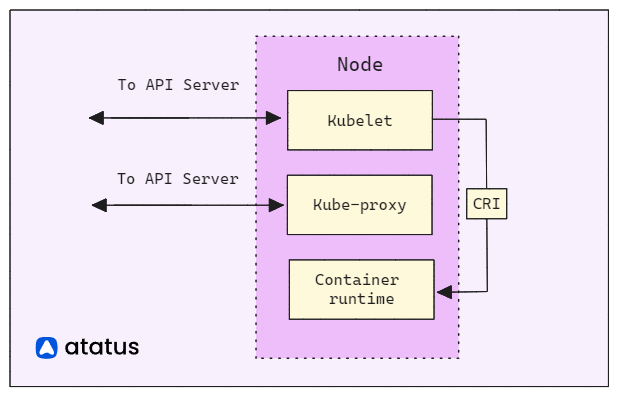
Let's dive into each of these components. For a great visual overview, we'll use a video from TechWorld with Nana.
Kubernetes Architecture explained | Kubernetes Tutorial 15
This video provides a clear and concise explanation of the three worker node components. We will watch specific segments for each component.
First, watch the introduction from 01:12 to 01:54. This segment will introduce the three processes that are essential for every worker node.
1. The Container Runtime
The container runtime is the fundamental software component that runs containers. It's the engine of the worker node. While you have extensive experience with Docker, it's important to know that Kubernetes is designed to be runtime-agnostic.
It achieves this using the Container Runtime Interface (CRI), a plugin interface that enables the kubelet to use different container runtimes without needing to be recompiled. Any runtime that implements the CRI can work with Kubernetes.
Common container runtimes include:
- containerd (the industry-standard runtime, originally from Docker)
- CRI-O (a lightweight runtime created specifically for Kubernetes)
- Docker (more accurately, the
dockershimcomponent, which has been deprecated in recent Kubernetes versions in favor of direct CRI integration)
The container runtime's responsibilities are straightforward: pulling container images from a registry, starting containers, and stopping them. It manages the low-level details of container isolation and resource allocation as instructed by the kubelet.
Kubernetes Architecture explained | Kubernetes Tutorial 15
This short clip from the same video clarifies the role of the container runtime.
Watch from 01:41 to 02:08 to see how the container runtime fits into the picture.
2. The Kubelet: The Node's Captain
The kubelet is the most important Kubernetes agent on a worker node. Think of it as the "captain" of the node. It receives instructions from the kube-apiserver and ensures that the containers described in Pod specifications are running and healthy.
The kubelet's core responsibilities include:
- Registering the node: When a
kubeletstarts on a machine, it registers itself with the control plane, making the node available for scheduling Pods. - Watching for Pods: It constantly watches the
kube-apiserverfor Pods that have been scheduled to its node. This is a pull-based model—thekubeletinitiates the communication, which makes the system robust and scalable. - Managing the Pod lifecycle: When a new Pod is assigned, the
kubelet:- Instructs the container runtime (via CRI) to pull the necessary images and run the containers.
- Mounts any required volumes for the Pod.
- Creates the Pod's directories on the host.
- Reporting Status: It regularly reports the status of the node and each of its Pods back to the
kube-apiserver. This includes node health, Pod phases (e.g.,Running,Failed), and container events.
Kubernetes Architecture explained | Kubernetes Tutorial 15
Now, let's look at the kubelet's role in detail.
Watch the segment from 01:54 to 02:53. Pay close attention to how the kubelet interacts with both the container runtime and the node's resources (CPU, RAM).
To reinforce this, the article we used in the previous lesson provides an excellent, concise summary of the kubelet's duties.
Kubernetes Architecture Explained for CKA- Part 1
The article 'Kubernetes Architecture Explained for CKA' clearly outlines the kubelet's responsibilities, highlighting its pull-based communication model.
Read section '3.1 kubelet — The Executor'. The key takeaway here is: 'kubelet pulls instructions — nothing is pushed to it.' This is a critical architectural principle.
3. Kube-proxy: The Networking Glue
The kube-proxy is a network proxy that runs on each node and is responsible for the networking aspects of Kubernetes Services. While we will cover Services in depth in a later module, the key function of kube-proxy at this stage is to ensure reliable communication to your application's Pods.
Its primary responsibility is to maintain network rules on the node. These rules allow network traffic to be directed to the correct Pods when a request comes in.
To do this, kube-proxy operates in one of several modes, typically:
- iptables: It programs
iptablesrules on the node to capture traffic destined for aService's IP and redirect it to the appropriate backend Pod. This mode is robust and widely used. - IPVS (IP Virtual Server): Built on the Linux kernel, IPVS is designed for load balancing and offers higher performance at scale than
iptablesby using more efficient data structures (hash tables instead of long rule chains).
In essence, kube-proxy acts as the "networking glue," making a collection of individual Pods appear as a single, consistent service to other applications.
Kubernetes Architecture explained | Kubernetes Tutorial 15
Finally, this segment explains how kube-proxy handles network requests.
Watch from 03:08 to 04:06. Notice the 'intelligent forwarding' it can perform, such as routing a request to a Pod on the same node to reduce network latency.
Test your understanding!
A worker node in your cluster suddenly becomes unresponsive due to a hardware failure, and the kubelet process on it dies. The Pods on that node were running a stateless web application managed by a Deployment.
- Do the containerized web server processes on the failed node stop immediately?
- What does the control plane do in response to the
kubeletfailure? Which control plane component is primarily responsible?
Show answer
- No. The container processes themselves, managed by the container runtime, will continue to run until the machine itself powers off. However, they are effectively "zombies" because the
kubeletis no longer there to manage them or report their status. - The
kubeletstops sending its regular "heartbeat" status updates to thekube-apiserver. After a timeout period, the Node Controller (which is part of thekube-controller-manageron the control plane) will mark the Node object asNotReady. Since the Pods are managed by a Deployment, the Deployment controller will see that its Pods on the unresponsive node are no longer healthy and will create new Pods to be scheduled on other, healthy worker nodes in the cluster to maintain the desired replica count.
Conclusion
You've now covered the full high-level architecture of a Kubernetes cluster, from the control plane to the worker nodes. You now know that for a machine to function as a worker node, it must run these three key components.
Let's summarize the key takeaways:
- Worker Nodes are the machines that execute your containerized applications (Pods).
- The Container Runtime is the low-level engine (like
containerd) responsible for pulling images and running containers. - The Kubelet is the essential node agent that acts as the "captain," communicating with the
kube-apiserverto manage the lifecycle of Pods on its node. - The Kube-proxy is the network agent that manages network rules (
iptablesorIPVS) on the node, enabling the robust networking model for KubernetesServices.
In our next lesson, we'll shift from the architectural components to the fundamental unit of work in Kubernetes: the API Object. We'll explore the structure of these objects and how to define them in YAML manifest files, which is how you will tell the cluster what you want it to do.