Hello! Welcome to your third lesson in our Kubernetes course.
In the first two lessons, we built a mental model of the Kubernetes cluster's architecture. We explored the control plane as the cluster's brain and the worker nodes as the muscle that runs your applications. Now that we understand the components, it's time to learn the language we use to communicate with the cluster.
This lesson focuses on the Kubernetes API object model. Everything you create and manage in Kubernetes—from a single container to a complex application—is represented as an API object. By the end of this lesson, you will understand how these objects are structured and how to define them declaratively using resource manifest files. This is the foundation for all practical work in Kubernetes and aligns with the "infrastructure as code" principles you're familiar with from Terraform.
Understanding Kubernetes Objects
At its core, Kubernetes is a state machine. You tell it what you want your system to look like, and it works tirelessly to make it so. The "things" you tell Kubernetes about are called objects.
The official Kubernetes documentation provides the best definition of this core concept. Let's start here to understand what an object is and the difference between its 'spec' and 'status'.
Read the sections 'Understanding Kubernetes objects' and 'Object spec and status'. Focus on how an object is a 'record of intent' and the distinct roles of the spec and status fields.
As you just read, every Kubernetes object has two main parts:
spec(Specification): This is the desired state that you define. It's a declaration of what you want to exist in the cluster. For example, "I want three replicas of my web server running the Nginx 1.21 image."status: This is the current state of the object, as observed and reported by the Kubernetes system. The control plane constantly works to reconcile thestatuswith thespec. If a web server instance crashes, thestatuswill reflect two running replicas, Kubernetes will see the mismatch with thespec(which asks for three), and it will automatically start a new one.
This declarative model is powerful. You don't tell Kubernetes how to do something (imperative); you tell it what you want the end result to be (declarative).
The Kubernetes API: Groups and Versions
All interactions with Kubernetes objects happen through the Kubernetes API. When you run a kubectl command, you're making a RESTful API call to the kube-apiserver. This API is extensive and is organized into logical API Groups and managed with Versions.
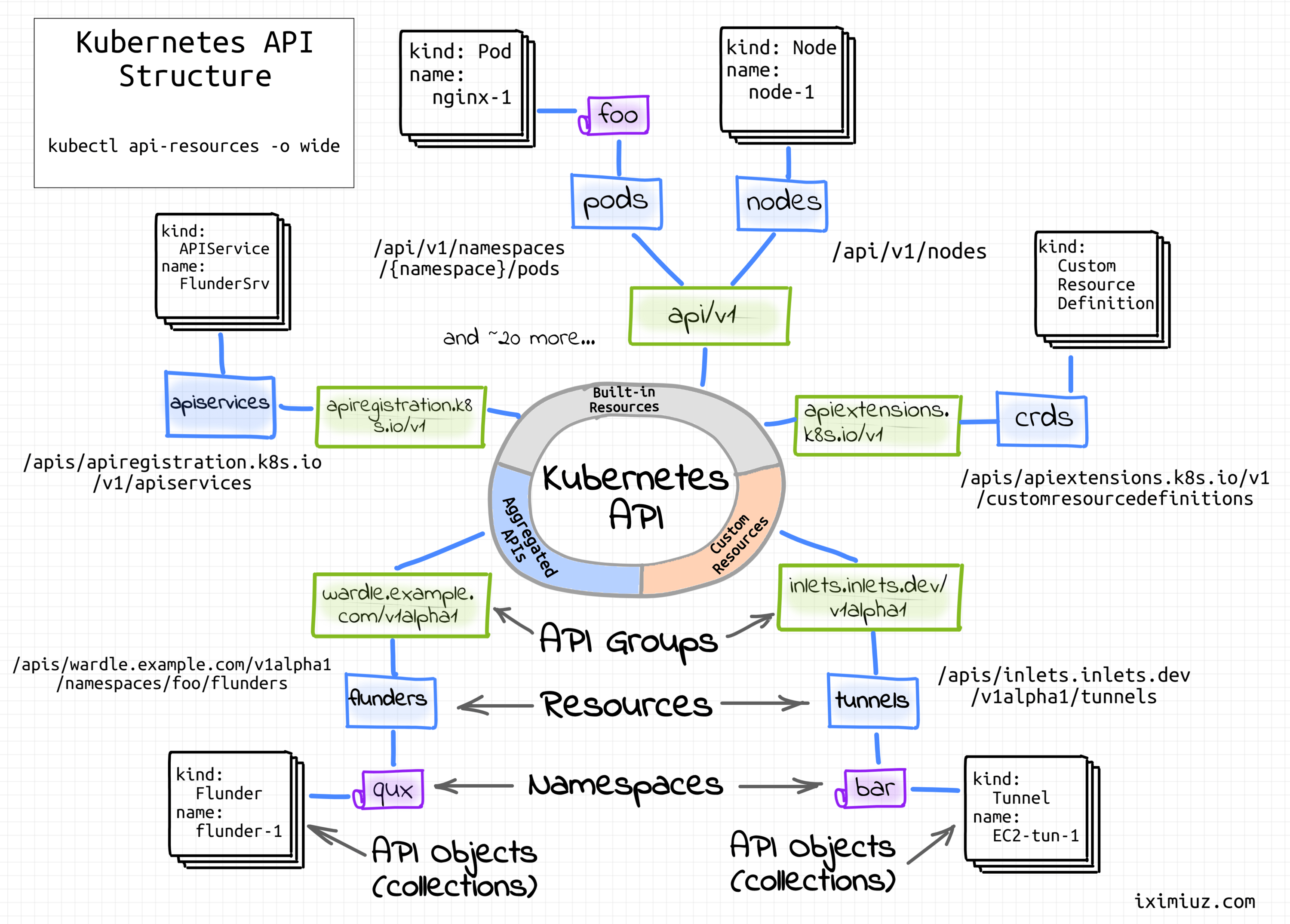
Understanding this structure is crucial, especially as you work towards your CKA certification. It explains why different resources have different apiVersion fields in their manifests.
Kubernetes API Fundamentals You Must Know!
The following video from KodeKloud provides an excellent deep dive into the Kubernetes API structure. We'll watch a few key segments.
First, watch the segment from 00:53 to 03:36. This explains the concept of API groups, distinguishing between the 'core' group (for fundamental resources like Pods) and 'named' groups (like apps or networking.k8s.io). Then, watch from 06:27 to 12:20. This part details the meaning of API versions (alpha, beta, and stable/GA), which is critical for knowing if a feature is production-ready.
Key takeaways from the video:
- API Groups: Bundle related resources. The original, fundamental resources (Pods, Services, Namespaces) are in the core group, which has a special
apiVersionof justv1. Newer resources are in named groups likeapps,batch, ornetworking.k8s.io. - API Versions:
- Alpha (
v1alpha1): Experimental, disabled by default, may be buggy and can be removed without notice. For testing only. - Beta (
v1beta1): Well-tested and enabled by default. The feature is considered stable, but the schema (the structure of the object'sspec) might change. - Stable/GA (
v1,v2, etc.): Production-ready. The feature will be available for many future releases.
- Alpha (
You can explore the available API resources in your cluster at any time using the command kubectl api-resources.
Describing an Object: The Manifest File
Now let's connect the theory to practice. You describe a Kubernetes object and its spec in a manifest file, which is typically written in YAML. Think of this as the equivalent of a Terraform .tf file for defining a resource.
A manifest file has four essential, top-level fields:
apiVersion: The API group and version for this object (e.g.,apps/v1,v1).kind: The type of object you want to create (e.g.,Pod,Deployment,Service).metadata: Information that uniquely identifies the object, such as itsnameandlabels.spec: The desired state for the object. The structure of thespecis different for eachkind.

Let's watch a short video that walks through these fields in the context of a real YAML file.
Kubernetes YAML File Explained - Deployment and Service | Kubernetes Tutorial 19
This clip from TechWorld with Nana clearly explains the main parts of a manifest file.
Watch from 00:32 to 04:43. Pay attention to the three main components she discusses: metadata, specification, and the auto-generated status. Also, note her comment on the strictness of YAML indentation, which is a common source of errors.
Writing Your First Manifest
Let's put it all together by examining a complete manifest for a Pod, the smallest deployable unit of computing in Kubernetes. We will cover Pods in detail in a future lesson, but for now, they serve as a perfect example of a basic Kubernetes object.
Here is a manifest file named my-pod.yaml:
# my-pod.yaml

apiVersion: v1
kind: Pod
metadata:
  name: my-nginx-pod
  labels:
    app: web-server
spec:
  containers:
    - name: nginx-container
      image: nginx:1.21.6
      ports:
        - containerPort: 80
Let's break this down:
apiVersion: v1: We're using the stable core API group. Pods are a fundamental resource, so they live here.kind: Pod: We are defining a Pod object.metadata: We've given our Pod a uniquename(my-nginx-pod) and attached alabelto it for organization.spec: This is the desired state. Here, we specify that this Pod must contain one container.containers: A list of containers to run in the Pod.name: A name for the container inside the Pod.image: The container image to pull and run, which you're very familiar with from Docker.ports: A list of network ports the container exposes.
To create this Pod in your cluster, you would save the file and run:kubectl apply -f my-pod.yaml
Kubernetes would then read this manifest, create the Pod object, and the control plane would schedule it to a node. The kubelet on that node would then instruct the container runtime to pull the nginx:1.21.6 image and start the container.
Test your understanding!
You are given the following manifest for a Kubernetes Deployment. Based on what you've learned, answer the following questions:
apiVersion: apps/v1
kind: Deployment
metadata:
  name: backend-api
spec:
  replicas: 3
  selector:
    matchLabels:
      app: backend
  template:
    metadata:
      labels:
        app: backend
    spec:
      containers:
      - name: api-server
        image: my-company/api:2.5
- What API Group does this object belong to? Is this feature likely to be stable?
- What is the
kindof object being created? - What is the desired state for the number of application instances (
replicas)? - If you applied this manifest and one of the running instances crashed, what would Kubernetes do?
Show answer
- The object belongs to the
appsAPI group. Thev1version indicates it is a stable (GA) feature, suitable for production. - The
kindof object is aDeployment. - The desired state specified in the
specis to have3replicas running. - Kubernetes would detect that the actual state (2 replicas) does not match the desired state in the
spec(3 replicas). The Deployment controller would automatically create a new Pod to replace the crashed one, bringing the replica count back to 3.
Conclusion
In this lesson, we transitioned from the physical components of the cluster to the logical, declarative way we manage it. You now have the foundational knowledge to read and understand Kubernetes manifests.
Here are the key takeaways:
- Kubernetes Objects are records of intent that represent your cluster's state.
- The
specfield defines your desired state, while thestatusfield reflects the current state. - The Kubernetes API is organized into Groups and Versions (
apiVersion), which determine a feature's stability (alpha, beta, GA). - A manifest file (YAML) is how you declaratively define an object, using the four required fields:
apiVersion,kind,metadata, andspec.
In the next few lessons, we'll get our hands dirty by setting up a real Kubernetes cluster from scratch using kubeadm. We'll begin by preparing our nodes, installing the necessary packages, and getting ready to initialize the control plane. You'll see the components we've discussed (kubelet, kubeadm, etc.) in action.