Hello! Last time, you used loops to process task statuses one at a time. A function lets you give that work a name, supply different inputs, and use its result elsewhere. Today you’ll define and call functions, distinguish parameters from arguments, return values, and provide defaults for omitted inputs.
Keep using app.js and node app.js. Allow about 40 minutes to watch and read the short resources, build the program, and rerun it with different values. These are JavaScript fundamentals you’ll use when you begin writing typed functions in TypeScript.
Define a function, then call it
Watch the selected parts of How To Create/Use Functions – JavaScript Essentials from Web Dev Simplified. The presenter first shows why defining a function produces no output on its own, then adds inputs and a returned result.
How To Create/Use Functions - JavaScript Essentials
Watch How To Create/Use Functions – JavaScript Essentials from Web Dev Simplified to see the difference between storing instructions in a function and running them.
Start with defining and calling a function. Continue through parameters and arguments, where the order of two inputs matters. Watch a missing argument, then returning a value. Notice that the early addition example prints a sum; the later version returns it.
Replace app.js with:
function announceReview() {
  console.log("Reviewing tasks...");
}

announceReview();
Save and run node app.js. You’ll see Reviewing tasks... once. The declaration beginning with function names the behavior and places its instructions in the function body, between { and }. The line announceReview() is a call, or invocation: its parentheses tell JavaScript to run that body. If you remove the call and rerun the file, nothing is printed. If you add a second call, the message prints twice.
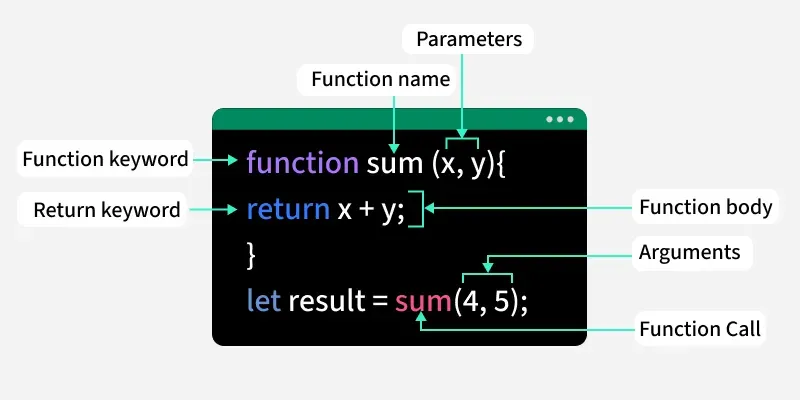
The image below labels the same pieces in a function that accepts two inputs and returns their sum.
Pass inputs and use a returned result
Rather than rewriting your loop whenever the statuses change, put it inside a function. Append this code to app.js, below the announceReview() call:
function countDone(statuses) {
  let count = 0;

  for (const status of statuses) {
    if (status === "done") {
      count++;
    }
  }

  return count;
}

const taskStatuses = ["todo", "done", "in_progress", "done", "todo"];
const completedTasks = countDone(taskStatuses);

console.log("Completed tasks:", completedTasks);
console.log("Completed in another list:", countDone(["done", "todo", "done"]));
After the review message, the program prints Completed tasks: 2 and Completed in another list: 2. You wrote the counting loop only once, but called it with two different lists.
In function countDone(statuses), statuses is a parameter: a name for the input inside the function. In countDone(taskStatuses), taskStatuses is an argument: the value supplied by that particular call. Each call gets its own count, starting at zero.
The return count line does two things: it ends that call and makes count its result. In the first call, the returned number is assigned to completedTasks. In the second, the returned number is passed straight to console.log. Either way, the caller can use the value.
That differs from announceReview(). It prints a message but has no return statement, so its returned result is undefined. Printing is useful when you want an immediate display; returning is useful when another part of the program needs the result.
With multiple inputs, position determines which parameter receives which argument. For example, in function subtract(a, b) { return a - b; }, calling subtract(8, 3) makes a equal to 8 and b equal to 3, so the result is 5. Reversing the arguments gives a different result.
Provide a default for an omitted argument
JavaScript does not automatically reject a call with too few arguments. A parameter without a corresponding argument receives undefined. A default parameter supplies a more useful value when an argument is omitted.
Read the beginning of “Default values” in Functions from JavaScript.info. Its examples show both an omitted argument and an explicitly supplied undefined.
Read the “Default values” subsection of Functions from JavaScript.info to see exactly when a parameter’s fallback is used.
In “Default values,” begin with the omitted-argument explanation. Read through the examples calling showMessage with one argument and then with undefined. Stop at the sentence explaining that a more complex default expression is evaluated only when the parameter is missing; you do not need the later anotherFunction() example.
Now append a second function to app.js:
function formatProgress(done, total = 5) {
  if (total === 0) {
    return "No tasks planned.";
  }

  return done + " of " + total + " done";
}

console.log(formatProgress(completedTasks));
console.log(formatProgress(completedTasks, 8));
console.log(formatProgress(0, 0));
The three lines print:
2 of 5 done
2 of 8 done
No tasks planned.
done has no default, so these calls supply it. total = 5 means that omitting the second argument uses 5; supplying 8 overrides it. Supplying 0 also overrides it—zero is a real value, not a missing argument. Explicitly passing undefined would use the default, but null would not.
The if handles the zero-task case. When its condition is true, return "No tasks planned." immediately ends the function, so the later return is not reached. Otherwise, the function returns a progress string. This combines a conditional you already know with a reusable function result.
For a quick observation, change one "done" in taskStatuses to "todo" and rerun the file. Both the stored count and the progress message should reflect the new count without any change to either function.
What to carry forward
A declaration defines what a function does; a call runs it. Parameters name inputs in the declaration, while arguments provide values at the call site. return sends a reusable value back and stops that call. A default parameter handles an omitted or undefined argument without replacing valid values such as 0.
You’ve used an array as a function input without needing to manage the array itself yet. Next, you’ll learn how to create and update arrays with indexes and standard operations, giving your functions more data to work with.