Hello! In the previous lesson, your countDone function received an array of task statuses and counted its "done" entries. This time, you’ll work on the array itself: create one, read and replace items by index, and use built-in operations to add, remove, or insert items.
Keep using app.js and node app.js. Allow about 40 minutes to watch the selected video segments, read a short reference section, and run the code as you build it. Arrays will remain a basic building block when you move from JavaScript to TypeScript.
Create an array and find an item
Watch the opening of Arrays in Javascript | Arrays Tutorial for Beginners by Dave Gray. It introduces array creation, indexes, length, and the operations you’ll use shortly.
Arrays in Javascript | Arrays Tutorial for Beginners
Dave Gray’s beginner array tutorial demonstrates the core operations in a running program. Watch the selected opening segments before building your own task list.
Watch array creation for square-bracket syntax and the distinction between a const variable and changeable array contents. Continue through indexes and length, paying particular attention to why the last index is one less than the length. Then watch adding and removing for push, pop, unshift, and shift.
Replace the contents of app.js with this small list:
const taskStatuses = ["todo", "in_progress", "done"];

console.log(taskStatuses);
console.log("First:", taskStatuses[0]);
console.log("Third:", taskStatuses[2]);
console.log("Number of tasks:", taskStatuses.length);
console.log("Last:", taskStatuses[taskStatuses.length - 1]);
Run node app.js. The array contains three strings, written between square brackets and separated by commas. Its length is 3, but its indexes are 0, 1, and 2. Brackets after the variable name retrieve an item: taskStatuses[0] is "todo", while taskStatuses[2] is "done".
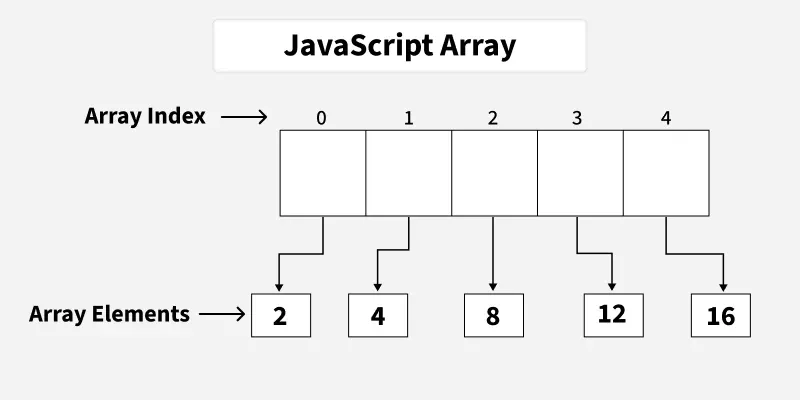
The expression taskStatuses[taskStatuses.length - 1] retrieves the last item even if the list grows or shrinks. For this three-item array, it means taskStatuses[2]. An index that does not exist, such as taskStatuses[3] right now, evaluates to undefined; JavaScript does not automatically stop you with an error. Likewise, an empty array has length 0 and no last item. When an item must exist for your code to work, check the array’s length first.
Change an item, then add or remove items at the ends
Suppose the task at index 1 has been completed. Append this code to app.js:
taskStatuses[1] = "done";
console.log("After update:", taskStatuses);

const lengthAfterPush = taskStatuses.push("todo");
taskStatuses.unshift("blocked");
console.log("After additions:", taskStatuses);
console.log("Length returned by push:", lengthAfterPush);

const removedFromEnd = taskStatuses.pop();
const removedFromStart = taskStatuses.shift();
console.log("Removed:", removedFromEnd, removedFromStart);
console.log("After removals:", taskStatuses);
Follow the changes in the order they occur. Assigning through [1] replaces "in_progress" with "done"; it does not add an item. push("todo") adds to the end, and unshift("blocked") adds to the beginning. At that point, the array is:
["blocked", "todo", "done", "done", "todo"]
pop() removes and returns the last item ("todo"). shift() removes and returns the first ("blocked"). Your array is now ["todo", "done", "done"] again. Inserting or removing at the beginning changes the indexes of the other items: after shift(), "todo" is at index 0.
The return values are worth distinguishing. push() and unshift() return the new length; pop() and shift() return the removed item, or undefined if the array was empty. Here, lengthAfterPush is 4, even though the array later grows to five items and shrinks again.
Why does this work when taskStatuses was declared with const? const prevents assigning a different array to the variable. It does not prevent changing an item or calling a method that changes the existing array. These are different actions:
taskStatuses[0] = "done";   // Changes an item in the existing array
// taskStatuses = ["todo"]; // Would fail: reassigns a const variable
Do not add the first line of that illustration to app.js yet; keeping "todo" at index 0 will make the next example easier to follow. In practice, use push() to append rather than assigning to a distant index such as [99]: a distant assignment creates gaps rather than a tidy sequence of task entries.
Locate and change an item in the middle
An index is useful when you already know the position. If you know the value instead, indexOf() can find its first matching position. Read MDN’s short explanation before using it.
Arrays - Learn web development | MDN
MDN’s Arrays guide shows how indexOf() reports a position and how it signals that a value was not found. Read this part to understand the check in the code below.
In the subsection “Finding the index of items in an array,” start at the paragraph beginning “If you don't know the index of an item.” Read the explanation and the birds example immediately below it, ending with the lookup of "Rabbit" that returns -1. Stop before the next subsection, “Adding items.”
Now watch the middle-array operations in Dave Gray’s tutorial. The distinction between splice(), which changes the existing array, and slice(), which produces a new array, is especially useful.
Arrays in Javascript | Arrays Tutorial for Beginners
Return to Arrays in Javascript | Arrays Tutorial for Beginners by Dave Gray for removal, insertion, replacement, and copying part of an array.
Watch splice operations. Notice why delete is not suitable for removing an array item: it leaves a gap rather than closing the list. Then watch slice for a method that returns selected items without changing the original array.
After the end operations, taskStatuses is ["todo", "done", "done"]. Append the following:
const firstDoneIndex = taskStatuses.indexOf("done");
console.log("First done index:", firstDoneIndex); // 1

if (firstDoneIndex !== -1) {
  taskStatuses.splice(firstDoneIndex, 1);
}
console.log("After removing one done:", taskStatuses);

taskStatuses.splice(1, 0, "in_progress");
console.log("After inserting:", taskStatuses);

taskStatuses.splice(1, 1, "done");
console.log("After replacing:", taskStatuses);
indexOf("done") returns 1 because that is the first place "done" appears. If it could not find the value, it would return -1. Check for that result before removing anything: splice(-1, 1) would remove the last item, probably not what you intended.
The first two arguments to splice(startIndex, deleteCount, ...itemsToInsert) control where to start and how many existing items to remove. In this program:
splice(1, 1)removes one item at index1, leaving["todo", "done"].splice(1, 0, "in_progress")removes none and inserts at index1, giving["todo", "in_progress", "done"].splice(1, 1, "done")replaces the item at index1, giving["todo", "done", "done"].
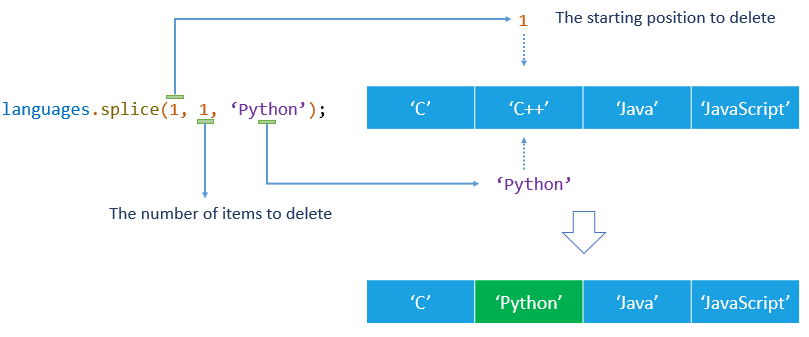
For a straightforward replacement at a known index, taskStatuses[1] = "done" is simpler. Use splice() when you need to remove items or insert items while keeping the remaining array together. splice() changes the original array and returns an array of the removed items.
By contrast, append this code to observe slice():
const firstTwoStatuses = taskStatuses.slice(0, 2);

console.log("First two:", firstTwoStatuses);
console.log("Still the full list:", taskStatuses);
slice(0, 2) makes a new array containing indexes 0 and 1; the end index 2 is not included. taskStatuses remains ["todo", "done", "done"]. The similar names are easy to confuse: splice changes the array; slice selects a portion without changing it.
Put the list back to work
You can now use the familiar function from the previous lesson on data that your program has changed. Add it once at the bottom of app.js:
function countDone(statuses) {
  let count = 0;

  for (const status of statuses) {
    if (status === "done") {
      count++;
    }
  }

  return count;
}

console.log("Completed tasks:", countDone(taskStatuses)); // 2
The function did not need to know how the array was updated. It simply receives the current list and counts its "done" entries. This separation is useful: one part of a program manages a collection, while another uses that collection to calculate a result.
What to carry forward
An array is an ordered collection created with square brackets. Indexes start at 0, so the last index of a nonempty array is length - 1. Use bracket assignment to replace an item at a known index; use push/pop at the end and unshift/shift at the beginning. For a specific position, indexOf can locate a value, while splice can remove, insert, or replace items. Check for -1 before acting on a failed lookup, and remember that slice returns a new portion rather than changing the original.
Next, you’ll model a single application entity with a JavaScript object and methods. Arrays can then hold multiple such entities, rather than just status strings.