Hello! Welcome to the final lesson in our module on the browser environment.
In our previous lessons, we've explored how to observe the DOM, looking at the IntersectionObserver for an element's visibility and the MutationObserver for its structural changes. We saw how these powerful APIs allow us to build efficient, decoupled applications that react to the state of the page.
Today, we take a step back from observing the DOM to understand a fundamental security pillar of the web: the Same-Origin Policy (SOP). You've likely encountered its effects as a developer, often in the form of a "CORS error." This lesson will demystify that experience by addressing the learning outcome: Explain the browser's same-origin policy and how the Cross-Origin Resource Sharing (CORS) mechanism enables secure cross-origin requests.
We will cover:
- The security motivation behind the Same-Origin Policy.
- The technical definition of an "origin."
- How Cross-Origin Resource Sharing (CORS) uses HTTP headers to selectively relax the SOP.
- The critical distinction between "simple" and "preflighted" requests, and the underlying reason for this design.
This is an essential topic for any web developer, especially when building applications that fetch data from external APIs, a standard practice in modern development.
The Same-Origin Policy (SOP): The Browser's Security Guard
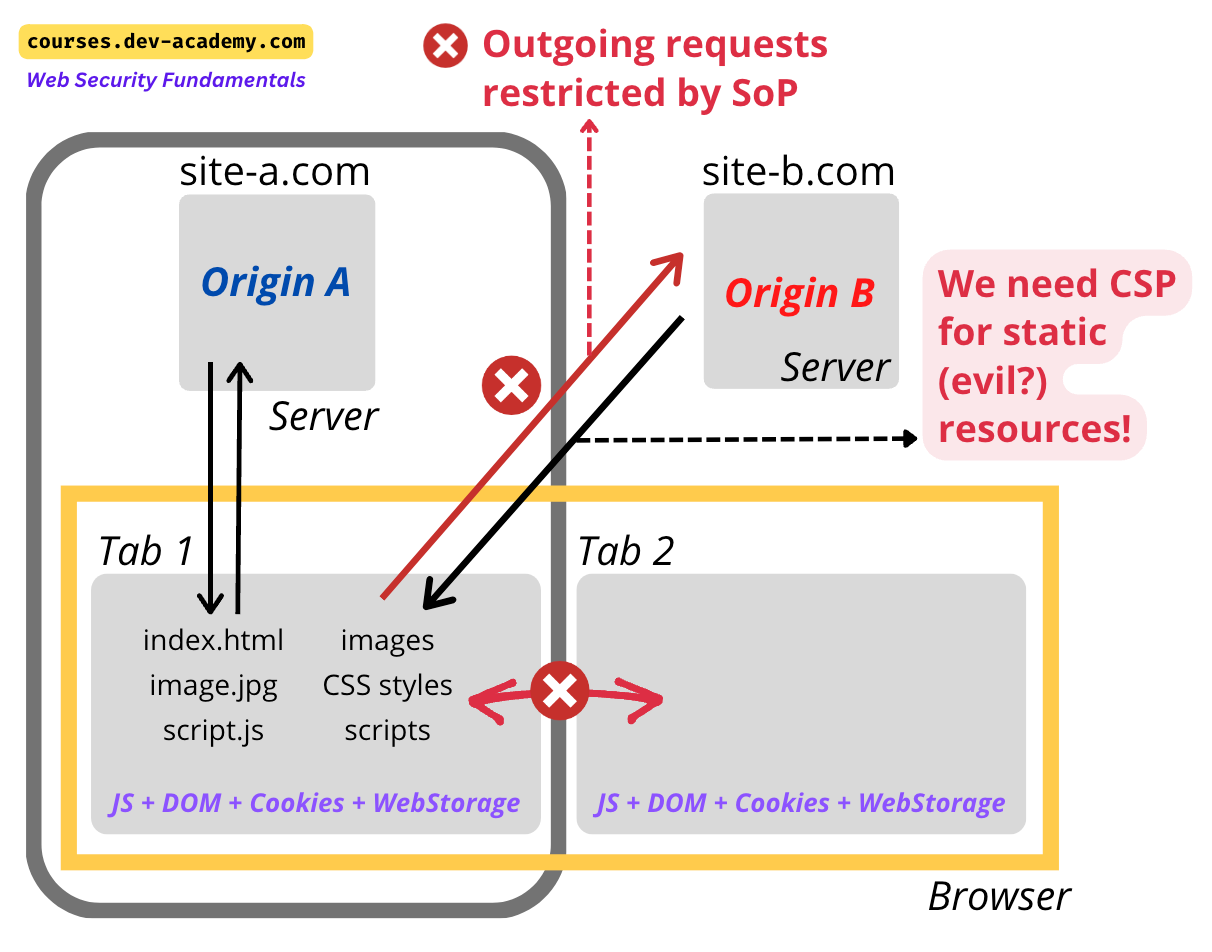
At its heart, the Same-Origin Policy is a security mechanism that prevents a document or script loaded from one origin from interacting with a resource from another origin. Without it, if you were logged into your bank's website in one tab and visited a malicious website in another, the malicious script could potentially make requests to your bank's API and read your financial data.
To understand why this is such a critical protection, let's start with a video that clearly explains the problem SOP solves.
Cross-Origin Resource Sharing (CORS) | Complete Guide
This segment from Rana Khalil's guide on CORS provides an excellent introduction to the Same-Origin Policy and its security rationale.
Watch from 02:32 to 05:53. Focus on: The core purpose of SOP as a browser-enforced security mechanism. The example of a malicious shopping site trying to access a banking site. The crucial distinction that SOP prevents reading cross-origin data but doesn't necessarily block the request from being sent (a key point we'll revisit).
As the video explains, SOP acts as a default barrier. But what exactly constitutes a "same" or "different" origin?
Defining an "Origin"
An origin is defined by the combination of three parts of a URL: the protocol (or scheme), the hostname, and the port. If all three of these match between two URLs, they are considered to be of the same origin.
Cross-Origin Resource Sharing (CORS) | Complete Guide
Let's continue with the same video to get a precise, technical definition of an origin, complete with clear examples.
Watch from 05:53 to 11:07. This section breaks down how the browser compares origins. Pay close attention to the examples, which show why http vs. httpss, domain.com vs. sub.domain.com, and different ports all result in different origins.
Here's a quick summary of what you just saw. Given a base URL of http://example.com:80:
| URL to Compare | Same Origin? | Reason |
|---|---|---|
http://example.com/page.html |
Yes | Same protocol, hostname, and port (80 is default for http) |
https://example.com |
No | Different protocol (https vs. http) and port (443 vs. 80) |
http://www.example.com |
No | Different hostname (www.example.com vs. example.com) |
http://example.com:8080 |
No | Different port (8080 vs. 80) |
This strict policy is secure, but it's too restrictive for modern web applications that often need to load fonts, images, and API data from third-party domains. This is where CORS comes in.
Cross-Origin Resource Sharing (CORS)
CORS is a mechanism that uses additional HTTP headers to tell browsers to give a web application running at one origin permission to access selected resources from a server at a different origin.
The process is a "conversation" between the browser and the server:
- Browser: "I'm a script from
https://origin-a.com. I'd like to request a resource from you." The browser automatically adds anOrigin: https://origin-a.comheader to the HTTP request. - Server: "Let me check my rules. Okay, I see that I'm configured to allow requests from
https://origin-a.com." The server responds with anAccess-Control-Allow-Origin: https://origin-a.comheader. - Browser: "Great! The server's response has the correct CORS header, so I will allow the script from
origin-a.comto read the response data."
If the server doesn't respond with the appropriate Access-Control-Allow-Origin header, the browser blocks the script from accessing the response, even if the data was sent back from the server.
This mechanism has two primary modes of operation: simple requests and preflighted requests.
Simple Requests
Not all cross-origin requests require the full CORS dance. Certain requests that are considered "safe" or that were possible before CORS was invented are classified as simple requests.
MDN: Examples of access control scenarios
The MDN documentation on CORS provides an excellent, detailed breakdown of different request scenarios, complete with HTTP header examples. We'll use it as our main reference.
Read the section titled 'Simple requests'. Focus on the three conditions a request must meet to be considered 'simple': The HTTP method (GET, HEAD, or POST). The allowed headers. The allowed Content-Type values. Notice the logic: these conditions mirror what an old HTML <form> element could do, so servers should already be protected against them.
A simple request doesn't trigger a CORS "preflight" (which we'll cover next). The request is sent directly, and the browser inspects the response for the Access-Control-Allow-Origin header to decide whether to expose the response to the frontend JavaScript code.
Preflighted Requests
What happens if your request doesn't meet the "simple" criteria? For example, you might need to send a DELETE request, use Content-Type: application/json, or include a custom Authorization header for your API. These are not "simple" requests.
For these more complex or potentially state-changing requests, the browser adds a layer of safety: the preflight request. Before sending the actual request, the browser first sends a preliminary OPTIONS request to the server to check if the server understands and permits the actual request.
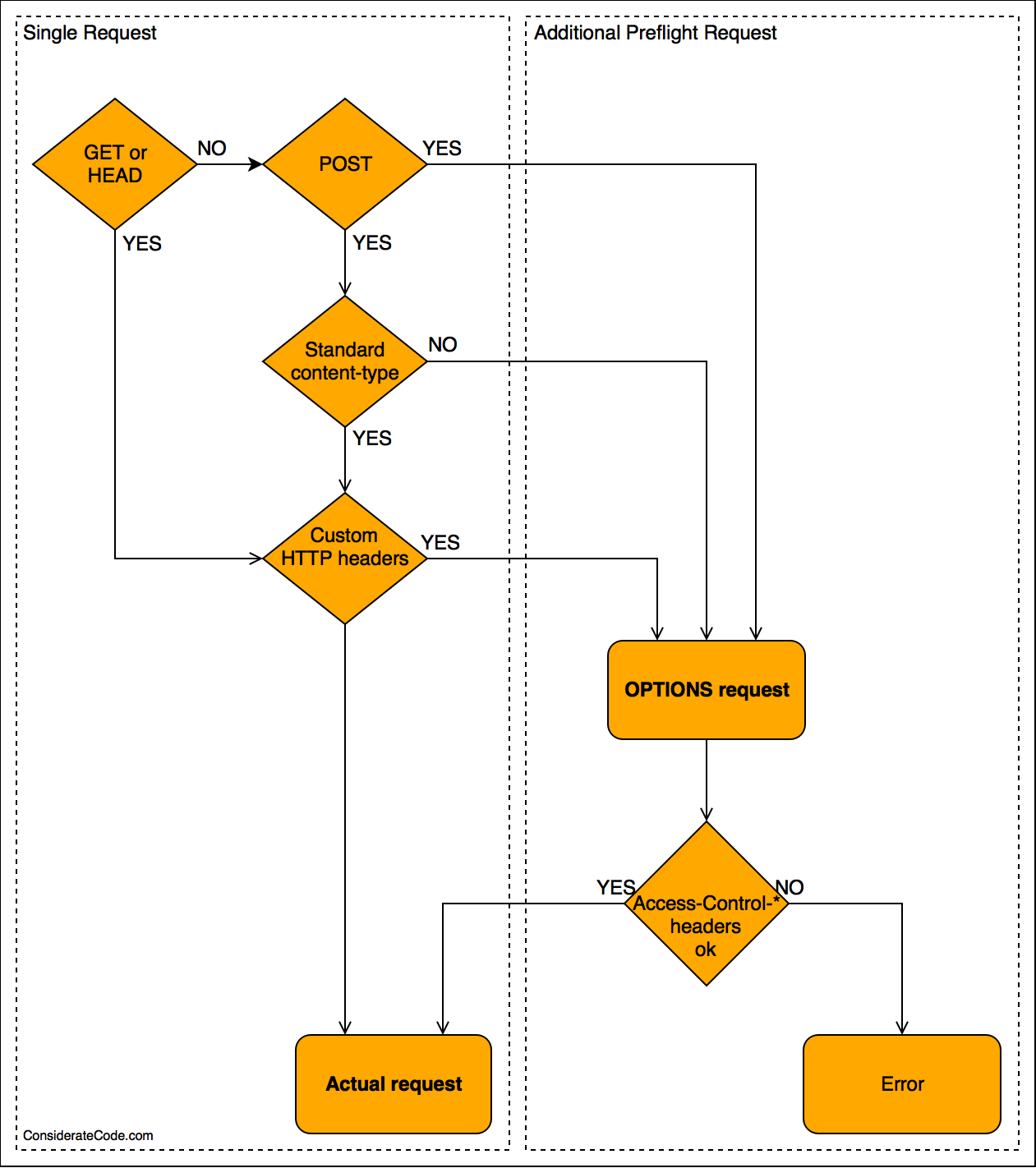
Let's dig into the mechanics of this preflight exchange.
Let's return to the MDN article to see how a preflighted request works in practice.
Now, read the section 'Preflighted requests'. Pay close attention to the two-step exchange: The Preflight OPTIONS Request: Note the request headers Access-Control-Request-Method and Access-Control-Request-Headers, which ask the server for permission. The Preflight Response: The server responds with headers like Access-Control-Allow-Methods and Access-Control-Allow-Headers, indicating what it will accept. The Actual Request: Only if the preflight is successful does the browser send the actual POST request.
The Deep "Why": The Purpose of Preflight
This might seem like a lot of overhead. Why not just send the DELETE request and let the server decide whether to allow it? This is a question that gets to the core of your interest in "under-the-hood" mechanics.
The preflight mechanism exists primarily to protect older, non-CORS-aware servers.
What is the motivation behind the introduction of preflight CORS requests?
This Stack Overflow answer is one of the clearest explanations available for the motivation behind preflight requests. It's essential reading for understanding the 'why'.
Read the accepted answer (the first one). It explains that before CORS, a server could assume it would never receive a cross-origin DELETE request from a browser due to SOP. Preflight ensures that a server explicitly opts in to receiving these new types of requests, preventing legacy servers from being vulnerable to new attack vectors that CORS enables.
In essence, preflight is a backward-compatibility and safety feature. It prevents the introduction of CORS from breaking the security assumptions of the existing web.
Requests with Credentials
By default, browsers do not include credentials like cookies or HTTP Authorization headers on cross-origin requests. To include them, you must explicitly ask for them on both the client and server side.
- Client-side: When using
fetch, you must setcredentials: 'include'. - Server-side: The server must respond with the header
Access-Control-Allow-Credentials: true.
Crucially, for security reasons, if a request includes credentials, the server cannot use a wildcard for the origin. It must specify the exact origin it trusts.
Cross-Origin Resource Sharing (CORS) | Complete Guide
Let's revisit Rana Khalil's video for a concise explanation of how credentials work with CORS and the important restriction on using wildcards.
Watch from 18:34 to 20:59. This section clearly explains the role of the Access-Control-Allow-Credentials header and why it's a security risk to combine it with a wildcard (*) origin.
The CORS Headers: A Quick Reference
As a developer, you'll primarily interact with these headers on the server side when building an API. Here are the most important ones we've discussed:
Request Headers (sent by the browser)
| Header | Description |
|---|---|
Origin |
Indicates the origin of the cross-origin request. Sent on all CORS requests. |
Access-Control-Request-Method |
Sent in a preflight request to specify the method of the actual request. |
Access-Control-Request-Headers |
Sent in a preflight request to specify the custom headers of the actual request. |
Response Headers (sent by the server)
| Header | Description |
|---|---|
Access-Control-Allow-Origin |
Specifies the allowed origin(s). Can be a specific origin or * (for non-credentialed requests). |
Access-Control-Allow-Credentials |
A boolean (true) indicating that the browser can expose the response to the client when credentials are included. |
Access-Control-Allow-Methods |
Used in a preflight response to specify which methods are allowed. |
Access-Control-Allow-Headers |
Used in a preflight response to specify which headers are allowed. |
Access-Control-Max-Age |
Specifies how long (in seconds) the results of a preflight request can be cached by the browser. |
For a complete and detailed list, the MDN CORS documentation is an invaluable resource.
Conclusion
Understanding the interplay between the Same-Origin Policy and CORS is fundamental to building modern web applications. What might seem like a frustrating error is, in fact, a carefully designed security system working as intended.
Key Takeaways:
- Same-Origin Policy (SOP) is a default browser security feature that restricts how scripts from one origin can interact with resources from another. An origin is defined by
protocol + hostname + port. - Cross-Origin Resource Sharing (CORS) is the standard mechanism for servers to explicitly grant permission for cross-origin requests, using a system of HTTP headers.
- Simple Requests (
GET,HEAD, and somePOSTs) do not require a preflight check as they mimic behavior possible before CORS. - Preflighted Requests (e.g.,
PUT,DELETE, or with custom headers) trigger a preliminaryOPTIONSrequest. This is a crucial safety feature to ensure legacy, non-CORS-aware servers opt-in before receiving these more powerful request types. - Credentialed Requests require explicit opt-in from both the client (
credentials: 'include') and the server (Access-Control-Allow-Credentials: true) and cannot be used with a wildcardAccess-Control-Allow-Origin: *.
What's Next?
This lesson concludes our module on the browser environment. We've journeyed from the critical rendering path and event propagation to advanced observer APIs and now, fundamental security policies.
With this solid foundation in how the browser works, we are perfectly positioned to move up a level of abstraction. In the next module, React's Rendering Model: JSX & Reconciliation, we will begin our deep dive into React. We'll start by exploring how React's JSX and Virtual DOM abstract away direct DOM manipulation, and how these concepts are transpiled into the browser APIs we've just finished studying.