Hello! Welcome back to our exploration of advanced browser APIs.
In our last lesson, we focused on the IntersectionObserver API, a highly efficient tool for reacting to an element's positional changes, like its visibility within the viewport. We learned how it avoids the performance pitfalls of polling getBoundingClientRect() within a scroll event handler.
Today, we shift our focus from an element's position to its very structure. What if you need to know when an element's attributes are modified, or when new child nodes are added or removed, perhaps by a third-party script you don't control? This is where the MutationObserver API comes in. This lesson directly addresses the learning outcome: Describe how the MutationObserver API works for reacting to changes in the DOM tree.
We will cover not only how to use the API but, crucially for your interest in underlying mechanics, when its callbacks execute in the context of the JavaScript event loop and its microtask queue.
What is the MutationObserver?
At its core, MutationObserver is a built-in browser API that allows you to "watch" a DOM element and its descendants for changes. When a change (a "mutation") occurs that matches the criteria you've specified, a callback function you provide is executed.
This is fundamentally different from listening for specific events like click or submit. It’s a generalized mechanism for observing the state of the DOM tree itself.
How to Use the MutationObserver API
The API's usage pattern is straightforward:
- Create a new
MutationObserverinstance, passing it a callback function. - Choose a target DOM node to observe.
- Call the
observe()method on your observer, passing it the target node and a configuration object that specifies which types of mutations to watch for.
Let's walk through the practical implementation.
This video from Web Dev Simplified provides a clear, step-by-step guide to using the MutationObserver. We'll use it to cover the primary configuration options.
First, watch from the beginning to 05:30. This segment covers: How to instantiate a MutationObserver. How to use the observe() method. The childList option for detecting when nodes are added or removed. The structure of the MutationRecord objects passed to the callback (addedNodes, removedNodes, target). Pay attention to how multiple DOM changes made synchronously are batched into a single callback execution.
As you saw, the callback receives an array of MutationRecord objects. The browser cleverly batches all mutations that happen in one synchronous block of code and delivers them together in a single callback.
Types of Mutations to Observe
The config object is where you define exactly what you're interested in. The three main mutation types are:
childList: true: Watches for the addition or removal of direct children of the target node.attributes: true: Watches for changes to the attributes of the target node.characterData: true: Watches for changes to the text content of the target node or its descendants.
Let's continue with the video to see attributes and characterData in action, along with other important options.
Now let's explore how to observe attributes, text content, and entire subtrees.
Please watch from 05:23 to the end (10:43). This part covers: How to stop observing with disconnect(). The attributes option, along with attributeOldValue and attributeFilter. The characterData option and the important nuance that you must observe the text node itself, not just the parent element. The subtree: true option, which extends the observation to all descendants of the target node, simplifying many use cases.
The point about characterData is a perfect example of the "under-the-hood" mechanics you're interested in. In the DOM, text is not a property of an element but a separate Text node that is a child of the element. MutationObserver operates on this real structure. The subtree: true option is often a convenient way to work around this, as it automatically includes all descendant nodes, including text nodes.
Here is a summary of the core concepts:
| Component | Description |
|---|---|
observer.observe() |
Starts observing a target node with a given config. |
observer.disconnect() |
Stops the observer from watching all targets. |
config.childList |
Boolean. Observes the addition/removal of child nodes. |
config.attributes |
Boolean. Observes changes to the target's attributes. |
config.characterData |
Boolean. Observes changes to the text content (node.data). |
config.subtree |
Boolean. Extends observations to all descendants of the target. |
config.*OldValue |
Booleans (attributeOldValue, characterDataOldValue). If true, the oldValue property on the MutationRecord will be populated. |
MutationRecord |
An object passed to the callback describing a single change. Key properties: type, target, addedNodes, removedNodes, attributeName, oldValue. |
Architectural Use Case: Decoupling and Dynamic Content
So, why is this API so powerful from a software architecture perspective? It allows you to create self-contained modules that can react to DOM changes without being tightly coupled to the code that causes those changes.
Mutation observer - The Modern JavaScript Tutorial
The javascript.info tutorial provides an excellent architectural example that demonstrates this decoupling principle.
Read the section titled 'Usage for architecture'. It presents a scenario of a syntax highlighting library that needs to process code snippets added to the page dynamically. Focus on how MutationObserver provides a clean solution that avoids having to manually call the highlighting function from every place in the application where content might be loaded.
As the article illustrates, you can build a component (like a syntax highlighter) that simply "listens" for relevant elements being added to the DOM anywhere within a specific container (or the whole document.body) and automatically applies its logic. The code that fetches and inserts the content doesn't need to know anything about the syntax highlighter. This promotes separation of concerns and makes your codebase more modular and maintainable.
Under the Hood: MutationObserver and the Event Loop
We've established that the callback is asynchronous, but the key question is: when does it run? Is it like setTimeout(callback, 0), which queues a task? Or is it like Promise.then(callback), which queues a microtask?
The answer to this is critical for predicting application behavior and is a core part of the browser's concurrency model. MutationObserver callbacks are queued as microtasks.
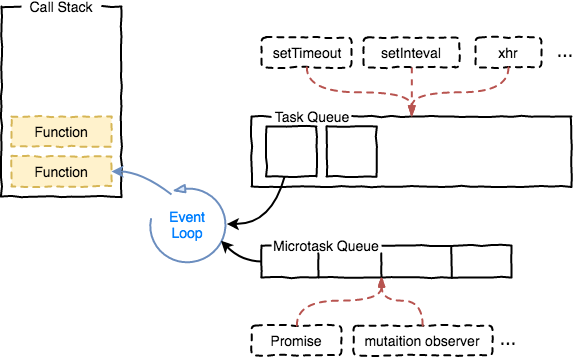
Microtasks have a higher priority than tasks. The event loop follows this sequence:
- Execute one task from the task queue (e.g., run the initial script, or a
setTimeoutcallback). - After the task completes, execute the entire microtask queue until it is empty. If new microtasks are added during this process, they are also executed.
- The browser may then perform rendering updates (layout, paint).
- Return to step 1 to pick the next task.
This means a MutationObserver callback is guaranteed to run immediately after the currently executing script finishes, but before any setTimeout or other events are handled, and before the browser repaints the screen.
Tasks, microtasks, queues and schedules
Jake Archibald's article 'Tasks, microtasks, queues and schedules' is the definitive guide on this topic. It will give you the precise, spec-level understanding you're looking for.
Read the introduction and the section 'How to tell if something uses tasks or microtasks'. Focus on the distinction it draws between tasks (like setTimeout) and microtasks (like Promise callbacks and MutationObserver callbacks). It even links to the relevant parts of the official specifications.
The key insight from Archibald's article is that the microtask queue is processed not just at the end of a task, but also after JavaScript callbacks (like event listeners) complete. This has profound implications. For instance, if you have a click event that bubbles up through two elements, and each handler makes a DOM mutation, the MutationObserver microtasks will run after each individual click handler completes, not just once after the entire event bubbling process is over. This ensures an extremely fast and predictable reaction to DOM changes.
Conclusion
The MutationObserver API is a powerful tool for building responsive and architecturally sound web applications. It provides a performant, native mechanism to react to structural changes in the DOM, enabling patterns like lazy initialization of components, integration with third-party scripts, and robust data-binding frameworks.
Key Takeaways:
MutationObserveris the browser's API for observing changes to a DOM node's attributes, text content, or children.- It is configured via an
optionsobject (childList,attributes,characterData,subtree) to optimize performance by only watching for relevant changes. - It promotes decoupled architecture by allowing modules to react to DOM changes without being explicitly called by the code making those changes.
- Critically,
MutationObservercallbacks are queued as microtasks. This ensures they execute immediately after the code that caused the mutation finishes, and before the browser renders the next frame or handles lower-priority tasks likesetTimeout.
What's Next?
We have now explored two powerful APIs for observing the state of the DOM: IntersectionObserver for position and MutationObserver for structure. In our next lesson, we'll shift our focus from the DOM to a fundamental browser security feature: the Same-Origin Policy. We'll explore why it exists and how the Cross-Origin Resource Sharing (CORS) mechanism provides a secure way to work around its restrictions, a concept absolutely essential for any developer building applications that interact with external APIs.