Introduction
Welcome back! In our last lesson, we explored the very heart of the Node.js runtime: its event-driven, non-blocking I/O model. You learned how a single thread can handle immense concurrency by offloading slow operations to the libuv worker pool, keeping the main event loop free.
Now that you understand the environment in which your code runs, we'll turn our attention to how that code is structured and shared. This lesson addresses the learning outcome: Describe the differences between the CommonJS and ES Module systems in Node.js, including syntax and loading behavior.
This isn't just a matter of require versus import. The two systems have fundamentally different designs that affect how modules are loaded, when code is executed, and how they interoperate. For a developer working in the modern Node.js ecosystem, understanding this divide is crucial for managing dependencies, configuring projects, and writing clean, maintainable code.
1. CommonJS (CJS): The Original Node.js Module System
When Node.js was created, JavaScript had no built-in module system. To enable server-side development with its need for code organization, Node.js adopted and popularized its own system: CommonJS.
The syntax is likely familiar to you: you use require() to import a module and module.exports (or exports) to expose functionality.
To see a quick recap of the syntax, watch the first part of the following video.
Say goodbye to CommonJS and use ESM! 👋
This video, 'Say goodbye to CommonJS and use ESM! 👋', starts with a clear and concise demonstration of CommonJS syntax, covering both default and named exports.
Watch from the beginning to 03:11. Focus on the require and module.exports syntax for both default and named exports. Notice how it treats imported modules as objects.
The syntax is straightforward, but the real distinction lies in the loading behavior. To explore this, let's dive into a more detailed explanation of CJS mechanics.
ES Modules vs CommonJS in JavaScript
The article 'ES Modules vs CommonJS in JavaScript' provides an excellent conceptual breakdown. The first half focuses on the internal workings of CommonJS, which aligns perfectly with your goal of understanding the 'how' and 'why'.
Read the section 'How CommonJS Works Behind the Scenes'. Pay close attention to these key concepts: Synchronous Loading: require() is a synchronous operation. It blocks execution until the module is read from disk, parsed, and executed. This was a reasonable design choice for a server environment where files are on a local, fast disk. Caching: Modules are executed only once and then cached. Subsequent require() calls for the same module return the cached module.exports object. Dynamic Nature: Since require is a standard function call, it can be placed anywhere—inside an if statement, a loop, or another function. This means the dependency graph is built dynamically at runtime.
A key takeaway from the reading is that when you require a module, you are getting a copy of the value of module.exports at that point in time. It's an object, and that object is passed by reference, but the properties themselves are copies. This has important implications, especially when compared to ES Modules.
2. ES Modules (ESM): The Modern Standard
With the ES2015 (ES6) specification, JavaScript finally received its own official, standardized module system. ES Modules (ESM) were designed from the ground up to be the universal standard, working across different environments like browsers and Node.js.
The syntax uses the import and export keywords.
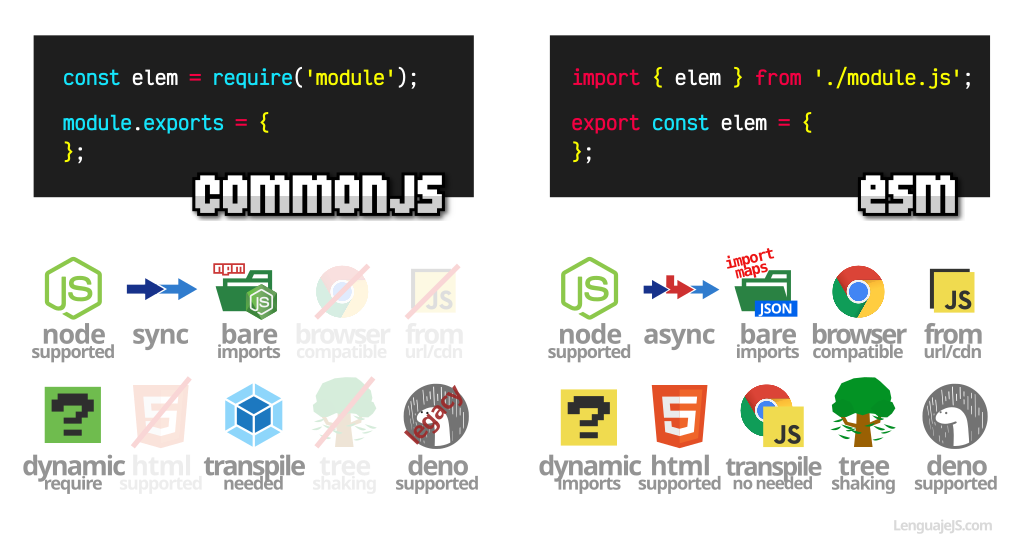
The most significant difference from CommonJS is that ESM loading is asynchronous and static.
ES Modules vs CommonJS in JavaScript
Let's return to the article 'ES Modules vs CommonJS in JavaScript' to understand how ESM's design contrasts with CJS.
Now read the section 'How ES Modules Work Behind the Scenes'. Focus on these critical differences: Static Analysis: The engine parses import and export statements before executing any code. This is why import statements must be at the top level of a file and cannot be conditional. Phased Loading: ESM loading happens in stages: construction (finding and loading all modules), instantiation (linking exports and imports in memory), and evaluation (running the code in the modules). Live Bindings: This is a crucial concept. When you import from an ESM, you are not getting a copy. You are getting a live, read-only binding (like a reference or pointer) to the exported value. If the value of an exported variable changes in the original module, that change is reflected in all modules that have imported it.
This "live binding" feature is a powerful distinction. It also comes with a security benefit. Since the imported bindings are read-only, one module cannot accidentally (or maliciously) mutate the exports of another.
The article 'CJS vs ESM' by Andrea Giammarchi highlights this security aspect with a very clear example.
Read the first two sections, 'CommonJS is insecure by design' and 'ESM is secure-ish by design'. Note how a CJS module's exports can be modified by any other module, whereas attempting to modify an ESM import results in a TypeError. This is a direct consequence of ESM's live, read-only bindings versus CJS's mutable exported object.
3. Comparison and Interoperability in Node.js
The JavaScript ecosystem has been in a long transition period from CJS to ESM. Node.js now supports both, but you need to explicitly tell the runtime which system you're using.
This short, high-level video succinctly explains the core reason for the split and the resulting interoperability challenges.
Import vs Require: The Biggest JavaScript Divide
Matt Pocock's 'Import vs Require: The Biggest JavaScript Divide' does an excellent job of framing the core issue: the synchronous nature of CJS vs. the asynchronous design of ESM.
Watch from 01:07 to 02:16. This clip explains why require is synchronous and import is asynchronous, and it introduces the 'dual package hazard'—the complexity that arises for package authors who need to support both systems.
So, how do we manage this divide in a Node.js project?
How to use ESM in Node.js:
You have two primary methods:
- Add
"type": "module"to yourpackage.jsonfile. This tells Node.js to treat all.jsfiles in your project as ES Modules. - Use the
.mjsfile extension for your module files. Node.js will always interpret.mjsfiles as ES Modules.
How to use CJS in an ESM-first project:
- If your
package.jsonhas"type": "module", you can still write CommonJS code by naming the files with the.cjsextension.
How to import ESM from a CJS module:
- You cannot use
require()to import an ES Module. Instead, you must use the dynamicimport()function, which returns a Promise that resolves with the module's contents.
// In a CommonJS file (e.g., index.js)
async function loadMyModule() {
  const myModule = await import('./my-module.mjs');
  myModule.doSomething();
}

loadMyModule();
The video we watched earlier also covers these practical aspects of configuration.
Say goodbye to CommonJS and use ESM! 👋
Let's revisit 'Say goodbye to CommonJS and use ESM! 👋' to see how these interoperability rules are applied in practice.
Rewatch the sections from 08:56 to 11:14 (Using ESM in browsers and Node.js) and 11:14 to 12:59 (Mixing CJS and ESM). Finally, jump to 20:46 to 21:50 for a summary of the benefits of ESM, including dynamic import() for lazy loading.
Summary of Differences
| Feature | CommonJS (CJS) | ES Modules (ESM) |
|---|---|---|
| Loading | Synchronous | Asynchronous & Phased |
| Parsing | Runtime (dynamic) | Parse-time (static) |
| Syntax | require(), module.exports |
import, export |
| Bindings | Returns a copy of the exported value | Creates a live, read-only binding |
| Environment | Node.js-specific (originally) | JavaScript Standard (Browser & Node.js) |
| Conditional Loading | Allowed: if (condition) require(...) |
Not allowed with static import; use dynamic import() |
| File Extensions | .js (default), .cjs |
.mjs, or .js with "type": "module" |
Conclusion
You now have a deep understanding of the two module systems that govern the Node.js landscape. This knowledge goes beyond simple syntax and touches on the fundamental design philosophies of each system.
Key Takeaways:
- CommonJS (CJS) is Node.js's legacy module system. It is synchronous, dynamic, and loads modules at runtime using
require(). It exports a copy of themodule.exportsobject. - ES Modules (ESM) are the official JavaScript standard. They are asynchronous, static, and are parsed before any code execution.
importcreates a live, read-only binding to the original exported value, not a copy. - Loading Behavior is the Core Difference: CJS's synchronous nature was suited for fast local file access on a server. ESM's asynchronous, phased approach was designed to be universal, accommodating network latency in browsers while also enabling optimizations.
- Interoperability: Node.js supports both systems, but you must be explicit. Use
"type": "module"inpackage.jsonor.mjs/.cjsfile extensions to control how files are interpreted. To load ESM from CJS, you must use the dynamicimport()function.
What's Next?
With a solid grasp of the Node.js runtime and its module systems, you are now ready to build a web server. In the next lesson, we will introduce Express.js, the most popular web framework for Node.js. We will explore its core architectural concept: the middleware pattern, and see how require and import are used to structure a real Express application.