Welcome to your seventh lesson in the Python Foundations module. In our previous lesson, we explored lists and tuples, which are powerful for managing ordered sequences of data. We learned to access items by their numerical position, or index. This is useful, but often in market analysis, we need to retrieve data based on a unique identifier, not its position. For instance, you'd want to look up a company's revenue using its stock ticker, not by remembering it's the 57th item in a list.
This lesson introduces you to dictionaries, Python’s primary data structure for mapping unique keys to values. You will learn to create, access, modify, and iterate through dictionaries. Mastering this data structure is absolutely essential, as it forms the backbone of how we represent complex, structured information, such as the data you'll encounter from APIs and web scraping in later modules.
1. Understanding Dictionaries: Key-Value Pairs
A dictionary is an unordered, mutable collection that stores data not as a sequence, but as a set of key-value pairs. Each key must be unique and is used to look up its corresponding value. Think of it like a real-world dictionary where you look up a word (the key) to find its definition (the value).
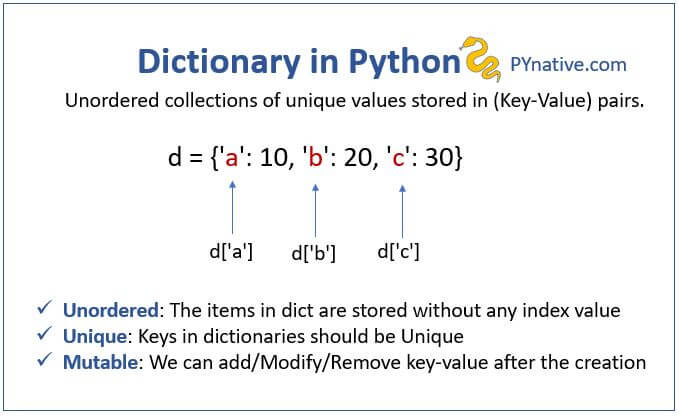
In the context of your work, a dictionary could store data about a company:
company = {
    'name': 'Apple Inc.',
    'ticker': 'AAPL',
    'industry': 'Technology',
    'market_cap_billions': 3200
}
Here, 'ticker' is a key, and 'AAPL' is its value. This is far more intuitive and less error-prone than using indexed access like company_list[1].
Let's begin with a video that walks through the fundamentals of creating and using dictionaries.
Python Tutorial for Beginners 5: Dictionaries - Working with Key-Value Pairs
The video "Python Tutorial for Beginners 5: Dictionaries" by Corey Schafer is an excellent starting point.
Watch the first two parts of this video to understand the basic syntax: The introduction explains the key-value pair concept. Creating and accessing shows you how to create a dictionary with curly braces {} and retrieve values using square bracket notation []. Notice how the values can be different data types, including a list.
2. Modifying and Accessing Dictionaries Safely
A key part of working with real-world data is handling situations where data might be missing. If you try to access a key that doesn't exist in a dictionary, your program will crash with a KeyError. A more robust approach is to use the .get() method, which allows you to retrieve a value safely and provide a default if the key is not found.
Dictionaries are also mutable, meaning you can add new key-value pairs, update existing ones, and remove them after creation.
Python Tutorial for Beginners 5: Dictionaries - Working with Key-Value Pairs
Let's continue with Corey Schafer's video to see these operations in action.
Watch the following segments: Safe access with .get(): This demonstrates how to avoid KeyError and provide default values, a crucial practice for writing reliable code. Adding and updating: Learn how to add new entries and modify existing values using both direct assignment and the .update() method, which is useful for merging dictionaries. Deleting entries: This covers removing key-value pairs using the del keyword and the .pop() method, which also returns the value being removed.
A crucial rule for dictionaries is that keys must be of an immutable type. This means you can use strings, numbers, or tuples as keys, but you cannot use a list or another dictionary. This is because the dictionary relies on a consistent "hash" of the key to quickly locate its value, and mutable objects can't guarantee this consistency.
3. Iterating Through Dictionaries
In many analytical tasks, you'll need to process every entry in a dictionary. Python provides efficient ways to loop through a dictionary's keys, its values, or its key-value pairs.
my_dict.keys(): Returns a view of all the keys.my_dict.values(): Returns a view of all the values.my_dict.items(): Returns a view of all the key-value pairs as(key, value)tuples.
Let's see how this works.
Python Tutorial for Beginners 5: Dictionaries - Working with Key-Value Pairs
The final section of the video covers looping techniques.
Watch from this segment on looping. Pay close attention to the for key, value in student.items(): pattern. This is the most common and readable way to iterate through a dictionary, and you will use it frequently.
To reinforce these concepts with examples tailored to your financial interests, the following reading provides a great summary.
17. Dictionaries — Programming for Financial Technology
This document from a course at Duke University frames dictionary usage in a financial context.
Please read the following sections: The introduction provides excellent examples relevant to finance and retail. Section 17.5 reviews the modification methods we just saw. Section 17.6 revisits accessing items, reinforcing the utility of get(). Section 17.10 shows iteration examples with stock tickers. Section 17.12 demonstrates using the in operator to quickly check for a key's existence.
One of the reasons dictionaries are so widely used is their performance. Accessing a value by its key is an extremely fast operation, with an average time complexity of . This means the time it takes to find an item doesn't increase even as the dictionary grows very large—a critical feature when processing massive datasets.
4. Nested Dictionaries: Representing Complex Data
The real power of dictionaries emerges when you use them to build complex, nested data structures. The value associated with a key can be another dictionary, a list, or any other data type. This allows you to model hierarchical information, which is exactly how data is structured in formats like JSON (JavaScript Object Notation)—the standard for most web APIs.
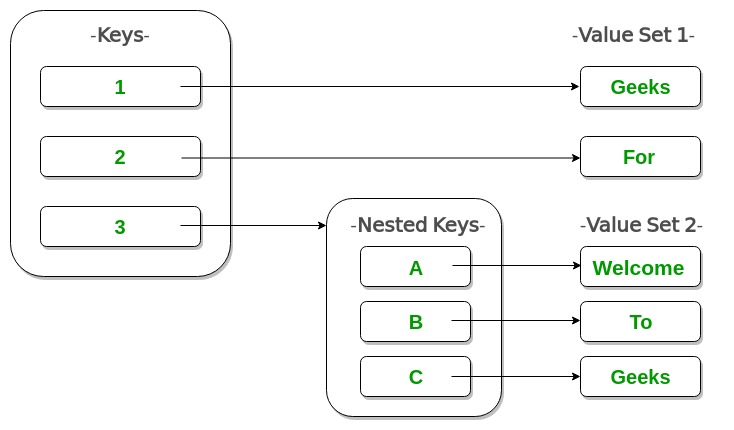
Your goal of building market intelligence systems will heavily involve fetching and parsing data from APIs. Let's watch a video that demonstrates this by working with nested data loaded from a JSON file.
Python - Accessing Nested Dictionary Keys
The video "Python - Accessing Nested Dictionary Keys" by Academind provides a practical, real-world example.
Follow along as the instructor parses a nested data structure representing Q&A data. Problem introduction: Understand the structure of the nested JSON data. Loading and inspecting: See how to load a JSON file into a Python object, which turns out to be a dictionary. Accessing the first level: The instructor accesses the value for the top-level key 'results', which is a list. Looping and accessing deeper: A for loop is used to iterate through the list of questions. Inside the loop, the 'replies' key is accessed. Multi-level access: This part shows the key technique of chaining square brackets (e.g., reply['user']['display_name']) to navigate through the nested dictionaries to extract the final piece of data. This process of iteratively "drilling down" into a nested structure is a core skill for data extraction and manipulation.
The "Drill" sections in the Duke University reading provide excellent, self-contained exercises for practicing with nested data structures, such as a dictionary of student grades or a list of stock portfolio dictionaries. You may find them useful for practice.
Conclusion
In this lesson, we moved beyond position-based data access and learned to use dictionaries for storing and retrieving information with unique identifiers. This is a significant step towards handling the structured, real-world data central to market intelligence.
Here are the main takeaways:
- Dictionaries (
{}) store data as mutable, unordered collections of key-value pairs. - Access is performed using unique, immutable keys, which is highly efficient ( on average).
- The
.get()method is the standard for safely accessing keys that might not exist. - Iteration is best done using the
.items()method to access both keys and values in aforloop. - Nesting dictionaries and lists allows you to represent complex, hierarchical data, which is crucial for working with formats like JSON from APIs.
So far, we've created and manipulated data structures entirely in memory. When your program finishes, that data is lost. In our next and final lesson of this foundational module, we will address this by learning how to read from and write to files. This will enable you to save your data, load it back for later analysis, and build programs that persist information. We will also cover error handling, an essential skill for creating robust applications.