Welcome to your sixth lesson. In our last session, we learned to build functions, which allow us to package our code into reusable, modular blocks. This is a powerful step towards building complex analytical systems. Now, we need to focus on the data that these functions will process. So far, we've worked with individual pieces of data like numbers and strings. However, in any real-world analysis, from tracking market trends to analyzing competitor performance, you'll be working with collections of data.
This lesson introduces lists and tuples, Python's fundamental data structures for storing ordered sequences of information. Mastering these is essential for virtually any data manipulation task. You will learn how to create these structures, access the data within them, perform modifications, and understand the crucial difference between them to make informed choices in your code. This forms the bedrock upon which all data analysis in Python is built.
1. Introduction to Lists: The Mutable Sequence
A list is Python's most versatile and commonly used sequence type. It is an ordered collection of items, which can be of any data type. The most important characteristic of a list is that it is mutable, meaning you can change its content after it has been created—you can add, remove, or change items. This makes lists ideal for collecting data where the size and content might change during your program's execution.
Let's begin by learning how to create lists and access their elements.
Python Tutorial for Beginners 4: Lists, Tuples, and Sets
The video "Python Tutorial for Beginners 4: Lists, Tuples, and Sets" by Corey Schafer provides an excellent practical introduction.
Watch the first section from the beginning. Focus on: The syntax for creating a list using square brackets []. How to find the number of items in a list using the len() function. Accessing individual items using zero-based indexing (e.g., courses[0]). Using negative indexing to access items from the end of the list (e.g., courses[-1]).
Slicing: Accessing Sub-sequences
Beyond accessing single items, you often need to work with a portion of a list. This is done through slicing. Slicing lets you create a new list containing a subset of the original elements. The syntax is my_list[start:stop], which extracts elements from the start index up to, but not including, the stop index.
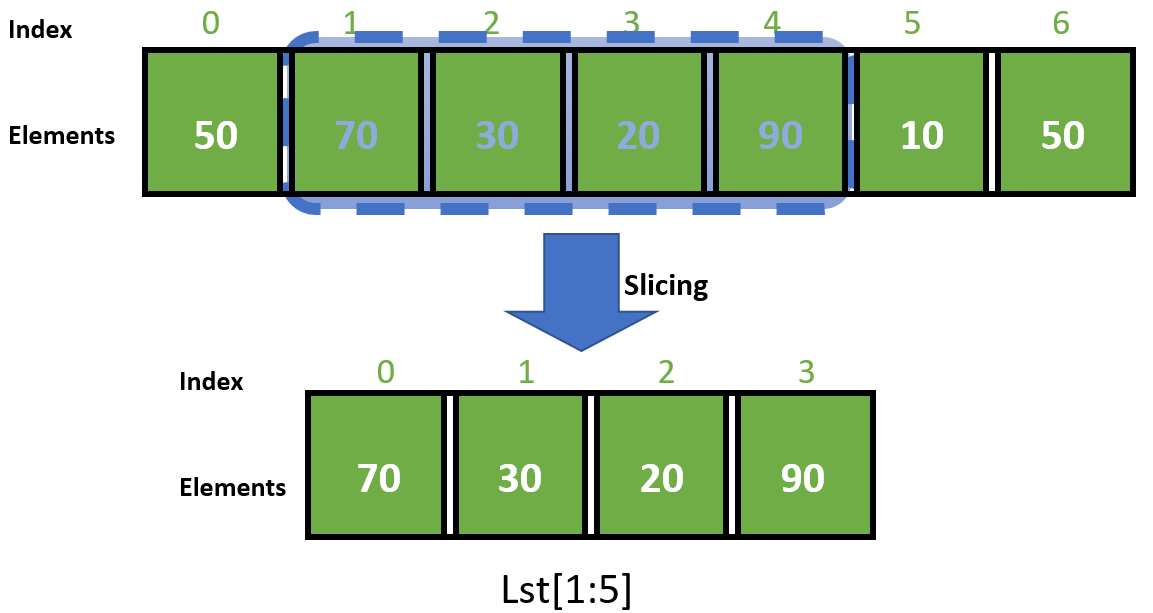
You can also use a third parameter, step, to skip elements: my_list[start:stop:step].
Python Tutorial for Beginners 4: Lists, Tuples, and Sets
Now, let's revisit the same video to see slicing in action.
Continue watching from this segment on slicing. Notice how you can leave the start or stop index blank to slice from the beginning or to the end of the list.
2. The Power of Mutability: Modifying Lists
The defining feature of lists is their mutability. For your goal of building market intelligence systems, this is critical. You might start with an empty list and populate it with data scraped from the web, remove invalid entries, or insert new data points as they are discovered.
Python provides several built-in methods to modify a list "in-place," meaning the list object itself is changed.
This article from Real Python provides a comprehensive overview of list modification.
First, read the section on mutability. This demonstrates how to change elements using index and slice assignment. Next, focus on the key mutator methods in the section "Lists Have Mutator Methods, Tuples Don’t". Pay close attention to the purpose of each method: .append(obj): Adds a single object to the end of the list. .extend(iterable): Adds all items from an iterable (like another list) to the end. .insert(index, obj): Adds an object at a specific position. .remove(obj): Removes the first occurrence of a specific value. .pop([index]): Removes an item at a specific index and returns it. If no index is given, it removes and returns the last item.
Notice that these methods modify the list in-place and return None (except for .pop()). This is a common source of bugs for beginners, who might write new_list = my_list.append(item), expecting new_list to be the modified list.
3. Sorting and Reversing Lists
Two other useful in-place modification methods are .sort() and .reverse().
courses.sort(): Sorts the list alphabetically or numerically in ascending order.courses.sort(reverse=True): Sorts the list in descending order.courses.reverse(): Reverses the order of elements in the list.
Sometimes, you need a sorted version of a list but want to keep the original intact. For this, Python provides the built-in sorted() function, which returns a new sorted list without changing the original.
Python Tutorial for Beginners 4: Lists, Tuples, and Sets
Let's return to Corey Schafer's video for a clear demonstration of these sorting methods.
Watch the segment from Sorting and Reversing. The distinction between the .sort() method and the sorted() function is a key concept.
4. Tuples: The Immutable Sequence
Now let's turn to tuples. A tuple is also an ordered collection of items, just like a list. You can index and slice them in exactly the same way. The fundamental difference is that tuples are immutable. Once you create a tuple, you cannot change it. You cannot add, remove, or reassign elements.
Why would you want a data structure you can't change?
- Data Integrity: It guarantees that a collection of data remains constant. This is perfect for representing fixed records, like a company's name, stock ticker, and founding year:
('Apple Inc.', 'AAPL', 1976). - Performance: Because they are immutable, Python can perform internal optimizations. Tuples are generally more memory-efficient and can be slightly faster to create and access than lists.
- Dictionary Keys: As we will see in the next lesson, only immutable types can be used as keys in dictionaries.
Tuples are created using parentheses (). There's one important syntax quirk: to create a tuple with a single element, you must include a trailing comma.
# A tuple with one item
single_item_tuple = ('hello',)
print(type(single_item_tuple)) # <class 'tuple'>


# This is NOT a tuple, it's just a string in parentheses
not_a_tuple = ('hello')
print(type(not_a_tuple)) # <class 'str'>
Python Tutorial for Beginners 4: Lists, Tuples, and Sets
Let's see the immutability of tuples demonstrated in Corey Schafer's video.
Watch the section from this timestamp. It clearly shows how trying to change an element in a list works, but the same operation on a tuple results in a TypeError.
5. Lists vs. Tuples: A Performance-Based Choice
Your background in data science and analytics means you appreciate efficiency. The choice between a list and a tuple isn't just about mutability; it has practical implications for performance, especially with large datasets.
Python Tuples || Python Tutorial || Learn Python Programming
The video "Python Tuples" by Socratica offers a brilliant, quantitative comparison.
Watch the segment from Comparing Lists and Tuples. It uses Python's sys.getsizeof and timeit modules to demonstrate that for the same data, tuples: Occupy less memory. Are created faster than lists. These differences may seem small, but when processing millions of data points, they can have a significant impact on your application's performance.
To summarize the choice:
- Use a list when your collection of items needs to change (grow, shrink, or be modified). They are your default choice for dynamic collections.
- Use a tuple when you have a collection of items that should not change. They are ideal for fixed data records and offer performance benefits.
6. Common Operations for All Sequences
Many operations work identically on both lists and tuples because they don't rely on mutability.
- Iteration: You can loop through them with a
forloop. Theenumerate()function, which we saw in the previous lesson on functions, is particularly useful for getting both the index and the value. - Membership: You can check if an item exists using the
inoperator (e.g.,'AAPL' in my_stocks). - Concatenation & Repetition: You can combine them with
+and repeat them with*. - Built-in Functions:
len(),min(),max(), andsum()work on both.
Python Tutorial for Beginners 4: Lists, Tuples, and Sets
Finally, let's watch a demonstration of some of these common operations.
Watch from this section of the video. It covers finding an item's index with .index(), checking for membership with in, and iterating with a for loop and enumerate.
Conclusion
In this lesson, we explored Python's two primary ordered sequence types, laying a crucial foundation for data handling. You now have the tools to store and manage collections of data, a task central to every aspect of market intelligence.
Here are the key takeaways:
- Lists (
[]) are mutable (changeable), ordered collections. They are the workhorse for dynamic data that you need to add to, remove from, or modify. - Tuples (
()) are immutable (unchangeable), ordered collections. They provide data integrity, are more memory-efficient, and are faster to process, making them ideal for fixed data records. - Access for both is done via indexing (for single items) and slicing (for sub-sequences).
- The choice between them is strategic: use a list for flexibility and a tuple for integrity and performance.
So far, we've accessed data based on its order or position (its index). But what if we want to store and retrieve data using a unique identifier, like looking up a company's revenue using its stock ticker? In our next lesson, we will explore dictionaries, Python's powerful key-value data structure that allows us to do just that.