Welcome to your fifth lesson. In our last session, we mastered loops, which gave us the power to automate repetitive tasks by iterating through data or executing code as long as a condition holds. This is the engine of large-scale data processing. However, as our analytical scripts grow, simply repeating code isn't enough. We need a way to organize, reuse, and manage complexity.
This lesson introduces functions, one of the most important concepts in programming. Functions are named, reusable blocks of code that perform a specific task. They are the fundamental building blocks for creating modular, readable, and maintainable programs. For your goal of building sophisticated market intelligence systems, mastering functions is non-negotiable. They allow you to encapsulate a piece of logic—like calculating a financial metric or cleaning a specific data column—and call it whenever you need it, without rewriting the code.
Today, you will learn how to define your own Python functions, pass information into them using parameters, and receive results using return values.
1. Why Use Functions? The Principle of Reusability
In your work, you constantly perform recurring analyses. Imagine you have several lists of company sales data and you need to check each one for data quality—for instance, ensuring all numbers are even integers. Without functions, you might be tempted to copy and paste your validation loop for each list. This approach is inefficient, error-prone, and difficult to maintain.
Python Functions for Data Science / Data Analysis - P.5
To see a practical demonstration of this problem, watch the first part of the video "Python Functions for Data Science / Data Analysis" by Luke Barousse.
Watch from the beginning until the end of this section. The presenter clearly illustrates the issues with duplicating code for slightly different inputs and how a function elegantly solves this by creating a single, reusable tool.
As the video shows, functions allow you to follow the "Don't Repeat Yourself" (DRY) principle. You write the logic once and can apply it to any number of datasets, making your code more efficient and robust.
2. The Anatomy of a Python Function
Defining a function in Python has a clear and consistent structure. You use the def keyword to declare it, give it a name, specify its inputs (parameters), and define the code it will execute in an indented block.
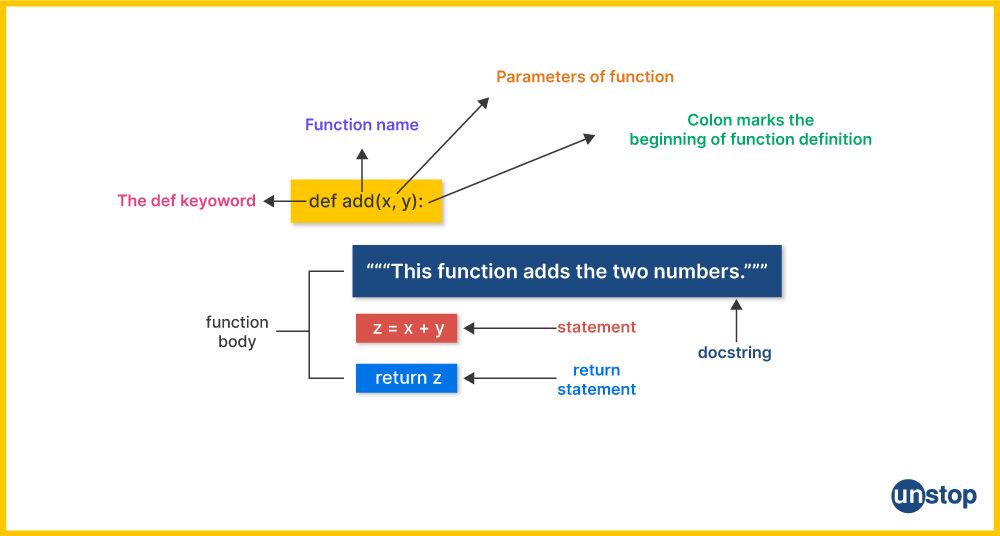
A well-defined function should ideally follow the single responsibility principle: it should do one thing and do it well. This makes your code easier to test, debug, and understand.
Python Functions: Visually Explained
The video "Python Functions - Visually Explained" provides an excellent animated breakdown of function syntax and execution flow.
Watch the first part of this video from this segment. Pay close attention to: The syntax for defining a function (def, name, parameters, colon, indented body). The distinction between defining a function (when Python memorizes it) and calling a function (when Python executes it). The difference between parameters (the variable names in the function's header) and arguments (the actual values you pass during the call).
For a detailed written reference on function definition and calling, the Real Python guide is an excellent resource.
Defining Your Own Python Function
This article from Real Python provides a thorough introduction to the syntax and concepts of creating and using functions.
Please read the introductory sections, focusing on: The function syntax, which reinforces the video's explanation. The section on calling functions, which clearly distinguishes between parameters and arguments.
3. Passing Information to Functions: Arguments
Most useful functions need to accept input to work on. As you've just seen, you pass this information using arguments, which correspond to the parameters in the function definition. Python offers two primary ways to pass arguments: by position and by keyword.
- Positional Arguments: These are the most common. The arguments you pass are matched to the parameters based on their order. The first argument goes to the first parameter, the second to the second, and so on. Order is critical.
- Keyword Arguments: You can explicitly name which parameter you're providing a value for using the syntax
parameter_name=value. This makes your code more readable and means the order of arguments no longer matters.

Your extensive experience in creating market sizing models and dashboards highlights the importance of clarity. When a function takes many numerical inputs, using keyword arguments can prevent hard-to-find bugs and make the function's purpose self-documenting.
Defining Your Own Python Function
Let's continue with the Real Python article to explore these argument types in more detail.
Read the sections on Positional Arguments and Keyword Arguments. Note the calculate_cost example and how using keyword arguments improves the readability of the hypothetical update_product function call.
4. Getting Results: The return Statement and Namespaces
A function can perform an action that has a side effect (like printing to the screen) or it can return a value to the code that called it. In data analysis and financial modeling, returning values is essential. You'll write functions that calculate metrics, clean data, or run projections, and you need to get the results of those computations back to use in further analysis.
This is done with the return statement. When Python hits a return statement, it immediately exits the function and sends the specified value back to the caller.
But why is return so important? This has to do with a concept called namespaces. When a function is called, Python creates a temporary, local namespace for it. All the function's parameters and any variables created inside it live in this local namespace. When the function finishes, this entire local namespace is destroyed. The return statement is your only way to pass a value from that temporary local world back to the main, or global, part of your program.
Python Functions: Visually Explained
The "Visually Explained" video does a phenomenal job of illustrating namespaces. This is a crucial concept for writing bug-free code.
Watch from this segment. It explains: Why variables created inside a function are "local" and can't be accessed from outside. How the return statement saves a value from the local namespace before it's destroyed. Why Python uses separate local namespaces to prevent naming conflicts and unintended side effects, a cornerstone of reliable software design.
A function that doesn't have an explicit return statement will automatically return a special value, None.
5. Advanced Argument Handling
Python functions offer more flexibility for handling arguments, which is particularly useful when building complex analytical tools.
- Default Argument Values: You can provide a default value for a parameter, making it optional. If the caller doesn't provide an argument for that parameter, the default value is used.
def calculate_growth(revenue, period_years=1): # If period_years isn't provided, it defaults to 1 return (revenue / period_years) * 100 - Variable-Length Arguments (
*argsand**kwargs): Sometimes you don't know how many arguments a function will receive.*args: Gathers any number of positional arguments into a tuple. This is useful for functions likesum()oraverage()that can operate on any number of inputs.**kwargs: Gathers any number of keyword arguments into a dictionary. This is common when building functions that configure a process with many optional settings.
Defining Your Own Python Function
The Real Python guide provides clear explanations of these advanced features.
Please read the following sections: Default Argument Values: Pay attention to the "common gotcha" of using mutable objects (like a list) as defaults. *args: See how it's used to create a flexible average() function. **kwargs: Understand how it can create a flexible report() function. The combined syntax, which shows the correct order for defining all argument types.
6. Practical Application: A Data Analysis Function
Let's tie everything together with a practical example that mirrors a task from business intelligence. We'll build a function to count the number of lines spoken by a specific character from a script dataset. This encapsulates the full workflow: defining a function that takes an input, performing a task (reading data and counting), and returning a result.
Python Functions for Data Science / Data Analysis - P.5
Let's return to Luke Barousse's video for a complete, data-focused example.
Watch the application section from this timestamp. This segment is a microcosm of a data analysis project: Problem Definition: Count the lines for a given actor. Code to Function: Existing code for reading a CSV is wrapped in a function, actor_counter. Parameterization: The actor's name is passed as a parameter. Logic: The function contains a loop and logic to count occurrences. Return Value: The function returns the final count. Application: The function is called repeatedly within another loop to analyze multiple actors and store the results in a dictionary.
This example demonstrates how functions become powerful, reusable tools in an analytical workflow, directly aligning with your goal of building systems for faster and better intelligence mining.
Conclusion
In this lesson, we transitioned from writing repetitive scripts to creating modular, reusable blocks of code with functions. This step is crucial for managing the complexity inherent in any significant software or data analysis project.
Here are the key takeaways:
- Definition: Functions are defined with the
defkeyword, a unique name, and an indented body of code. - Parameters and Arguments: Functions receive data through parameters, which are placeholders in the definition. The actual values passed during a call are arguments.
- Argument Types: You can pass arguments by position or by keyword. Keyword arguments improve readability and flexibility.
- Return Values: The
returnstatement is used to send a computed value back from a function's temporary local namespace to the caller. - Modularity: Functions allow you to break down large problems into smaller, manageable, and testable pieces, which is the essence of good program design.
In our previous lessons, we've manipulated individual variables. However, most real-world analysis involves working with collections of data—lists of stock prices, company names, or survey results. In our next lesson, we will dive into Python's core data structures, lists and tuples, which allow you to store, access, and manage these ordered collections of data.