Welcome to your third lesson. In our previous session, you learned how to use variables, data types, and operators to store and manipulate information. We saw that comparison and logical operators produce Boolean (True or False) values, which serve as the raw material for decision-making.
This lesson builds directly on that foundation. Decision-making is the bedrock of any intelligent process, whether in business strategy or in a computer program. In Python, we implement this logic using conditional statements. You will learn to use if, elif, and else to control the flow of your program, enabling it to perform different actions based on different conditions. This is the first major step toward creating dynamic, responsive code that can automate the kind of analytical tasks central to your work in market research and strategy.
1. The Anatomy of a Decision: if, else, and elif
At its most basic, a conditional statement checks if a condition is true and executes a block of code if it is. The structure is simple, but the rules, especially regarding indentation, are strict and crucial to how Python interprets your code.
We will start with the fundamental if statement, then add else to handle the alternative case, and finally use elif to manage multiple, sequential conditions.
Control Flow in Python - If Elif Else Statements
The video "Control Flow in Python" by Programming with Mosh provides a very clear, professional explanation of the if-elif-else structure. It pays special attention to the importance of indentation, a common pitfall for newcomers to Python.
Please watch the first two segments of this video: Basic if Statement: Watch from the beginning to this point. The instructor explains the core syntax: the if keyword, a condition that evaluates to a Boolean, a colon, and the indented code block that executes if the condition is True. elif and else Statements: Continue from this segment. This part shows how to add an else block for when the if condition is false, and how to use elif (short for "else if") to test for multiple mutually exclusive conditions.
Let's recap the key points from the video with an example relevant to market analysis. Imagine you're classifying a company based on its annual revenue.
revenue = 750_000_000  # A company with $750M in revenue

if revenue > 1_000_000_000:
    print("Classification: Large-Cap")
elif revenue > 50_000_000:
    print("Classification: Mid-Cap")
else:
    print("Classification: Small-Cap")


# Output: Classification: Mid-Cap
Here's how Python processes this:
ifcheck: Isrevenue > 1_000_000_000? No,750_000_000is not greater than1_000_000_000. Python skips the firstprintstatement.elifcheck: Isrevenue > 50_000_000? Yes,750_000_000is greater than50_000_000. Python executes the code in this block, printing "Classification: Mid-Cap".- Execution stops: Because a condition was met, Python skips the rest of the chain, including the
elseblock.
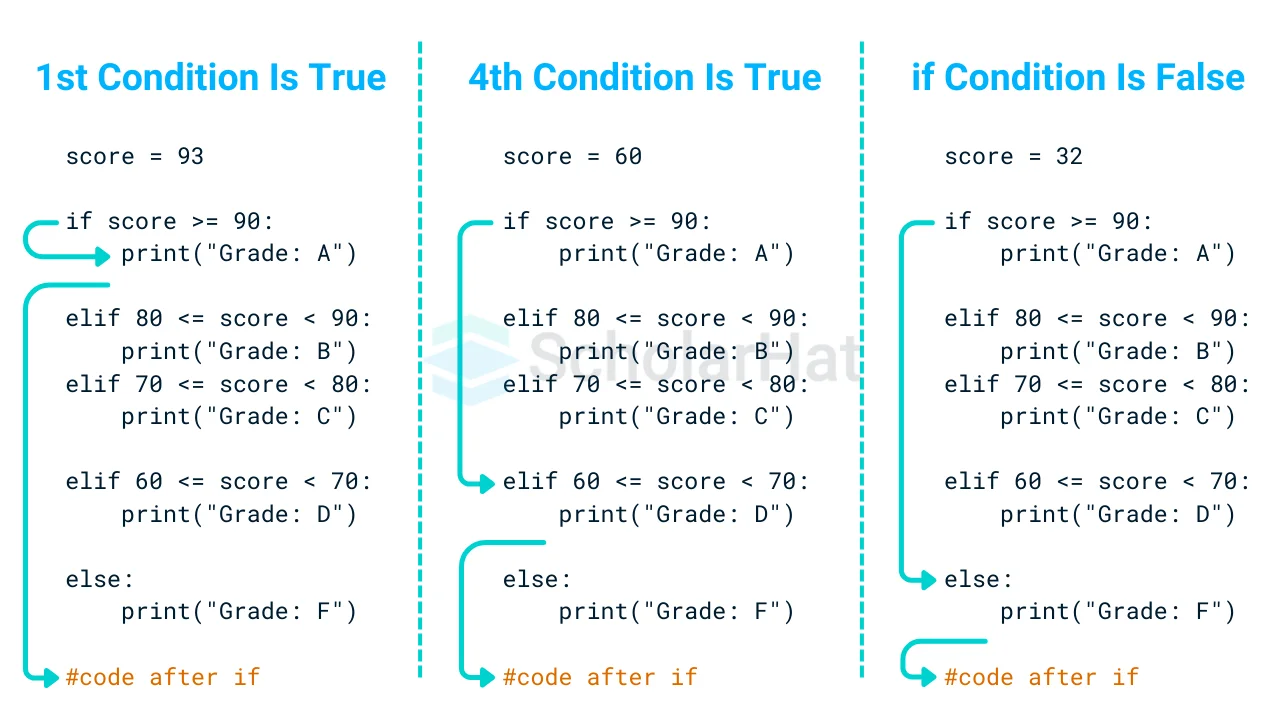
This sequential, one-and-done logic is what makes if-elif-else so efficient for handling a series of checks. The following diagram illustrates this flow for three different input values.
2. Crafting Complex Conditions
Real-world business rules are rarely simple. You often need to check multiple criteria simultaneously. For instance, a "high-potential market" might be defined by both high growth and a large size. In the previous lesson, you learned about the logical operators and, or, and not. Now, we'll put them to work inside our if statements.
and: Requires all conditions to beTrue.or: Requires at least one condition to beTrue.not: Inverts a condition (fromTruetoFalseor vice-versa).
Control Flow in Python - If Elif Else Statements
Let's return to the Mosh video to see how these logical operators are used to build more sophisticated conditions. He also discusses an important optimization concept called "short-circuiting."
Watch these two sections: Logical Operators: From this segment, you'll see how to combine Boolean variables and expressions using and, or, and not. Pay attention to the use of parentheses () to group conditions for clarity, which is a best practice. Short-Circuit Evaluation: Continue from this part. This explains how Python saves time by stopping the evaluation of a logical expression as soon as the outcome is known. For an and expression, this happens on the first False. For an or expression, it happens on the first True.
Consider a practical application in investment screening. An analyst might be looking for companies that have high income or good credit, but must not be a startup (let's assume startups are tracked by a is_startup flag).
high_income = False
good_credit = True
is_startup = False

if (high_income or good_credit) and not is_startup:
    print("Eligible for further analysis.")
else:
    print("Not eligible.")


# Output: Eligible for further analysis.
In this case, (high_income or good_credit) evaluates to True because good_credit is True. not is_startup also evaluates to True because is_startup is False. Since both sides of the and are True, the overall condition is met.
3. Hands-on Challenge: Classifying a Number
It's time to apply what you've learned. The following exercise requires you to combine if-elif-else logic with multiple conditions using logical operators. It also involves the modulo operator (%) for checking divisibility, which we touched upon in the last lesson.
Python If Statements Explained (Python For Data Science Basics #4)
This article from Data36 presents a concise and practical challenge to test your understanding of conditional logic.
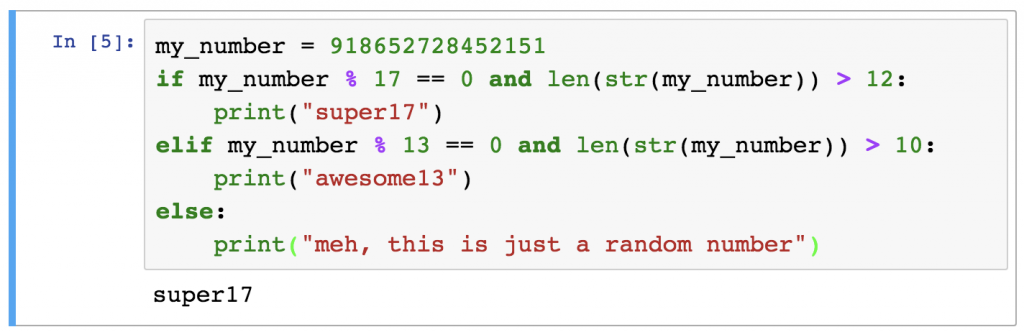
Please navigate to the section titled "Test yourself!". Read the problem description carefully. Your task is to write a Python script that classifies the number 918652728452151 based on the given rules. Try to write the code yourself in VS Code first. After you have a solution, compare it with the one provided in the article's "The solution" section to check your work and understand the explanation. The solution introduces the len() and str() functions, which are common and useful tools for working with strings and their lengths.
Here is the code that solves the challenge, which you can also find in the article.
4. Advanced Conditional Techniques
While if-elif-else forms the core of conditional logic, Python offers a few more concise and powerful ways to write decision-making code.
Nested if Statements
You can place if statements inside other if statements. This is called nesting and is useful for creating more granular logic. For example, after identifying a "Pass" grade, you might want to further classify it.
How to Use IF Statements in Python (if, else, elif, and more)
The Dataquest article "How to Use IF Statements in Python" provides a clear example of nested conditionals.
Read the short section under the heading Nested if Statements. It shows how a primary if statement can filter for a range of marks, and a nested if-elif-else block can then provide more detailed feedback within that range.
Chaining Comparison Operators
Python allows you to write range checks in a way that is very similar to standard mathematical notation, making your code clean and intuitive.
Instead of writing if age >= 18 and age < 65:, you can write:if 18 <= age < 65:
This more readable style is preferred by Python developers.
The Ternary Operator
For simple if-else assignments, you can use a compact, one-line syntax called the ternary operator.
Instead of this:
if score >= 60:
    result = "Pass"
else:
    result = "Fail"
You can write this:
result = "Pass" if score >= 60 else "Fail"
This is read almost like a sentence: "result is 'Pass' if score is 60 or more, else it's 'Fail'."
Control Flow in Python - If Elif Else Statements
The Mosh video demonstrates both of these elegant techniques.
Ternary Operator: Watch the segment from this timestamp for a clear explanation of this concise syntax. Chaining Comparison Operators: The section from this point shows how to chain operators for clean and readable range checking.
Conclusion
In this lesson, you've gained a crucial skill: the ability to make your programs think. You can now write code that responds to different inputs and conditions, a fundamental requirement for any form of automation or analysis.
Here are your key takeaways:
- The
if-elif-elsestructure allows you to execute different code blocks based on a series of conditions. - Indentation is not just for style; it is mandatory Python syntax that defines which code belongs to which conditional block.
- Logical operators (
and,or,not) are used to create complex conditions that reflect nuanced business rules. - Python evaluates conditions sequentially and uses short-circuiting for efficiency.
- Advanced techniques like nested ifs, chained comparisons, and the ternary operator can make your code more powerful and readable.
So far, we have learned to make a single decision. But what if you need to perform an action or check a condition for every item in a list of companies or every data point in a market survey? In our next lesson, we will explore loops, which allow you to execute code repeatedly, unlocking the ability to process large datasets efficiently.