Welcome to the final lesson of our Python Foundations module. In our last session, we mastered dictionaries, which are perfect for organizing complex, structured data in memory. However, for any market intelligence system to be effective, it must be able to persist data—saving analyses, storing scraped information, and loading configurations. When your program stops running, that in-memory data disappears.
This lesson bridges that gap by teaching you two crucial, interconnected skills: file handling and error handling. You will learn how to read data from files and write data back to them, making your programs capable of long-term storage. Equally important, you will learn to use try...except blocks to build robust applications that can gracefully handle unexpected issues, such as a missing file or a failed network connection. These are indispensable skills for building the reliable automation tools that are central to your goal.
1. Anticipating Problems: An Introduction to Error Handling
Before we even open a file, we must confront a reality of programming: things can and will go wrong. You might try to read a file that doesn't exist, divide by a variable that happens to be zero, or request data from a web service that is temporarily down. A program that simply crashes in these situations is not a professional tool.
In Python, we use the try...except block to manage these situations. This is conceptually similar to risk management or strategic contingency planning. You define a primary course of action in the try block and a contingency plan in the except block that executes only if the primary action fails.
Let's begin with a video that clearly explains this fundamental concept.
Python Tutorial: Using Try/Except Blocks for Error Handling
The video "Python Tutorial: Using Try/Except Blocks for Error Handling" by Corey Schafer provides a fantastic introduction to this topic.
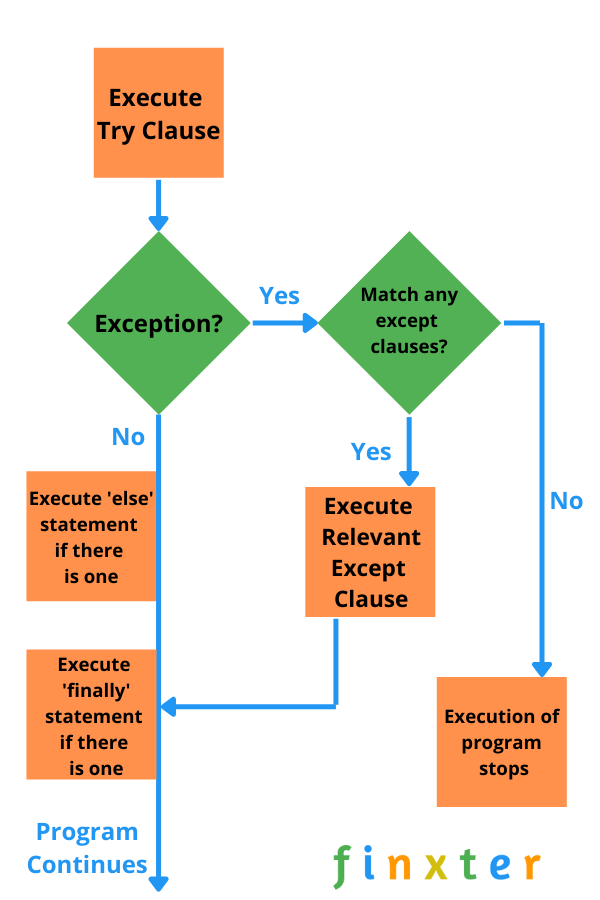
Please watch the following segments to understand the structure and logic of error handling: The Basics: This part introduces the core problem—unhandled exceptions—and shows how a simple try...except block can prevent a program from crashing when it can't find a file. Catching Specific Exceptions: It's crucial to handle specific errors you anticipate, rather than catching all possible errors. This segment explains why and shows how to handle different exception types, like FileNotFoundError and NameError. The else and finally Clauses: This section introduces two optional but powerful clauses. The else block runs only if the try block succeeds. The finally block runs no matter what, which is perfect for cleanup actions like closing a file or a database connection.
The flow of control can be visualized with the following diagram.
2. Reading From and Writing to Files
Now that we understand how to handle potential errors, let's dive into the mechanics of file operations. The primary function for this is open(), which takes a file path and a "mode" as arguments. The three most common modes are:
'r'for read: Opens a file for reading. This is the default mode.'w'for write: Opens a file for writing. Be careful: If the file already exists, its contents will be erased. If it doesn't exist, it will be created.'a'for append: Opens a file for writing, but adds new content to the end of the file without erasing what's already there.
The following video provides a practical demonstration of these operations.
Python File Handling for Beginners
The video "Python File Handling for Beginners" by Dave Gray is a clear, step-by-step guide to working with files.
Watch these sections to see the different file modes in action: Reading Files: Learn how to open a file in read mode and read its contents using methods like .read(), .readline(), and by iterating through the file line by line. The Importance of Closing Files: This part combines our knowledge of file I/O and error handling. It shows how a try...finally block can be used to ensure a file is always closed with f.close(), even if an error occurs during processing. This prevents resource leaks. Appending to Files: See how to use append mode ('a') to add new information to a file without deleting the existing content. Writing to Files: This demonstrates the write mode ('w'), emphasizing that it will overwrite any existing file content.
3. The with Statement: A More Pythonic Approach
While using a try...finally block to ensure files are closed is effective, it's also verbose. Python provides a more elegant and widely-used solution called the with statement, also known as a context manager.
When you use with to open a file, Python automatically guarantees that the file will be closed when the block is exited, regardless of whether it finishes successfully or an error was raised. This makes your code cleaner, safer, and easier to read.
# The verbose try...finally way
try:
    f = open('market_data.txt', 'r')
    content = f.read()
    print(content)
finally:
    f.close()


# The clean and safe 'with' statement way
with open('market_data.txt', 'r') as f:
    content = f.read()
    print(content)


# The file is automatically closed here
This is the standard, modern practice for resource management in Python.
Python File Handling for Beginners
Let's return to Dave Gray's video to see the with statement in action.
Watch the final, important segment on using the with keyword. The instructor refactors the code to use with, demonstrating how it simplifies file operations while providing implicit error handling for closing the file.
To reinforce this, the following reading provides a concise summary of the with statement and its relationship to exception handling.
This article from GeeksforGeeks summarizes the key patterns for file handling.
Focus on these two sections: Read Using with Statement to review the syntax and benefit of this approach. Then, read Handling Exceptions When Closing a File, which shows the try...finally pattern that the with statement so elegantly replaces.
4. Putting It All Together: Saving and Loading Structured Data
Let's connect this lesson to our previous one on dictionaries. A common task is to save a Python dictionary (like one containing API results or company profile data) to a file. The standard format for this is JSON (JavaScript Object Notation). Python's built-in json library makes this easy.
Here is how you can save a dictionary to a file named company_aapl.json:
import json


# Data from our previous lesson
company = {
    'name': 'Apple Inc.',
    'ticker': 'AAPL',
    'industry': 'Technology',
    'market_cap_billions': 3200,
    'competitors': ['GOOGL', 'MSFT', 'AMZN']
}

try:
    with open('company_aapl.json', 'w') as f:


        # json.dump() writes the dictionary to the file object
        json.dump(company, f, indent=4)
    print("Successfully saved data to company_aapl.json")
except IOError as e:


    # A more specific exception for file I/O problems
    print(f"Error writing to file: {e}")
The indent=4 argument makes the JSON file human-readable.
And here is how you would load that data back into a dictionary:
import json

try:
    with open('company_aapl.json', 'r') as f:


        # json.load() reads from the file and parses it into a Python dictionary
        loaded_company = json.load(f)
    print("Successfully loaded data:")
    print(loaded_company)
except FileNotFoundError:
    print("Error: The file company_aapl.json was not found.")
except json.JSONDecodeError:
    print("Error: The file is not a valid JSON file.")
This pattern—using with to open a file and try...except to handle potential FileNotFoundError or data format errors—is a robust and fundamental technique you will use constantly.
Conclusion
This lesson completes your foundation in core Python programming. You've moved from transient, in-memory data structures to building persistent and resilient programs. The ability to read and write files, combined with robust error handling, is what separates simple scripts from professional-grade applications.
Key takeaways from this lesson:
- Error Handling is Essential: Use
try...exceptblocks to anticipate and manage errors gracefully, preventing your programs from crashing. Be specific about the exceptions you catch. - File Operations: Use the
open()function with modes like'r','w', and'a'to read from, write to, and append to files. - The
withStatement is Best Practice: Always use thewithstatement for file handling, as it ensures files are automatically and safely closed, even when errors occur. - Structured Data Persistence: The
jsonlibrary provides a simple way to serialize Python dictionaries to files and deserialize them back, allowing you to save and load complex data structures.
You are now well-prepared to move into the next phase of your journey. In our next module, Data Analysis and Visualization with Python, we will immediately apply these skills. We'll start by using the powerful pandas library to load data from files (like CSVs) into DataFrames, the fundamental structure for any serious data work in Python.