Welcome back. In our last lesson, we mastered how to trace and catch asynchronous errors using both Promise .catch() chains and the superior try...catch syntax with async/await. You now understand the critical distinction between return and return await within a try block—a key piece of knowledge for preventing unhandled rejections.
This lesson is the logical next step: we move from how to catch errors to defining what exactly we are catching. A generic Error object tells you something failed, but it doesn't tell you why in a way your program can understand. Today, we will design and implement custom Error subclasses to create a rich, contextual, and maintainable error handling system. We will also build the ultimate safety net: a global handler for any promise rejections that might slip through the cracks. For someone who has architected high-availability platforms, you'll immediately see how this moves error handling from a defensive chore to a powerful tool for observability and system resilience.
Why This Matters at a Senior Level
Mid-level developers throw new Error('thing failed'). Senior engineers design an error taxonomy. They create a hierarchy of error classes (APIError, DatabaseError, ValidationError) that are self-describing, carry machine-readable context (like error codes and status codes), and preserve the original cause of the failure. In a production environment, especially the kind of high-concurrency e-commerce systems you've worked on, this is non-negotiable. When an incident occurs, you don't want a log file full of "Something went wrong." You need structured, queryable error data that instantly tells you which subsystem failed and why. Getting this right is the difference between a five-minute debugging session and a five-hour outage.
Core Concepts
1. Beyond Generic Errors: Extending the Error Class [Often asked]
Let's start with the fundamental problem. Consider this code in a service layer:
if (user.isNotAuthorized()) {
  throw new Error('User is not authorized');
}

if (db.isOffline()) {
  throw new Error('Database is offline');
}
In a catch block, how do you distinguish between these two failures to take different actions (e.g., redirect for authorization, retry for database)? You can't, aside from parsing the string message, which is brittle and a terrible practice.
The solution is to create our own error types that extend the built-in Error class. This allows us to use the instanceof operator to programmatically identify the error type.
// in a shared 'errors.js' file
class AuthorizationError extends Error {
  constructor(message) {
    super(message); // Pass message to the parent Error class
    this.name = 'AuthorizationError'; // Set the error name
  }
}

class DatabaseError extends Error {
  constructor(message) {
    super(message);
    this.name = 'DatabaseError';
  }
}

// In our service logic
try {
  // ...
} catch (err) {
  if (err instanceof AuthorizationError) {
    // Redirect to a login page
  } else if (err instanceof DatabaseError) {
    // Trigger a retry mechanism
  } else {
    // Handle unexpected errors
    throw err;
  }
}
This is the first step toward a robust error handling strategy. The following resource provides an excellent walkthrough of this pattern.
Custom errors, extending Error
This article from javascript.info clearly explains the motivation and mechanics of creating custom error classes.
Read the introduction and the section "Extending Error" to understand the basic implementation and how instanceof is used for dispatching logic in a catch block. Then, read "Further inheritance" to see how you can create a hierarchy of errors.
2. Crafting Professional Custom Errors [Always asked]
While the basic extension is good, a senior-level implementation requires more finesse. We need to solve two problems:
- Noisy Stack Traces: The stack trace for a custom error by default includes the error's own constructor, which is useless noise for debugging. The trace should point to where the error was created, not the constructor that created it.
- Lack of Context: A
messagestring is for humans. A robust error needs machine-readable context like an HTTP status code, an internal error code, or a timestamp.
Let's look at the noisy stack trace problem first.
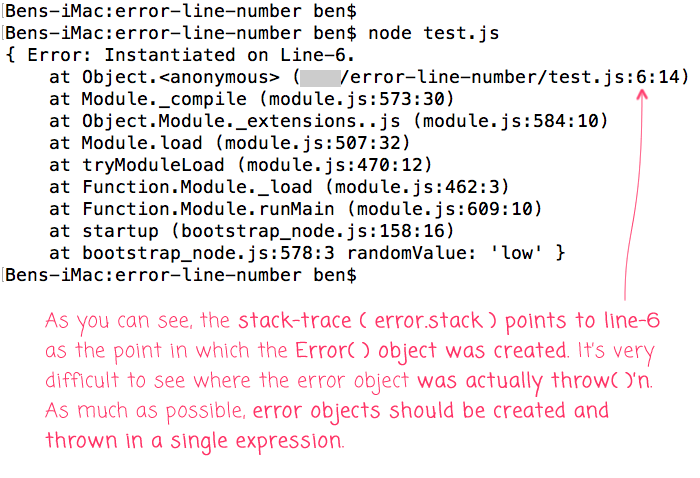
To fix this, V8 (the engine in Node.js and Chrome) provides a powerful, non-standard API: Error.captureStackTrace.
By calling Error.captureStackTrace(this, this.constructor) inside our constructor, we tell the engine to "capture the call stack, but omit my own constructor and everything above it from the output." This results in a clean stack trace that points directly to the line of code that instantiated your custom error.
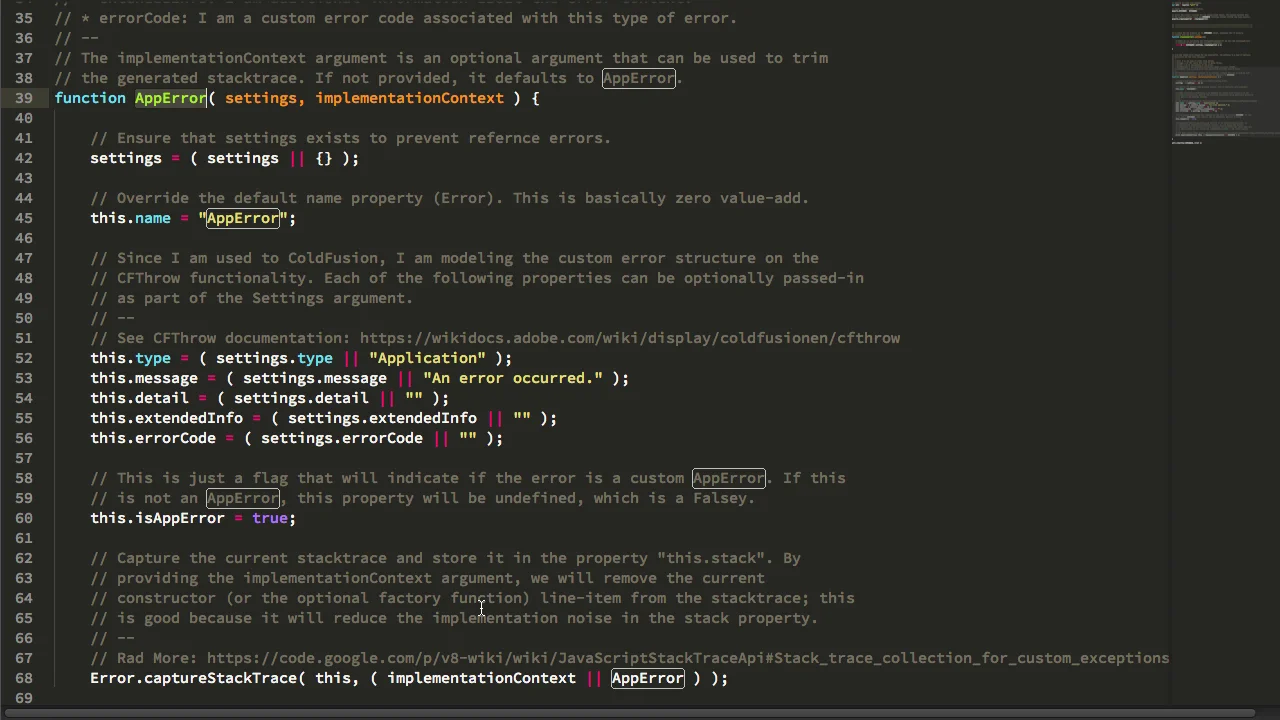
Now, let's combine this with adding more context. We'll create a base ApplicationError that all our other errors can inherit from.
class ApplicationError extends Error {
  constructor(message, statusCode, errorCode, originalError) {
    super(message);
    this.name = this.constructor.name; // Automatically sets the name
    this.statusCode = statusCode || 500;
    this.errorCode = errorCode || 'INTERNAL_ERROR';
    this.cause = originalError; // To "wrap" the original error

    // This is the magic for clean stack traces
    if (Error.captureStackTrace) {
      Error.captureStackTrace(this, this.constructor);
    }
  }

  toJSON() {
    return {
      name: this.name,
      message: this.message,
      statusCode: this.statusCode,
      errorCode: this.errorCode,
    };
  }
}

// Example of a specific error extending our base class
class NotFoundError extends ApplicationError {
  constructor(resource = 'Resource') {
    super(`${resource} not found.`, 404, 'NOT_FOUND');
  }
}
This ApplicationError is a template for production-grade errors. It includes a status code for API responses, a machine-readable error code for programmatic handling, and crucially, it can wrap a lower-level error using the cause property. This "error wrapping" (also called "error chaining") is vital for preserving the full context of a failure.
The following article is a phenomenal deep dive into these advanced patterns. It's dense but contains everything you need to know to design an enterprise-grade error system.
Why Custom JavaScript Errors Create Messy Stack Traces ...
This article is your guide to creating truly professional custom errors in JavaScript.
Start by reading The Problem and its solution in the section Understanding Error.captureStackTrace. Next, study the complete pattern, which shows how to add custom properties and a toJSON method. Then, review the practical Database Layer Errors example to see error wrapping in action. Finally, absorb the concept of a Hierarchical Error System, which is the blueprint for scalable error management in large applications.
3. The Global Safety Net: Handling Unhandled Rejections [Often asked]
What happens if a promise rejects but there's no .catch() handler or try...catch block to intercept it? This is an unhandled promise rejection. In older Node.js versions, this would just print a warning. In modern Node.js (v15+), it will crash the process by default. In the browser, the error is logged to the console, but the application keeps running.
A senior engineer never leaves this to chance. We must set up a global handler to catch these rejections. This is our last line of defense for logging errors we didn't anticipate.
In Node.js:
You listen to the unhandledRejection event on the global process object.
process.on('unhandledRejection', (reason, promise) => {
  console.error('CRITICAL: Unhandled Rejection at:', promise, 'reason:', reason);
  // Here you would send the error to your logging service (e.g., Sentry, Datadog)
  // In a production environment, you might want to exit gracefully after logging.
  // process.exit(1);
});

// Example that would trigger the handler:
Promise.reject(new Error("Something went terribly wrong!"));
In the Browser:
You add an event listener to the window object for the unhandledrejection event.
window.addEventListener('unhandledrejection', (event) => {
  console.error('CRITICAL: Unhandled promise rejection:', event.reason);
  // Again, log this to your monitoring service.
  // The event can be prevented from logging to console with event.preventDefault();
});

// Example that would trigger the handler:
Promise.reject(new Error("Something broke in the UI!"));
Implementing these global handlers is a critical piece of production readiness. It ensures that no error ever goes unnoticed.
Mental Model: Error Taxonomy
Think of your error system like a biological classification.
Erroris the Kingdom (the most general category).- Your
ApplicationErroris a Phylum (a major division, e.g., errors related to your app). ClientErrorandServerErrorare Classes (separating user-facing vs. internal issues).NotFoundErrorandAuthenticationErrorare Orders (more specific types of client errors).DatabaseConnectionErroris an Order withinServerError.
This hierarchy lets you handle errors at the exact level of specificity required. You can catch (err) and check if (err instanceof ClientError) to handle all 4xx-level issues in one block, or you can be more specific and catch (err) where err instanceof NotFoundError to display a custom "Not Found" page. This structured approach is the foundation of clean, scalable error handling.
Conclusion
You've now moved beyond simply catching errors to designing the very nature of the errors themselves. You can create a rich hierarchy of custom error classes that provide essential context, produce clean stack traces for easier debugging, and are serializable for effective logging. You've also built the ultimate safety net by implementing global handlers for unhandled promise rejections. This knowledge is fundamental to building resilient, observable, and maintainable systems—a core competency of any senior engineer.
Key Takeaways:
- Extend the built-in
Errorclass to create custom error types for different failure scenarios. - Use
instanceofincatchblocks to programmatically distinguish between error types and execute specific logic. - For professional-grade errors, use
Error.captureStackTrace(in V8 environments) to create clean stack traces that exclude constructor noise. - Enrich your custom errors with contextual properties like
statusCode,errorCode, and acauseproperty to wrap the original error. - Implement a
toJSON()method on your custom errors to control how they are serialized for logging. - Always set up global handlers (
unhandledRejectionin Node.js,unhandledrejectionin the browser) to catch and log any errors that slip through your localtry...catchblocks.
In our next lesson, we will put this all together. Now that you can create and handle specific asynchronous errors, you'll learn to build advanced asynchronous control flow patterns, starting with a robust retry-with-exponential-backoff utility that intelligently reacts to the different types of errors we've just designed.