Welcome back. In our last lesson, you mastered the four Promise combinators, learning to choose between Promise.all's all-or-nothing approach, Promise.allSettled's comprehensive reporting, Promise.race's speed, and Promise.any's redundancy. A key takeaway was how each combinator handles rejection differently. This naturally leads to our next critical topic: what do you do when a promise rejects?
Merely knowing that an operation can fail is insufficient for a senior engineer. You must be able to control the flow of errors with precision, ensuring they are caught, logged, and handled gracefully without crashing the application or leaving the user in a broken state. This lesson focuses on tracing error propagation through both classic Promise chains and modern async/await syntax. You will learn not just how to catch errors, but why the async/await model provides a superior, more intuitive, and less error-prone mechanism for building resilient systems.
Why This Matters at a Senior Level
A mid-level developer can write a .catch() block. A senior engineer understands the precise mechanics of how an error flows through a chain of asynchronous operations and can architect an error-handling strategy for an entire feature. They know the subtle but critical difference between return promise and return await promise within a try/catch block—a distinction that often separates a robust system from one riddled with unhandled promise rejections. In an interview, being able to articulate these nuances demonstrates a deep, practical understanding of JavaScript's concurrency model, moving you far beyond basic syntax.
Core Concepts
1. Error Propagation in Promise Chains [Often asked]
Before async/await, error handling was managed with the .catch() method. Let's start with its behavior. When a promise in a chain rejects, the JavaScript runtime looks for the next available .catch() handler, skipping all intermediate .then() handlers.
Consider this example:
new Promise((resolve, reject) => {
  console.log('Initial');
  reject('Something went wrong');
})
.then(() => {
  // This block is skipped
  console.log('This will not run');
})
.catch((error) => {
  console.log('Caught:', error);
  // We can "recover" from the error by returning a value
  return 'Recovered value';
})
.then((value) => {
  // This block now executes
  console.log('Continued with:', value);
});

// Logs:
// "Initial"
// "Caught: Something went wrong"
// "Continued with: Recovered value"
A .catch() block isn't just a dead end; it's a branching point. It can either handle the error and return a new value to resume the "happy path" (the subsequent .then() handlers), or it can throw a new error (or return a rejected promise) to continue the "error path."
The Fireship channel has a concise explanation of this flow.
The Async Await Episode I Promised
This video quickly demonstrates how a single .catch() can handle errors from anywhere in the preceding promise chain.
Watch from this section to see the concept of a unified error handler in a promise chain.
While powerful, this can lead to complex scoping and what some developers call "pyramid of doom" scenarios when logic becomes nested.
5 Async + Await Error Handling Strategies
In this video, Wes Bos explains the limitations and potential "spaghetti" code that can arise from complex .then() and .catch() chains.
Watch the section from "the first method" where he discusses the scoping challenges of .catch().
2. Simplification with async/await and try...catch [Always asked]
async/await revolutionized asynchronous error handling by allowing us to use the familiar synchronous try...catch block. This is more than just syntactic sugar; it fundamentally changes how we reason about error flow.
When you await a promise, one of two things happens:
- If the promise fulfills, the
awaitexpression evaluates to the fulfilled value. - If the promise rejects, the
awaitexpression throws the rejection reason.
This "throwing" behavior is the key. It means we can wrap await calls in a try...catch block, just like we would with synchronous code that might throw an error.
Let's refactor our previous example:
async function runAsyncTask() {
  try {
    console.log('Initial');
    await Promise.reject('Something went wrong');
    // This line is never reached
    console.log('This will not run');
  } catch (error) {
    console.log('Caught:', error);
    return 'Recovered value';
  }
}

runAsyncTask().then((value) => {
  console.log('Continued with:', value);
});

// Logs:
// "Initial"
// "Caught: Something went wrong"
// "Continued with: Recovered value"
The logic is identical, but the code is flatter, more readable, and avoids the nesting issues of promise chains. The control flow is much clearer.

The following reading provides a solid foundation for this concept.
This article from javascript.info provides a crystal-clear explanation of how await interacts with rejected promises and the try...catch block.
Read the section "Error handling" to understand how a rejection becomes a thrown error. Then, review the subsection comparing try..catch to the older .catch method.
3. The return await Nuance: A Senior-Level Trap
This is where deep understanding separates you from the crowd. Consider an async function that calls another async function within a try...catch block. What should you return?
Let's analyze the brilliant breakdown by Jake Archibald.
await vs return vs return await - JakeArchibald.com
This article is the definitive guide on a subtle but critical topic. Understanding this will prevent hard-to-debug unhandled promise rejections.
First, familiarize yourself with the helper function. Then, carefully read through the four scenarios presented: "Just calling": The most common bug. The error is never caught. "Awaiting": The error is caught, but the success value is lost. "Returning": The success value is passed on, but the error is NOT caught by the local try/catch. "Return-awaiting": The correct pattern inside a try/catch to handle both success and failure properly. Finally, read the important note that return await is redundant when not inside a try/catch.
To summarize the key insight from the article:
return myAsyncFunc();inside atryblock: You are passing the promise "hot potato" to the caller. Yourcatchblock will never execute because you aren'tawaiting the result to see if it throws. The responsibility for catching is delegated upwards.return await myAsyncFunc();inside atryblock: You areawaiting the promise. If it rejects, your localcatchblock will execute. If it resolves, youreturnthe resolved value. This allows you to locally intercept errors while still propagating success values.
Use return await inside a try...catch block. Use return outside of one.
4. Debugging Asynchronous Call Stacks
Modern developer tools have made huge strides in debugging asynchronous code. In the past, an error thrown after an await would have a call stack that started at the point of resumption, losing the context of where the async function was originally called. Now, DevTools provide "async stack traces."
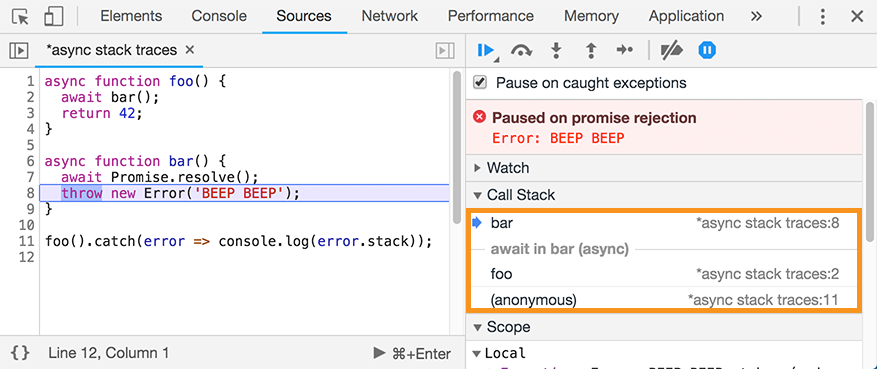
This feature makes the try...catch model with async/await even more powerful, as the debugging experience aligns with the synchronous-looking code structure.
Mental Model: The Try-Catch Net
Think of your asynchronous code as a trapeze artist performing a series of aerial maneuvers (await calls).
-
A Promise chain with
.catch()is like having a single, large safety net at the very end of the entire routine. If the artist falls at any point, they drop past all subsequent trapezes and land in the final net. The person managing the net can then decide to give them a boost back up (return value) or declare the routine over (throw error). -
An
asyncfunction withtry...catchis like having a dedicated safety net directly under each maneuver. Thetryblock defines the performance area. If the artist misses a catch (awaiton a rejected promise), they immediately fall into the net below (catchblock). The local crew can help them up right there before they decide what to do next. It's immediate, localized, and much easier to manage.
Conclusion
You've now dissected the mechanics of asynchronous error handling in JavaScript. You can trace an error's path through a .catch() chain and appreciate the elegant simplification async/await brings with try...catch. Most importantly, you understand the critical return vs. return await distinction, a hallmark of a senior developer's attention to detail. This knowledge is not just for passing interviews; it's for writing robust, predictable, and debuggable code that can withstand the rigors of production.
Key Takeaways:
- A
.catch()in a promise chain handles rejections from any preceding.then()and can either resolve the chain with a new value or continue the rejection. awaiton a rejected promise throws an error, allowing you to use standardtry...catchblocks for asynchronous error handling.- Inside a
try...catchblock,return await promise;is the correct way to both handle potential rejections locally and propagate successful values. - Outside a
try...catchblock,return awaitis redundant; simplyreturn promise;is sufficient. - Modern DevTools provide async stack traces, making debugging errors in
async/awaitcode much more intuitive.
In the next lesson, we will move from how to catch errors to what we are catching. You will learn to design and implement custom Error subclasses and handle unhandled promise rejections globally, allowing you to create a far more expressive and maintainable error handling strategy for your applications.