Hello! Welcome to the fifth lesson in our module on "Production-Grade Dockerfiles."
In our last session, we learned how to parameterize builds using ARG, making our Dockerfiles more flexible and CI/CD-friendly. Now, we shift our focus from building the image to ensuring its runtime reliability. Just because a container starts doesn't mean the application inside it is working correctly.
Today, we will address this by learning how to configure container health checks using the HEALTHCHECK instruction. This is a critical feature for building resilient, self-healing systems. It allows Docker—and by extension, orchestrators like Kubernetes—to go beyond simply checking if a process is running and instead verify if the application is truly functional. This capability is fundamental to achieving the production-ready deployments you're aiming for.
1. The Problem: A Running Container Isn't Always a Healthy Container
Imagine a web application container that starts successfully. The web server process is running, so from Docker's default perspective, everything is fine. However, the application might be stuck in a deadlock, unable to connect to its database, or has run out of memory. It's "running" but completely unable to serve requests. This is a "zombie" state that can bring down your service without any obvious process-level failure.
The HEALTHCHECK instruction solves this by providing a direct window into the application's true state.
The Missing Layer in Production-Grade Containers
To start, let's get a clear understanding of what HEALTHCHECK is and why it's considered a vital part of any production-grade container. This article provides an excellent introduction.
Please read the introduction and the section 'What is Dockerfile HEALTHCHECK?'. Focus on how Docker uses the command's exit code and why this is so valuable for orchestration systems.
As the article mentions, without a health check, an orchestrator only knows that PID 1 inside the container is active. With HEALTHCHECK, the orchestrator gains application-level awareness, enabling it to automatically restart or replace an unhealthy container. This is a core principle of automated recovery in DevOps.
2. The HEALTHCHECK Instruction: Syntax and Options
The HEALTHCHECK instruction is added to your Dockerfile and defines a command that Docker will run periodically inside the container.
The basic syntax is:HEALTHCHECK [OPTIONS] CMD command
Docker uses the exit code of the command to determine health:
0: The container is healthy.1: The container is unhealthy.2: This exit code is reserved and should not be used.
You can also disable a health check inherited from a base image using HEALTHCHECK NONE.
The real power comes from the options that let you fine-tune its behavior.
The Missing Layer in Production-Grade Containers
The article 'The Missing Layer in Production-Grade Containers' provides a clean breakdown of the available options.
Now, read the 'Syntax Breakdown' section. Pay close attention to the purpose of each parameter: --interval, --timeout, --start-period, and --retries.
To summarize these crucial options:
--interval: How often to run the check (e.g., every 30s).--timeout: How long to wait for the command to return a result before considering it failed.--retries: How many consecutive failures are needed to mark the container asunhealthy. This prevents flagging a container as unhealthy due to a single transient glitch.--start-period: A grace period for the container to initialize before health checks start counting against the retry limit. This is essential for applications with longer startup times (like a Java application warming up its JVM or an ML model loading).
3. Implementing a Health Check
A common and effective way to implement a health check is to:
- Expose a dedicated health endpoint in your application (e.g.,
/healthor/status). - Use a command-line tool inside the container (like
curlorwget) to query this endpoint.
Let's look at a practical example. Given your interest in AI, we'll use a scenario for an ML inference API.
Implementing Health Checks for ML Inference Containers
The article 'Implementing Health Checks for ML Inference Containers' shows exactly how to do this, including how to create a more intelligent health endpoint in a Python application.
Please read the section 'Implementing Health Checks for Inference APIs'. Notice the difference between the 'Simple HTTP Check' using curl and the more robust 'Application-Level Health Endpoint' using FastAPI. The latter demonstrates how a health check can verify internal state, like whether an ML model has loaded.
The key pattern shown in the curl example is CMD curl --fail http://localhost:8000/health || exit 1. Let's break this down:
curl --fail: This tellscurlto return a non-zero exit code (which signals failure) if the server responds with an HTTP error code (4xx or 5xx).|| exit 1: This is a shell command. The||(OR) operator means "if the command on the left fails, run the command on the right." So, ifcurlfails for any reason (e.g., it can't connect to the server at all), the command ensures the health check still exits with code1(unhealthy).
This combination creates a very robust check.
Test your understanding!
You are writing a Dockerfile for a Go application that runs on port 9090 and has a health endpoint at /ping. The application can take up to 15 seconds to start. You want to check its health every minute, allow 10 seconds for the check to complete, and mark it as unhealthy only after 3 consecutive failures.
Write the HEALTHCHECK instruction for this scenario.
Show answer
HEALTHCHECK --interval=1m --timeout=10s --start-period=15s --retries=3 \
  CMD curl --fail http://localhost:9090/ping || exit 1
--interval=1m: Check every minute.--timeout=10s: Wait up to 10 seconds.--start-period=15s: Provides a 15-second grace period for startup.--retries=3: Requires 3 failures to be marked unhealthy.- The
CMDuses the robustcurl --fail || exit 1pattern pointed at the correct port and endpoint.
4. Monitoring Container Health Status
Once you've added a HEALTHCHECK and run a container, you need to see the results. Docker provides two main commands for this.
1. docker ps: This gives you a quick, at-a-glance status. The STATUS column will show the health state in parentheses.
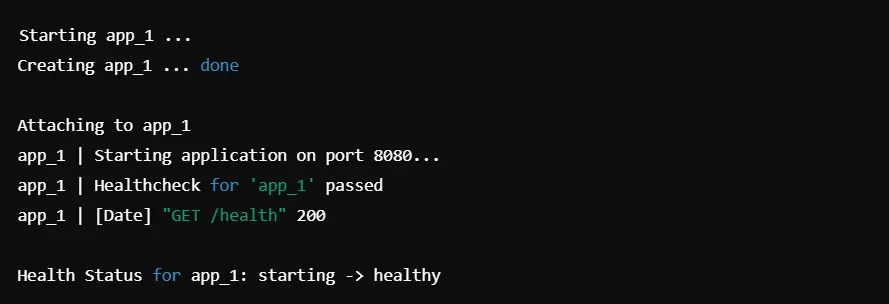
2. docker inspect: For a detailed view, including the output from the last few health checks, docker inspect is the tool to use. This is invaluable for debugging a failing health check.
Implementing Health Checks for ML Inference Containers
Let's return to the 'ML Inference Containers' article to see the exact commands and sample output for monitoring health.
Read the final section, 'Checking Container Health Status'. It shows you how to use docker ps and provides a great docker inspect command to extract and format just the health status log.
The command docker inspect --format='{{json .State.Health}}' <container_id> is particularly useful as it filters the massive JSON output of inspect down to only the health information.
5. Best Practices and Common Pitfalls
To wrap up, let's review some key best practices and things to avoid when implementing health checks. Getting this right is key to building reliable systems and avoiding ones that are noisy or prone to false alarms.
The Missing Layer in Production-Grade Containers
The 'Mihir Popat' article provides a concise list of common mistakes and best practices.
Please read the sections 'Common Pitfalls' and 'Best Practices'. These are excellent rules of thumb for production environments.
Key points to remember:
- Don't use heavyweight tools: In minimal images (like
alpineordistroless), tools likecurlmight not be present. Always ensure your health check command uses a tool available in your final image. - Tune your timeouts: Overly aggressive intervals or short timeouts can cause false positives on a busy system. Tailor the values to your application's expected performance.
- Use a dedicated health endpoint: This allows you to perform deep checks (database connections, dependency availability) without adding load to your main application logic.
- Use a start period: Give your application time to start before you start probing it.
Conclusion
You've now learned how to implement one of the most important features for production-ready containers. By using the HEALTHCHECK instruction, you empower Docker and orchestration platforms to understand your application's true state, leading to more resilient and self-healing deployments.
Key Takeaways:
- A running container is not necessarily a healthy one.
HEALTHCHECKbridges this gap. - The instruction is configured with a
CMDand fine-tuned with options like--interval,--timeout,--start-period, and--retries. - A robust health check command (like
curl --fail || exit 1) is essential for reliable checks. - You can monitor health status using
docker psfor a quick look anddocker inspectfor detailed logs. - This feature is not just for Docker; it is the foundation for liveness and readiness probes in Kubernetes, a topic we will explore later in your learning journey.
In our next lesson, we'll continue our focus on security and production best practices by learning how to set the USER instruction to run containers as a non-root user, a simple but powerful technique for improving security.