Hello! In our last lesson, we built a robust, automated versioning strategy for our Docker images using docker/metadata-action. We've moved beyond the risky latest tag, and our CI/CD pipeline can now produce images with meaningful, immutable tags based on Git branches and tags. This was a crucial step in professionalizing our workflow.
Today, we'll focus on the final step in the Continuous Integration phase: the push. This lesson directly addresses the learning outcome: Automate pushing images to a container registry as part of a deployment pipeline. We'll treat the image push not just as a storage step, but as a critical handover event that can trigger deployments. We'll explore how to automate pushes to different kinds of registries, a core skill for any DevOps Engineer working with containerized applications.
Let's start by looking at where this step fits in the grand scheme of things.
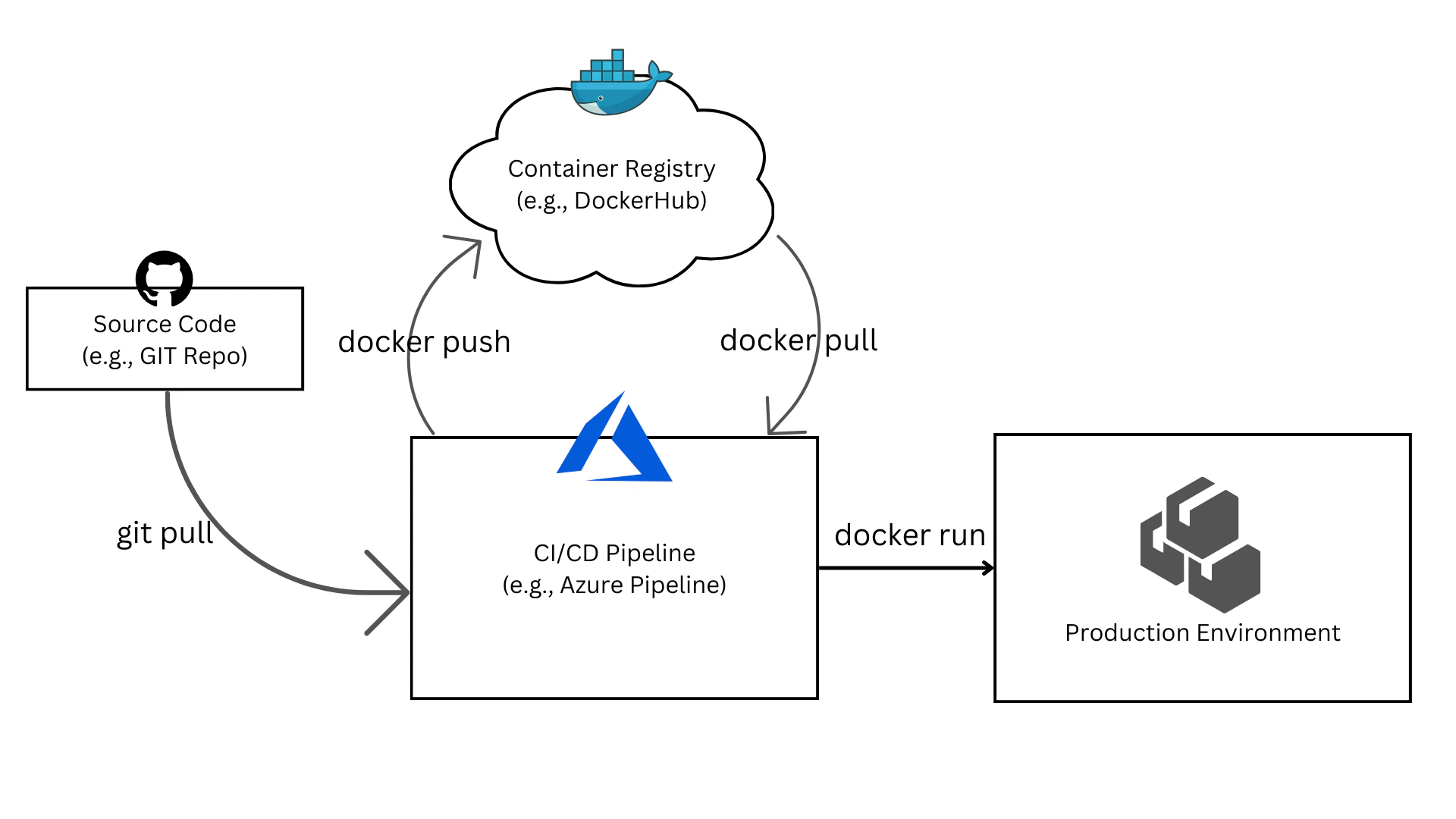
The Push: A Bridge from CI to CD
In modern deployment patterns like GitOps, the container registry is more than just a place to store images. It's an event source. Continuous Deployment (CD) tools like ArgoCD or Flux often monitor a registry for new image tags. When a new version (e.g., myapp:1.2.4) is pushed, the CD tool automatically pulls that image and updates the application in Kubernetes or another environment.
Therefore, automating the push is how you automate the trigger for a deployment. Your CI pipeline's responsibility ends when it successfully builds, tests, and pushes a new, versioned image. The CD pipeline's responsibility begins when it detects that new image.
Conditional Pushing: A Strategic Approach
You don't necessarily want to push every single image from every branch to your primary container registry. A common strategy is to use conditional logic in your CI/CD pipeline:
- On every push to
main: Build, test, and perhaps push the image with a commit SHA tag (e.g.,sha-a1b2c3d) to a development or staging registry. - On creation of a Git tag (e.g.,
v1.2.4): Build, test, and push the image with a proper semantic version tag (e.g.,1.2.4) to the production registry. This is the official release.
Let's see how to implement this automation for different registries using GitHub Actions.
Pushing to Docker Hub (with Conditions)
We've already configured our pipeline to push to Docker Hub. Now, let's refine it by adding a condition so that it only pushes a "release" image when we create a Git tag. We can achieve this with an if condition in our workflow job.
  build-and-push:
    # This job now only runs when a git tag is pushed
    if: startsWith(github.ref, 'refs/tags/')
    needs: test
    runs-on: ubuntu-latest
    steps:
      - name: Checkout code
        uses: actions/checkout@v4

      # ... (docker/metadata-action step remains the same) ...

      - name: Login to Docker Hub
        uses: docker/login-action@v3
        with:
          username: ${{ secrets.DOCKERHUB_USERNAME }}
          password: ${{ secrets.DOCKERHUB_TOKEN }}

      - name: Build and push
        uses: docker/build-push-action@v5
        with:
          context: .
          push: true
          tags: ${{ steps.meta.outputs.tags }}
          labels: ${{ steps.meta.outputs.labels }}
          # ... (cache settings) ...
The key line is if: startsWith(github.ref, 'refs/tags/'). This ensures the entire build-and-push job is executed only for release events, making the push to your primary registry a deliberate act.
For a comprehensive review of setting up a CI pipeline that pushes to a private Docker Hub repository, the following video is an excellent resource.
GitHub Actions Tutorial - Basic Concepts and CI/CD Pipeline with Docker
This video from TechWorld with Nana provides a complete demonstration of building a CI pipeline with GitHub Actions that builds a Docker image and pushes it to a private Docker Hub repository. It's a great practical example of the concepts we're discussing.
Watch the section from 24:36 to 31:52. Focus on how a pre-built action is used to build and push the image, how secrets are used for authentication, and how parameters like the image name are configured.
Pushing to GitHub Container Registry (GHCR)
GHCR is GitHub's native container registry. It's tightly integrated with GitHub Actions, making it a very convenient choice.
The main differences from Docker Hub are:
- Image Naming: The image URL format is
ghcr.io/YOUR_GITHUB_USERNAME/IMAGE_NAME. - Authentication: You can authenticate using the built-in
GITHUB_TOKENthat is automatically available in every workflow run. You don't need to create a separate personal access token.
This article snippet shows how simple the build-push-action configuration becomes.
Automating Docker Image Versioning, Build, Push, and Scanning Using GitHub Actions
This article from Md. Abu Raihan Srabon on dev.to demonstrates a clean setup for pushing to GitHub Container Registry.
Read the section 'Clean Docker Build and Push to GHCR'. Pay attention to the tags format, which now uses ghcr.io/${{ github.repository }}, and note the simplicity of the login step (which we will add next).
Here’s how you would adapt your workflow to push to GHCR:
  build-and-push-ghcr:
    # Run this job on every push to the main branch
    if: github.ref == 'refs/heads/main'
    runs-on: ubuntu-latest
    # Grant permissions for the GITHUB_TOKEN to write to packages
    permissions:
      contents: read
      packages: write
    steps:
      - name: Checkout code
        uses: actions/checkout@v4

      - name: Docker meta
        id: meta
        uses: docker/metadata-action@v5
        with:
          # The image name now points to GHCR
          images: ghcr.io/${{ github.repository }}

      - name: Login to GHCR
        uses: docker/login-action@v3
        with:
          registry: ghcr.io
          # The username is the GitHub user or organization that owns the repo
          username: ${{ github.repository_owner }}
          # The password is the GITHUB_TOKEN secret
          password: ${{ secrets.GITHUB_TOKEN }}

      - name: Build and push to GHCR
        uses: docker/build-push-action@v5
        with:
          context: .
          push: true
          tags: ${{ steps.meta.outputs.tags }}
          labels: ${{ steps.meta.outputs.labels }}
Notice the permissions block at the job level. This is required to grant the temporary GITHUB_TOKEN the necessary scope to push packages (container images) to GHCR.
Test your understanding!
A developer wants to set up a pipeline where pushes to any feature branch (e.g., feat/new-login) are automatically built and pushed to GHCR for internal testing, but pushes to Docker Hub only happen for official v1.x.x releases. How would you structure the workflow file to achieve this?
Show answer
You would create two separate jobs in your workflow file:
push-to-ghcrjob: This job would have a condition likeif: startsWith(github.ref, 'refs/heads/feat/'). It would contain the steps to log in to GHCR (usingsecrets.GITHUB_TOKEN) and push the image.push-to-dockerhubjob: This job would have a condition likeif: startsWith(github.ref, 'refs/tags/v'). It would contain the steps to log in to Docker Hub (usingsecrets.DOCKERHUB_TOKEN) and push the release-tagged image.
This separation allows for different triggers and authentication mechanisms for different registries within the same workflow.
Pushing to a Cloud Provider Registry (AWS ECR)
For production systems, you'll often use a registry provided by your cloud provider, such as Amazon Elastic Container Registry (ECR), Google Artifact Registry, or Azure Container Registry. These offer better integration with the cloud ecosystem, IAM-based security, and often lower network latency for your running applications.
Authentication is the main challenge here. Instead of a simple token, you use the cloud's Identity and Access Management (IAM) system. The general pattern is:
- Configure credentials (e.g., an IAM User's access key or an OIDC role) as GitHub secrets.
- Use a dedicated GitHub Action from the cloud provider to authenticate.
- This action retrieves temporary credentials and configures the Docker client.
- Proceed with the
docker/build-push-actionas usual.
Let's walk through an example for AWS ECR.
Build and push Docker images to Amazon ECR using GitHub Actions and Terraform
This official AWS prescriptive guidance outlines the pattern for automating ECR pushes with GitHub Actions. While it includes Terraform, the GitHub Actions workflow logic is what we'll focus on.
First, review the 'Architecture' section to understand the high-level flow. Then, read the 'Customize the workflow' epic. Focus on the requirements mentioned for the workflow.yaml file, such as specifying the AWS account ID, region, and the need for IAM roles.
Here is a practical workflow snippet to push an image to AWS ECR.
Prerequisites:
- You have created an ECR repository in your AWS account.
- You have an IAM User with programmatic access and permissions to push to ECR (
ecr:GetAuthorizationToken,ecr:BatchCheckLayerAvailability,ecr:InitiateLayerUpload, etc.). - You have stored the user's
AWS_ACCESS_KEY_IDandAWS_SECRET_ACCESS_KEYas secrets in your GitHub repository.
  build-and-push-ecr:
    # Run this job for releases
    if: startsWith(github.ref, 'refs/tags/v')
    runs-on: ubuntu-latest
    permissions:
      id-token: write # Required for configuring AWS credentials with OIDC
      contents: read
    steps:
      - name: Checkout code
        uses: actions/checkout@v4

      # 1. Configure AWS credentials
      - name: Configure AWS credentials
        uses: aws-actions/configure-aws-credentials@v4
        with:
          aws-access-key-id: ${{ secrets.AWS_ACCESS_KEY_ID }}
          aws-secret-access-key: ${{ secrets.AWS_SECRET_ACCESS_KEY }}
          aws-region: us-east-1 # Change to your region

      # 2. Login to Amazon ECR
      - name: Login to Amazon ECR
        id: login-ecr
        uses: aws-actions/amazon-ecr-login@v2

      # 3. Docker meta to generate tags, pointing to the ECR registry
      - name: Docker meta
        id: meta
        uses: docker/metadata-action@v5
        with:
          # ECR image format: <aws_account_id>.dkr.ecr.<region>.amazonaws.com/<repo_name>
          images: ${{ steps.login-ecr.outputs.registry }}/${{ github.repository }}

      # 4. Build and push the image
      - name: Build and push to ECR
        uses: docker/build-push-action@v5
        with:
          context: .
          push: true
          tags: ${{ steps.meta.outputs.tags }}
          labels: ${{ steps.meta.outputs.labels }}
This pattern is very similar for other cloud providers. For Google Cloud, you would use the google-github-actions/auth and google-github-actions/setup-gcloud actions, as demonstrated in the video resource "Build a Docker Image and Publish It to GCP GCR & Artifact Registry using Github Actions" (ID LINK).
Conclusion
You've now mastered a critical part of the CI/CD lifecycle: automating the push of versioned Docker images to various types of container registries. This step is the automated handshake between your build process and your deployment process.
Key Takeaways:
- The Push as a Trigger: Pushing a new image tag to a registry is a standard mechanism for initiating automated deployments in modern GitOps workflows.
- Conditional Execution is Key: Use
ifconditions in your GitHub Actions to strategically control when and where images are pushed, separating development builds from production releases. - Registries Have Different Auth Patterns:
- Docker Hub: Requires a username and personal access token stored as secrets.
- GHCR: Can use the convenient, built-in
secrets.GITHUB_TOKENfor seamless authentication. - Cloud Registries (ECR, GCR): Rely on more robust IAM-based authentication, typically using dedicated actions from the cloud provider to handle login.
- The Workflow is Modular: The core
docker/build-push-actionremains the same; you just swap out the preceding login steps and the image name format depending on your target registry.
In our next lesson, we will shift our focus to security. Now that our pipeline can build, test, and push images, we'll ask a vital question: "Is this image secure?" We will learn how to implement a security gate in a CI/CD job to fail builds based on vulnerability scan results, preventing insecure code from ever reaching a registry.