Hello! Welcome to the next lesson in your journey to master Docker for professional use.
In our last session, we took a crucial first step in preparing applications for orchestration by adapting a Docker image to include health check endpoints. This allows Kubernetes to understand if your application is alive and ready to serve traffic.
Today, we'll build on that foundation. The learning outcome is to refactor a Docker Compose application to use orchestrator-friendly patterns for configuration. We will move beyond simple local setups and embrace principles that make our applications portable, scalable, and secure enough for production environments like Kubernetes. This lesson is about shifting your mindset from "it works on my machine" to "it works reliably everywhere."
The "Why": The Twelve-Factor App Methodology
Before we dive into specific code changes, it's essential to understand the philosophy behind modern, cloud-native application design. The Twelve-Factor App is a methodology that provides a set of best practices for building software-as-a-service applications. These principles were established before Docker and Kubernetes became mainstream, but they are perfectly suited for a containerized world.
Adhering to these factors ensures your application has a clean contract with the underlying operating system and is portable across different execution environments—a core requirement for any DevOps workflow.
Creating a Twelve-Factor App with Docker That Also Works on Kubernetes
To understand these guiding principles, let's watch a few key segments from the video "Creating a Twelve-Factor App with Docker That Also Works on Kubernetes" by Nick Janetakis. This will provide the conceptual foundation for the rest of our lesson.
Please watch the following sections. Focus on the core idea of each factor and how it promotes portability and separation of concerns. Factor III: Config (from 00:15:09 to 00:17:50): Understand the critical importance of separating configuration from code and storing it in the environment. Factor V: Build, Release, Run (from 00:28:12 to 00:31:30): Grasp the concept of three distinct stages and how an immutable Docker image fits into the 'build' stage. Factor VI: Processes (from 00:35:26 to 00:38:20): Note the emphasis on stateless, share-nothing processes, which is the key to horizontal scaling. Factor X: Dev/Prod Parity (from 01:02:13 to 01:05:30): See why using different backing services (like SQLite in dev vs. Postgres in prod) is an anti-pattern that Docker helps solve.
To summarize the key ideas for our context:
- Config in the Environment: Your application's configuration (database URLs, API keys, hostnames) can and will change between environments (dev, staging, prod). Hardcoding them in your application or Docker image is a violation of this principle. The image should be immutable, and the configuration should be injected at runtime.
- Strict Build, Release, Run Separation:
- Build: This is the stage where you run
docker build. It takes your code and dependencies and creates a runnable artifact: your Docker image. This image should be tagged and is considered immutable. - Release: This stage combines the build artifact (your image) with a specific environment's configuration. In Kubernetes, this is when a
Deploymentis created, pulling the image and injectingConfigMapsorSecrets. - Run: This is the final stage where the application runs as one or more processes (containers) in the target environment.
- Build: This is the stage where you run
- Stateless Processes: Your application container should not store any persistent data on its local filesystem. Any state (user sessions, data) must be stored in a backing service (like a database or Redis), which is treated as an attached resource. This allows you to scale, restart, or move containers without data loss.
From Theory to Practice: Orchestrator-Friendly Docker Compose
While Docker Compose is primarily a development tool, we can structure our docker-compose.yml files to follow these principles. This makes the eventual transition to Kubernetes much smoother.
The two most common anti-patterns in development-focused Compose files are:
- Hardcoding environment variables directly in the
docker-compose.yml. - Using a single, monolithic
docker-compose.ymlfor all environments.
Let's see how to fix this.
Stop Struggling with Docker Compose – Use These 10 Tricks Instead!
The video "Stop Struggling with Docker Compose – Use These 10 Tricks Instead!" by VirtualizationHowto demonstrates practical techniques for improving your Compose setup. We'll focus on externalizing configuration.
Please watch the following two segments: Externalizing Configuration (from 04:07 to 06:45): Pay attention to how .env files are used to separate configuration and secrets from the Compose file itself. Multi-configs and Overrides (from 13:00 to 15:53): Understand how to use override files to manage differences between environments (e.g., development vs. production) without duplicating code.
Let's look at a concrete before and after example.
Before: A typical dev-focused docker-compose.yml
# docker-compose.yml (BAD)
version: '3.8'
services:
  web:
    build: .
    ports:
      - "8000:8000"
    environment:
      - DATABASE_URL=postgres://user:supersecret@db:5432/myapp
      - DEBUG=True
    depends_on:
      - db
  db:
    image: postgres:14
    environment:
      - POSTGRES_USER=user
      - POSTGRES_PASSWORD=supersecret
      - POSTGRES_DB=myapp
    volumes:
      - db-data:/var/lib/postgresql/data

volumes:
  db-data:
This file has two major problems: the database password is in plain text, and the DEBUG flag is hardcoded, making it unsuitable for production.
After: A more orchestrator-friendly approach
First, create a .env file to hold our configuration. This file should never be committed to source control.
# .env
DATABASE_URL=postgres://user:supersecret@db:5432/myapp
DEBUG=True
Now, refactor the docker-compose.yml to read from this file.
# docker-compose.yml (GOOD)
version: '3.8'
services:
  web:
    build: .
    ports:
      - "8000:8000"
    environment:
      - DATABASE_URL=${DATABASE_URL} # Reads from .env file
      - DEBUG=${DEBUG:-false}        # Reads from .env, defaults to 'false' if not set
    depends_on:
      - db
  db:
    image: postgres:14
    env_file:
      - .env.db # Separate file for DB credentials
    volumes:
      - db-data:/var/lib/postgresql/data

volumes:
  db-data:
This is a huge improvement. The configuration is now separate from the service definitions. For a production deployment, you would simply provide a different .env file (e.g., with DEBUG=false) without changing the docker-compose.yml.
Mapping Configuration Patterns to Kubernetes
The patterns we just applied in Docker Compose have direct equivalents in Kubernetes. The reason we adopt them is to make this translation straightforward.
First, let's visualize the architectural difference. Docker Compose runs everything on a single host, whereas Kubernetes orchestrates containers across a cluster of machines. This distributed nature is why portable configuration is non-negotiable.
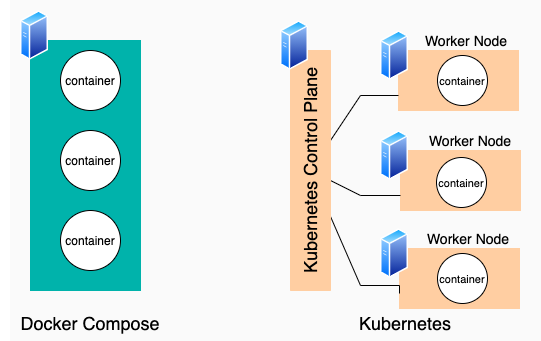
Now, let's map the concepts.
From Docker Compose to Kubernetes: A Step-by-Step Guide
This article, "From Docker Compose to Kubernetes: A Step-by-Step Guide", provides an excellent summary of how Compose features translate to Kubernetes resources.
Please read the following sections: "Map Docker Compose to Kubernetes Resources": Focus on the bullet points mapping environment and depends_on. "Manage Configurations & Secrets": Understand the distinction between ConfigMaps and Secrets. "Compose → Kubernetes Mapping Cheatsheet": Review this table as a concise summary.
Here's a breakdown of the most important configuration translations:
| Docker Compose Feature | Kubernetes Equivalent | Why it Matters |
|---|---|---|
.env file variables |
ConfigMap |
Used to store non-sensitive configuration data as key-value pairs (e.g., DEBUG=false, API_ENDPOINT=...). This decouples configuration from your application pods. |
Secrets in .env file |
Secret |
Used specifically for sensitive data like API keys and passwords. Kubernetes stores them more securely (e.g., base64 encoded by default, with options for encryption). |
depends_on |
Health Probes & Retries | depends_on only guarantees container start order, not that the service is actually ready. In a distributed system, you must build resilient apps that can wait for dependencies. This is done via readiness probes (from our last lesson) and retry logic in your application code. |
docker-compose run ... |
Job |
One-off administrative tasks like database migrations (rake db:migrate, alembic upgrade head) are run as Kubernetes Jobs. A Job creates one or more pods and ensures they complete successfully. |
Test your understanding!
You have a docker-compose.yml with the following service definition:
services:
  api:
    image: my-api:1.2.0
    environment:
      - CACHE_HOST=redis
      - STRIPE_API_KEY=sk_test_12345
    depends_on:
      - redis
How would you refactor this configuration for Kubernetes? Which Kubernetes objects would you use for CACHE_HOST and STRIPE_API_KEY, and what would you use instead of depends_on?
Show answer
CACHE_HOST=redis: This is non-sensitive configuration. It would be stored in aConfigMap. Theapipod would then be configured to consume this key-value pair as an environment variable.STRIPE_API_KEY=sk_test_12345: This is sensitive data. It must be stored in aSecret. The pod would be configured to mount this secret as an environment variable.depends_on: - redis: This would be replaced by a readiness probe in theapipod's definition. The application code for theapiservice should be responsible for attempting to connect to Redis. The readiness probe would only succeed once a connection to Redis is established, preventing Kubernetes from sending traffic to theapipod until it's truly ready.
Conclusion
You've now learned the core principles for structuring your application's configuration to thrive in an orchestrated environment. By adopting these patterns early in your development lifecycle, even with Docker Compose, you pave the way for smooth, predictable deployments to production systems like Kubernetes.
Key Takeaways:
- Separate Config from Code: Use environment variables for all configuration that varies between deploys.
- Use the Right Tool for the Job: In Kubernetes, use
ConfigMapsfor non-sensitive data andSecretsfor sensitive data. - Build Resilient Applications: Replace the
depends_oncrutch with robust health checks and application-level retry logic. - Embrace Immutability: Your Docker image is an immutable build artifact. Configuration is applied at runtime, not baked into the image.
In our next lesson, we will put this knowledge into practice. We'll analyze a complete Docker Compose application to identify all the modifications needed for Kubernetes compatibility, covering not just configuration but also networking and volumes.