Hello! Welcome back.
In our last lesson, we refactored a Docker Compose application to use orchestrator-friendly configuration patterns. We learned to separate configuration from code using .env files and saw how these patterns map directly to Kubernetes ConfigMaps and Secrets.
Today, we'll continue our journey of preparing applications for Kubernetes. Our learning outcome is to analyze a Docker Compose application to identify modifications needed for Kubernetes compatibility, focusing on networking and volumes. While the previous lesson was about what an application runs with, this lesson is about how its components connect and persist data in a distributed environment. This analysis is a critical skill for any DevOps professional bridging the gap between local development and production orchestration.
A Tale of Two Worlds: Compose vs. Kubernetes
Before we analyze a file, we need to understand the fundamental differences in how Docker Compose and Kubernetes approach networking and storage. They operate on different philosophical levels: one is designed for a single host, the other for a distributed cluster.

This shift from a single-host to a multi-host paradigm is the root of all the modifications we need to make.
Part 1: Deconstructing the Network
Let's break down how networking concepts translate from Compose to Kubernetes.
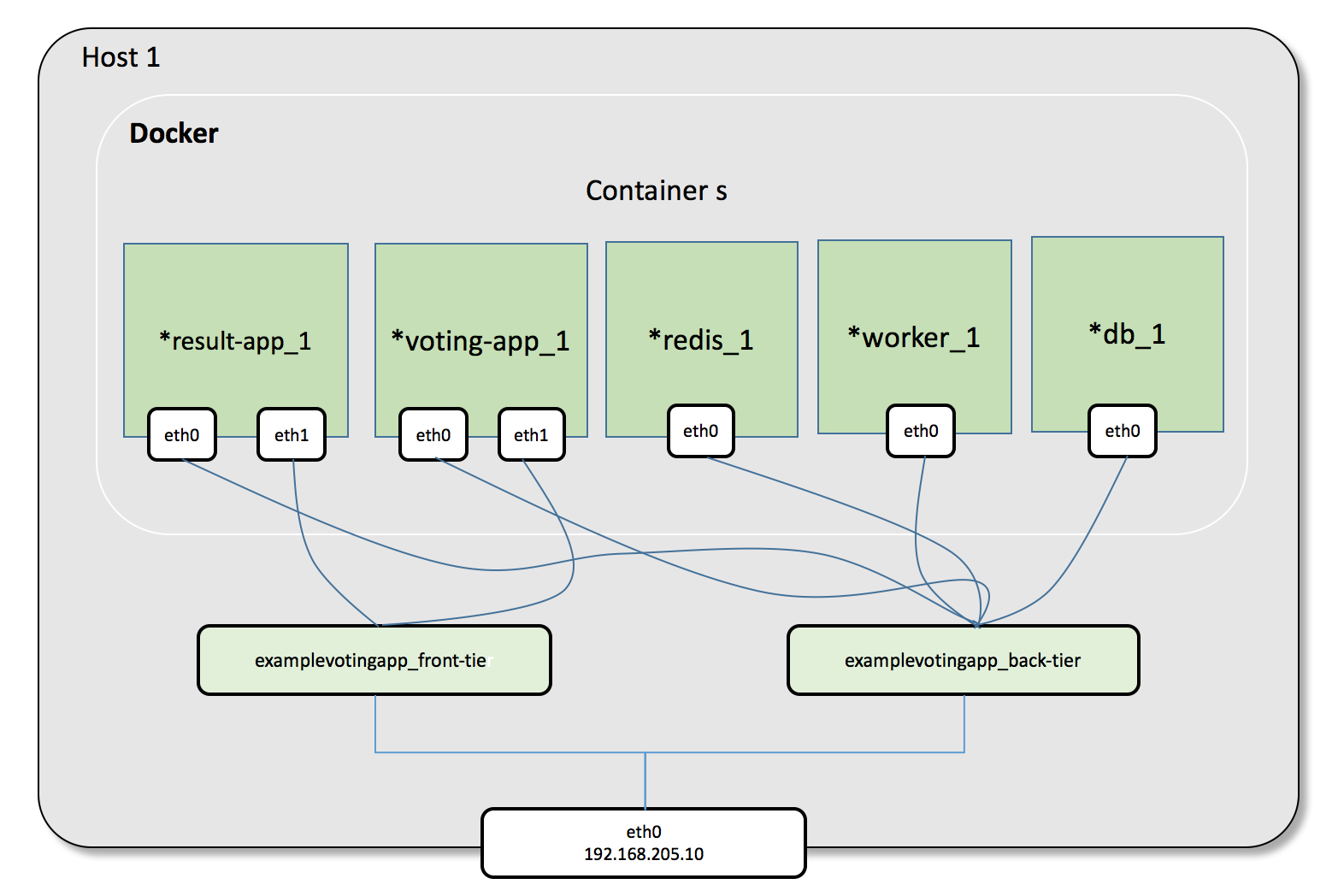
The Docker Compose Network
In Docker Compose, when you run docker compose up, it typically creates a dedicated bridge network for your application. All services defined in the file are attached to this network.
- Service Discovery: Containers can find each other using their service name as a DNS hostname (e.g., the
webservice can connect todb). This works because Docker's embedded DNS server resolves these names within the scope of that single network. - Exposure: Services are exposed to the outside world by mapping a port on the host to a port on the container (
ports: "8080:80").
The Kubernetes Network
Kubernetes uses a fundamentally different model. It assumes a flat network, where every pod in the cluster gets its own unique IP address and can communicate with any other pod, regardless of which physical or virtual machine (node) it's on.
- Service Discovery: Pods are ephemeral and their IPs change. To provide a stable endpoint, Kubernetes uses a
Serviceobject. AServicegets a stable internal IP (ClusterIP) and a DNS name (e.g.,db-service) that automatically load-balances traffic to the correct group of pods. - Exposure: Exposing your application externally is more sophisticated:
Serviceof typeNodePort: Exposes the service on a static port on each node's IP. This is useful for testing but not ideal for production.Serviceof typeLoadBalancer: On a cloud provider, this automatically provisions an external load balancer and points it to your service. This is the standard way to expose a TCP/UDP service.Ingress: An API object that manages external access to HTTP/S services in the cluster. It can provide routing based on hostname or path (e.g.,api.example.com->api-service), and handle TLS termination.
To solidify these concepts, let's turn to a guide.
Moving Docker Compose to Kubernetes — The Practical, No-Fluff Guide
The article "Moving Docker Compose to Kubernetes" provides a concise mapping of these concepts. We'll focus on the networking and storage sections.
Please read the following two sections to see how the concepts map directly: "Canonical concepts mapping (Compose → Kubernetes)": Pay close attention to the mapping for service and networks. "Deep dive: 5) Networking & ingress": Read this to understand the different Kubernetes Service types and the role of an Ingress object. Note the "common migration gotcha" about port mapping.
Part 2: Deconstructing Storage
Now, let's apply the same comparative analysis to storage.
Docker Compose Volumes
In Compose, persistence is typically handled in two ways, both tied to the host machine:
- Named Volumes: (
volumes: - db-data:/var/lib/postgresql/data). Docker manages a specific directory on the host's filesystem. This is the preferred method in Compose. - Bind Mounts: (
volumes: - .:/app). This mounts a directory from your host machine directly into the container. Great for development (live code reloading) but a major anti-pattern for production as it creates a tight coupling to a specific host's file structure.
Kubernetes Volumes
Kubernetes completely abstracts storage away from the host.
- PersistentVolume (PV): Represents a "piece of storage" in the cluster. This could be a cloud disk (like an AWS EBS volume), an NFS share, or another storage backend. It's a cluster resource, just like CPU or memory.
- PersistentVolumeClaim (PVC): A request for storage by a user or application. A pod requests a certain size and type of storage, and Kubernetes finds a matching PV to bind to that claim. This is the key abstraction: your pod doesn't need to know what kind of storage it's using, only that it needs it.
- StatefulSet vs. Deployment:
Deployment: Used for stateless applications. Pods are interchangeable and can be scaled up or down easily.StatefulSet: Used for stateful applications like databases. It provides pods with stable, unique network identifiers (e.g.,db-0,db-1) and stable, persistent storage. Each pod in aStatefulSetgets its own unique PVC.
Let's return to the "Moving Docker Compose to Kubernetes" guide for the storage mapping.
Moving Docker Compose to Kubernetes — The Practical, No-Fluff Guide
This time, we'll focus on the sections covering storage and stateful applications.
Please read these sections: "Canonical concepts mapping (Compose → Kubernetes)": Review the mapping for volumes. "Deep dive: 6) Storage & data": This section explains how to handle different types of data and contrasts StatefulSet with Deployment.
Part 3: The Complete Analysis - A Walkthrough
Now let's put it all together and analyze a real docker-compose.yml file. We will use the example of a simple Node.js application with a MongoDB database.
Here is the original docker-compose.yaml file (from the DigitalOcean tutorial LINK):
# docker-compose.yaml (for analysis)
version: '3.7'

services:
  nodejs:
    build:
      context: .
      dockerfile: Dockerfile
    image: nodejs
    container_name: nodejs
    restart: unless-stopped
    env_file: .env
    ports:
      - "80:8080"
    volumes:
      - .:/home/node/app
      - node_modules:/home/node/app/node_modules
    networks:
      - app-network
    command: ./wait-for.sh db:27017 -- /home/node/app/node_modules/.bin/nodemon app.js

  db:
    image: mongo:4.1.8-xenial
    container_name: db
    restart: unless-stopped
    env_file: .env
    volumes:
      - dbdata:/data/db
    networks:
      - app-network

networks:
  app-network:
    driver: bridge

volumes:
  dbdata:
  node_modules:
Let's audit this file, identifying every piece that needs to change for Kubernetes.
| Compose Feature | In docker-compose.yaml |
K8s Modification Analysis |
|---|---|---|
| Stateful Service | db service (MongoDB) |
This is a stateful service. It needs to be a StatefulSet in Kubernetes, not a Deployment, to ensure stable storage and network identity. |
| Stateless Service | nodejs service |
This is a stateless application frontend. It should be a Deployment in Kubernetes. |
| Port Exposure | ports: - "80:8080" on nodejs |
This exposes the app on the host's port 80. In K8s, this will become a Service of type LoadBalancer to get an external IP. If we were using a domain name, we would use a Service of type ClusterIP and an Ingress resource. |
| Internal Networking | networks: - app-network |
The custom app-network disappears. Pods can communicate by default. We need to create a Service for the db StatefulSet (e.g., named mongo-svc). The nodejs application will connect to this service by its DNS name (mongo-svc). |
| Persistent Volume | volumes: - dbdata:/data/db on db |
The named volume dbdata becomes a PersistentVolumeClaim (PVC). The StatefulSet for the db will reference this PVC to get its persistent storage. |
| Bind Mount | volumes: - .:/home/node/app on nodejs |
This development-time bind mount is an anti-pattern for production. It must be removed. The application code should be baked into the Docker image during the build stage. |
| Command/Dependencies | command: ./wait-for.sh ... |
As we learned last lesson, explicit depends_on and wait scripts are fragile. This should be replaced with a Kubernetes Init Container in the nodejs pod definition to wait for the db service to be ready before starting the app container. |
To see what these translated Kubernetes objects look like, the following video provides an excellent side-by-side walkthrough.
How To Migrate Docker Apps to Kubernetes Using Helm & Manifest Files. Portainer & WireGuard
The video "How To Migrate Docker Apps to Kubernetes" demonstrates the full conversion process. Watching these segments will help you visualize the 'after' state of our analysis, where Compose definitions become Kubernetes manifests.
Watch these key sections where the presenter compares the Docker Compose file to the resulting Kubernetes manifests: Reviewing the Docker Compose file (from 02:13 to 04:13): See how the presenter audits the original file, identifying ports, volumes, and other key parts. The Deployment Manifest (from 06:58 to 20:40): Pay close attention to how volumes from Compose become volumeMounts and a persistentVolumeClaim in the Kubernetes Deployment spec. The Service Manifest (from 20:40 to 26:47): Understand how a Service object exposes the container's ports internally (ClusterIP) or externally (LoadBalancer). The Ingress Manifest (from 26:56 to 29:17): See how an Ingress is used for L7 routing to a service.
Test your understanding!
You are given the following docker-compose.yml for a WordPress site. Based on your analysis, what Kubernetes objects or patterns would you use to replace the ports, volumes, and networks sections for both the db and wordpress services?
version: '3.8'

services:
  db:
    image: mysql:8.0
    volumes:
      - db_data:/var/lib/mysql
    networks:
      - app-net
    environment:
      - MYSQL_ROOT_PASSWORD=somewordpress
      - MYSQL_DATABASE=wordpress

  wordpress:
    image: wordpress:latest
    volumes:
      - wp_data:/var/www/html
    ports:
      - "8000:80"
    networks:
      - app-net
    environment:
      - WORDPRESS_DB_HOST=db:3306
      - WORDPRESS_DB_PASSWORD=somewordpress

volumes:
  db_data:
  wp_data:

networks:
  app-net:
Show answer
Here is a breakdown of the required modifications:
-
dbservice (MySQL):- Type: This is a stateful database, so it should be a
StatefulSet. volumes: The named volumedb_databecomes aPersistentVolumeClaimrequested by theStatefulSet.networks: To allow thewordpressservice to connect, you would create aServiceof typeClusterIPthat targets thedbStatefulSet.
- Type: This is a stateful database, so it should be a
-
wordpressservice:- Type: This service has state (uploaded files, themes, plugins in
/var/www/html), so it should also be aStatefulSetto ensure the data inwp_datais stable. If the WordPress image were configured to store uploads in external object storage (like S3), it could be aDeployment. volumes: The named volumewp_databecomes aPersistentVolumeClaim.ports: The8000:80mapping becomes aServiceof typeLoadBalancerto expose WordPress to the internet on port 8000 (or 80).networks: The customapp-netis no longer needed. Thewordpresscontainer will connect to thedbservice using its Kubernetes DNS name (e.g.,db-svc.default.svc.cluster.local).
- Type: This service has state (uploaded files, themes, plugins in
Conclusion
You have now learned how to perform a critical analysis of a Docker Compose application, identifying the necessary changes to make it compatible with Kubernetes. This process goes beyond simple translation; it requires a shift in thinking from a single-host model to a distributed, abstract one.
Key Takeaways:
- Networking: Host-bound port mappings (
ports) becomeServiceandIngressobjects. Isolated Compose networks become a single, flat pod network whereServiceobjects provide stable DNS endpoints. - Storage: Host-bound volumes and bind mounts are replaced by the
PersistentVolumeandPersistentVolumeClaimabstraction, decoupling storage from any single node. - Application Type: You must identify services as either stateless (
Deployment) or stateful (StatefulSet) to manage their lifecycle and data correctly.
In our next and final lesson of this module, we will put this analysis into action. We will use a tool like Kompose to translate a Docker Compose file into Kubernetes manifests, and with the knowledge from today, you'll be able to understand, critique, and refine its output like a pro.