Hello and welcome to the final lesson in our "Preparing Applications for Kubernetes" module!
In our last session, we conducted a manual analysis of a docker-compose.yml file, identifying the critical changes needed for Kubernetes compatibility. We learned that moving from the single-host world of Compose to the distributed cluster of Kubernetes requires a fundamental shift in how we handle networking and storage.
Today, we'll build directly on that knowledge by learning how to use a tool like Kompose to translate a Docker Compose file into Kubernetes manifests. While manual analysis is crucial for understanding why changes are needed, a tool like Kompose can significantly accelerate the how. You'll discover that it's a powerful assistant, but your expertise is still needed to review and refine its output for production readiness.
From Compose to Kubernetes: Introducing Kompose
As a DevOps Engineer, you're always looking for ways to streamline workflows. Migrating applications from a local Docker Compose setup to a Kubernetes cluster is a common task. Kompose is a tool designed specifically for this purpose.

Let's start with the official documentation to get a clear definition and then dive into using it.
Translate a Docker Compose File to Kubernetes Resources
The official Kubernetes documentation provides the most direct introduction to Kompose. This section will explain what it is and what you need to get started.
Please read the introduction and the "Install Kompose" section of the document. You don't need to perform the installation right now, but familiarize yourself with the process for your operating system (e.g., using curl for Linux or brew for macOS).
The Basic Conversion: kompose convert
At its heart, Kompose has one primary command: convert. This command reads your docker-compose.yml and generates the equivalent Kubernetes YAML files.
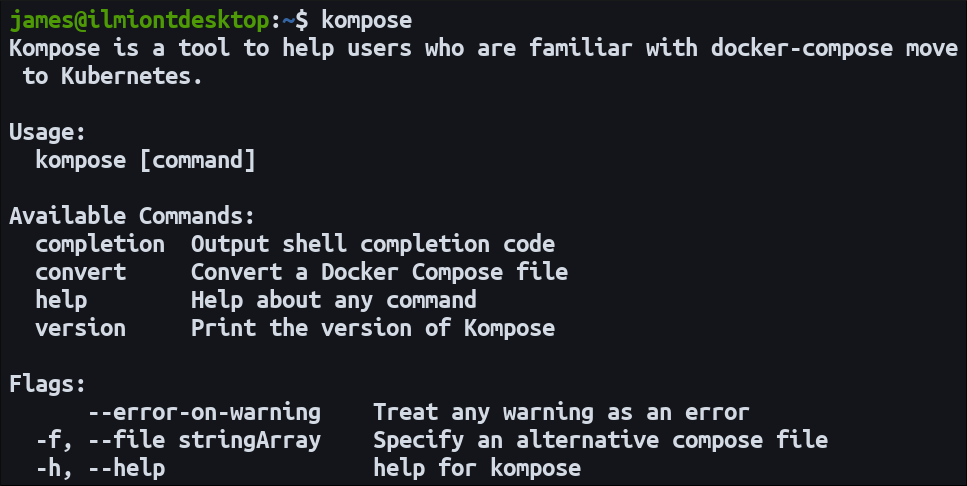
Let's see this in action with a simple example.
Translate a Docker Compose File to Kubernetes Resources
Now, let's walk through a basic conversion using the example provided in the Kubernetes documentation.
Read the "Use Kompose" section. Pay close attention to: The sample docker-compose.yml file with a redis-leader, redis-replica, and web service. The kompose convert command and the list of Kubernetes files it generates (service.yaml, deployment.yaml). The subsequent kubectl apply commands used to deploy these manifests to a cluster.
As you can see, Kompose translates each service in your Compose file into two main Kubernetes objects:
- A
Deployment: Manages the pods running your application container. - A
Service: Exposes the pods to the network.
This direct translation is a great starting point, but production applications often require more nuance.
A More Realistic Example: Refining the Output
Simple conversions are useful, but real-world Compose files contain volumes, build contexts, resource limits, and secrets. Let's look at a more complex example and see how we can guide Kompose to produce better manifests.
The article "From Your Docker-Compose File to a Cluster with Kompose" provides an excellent, production-oriented example.
From Your Docker-Compose File to a Cluster with Kompose
This article demonstrates a practical workflow, including a docker-compose.yml that uses labels and deploy keys, which are highly relevant for a DevOps professional.
Please read the following sections: "Example application description and constraints": This sets the stage for what a production-ready setup needs (configurable ingress, resource limits, secrets). "Associated docker-compose example": Study this docker-compose.yml. Notice the labels and deploy sections. These are key for influencing Kompose's output. "Generate Kubernetes manifests locally": Observe the kompose convert command and the list of generated files. Note how it created Ingress and Secret resources in addition to Deployments and Services.
The Power of Labels
From the article, you saw that Kompose isn't just a blind translator. You can add specific labels to your docker-compose.yml to control the conversion process. This is where your analysis skills from the previous lesson come into play.
| Label | Purpose | Example |
|---|---|---|
kompose.service.type |
Specifies the type of Kubernetes Service to create. |
nodeport, clusterip, loadbalancer |
kompose.service.expose |
If set to true, Kompose will try to create an Ingress. If set to a hostname, it will use that hostname in the Ingress rule. |
true or app.example.com |
By adding kompose.service.type: loadbalancer to your app-front service in the Compose file, you tell Kompose to generate a Service that will provision an external load balancer in a cloud environment—something you'd otherwise have to do manually.
Beyond the Defaults: Advanced Conversions
Kompose defaults to creating Deployment and Service objects, but it can do more. This is particularly useful when you need to create different types of workloads or package your application for Helm.
Translate a Docker Compose File to Kubernetes Resources
The official documentation covers these alternative conversion targets. Knowing these options allows you to use Kompose for more than just basic deployments.
Read the "Alternative Conversions" section. Focus on the flags used to generate: ReplicationControllers (--replication-controller) DaemonSets (--daemon-set) Helm charts (-c or --chart)
The ability to generate a Helm chart skeleton is especially valuable. It gives you a head start in packaging your application for repeatable deployments, a core practice in modern DevOps.
The StatefulSet Gap
One critical point to remember: Kompose does not automatically create StatefulSet resources. It defaults to creating Deployments for all services.
As we learned in the last lesson, databases and other stateful applications should be run as StatefulSets in Kubernetes to get stable network identifiers and persistent storage. After running kompose convert on a stack with a database, a crucial manual step is to convert the generated Deployment manifest for the database into a StatefulSet manifest.
Test your understanding!
You are given the following docker-compose.yml for a web application with a frontend and a Redis cache.
version: '3.8'

services:
  frontend:
    image: my-frontend-app:latest
    ports:
      - "8080:80"
    networks:
      - app-net

  cache:
    image: redis:alpine
    volumes:
      - redis-data:/data
    networks:
      - app-net

volumes:
  redis-data:

networks:
  app-net:
- How would you modify this file to ensure Kompose creates a
Serviceof typeLoadBalancerfor thefrontend? - After running
kompose convert, what Kubernetes object would be created for thecacheservice by default? - What is a critical review step you should perform on the manifest generated for the
cacheservice, and why?
Show answer
- You would add a
labelssection to thefrontendservice withkompose.service.type: loadbalancer:frontend: image: my-frontend-app:latest ports: - "8080:80" networks: - app-net labels: kompose.service.type: loadbalancer - By default, Kompose would create a
Deploymentand aServicefor thecacheservice. It would also create aPersistentVolumeClaimfor theredis-datavolume. - The critical review step is to check the workload type. Since Kompose created a
Deployment, you should evaluate if aStatefulSetis more appropriate. Because the Redis service uses a persistent volume (redis-data), it is stateful. AStatefulSetwould provide stable storage and a stable network identity (e.g.,cache-0), which is best practice for stateful services like a persistent cache or database.
An Alternative Approach: podman generate kube
While Kompose is the most well-known tool for this job in the Docker ecosystem, it's worth knowing that other container tools offer similar functionality. Podman, a popular daemonless container engine, has this capability built-in with the podman generate kube command.
This provides a different workflow: instead of converting a file, you can run your containers with Podman and then generate Kubernetes manifests from the running state.
Stop Using Docker. Use Open Source Instead
The video "Stop Using Docker. Use Open Source Instead" demonstrates how Podman can generate Kubernetes YAML. This will give you a broader perspective on the concept of translating local container setups to Kubernetes.
Watch the segment from 08:59 to 10:46. The speaker demonstrates: Running two containers (nginx and postgres). Using podman generate kube to create a single Kubernetes YAML file from those running containers. Using podman play kube to run that YAML file locally, demonstrating a round-trip workflow.
This shows that the core idea—generating declarative Kubernetes manifests from a simpler definition or a running state—is a powerful pattern that exists across different tools in the container ecosystem.
Conclusion
Congratulations on completing this module! You have bridged the gap between local development with Docker Compose and production orchestration with Kubernetes.
Key Takeaways:
- Kompose is an accelerator: It automates the translation of Docker Compose files into Kubernetes manifests, saving significant time.
- Translation maps concepts: It converts Compose services to
DeploymentsandServices,portstoServicedefinitions, and namedvolumestoPersistentVolumeClaims. - Human oversight is essential: Kompose is not a magic wand. Its output must be reviewed and refined. A key example is manually converting
Deploymentsfor stateful services intoStatefulSets. - You can guide the process: Using Kompose-specific
labelsin yourdocker-compose.ymlallows you to control the generated output, such asServicetypes andIngresscreation.
You have now journeyed from writing production-grade Dockerfiles and optimizing images to analyzing and preparing entire applications for a Kubernetes environment. The skills you've built throughout this course are foundational for any modern DevOps or cloud engineering role. Your next step is to apply them to build robust CI/CD pipelines, manage live clusters, and continue exploring the vast and exciting world of cloud-native technologies.