Hello! Welcome to your next Docker lesson.
In our last session, we covered how to securely manage secrets in Docker Compose, moving away from risky practices like hardcoding credentials and instead using .env files and, more securely, Docker's native secrets feature. This was a crucial step in preparing an application for production.
Today, we'll address another fundamental aspect of professional application deployment: managing different configurations for different environments. Your development setup, with its need for debugging and hot-reloading, is very different from a production setup, which prioritizes performance, security, and stability.
This lesson directly addresses the learning outcome: Override and extend Compose configurations for different environments (e.g., development vs. production). As a DevOps Engineer, mastering this is essential for building robust, repeatable deployment pipelines and eliminating the classic "it works on my machine" problem.
1. The Challenge: Configuration Drift
When building applications, the configuration you need for local development rarely matches what you need for production.
- Development: You want to mount your source code for hot-reloading, expose a debugger port, use verbose logging, and maybe run services that aren't needed in production (like a local mail server).
- Production: You need lean, optimized container images, no source code mounts, stricter security, resource limits (CPU/memory), and replication for high availability.
Trying to manage these differences by commenting and uncommenting lines in a single docker-compose.yml file is error-prone and doesn't scale. The solution is to separate your configurations in a clean, maintainable way.
2. The Core Strategy: Using Multiple Compose Files
The most common and powerful way to manage environment-specific configurations is to use multiple Compose files. The general idea is to have a base file with shared configurations and then layer environment-specific files on top of it.
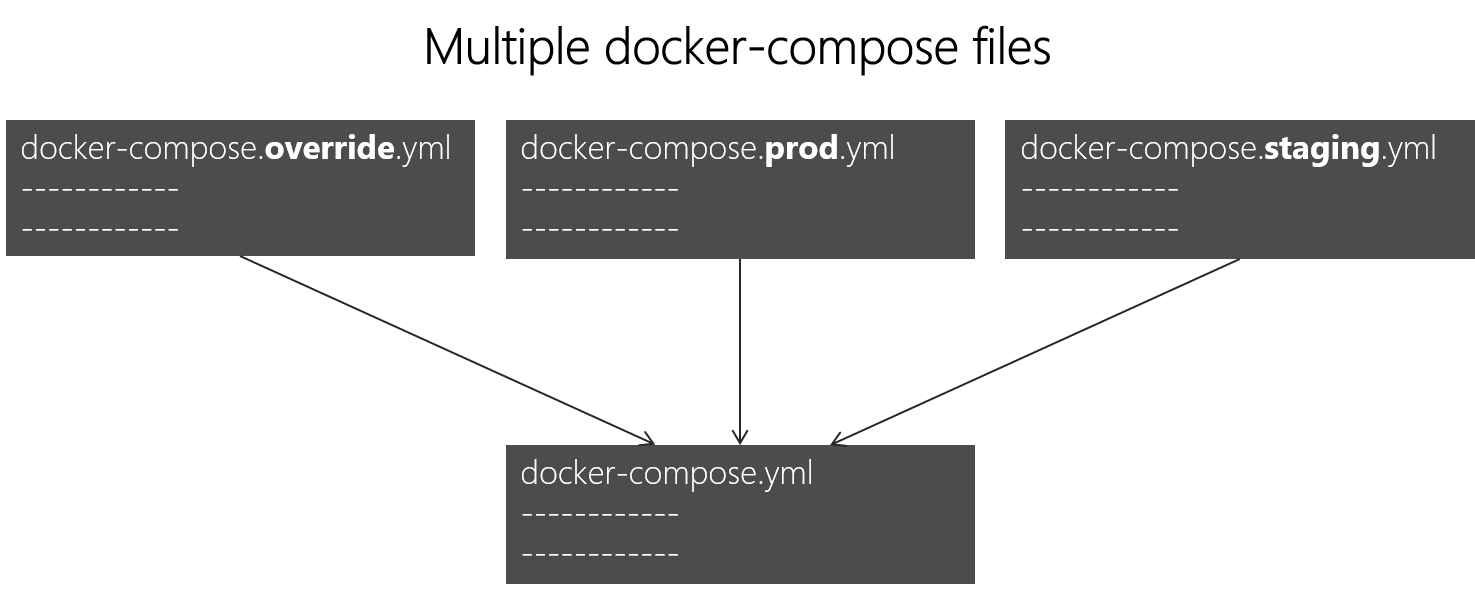
There are two primary approaches to this.
Approach A: The Automatic Override File
For local development, Docker Compose provides a convenient convention. If you have a file named docker-compose.yml and another named docker-compose.override.yml in the same directory, running docker compose up will automatically merge them. The override.yml file's settings will be applied on top of the base file.
This is the perfect pattern for development:
docker-compose.yml: Contains the core service definitions that are common to all environments (e.g., service names, base images, network connections).docker-compose.override.yml: Contains your development-only settings, such as bind mounts for code, debugger ports, and specific environment variables. This file is typically added to.gitignore.
Multi-Environment Deployments with Docker: A Guide
This article, 'Multi-Environment Deployments with Docker', provides a clear explanation of how the automatic override file works.
Please read the section titled 'Using Docker Compose Overrides'. It clearly demonstrates how a base docker-compose.yml can be paired with a docker-compose.override.yml for development and a separate, explicitly named docker-compose.prod.yml for production.
Approach B: Explicitly Specifying Files with -f
When you need more control, especially for staging or production environments in a CI/CD pipeline, you explicitly tell Docker Compose which files to use with the -f flag. The order matters: Compose reads the files in the order they are provided, with later files overriding earlier ones.
# For development (if not using the auto-override)
docker compose -f docker-compose.yml -f docker-compose.dev.yml up

# For production
docker compose -f docker-compose.yml -f docker-compose.prod.yml up -d
Let's watch a practical, end-to-end example of this in action.
Docker + ReactJS tutorial: Development to Production workflow + multi-stage builds + docker compose
This video provides an excellent, detailed walkthrough of creating separate configurations for a React application, including multi-stage Dockerfiles and distinct Docker Compose files for development and production.
Watch from 1:11:50 to 1:23:01. The presenter refactors a single setup into a multi-file configuration. File Structure (1:11:50 - 1:16:57): Observe how they create a base docker-compose.yaml (though it ends up being mostly empty in this simple case, the principle stands), a docker-compose.dev.yaml for development specifics (like bind mounts), and a docker-compose.prod.yaml for production (using a different port and Dockerfile). Execution (1:16:57 - 1:23:01): Pay close attention to how the -f flag is used to combine the base file with the environment-specific one (docker compose -f ... -f ... up). Also, note the real-world problem he encounters and solves regarding build-time arguments (args) vs. runtime environment variables—a crucial distinction in production setups.
The key to remember about merging is that simple values (like an image name) are replaced, while lists (like ports or volumes) and dictionaries (like environment) are merged together.
3. A Cleaner Approach: The extends Keyword
While using multiple files with -f is very effective, it can sometimes lead to repetition if you have multiple services with similar base configurations. The extends keyword allows a service to inherit its configuration from another service, even one in a different file. This promotes the Don't Repeat Yourself (DRY) principle, a cornerstone of good engineering.
This approach is great for creating reusable service "templates."
How to Use Docker Compose Extends for Reusable ...
For a more structured and maintainable setup, the extends keyword is a powerful tool. The article 'How to Use Docker Compose Extends' provides a clear guide on this feature.
Please read the following sections: Basic Extends Usage: This introduces the syntax of extends, showing how to point to a file and service to inherit from. Environment-Based Configuration: This section provides a perfect example of our use case. It shows a base.yml with a generic app service, and then docker-compose.dev.yml and docker-compose.prod.yml files that each extend that base service to add environment-specific settings.
Using extends, your docker-compose.prod.yml might look like this, clearly stating its intent to inherit from a base and then apply production-specific overrides:
# docker-compose.prod.yml
services:
  app:
    extends:
      file: base.yml # The file containing the base service
      service: app   # The name of the service to extend
    image: myapp:${VERSION:-latest} # Override the image tag
    deploy:
      replicas: 3 # Add production-only deployment settings
    environment:
      - NODE_ENV=production
Test your understanding!
You have a docker-compose.yml file with a web service:
# docker-compose.yml
services:
  web:
    image: myapp:1.0
    ports:
      - "80:8000"
    environment:
      - LOG_LEVEL=INFO
You need to create a development override file (docker-compose.override.yml) that does the following:
- Changes the
LOG_LEVELtoDEBUG. - Adds a bind mount to sync your local
./srcdirectory with/app/srcin the container. - Exposes port
5000on the host to port8000in the container, in addition to the existing port mapping.
What would the contents of your docker-compose.override.yml be?
Show answer
The docker-compose.override.yml file would look like this:
# docker-compose.override.yml
services:
  web:
    ports:
      # This adds to the list from the base file, it does not replace it.
      - "5000:8000"
    volumes:
      # This adds a new volume mapping.
      - ./src:/app/src
    environment:
      # This dictionary is merged, and since LOG_LEVEL exists, its value is overridden.
      - LOG_LEVEL=DEBUG
When you run docker compose up, Compose will merge these files. The ports and volumes lists will be combined, and the LOG_LEVEL environment variable will be overridden. The final image will still be myapp:1.0 since it wasn't specified in the override file.
4. A Professional Project Structure
As a DevOps engineer, you'll often work on complex projects with many services. Combining include, extends, and multiple override files allows you to create a highly modular and maintainable structure.
How to Use Docker Compose Extends for Reusable ...
Let's see how these concepts come together in a professional, scalable project structure. The same article on extends shows an excellent template for this.
Review the sections Modular Project Structure, Complete Example, and Usage. You don't need to memorize every line, but focus on the organizational pattern: compose/: Contains a base.yml and environment-specific override files (development.yml, production.yml). services/: Defines individual services, which often extend from the base configurations. docker-compose.yml: The main file that uses include (another useful feature for modularity) to pull in all the service definitions. Usage: Note how the final commands combine the main file with the environment-specific override, just as we saw earlier.
This kind of structured approach is exactly what's needed for creating automated, reliable CI/CD pipelines that can build and deploy your application to any environment with a single command.
Conclusion
You have now learned the standard professional patterns for managing environment-specific configurations with Docker Compose. This is a powerful technique that separates concerns, reduces errors, and makes your application deployments far more robust and repeatable.
Key Takeaways:
- Separate your base configuration from environment-specific overrides to maintain clarity and avoid errors.
- Use a
docker-compose.override.ymlfile for simple, automatic local development overrides. - Use the
-fflag to explicitly combine Compose files for controlled environments like staging and production. - Leverage the
extendskeyword to create reusable service templates and keep your configurations DRY. - For complex applications, adopt a modular project structure that separates base configs, service definitions, and environment overrides.
In our next lesson, we'll take our production setup a step further. Now that we can define a clean production configuration, we'll learn how to scale services to run multiple container instances for high availability, a critical step in building resilient applications.