Hello! Welcome to the first lesson in our module on Container Security Hardening.
In our previous module, we focused on making our multi-service applications production-ready by managing environment-specific configurations. Now that we have a solid process for building and configuring our applications, it's time to shift our focus to security. Deploying insecure code, even with perfect configuration, is a recipe for disaster.
This lesson addresses the learning outcome: Scan Docker images for known vulnerabilities using tools like 'docker scan' or Trivy. We'll explore why this is a critical practice in modern software development and get hands-on with two of the most popular tools for the job. As a DevOps Engineer, this is a foundational skill for implementing a "shift-left" security approach, where security is integrated early into the development lifecycle, not bolted on at the end.
1. Why Scan Docker Images?
Every Docker image is built from layers. It starts with a base image (like ubuntu:22.04 or node:18-alpine), which contains an operating system and its packages. On top of that, you add your own dependencies and application code. A vulnerability in any of these layers can expose your entire application to attack.
These known vulnerabilities are cataloged as Common Vulnerabilities and Exposures (CVEs). Vulnerability scanning is the process of inspecting your image's contents against databases of these known CVEs.
Integrating this scan into your CI/CD pipeline is a core principle of DevSecOps. It allows you to catch and fix security issues automatically before they ever reach production.

2. The Integrated Solution: Docker Scout
Docker's built-in tool for vulnerability scanning has evolved. The docker scan command, which you may see in older tutorials, is now deprecated and has been superseded by a more powerful and comprehensive tool: Docker Scout.
Docker Scout is integrated directly into the Docker CLI and Docker Desktop. It analyzes image layers, identifies vulnerabilities, and even provides recommendations for fixing them.
To see Docker Scout in action, let's watch a short video.
Find Vulnerabilities Fast! New Docker CLI Command: Docker Scout
This video from DevOps Directive clearly explains the move from docker scan to docker scout and provides a concise demonstration of its core features.
Please watch from 00:44 to 02:58. Focus on: The docker scout cves command: Observe how it's used to scan a specific image tag. Interpreting the output: Notice the summary of vulnerabilities by severity (critical, high, medium, low) and the detailed list, including the package, vulnerability ID (CVE), and a link for more information.
As you saw, the primary command for scanning is docker scout cves <image_name>. The output gives you a clear, actionable report.
A key feature of Docker Scout is its ability to provide remediation advice. By running docker scout recommendations <image_name>, you can get suggestions for updating your base image or packages to resolve found vulnerabilities.
While the command line is powerful, Docker Scout is also beautifully integrated into the Docker Desktop UI, which provides a rich, filterable view of an image's packages, layers, and vulnerabilities.
3. The Open-Source Powerhouse: Trivy
While Docker Scout is an excellent integrated tool, one of the most popular and versatile open-source scanners in the DevOps world is Trivy, by Aqua Security. Trivy is fast, simple, and can be used to scan a wide variety of artifacts beyond container images, including filesystems, Git repositories, and Infrastructure as Code (IaC) configurations.
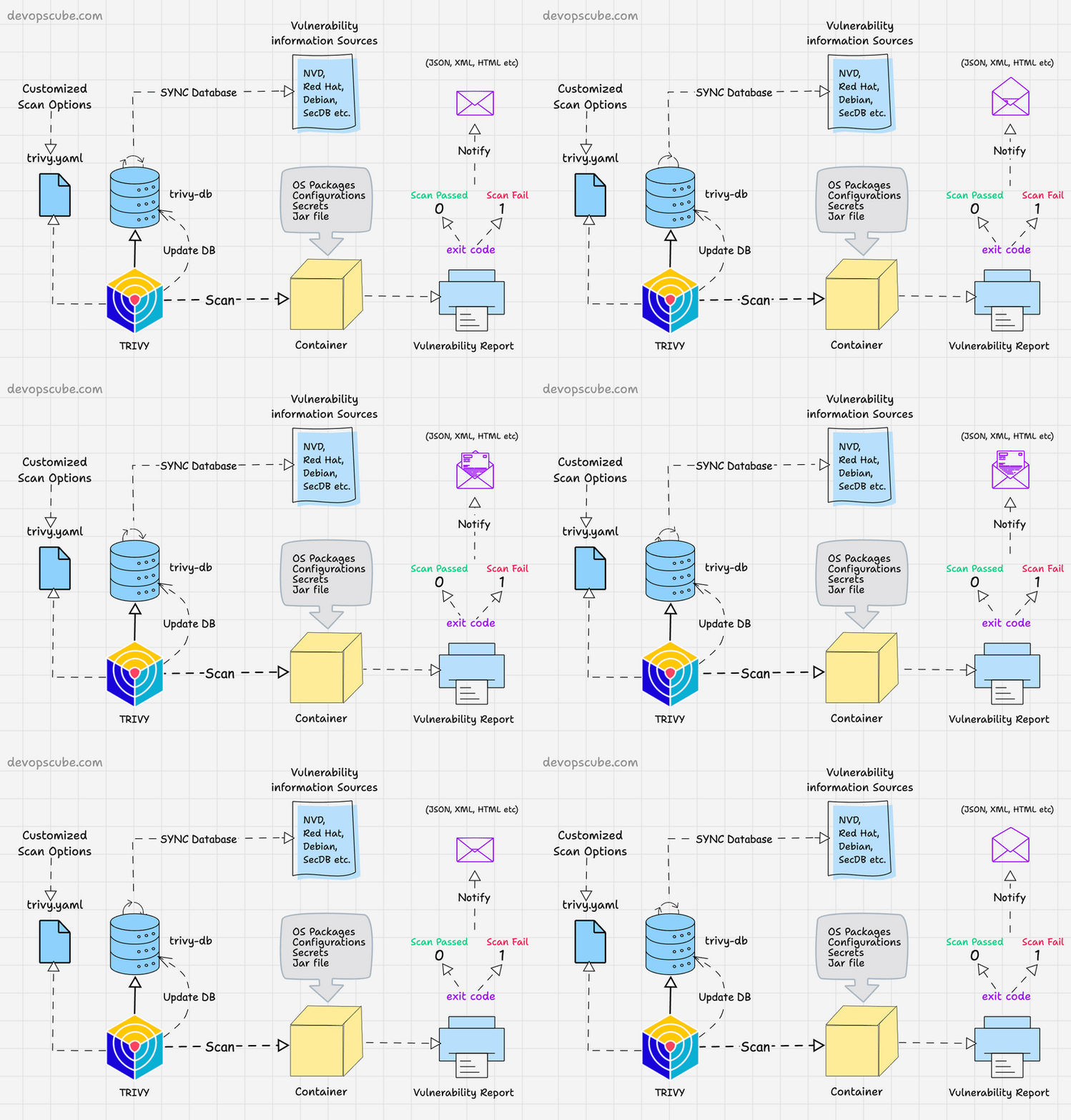
One of the most convenient ways to run Trivy is by using its official Docker image, which means you don't even need to install it on your system.
Let's see a practical demonstration of scanning an image and interpreting the results.
All-In-One Open Source Security Scanner | Docker Image Analysis with Trivy
This video from Akamai Developer demonstrates how to use the Trivy Docker image to scan other images and how to read the detailed output. The use of an intentionally vulnerable image for the Shellshock bug is a powerful example.
Watch from 11:43 to 18:00. Pay close attention to: The command structure: The command shown is a bit complex. A simpler, more modern syntax is docker run --rm -v /var/run/docker.sock:/var/run/docker.sock -v $HOME/Library/Caches:/root/.cache/ aquasec/trivy:latest image <image_name>. This mounts the Docker socket so Trivy can see other local images. Interpreting the output: Understand the columns: Library (the vulnerable package), Vulnerability ID, Severity, Installed Version, and Fixed Version. The Shellshock example: This demonstrates how Trivy identifies a critical, well-known vulnerability and provides the exact information needed to fix it.
Integrating Trivy into CI/CD
Trivy's real power in a DevOps context comes from its command-line options that are tailor-made for automation. You can configure it to fail a pipeline if vulnerabilities of a certain severity are found.
Using Trivy Container Scanner to Detect Vulnerabilities ...
This guide from DevOpsCube provides excellent, practical examples of using Trivy in a professional workflow. We'll focus on the options most relevant for CI/CD.
Please read the sections 'Scan Container Images With Trivy' and 'Trivy Scan in Docker Image Build Pipeline'. Focus on these key commands: Filtering by severity: The --severity flag allows you to show only the vulnerabilities you care about (e.g., HIGH,CRITICAL). Failing the build: The --exit-code 1 flag is the most important one for CI. It causes Trivy to exit with a non-zero status code if it finds vulnerabilities matching the specified severity, which will automatically fail the pipeline step. Changing output: The --format json flag is useful for programmatic processing of scan results.
A typical Trivy command in a CI script would look like this:
trivy image --exit-code 1 --severity HIGH,CRITICAL my-app:1.2.3
This command scans the image my-app:1.2.3. If it finds any HIGH or CRITICAL vulnerabilities, it will exit with code 1, causing the CI job to fail. This creates an automated security gate that prevents vulnerable code from being promoted.
Test your understanding!
You are tasked with setting up a security check in your Jenkins or GitLab CI pipeline. You need to scan the official nginx:1.21 image. The pipeline should fail only if CRITICAL vulnerabilities are detected. What is the precise Trivy command you would add to your CI script to accomplish this?
Show answer
The command would be:
trivy image --exit-code 1 --severity CRITICAL nginx:1.21
trivy image nginx:1.21specifies the target to scan.--severity CRITICALtells Trivy to only consider vulnerabilities with a "CRITICAL" rating.--exit-code 1instructs Trivy to return a non-zero exit code if it finds any vulnerabilities that match the severity filter, which in turn fails the CI job.
4. Docker Scout vs. Trivy: Which to Choose?
Both tools are excellent, and the choice often depends on your team's ecosystem and needs.
- Docker Scout is the best choice if you are heavily invested in the Docker ecosystem (Docker Desktop, Docker Hub). Its tight integration provides a seamless user experience, and its remediation recommendations are a significant plus.
- Trivy is a fantastic, vendor-neutral choice known for its speed, simplicity, and versatility. Its ability to scan more than just container images and its straightforward CI/CD integration make it a favorite in the open-source community.
In many professional environments, you might even use both: Docker Scout for local development feedback within Docker Desktop, and Trivy for standardized, fast checks within the CI/CD pipeline.
Conclusion
You've now learned the fundamentals of container vulnerability scanning, a crucial pillar of modern application security. By integrating tools like Docker Scout or Trivy into your workflow, you can proactively identify and eliminate security risks before they become a problem.
Key Takeaways:
- Container images can contain vulnerabilities in the base OS, system packages, or application dependencies.
- Vulnerability scanning automates the process of checking an image against known CVE databases.
- Docker Scout is Docker's integrated solution, offering deep analysis and remediation advice within the Docker CLI and Desktop UI.
- Trivy is a popular, fast, and versatile open-source scanner ideal for CI/CD integration.
- Using flags like
--exit-code 1and--severityin Trivy allows you to create automated security gates in your pipelines.
In our next lesson, we will continue our journey into container hardening. Now that we know how to find vulnerabilities, we'll learn how to limit the potential damage an attacker could do if they did manage to exploit one. We will apply the principle of least privilege by managing Linux capabilities (add/drop) to run our containers with only the permissions they absolutely need.