Hello! Welcome to your next lesson on Docker.
In our last session, we learned how to use Docker Compose profiles to manage different groups of services for various environments like development, testing, and production. This gave us control over what runs. Now, we'll turn our attention to one of the most critical aspects of any production application: how to handle sensitive data securely.
Today's learning outcome is to implement a strategy for managing secrets in Docker Compose using Docker secrets or environment files. We'll explore why hardcoding credentials is a major security risk and then dive into two common patterns for managing secrets: using external environment files and, more securely, using Docker's built-in secrets management feature. For a DevOps Engineer, mastering secure secret handling is a non-negotiable skill.
1. The Problem: Why Environment Variables Can Be Risky
Before we look at solutions, it's essential to understand the problem. It's common for developers to pass configuration, including secrets like API keys or database passwords, using environment variables. While this is better than hardcoding them directly into a Dockerfile or docker-compose.yml, it's not without risks.
How to Keep Docker Secrets Secure: Complete Guide
The following article, 'How to Keep Docker Secrets Secure', clearly explains the security implications of using standard environment variables for secrets. It provides a practical demonstration of how easily these secrets can be exposed.
Please read the section titled 'Why do you need secret management in Docker?'. Pay close attention to the examples showing how docker inspect and docker exec can be used to reveal secrets stored in environment variables.
As the article highlights, any process within the container can read all environment variables. They can also be accidentally leaked in application logs, especially during error stack traces, and are easily inspectable from the Docker host. Our goal is to find a method that limits this exposure.
2. Strategy 1: Using .env Files
A first step away from hardcoding secrets is to use an environment file (typically named .env). Docker Compose automatically detects and loads a .env file from your project's root directory, making its variables available for substitution in your docker-compose.yml file.
Here's the pattern:
-
Create a
.envfile:# .env # This file should NOT be committed to git! POSTGRES_PASSWORD=mysecretpassword -
Reference it in
docker-compose.yml:# docker-compose.yml services: db: image: postgres environment: - POSTGRES_PASSWORD=${POSTGRES_PASSWORD} -
Ignore the
.envfile in version control:
Your.gitignorefile must include.envto prevent secrets from being committed.# .gitignore .env
This approach externalizes secrets from your Compose file, which is a good practice. However, it still results in the secret being set as a plain-text environment variable inside the container, with the risks we discussed earlier.
Docker Compose Tutorial for Beginners (Networks - Volumes - Secrets - Postgres - Letsencrypt)
The video 'Docker Compose Tutorial for Beginners' provides a practical look at various ways to handle environment variables, including the .env file method. This will help solidify your understanding of this common pattern.
Watch from 26:00 to 29:46. The presenter demonstrates how to use env_file and variable substitution from an .env file, and shows how to access these variables within a Python application. Notice the warning Compose gives you if a variable is expected but not set—a helpful debugging feature.
3. Strategy 2: Docker Compose Secrets (The Secure Standard)
The most secure, recommended way to handle runtime secrets is with Docker's native secrets feature. Instead of injecting a secret as an environment variable, Docker securely mounts it as a file into a temporary in-memory filesystem inside the container, typically at /run/secrets/<secret_name>.
This has several key advantages:
- The secret is not part of the container's environment, preventing accidental leakage through logs.
- The secret is stored in memory (
tmpfs) on the container's filesystem and is never written to disk on the host or inside the container. - You can explicitly control which services have access to which secrets.
Here’s how it works:
-
Create a file containing your secret:
# On your host machine echo "super-secret-db-password" > db_password.txt -
Define the secret in
docker-compose.yml:
You define a top-levelsecretsblock and then grant services access to it.services: db: image: postgres:16 environment: # This tells the postgres image to read its password from a file POSTGRES_PASSWORD_FILE: /run/secrets/db_password secrets: - db_password # Grant this service access to the secret secrets: db_password: file: ./db_password.txt # Define the secret and its source file
Notice the POSTGRES_PASSWORD_FILE environment variable. This is a common convention used by many official images (like PostgreSQL and MySQL) to read a secret from a file instead of an environment variable. This pattern is crucial for using Docker secrets effectively.
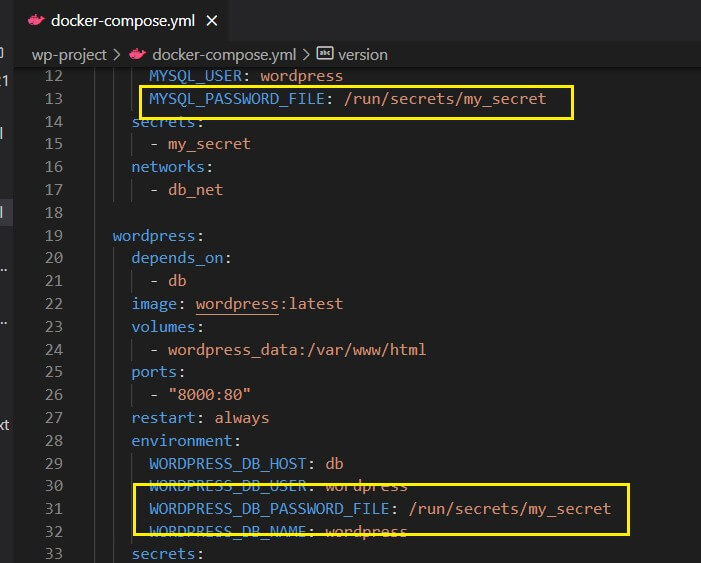
Docker Compose Tutorial for Beginners (Networks - Volumes - Secrets - Postgres - Letsencrypt)
Let's watch a practical demonstration of creating and using a Docker secret.
Watch the following two clips: Using Secrets (29:46 - 32:16): The presenter explains why secrets are more secure than environment variables, shows how to create a secret file, defines it in the Compose file, and reads it from the default /run/secrets/ path in an application. Practical Example with Postgres (44:43 - 47:04): This segment demonstrates the _FILE suffix pattern with a real-world PostgreSQL service, which is exactly the scenario you'll encounter professionally.
4. Advanced Control: The Long Syntax for Secrets
By default, secrets mounted in a container are world-readable (permissions 0444). For enhanced security, especially in a professional context, you should restrict access to the specific user running the application process. Docker Compose's "long syntax" for secrets allows you to do this.
Managing Secrets in Docker Compose — A Developer's Guide
The article 'Managing Secrets in Docker Compose' provides an excellent guide on advanced secret management. We'll focus on the section that details how to control file permissions.
Please read the section 'Controlling access to secrets supplied to your services'. It explains the long syntax keys: source, target, uid, gid, and mode. The PostgreSQL example is particularly relevant.
Here's an example applying what you just read, restricting a secret to be readable only by the postgres user and group (which both have the ID 999 inside the official image):
services:
  db:
    image: postgres:16
    environment:
      POSTGRES_PASSWORD_FILE: /run/secrets/db_password
    secrets:
      - source: db_password
        target: db_password # Optional: name of file inside /run/secrets/
        uid: '999'           # User ID of the owner
        gid: '999'           # Group ID of the owner
        mode: 0400           # Permissions: read-only for the owner only

secrets:
  db_password:
    file: ./db_password.txt
This level of granular control is a hallmark of a production-grade, secure setup, applying the principle of least privilege directly within your container definitions.
Test your understanding!
You are given the following insecure docker-compose.yml file. Your task is to refactor it to use Docker secrets securely.
Insecure docker-compose.yml:
version: "3.8"
services:
  api:
    image: my-api:1.0
    ports:
      - "8000:8000"
    environment:
      - DATABASE_URL=postgresql://user:hardcoded_password@db:5432/myapp
      - STRIPE_API_KEY=sk_test_12345
  db:
    image: postgres:16
    environment:
      - POSTGRES_USER=user
      - POSTGRES_PASSWORD=hardcoded_password
      - POSTGRES_DB=myapp
Requirements:
- Remove all hardcoded secrets.
- Create separate secret files for the database password and the Stripe API key.
- Configure both the
dbandapiservices to use these secrets. Assume theapiservice has been written to readDATABASE_URLfrom the environment and the Stripe key from the file/run/secrets/stripe_api_key.
How would you modify the docker-compose.yml and what other files would you create?
Show answer
First, you would create the secret files on your host.
db_pass.txt:
hardcoded_password
stripe_key.txt:
sk_test_12345
Next, you would update your docker-compose.yml to define and use these secrets.
Secure docker-compose.yml:
version: "3.8"
services:
  api:
    image: my-api:1.0
    ports:
      - "8000:8000"
    environment:
      # We still construct the DB URL here, but now we're not exposing the password.
      # The password will be read by the postgres driver inside the app from the file.
      # Note: This assumes the application logic can handle a file path in the password field.
      # A more robust solution is to set individual DB vars and have the app build the URL.
      # For this exercise, we'll keep the URL but will handle the Stripe key via file.
      - DATABASE_URL=postgresql://user@db:5432/myapp
    secrets:
      - stripe_api_key

  db:
    image: postgres:16
    environment:
      - POSTGRES_USER=user
      - POSTGRES_DB=myapp
      - POSTGRES_PASSWORD_FILE=/run/secrets/db_password
    secrets:
      - db_password

secrets:
  db_password:
    file: ./db_pass.txt
  stripe_api_key:
    file: ./stripe_key.txt
This configuration removes all hardcoded secrets from the Compose file and uses the secure file-mounting mechanism provided by Docker secrets.
Conclusion
You've now learned the professional standard for managing secrets in Docker Compose. While .env files offer a basic level of separation, Docker's native secrets feature provides a much more robust and secure solution by mounting secrets as in-memory files with controllable permissions.
Key Takeaways:
- Avoid hardcoding secrets. Never commit secrets to version control.
.envfiles are a simple way to externalize configuration, but secrets still exist as plain-text environment variables inside the container.- Docker Compose
secretsare the recommended approach. They mount secrets as files in an in-memory filesystem (/run/secrets), limiting their exposure. - Use the
*_FILEconvention for images that support reading secrets from files (e.g.,POSTGRES_PASSWORD_FILE). - Apply the principle of least privilege by using the long syntax for secrets to set restrictive
uid,gid, andmodepermissions.
In our next lesson, we'll build on our knowledge of managing configurations by learning how to override and extend Compose configurations for different environments. This will allow us to create a base docker-compose.yml and then layer on development- or production-specific settings, a powerful pattern for maintaining clean and scalable projects.