Hello! Welcome to your lesson on network performance optimization.
In our last session, we got hands-on with iperf to measure and diagnose network bottlenecks. We discovered a tangible performance gap between Docker's default bridge network and the high-speed host network. That exercise set the stage perfectly for today's goal: moving from measuring problems to actively resolving them.
This lesson directly addresses the learning outcome: Apply network optimization techniques, such as selecting appropriate drivers, to resolve performance issues. We'll explore the trade-offs between different Docker network drivers and cover other tuning methods to ensure your containerized applications communicate as efficiently as possible.
The Foundation: Choosing the Right Network Driver
The single most impactful decision you can make for Docker network performance is choosing the right driver for your workload. Each driver offers a different balance of isolation, security, and performance.
Let's start with a high-level overview of the main drivers and their use cases.
Optimizing Docker Networking Performance: Reducing ...
The article 'Optimizing Docker Networking Performance' provides an excellent summary of the primary networking drivers. Reading this section will give you a solid mental model of when to use each one.
Read the section titled '7. Choose the Right Networking Driver'. Pay close attention to the descriptions of Bridge, Host, Macvlan, and Ipvlan networks and their recommended use cases.
Now, let's dive deeper into these options.
Option 1: The Default bridge Network
As you know, this is the default. It provides great isolation by creating a private network for containers on a single host. However, as we measured in the last lesson, the traffic must pass through the docker0 bridge and undergo Network Address Translation (NAT) to reach the outside world, which introduces latency.
For many standard applications, this is perfectly acceptable. For better service discovery within a single application stack, it's best practice to create a custom bridge network.
Docker Networking Tutorial, ALL Network Types explained!
Christian Lempa's 'Docker Networking Tutorial' provides a clear demonstration of why custom bridge networks are superior to the default one, particularly for enabling DNS-based service discovery.
Watch from 04:46 to 08:53. Focus on how creating a custom bridge network allows containers to resolve each other by name, which is a crucial pattern for multi-service applications.
Key takeaway: Use custom bridge networks to group related services (e.g., an app and its database) for easy, name-based communication, while maintaining network isolation.
Option 2: The host Network for Maximum Throughput
As our iperf tests showed, the host network is the fastest option. It removes the network isolation layer entirely, allowing the container to share the host's network namespace.
Optimizing Docker Networking Performance: Reducing ...
Let's revisit the 'Optimizing Docker Networking Performance' article for a more detailed look at the 'host' network, including its security implications.
Read the section '1. Use the Host Network for Critical Services'. Note the performance benefits of bypassing NAT and the critical trade-off regarding security and port conflicts.
Use the host driver when:
- Latency is absolutely critical (e.g., high-frequency trading, real-time data processing).
- The container needs to manage the host's network interfaces (e.g., a VPN client container).
- You are running in a trusted environment where the loss of network isolation is an acceptable risk.
Option 3: macvlan and ipvlan for Direct Network Access
What if you need better performance than a bridge, but can't sacrifice isolation or need to avoid port conflicts? This is where macvlan and ipvlan come in. These advanced drivers allow you to assign a MAC address and/or IP address from your physical network directly to a container. This makes the container appear as a physical device on your LAN.
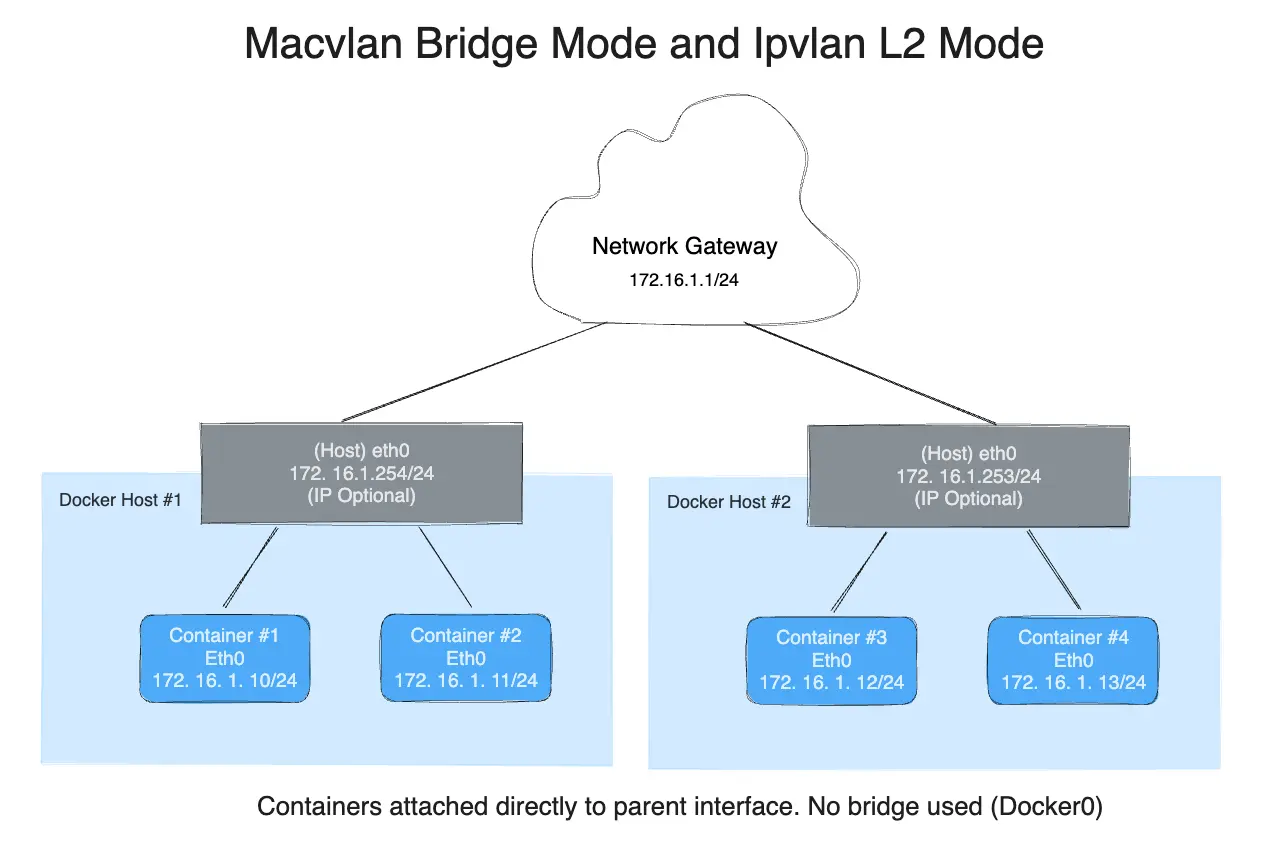
This approach is incredibly useful for resolving specific performance and integration challenges.
Docker Networking Tutorial, ALL Network Types explained!
This segment of the 'Docker Networking Tutorial' by Christian Lempa gives a fantastic, practical explanation of why and how you would use macvlan. The use case involving Pi-hole and a port conflict on port 53 is a perfect real-world example.
Watch from 10:50 to 19:14. This is a critical section. Pay close attention to: The problem macvlan solves (port conflicts). The command syntax for docker network create -d macvlan, including --subnet, --gateway, and -o parent. The difference between macvlan (unique MAC per container) and ipvlan (shared host MAC).
Key differences:
macvlan: Each container gets a unique MAC address. This is great for legacy applications or monitoring tools that expect to see distinct physical devices. Some network switches may have security policies that limit the number of MAC addresses per port, which can be an issue.ipvlan: All containers on the host share the host's MAC address but get unique IP addresses. This is often more compatible with restrictive network environments.
Test your understanding!
You are tasked with deploying a containerized DHCP server. The host machine is already running services that you don't want to disturb. The new DHCP server must be accessible to other physical devices and virtual machines on the same local area network. Which network driver would you choose and why?
Show answer
The best choice would be macvlan or ipvlan.
Reasoning:
- Port Conflict: A DHCP server needs to use standard ports (67/68). The
hostnetwork is not suitable because it could conflict with other services on the host. Thebridgenetwork would require complex port forwarding and wouldn't place the container on the physical LAN. - LAN Accessibility:
macvlanandipvlanassign an IP address from the physical LAN directly to the container, making it appear as just another device on the network. This allows it to directly serve DHCP requests to other clients on that network.
Beyond Drivers: Additional Tuning Techniques
While choosing the right driver is paramount, there are other layers where you can optimize performance. As a DevOps engineer, these host-level and configuration tweaks should be right in your wheelhouse.
1. DNS Resolution
In a dynamic container environment, services discover each other via DNS. Slow DNS lookups can add up, creating perceptible latency. You can optimize this by configuring Docker to use fast, external DNS servers.
Optimizing Docker Networking Performance: Reducing ...
The 'Optimizing Docker Networking Performance' article provides clear instructions on how to configure custom DNS servers, both for a single container and for the entire Docker daemon.
Review the section 'Optimize DNS Resolution' (it appears after the first mention of the topic). Note the two methods: using the --dns flag for a specific container and editing /etc/docker/daemon.json for a host-wide change.
2. Host-Level Kernel Tuning: TCP BBR
For hosts that handle significant network traffic, you can optimize performance at the kernel level. One of the most effective modern techniques is enabling TCP BBR (Bottleneck Bandwidth and Round-trip propagation time), a congestion control algorithm developed by Google.
Docker Performance Optimization: Real-World Strategies
This article, 'Docker Performance Optimization: Real-World Strategies', contains a fantastic, practical tip for enabling TCP BBR on your Docker host.
Find the section titled '2. Network Optimization'. The commands show how to modify /etc/sysctl.conf to enable the 'Fair Queuing' scheduler and the 'BBR' congestion control algorithm. This change can significantly improve network throughput and latency for all traffic originating from the host, including your containers.
Applying this setting on your Docker hosts is a powerful way to boost network performance for all containers running on them, especially over connections with high latency or packet loss.
Conclusion
You now have a complete toolkit for not only identifying network performance issues but actively resolving them.
Key Takeaways:
- Driver selection is key: There is no single "best" driver. The choice depends on a trade-off between isolation, security, and performance.
- Bridge: Good for general-purpose isolation and service discovery with custom networks.
- Host: For maximum performance when isolation is not a concern.
- Macvlan/Ipvlan: The optimal choice for integrating containers directly into a physical network, bypassing NAT and solving port conflicts.
- DNS can be a bottleneck: Use fast external DNS servers to speed up lookups.
- Optimize the host: Tuning kernel parameters like enabling TCP BBR provides a system-wide performance boost.
In our next lesson, we will shift our focus from runtime optimization to the build process itself. We'll explore how to implement multi-architecture image builds, allowing you to create a single image tag that works across different hardware platforms like amd64 and arm64.