Hello! Welcome to the next lesson in our "Advanced Networking and Data Persistence" module.
In our last session, we mastered how to implement robust backup and restore strategies for Docker volumes, ensuring the safety of your application data. Now that we've secured our state, let's turn our attention to how our containerized services communicate with each other and the outside world.
Today, we will explore the fundamental Docker network drivers. Our goal is to explain the use cases for bridge, host, and overlay network drivers. As a DevOps Engineer, understanding these drivers is critical for designing application environments that are secure, performant, and scalable—whether on a single machine or a multi-node cluster.
An Overview of Docker Network Drivers
Docker provides several network drivers that cater to different needs. Before diving into the specifics, it's helpful to have a high-level map of the main options.
Docker Networking - Basics, Network Types & Examples
The article 'Docker Networking - Basics, Network Types & Examples' from Spacelift offers a fantastic starting point. The summary table provides a bird's-eye view of the different drivers, their characteristics, and common use cases.
Please review the section 'Docker network types' and pay close attention to the summary table. Focus on the rows for Bridge, Host, and Overlay, as they are the focus of our lesson today.
This table gives you a great mental framework. Now, let's break down each of the three core drivers in detail.
1. Bridge Networks: Isolated Single-Host Communication
The bridge network is the most common and is the default driver for standalone containers. It creates a private, internal network on the host, allowing containers connected to it to communicate while being isolated from containers on other networks.
To understand how it works and, more importantly, the difference between the default bridge and a user-defined bridge, let's watch a detailed explanation.
Docker Networking Tutorial (Bridge - None - Host - IPvlan - Macvlan - Overlay)
The video 'Docker Networking Tutorial' by Anton Putra provides a clear, practical demonstration of bridge networks. It highlights a key best practice: using user-defined bridge networks over the default one.
Watch the segment from 02:14 to 10:02. Focus on: The limitations of the default bridge network. The primary advantage of a user-defined bridge network: automatic DNS resolution, which allows containers to communicate using their names.
Key Use Case for Bridge Networks:
This is your go-to choice for applications running on a single Docker host. For example, a web application and its database running in separate containers on your development machine or a single production server would use a user-defined bridge network to communicate securely and reliably.
The diagram below visually contrasts a single-host bridge network with a multi-host overlay network, which we'll discuss shortly. For now, focus on the top half illustrating the bridge.
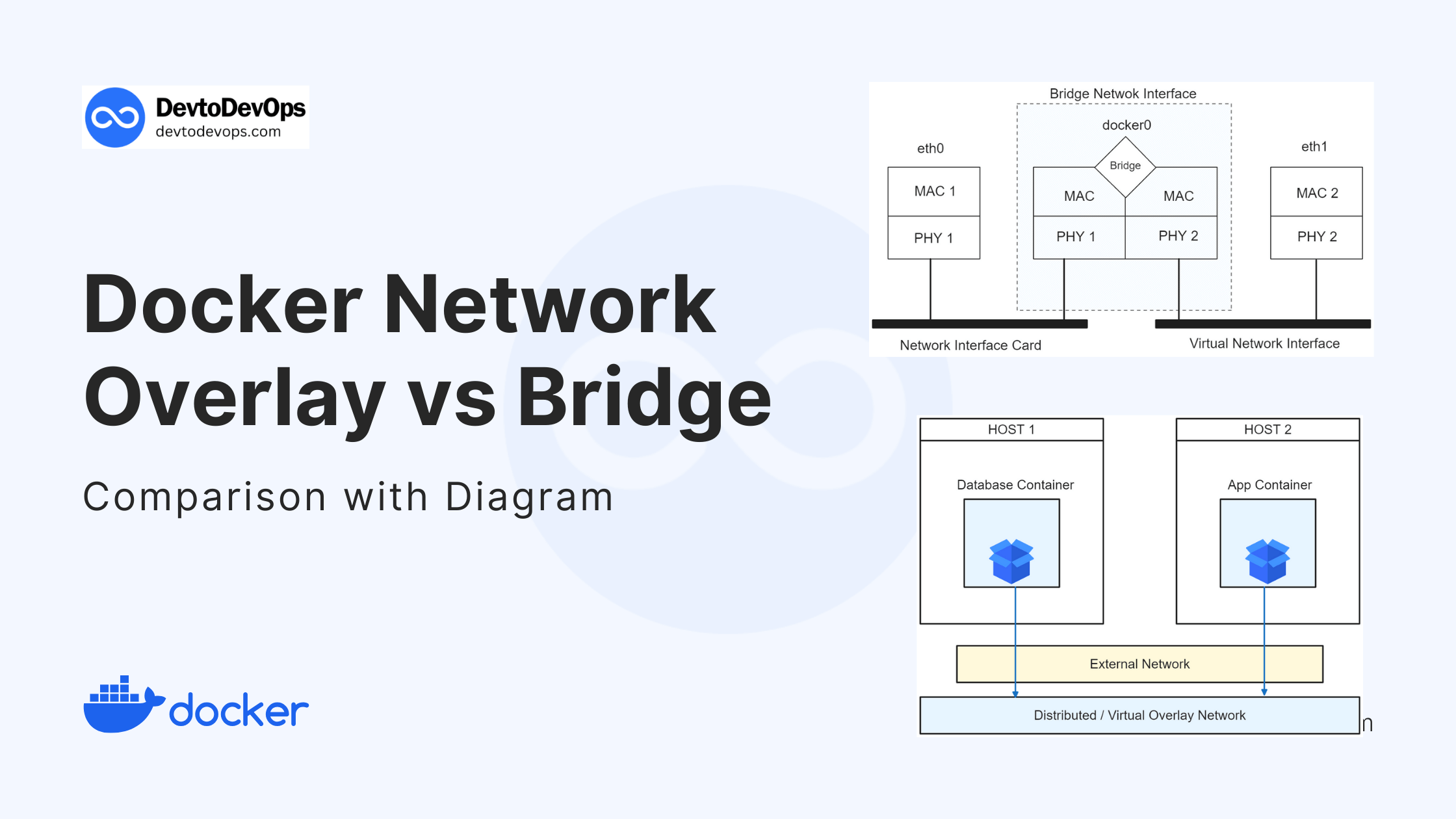
2. Host Networks: Maximum Performance, No Isolation
The host network driver removes the network isolation between a container and the Docker host. The container shares the host's network namespace, meaning it uses the host's IP address and port space directly. There is no Network Address Translation (NAT) involved.
Docker Networking Tutorial (Bridge - None - Host - IPvlan - Macvlan - Overlay)
Let's continue with the same 'Docker Networking Tutorial' video to see how the host network driver works.
Watch the segment from 10:02 to 11:56. Note how the container is accessed directly via the host's IP address without any port mapping.
Key Use Cases for Host Networks:
- Performance-Critical Applications: When you need to eliminate the network overhead of the bridge and achieve the highest possible network performance, close to bare-metal speed. This is common for high-throughput services or network-intensive applications.
- Host Network Management: When a container needs to monitor or manage the host's network traffic (e.g., a network monitoring tool).
The main trade-off is a loss of security and isolation. Since the container is not sandboxed from a network perspective, it has more access to the host's network services. You also risk port conflicts if you try to run multiple containers using the same port on the host network.
Test your understanding!
You are deploying a containerized monitoring agent (like Prometheus Node Exporter or netdata) that needs to collect detailed network metrics directly from the host's network interfaces. Which network driver would you choose for this container, and why?
Show answer
You would choose the host network driver.
By using --network host, the container shares the host's network stack. This gives it direct, un-sandboxed access to the host's network interfaces (eth0, wlan0, etc.), allowing it to gather the required metrics without the abstraction or limitations of a bridge network. This is a classic use case where sacrificing network isolation is necessary for the container's function.
3. Overlay Networks: Seamless Multi-Host Communication
While bridge networks are for single hosts, overlay networks are designed to connect containers across multiple Docker hosts. This driver creates a distributed, virtual network that "overlays" on top of the host networks, allowing containers to communicate as if they were on the same machine.
This concept should be familiar from your Kubernetes experience. An overlay network in Docker Swarm serves a similar purpose to a CNI plugin in Kubernetes: it provides a flat networking model for container-to-container communication across a cluster of nodes.
Docker Networking Tutorial (Bridge - None - Host - IPvlan - Macvlan - Overlay)
The final section of the 'Docker Networking Tutorial' explains and demonstrates overlay networks in the context of Docker's native orchestrator, Docker Swarm.
Watch the segment from 17:32 to 20:12. The key takeaway is that overlay networks enable containers on different VMs (hosts) to find and communicate with each other.
Key Use Case for Overlay Networks:
This driver is essential for container orchestration and distributed applications. When you use Docker Swarm to manage a cluster of Docker nodes, the overlay driver is used to facilitate communication between services, regardless of which node they are running on. It handles service discovery and load balancing across the cluster.
Summary: Which Driver Should You Use?
You now have a solid understanding of the three main network drivers. Let's bring it all together with a concise guide on when to choose each one.
Docker Networking - Basics, Network Types & Examples
The Spacelift article we started with has a final section that perfectly summarizes the decision-making process.
Read the short section titled 'Which network type should I use?'. This will reinforce the primary use cases we've discussed for each driver.
Conclusion
In this lesson, we've demystified the core Docker network drivers and their specific roles in application architecture.
Key Takeaways:
- Bridge Network: The default for single-host applications. It provides good isolation. Always prefer creating a user-defined bridge network to get automatic DNS resolution between containers.
- Host Network: Used for performance-critical applications or when a container needs to manage the host's network. It sacrifices network isolation for direct access and speed.
- Overlay Network: The driver for multi-host communication. It's fundamental for distributed applications and container orchestration with Docker Swarm.
We've established that user-defined bridge networks are the standard for most single-host setups. In our next lesson, we'll put this knowledge into practice as we learn to create custom bridge networks to isolate containerized applications, giving you fine-grained control over your application's network topology.