Introduction
In our last lesson, we established the fundamental principle of the Time Value of Money (TVM) and used Excel's PV, FV, and PMT functions to analyze loans and investments with regular payments. Today, we'll build directly on that foundation to tackle a core task in financial modeling: evaluating the profitability of entire projects. This process is known as capital budgeting.
This lesson will introduce you to two of the most important metrics in finance: Net Present Value (NPV) and the Internal Rate of Return (IRR). You will learn not just what these metrics mean, but how to calculate them using Excel's NPV, IRR, XNPV, and XIRR functions. Mastering these tools will enable you to assess whether a proposed investment—like opening a new office or launching a product—is financially sound, a critical skill for any freelance analyst advising a business.
1. Net Present Value (NPV): What is a Project Worth Today?
Imagine a client wants to know if investing $100,000 in a new project is a good idea. The project is expected to generate various cash flows over the next five years. Simply adding up all the future cash inflows and subtracting the initial investment is misleading because, as we learned, money in the future is worth less than money today.
This is where Net Present Value comes in. NPV calculates the sum of the present values of all cash flows (both the initial investment and future returns) associated with a project. It tells you the total value, in today's dollars, that a project is expected to add to the business.
The decision rule is straightforward:
- If NPV > 0, the project is expected to be profitable and should be considered.
- If NPV < 0, the project is expected to lose money and should be rejected.
- If NPV = 0, the project is expected to earn a return exactly equal to the discount rate (the company's minimum required rate of return).
To understand the concept and its application in Excel, the following article provides an excellent overview.
Assess Return with NPV, IRR, and Time to Break Even in ...
This article from CFO Perspective explains the business context for using NPV and the importance of the discount rate.
Please read the first section, Net Present Value (NPV). Focus on understanding the question NPV answers and the role of the discount rate, which represents the minimum acceptable return for the project given its risk.
Calculating NPV in Excel: A Critical Detail
When using Excel's NPV function, there is a crucial quirk you must always remember. The function's syntax is =NPV(rate, value1, [value2], ...). It assumes that value1 occurs at the end of the first period (e.g., Year 1), value2 at the end of the second period, and so on.
However, most projects involve a large initial investment at the very beginning—at Time 0. Because the NPV function doesn't account for a Time 0 cash flow, you must handle it outside the function.
The correct formula structure is:=NPV(rate, range_of_future_cash_flows) + initial_investment_at_time_0
Note that the initial investment is usually a negative number (a cash outflow), so you are effectively subtracting it.
This video provides a clear, practical demonstration of setting up a project evaluation and correctly applying the NPV formula.
Capital Budgeting: NPV, IRR, Payback | MUST-KNOW for Finance Roles
The video "Capital Budgeting" from Kenji Explains walks through a realistic scenario of evaluating two potential new stores for Nike.
Watch from the beginning to the NPV calculation. Pay close attention to how the net cash flows are calculated first. Then, from the formula part, observe precisely how the initial investment (Year 0 cash flow) is added separately after the NPV function has discounted all future cash flows (Years 1-5).
2. Internal Rate of Return (IRR): The Project's Intrinsic Return
While NPV gives you a dollar value, clients often want to know the return as a percentage. The Internal Rate of Return (IRR) provides this. The IRR is the discount rate at which a project's NPV becomes exactly zero. In simpler terms, it's the intrinsic annual percentage return that the project is expected to generate.
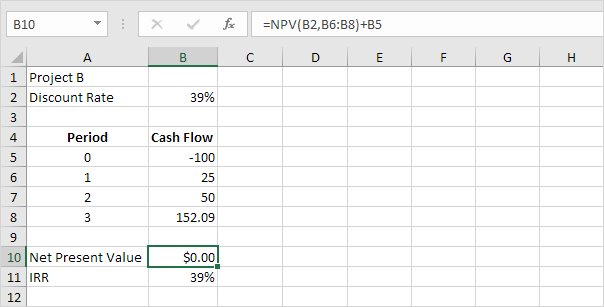
The decision rule for IRR is to compare it to a "hurdle rate," which is typically the company's cost of capital or minimum acceptable rate of return (the same rate you'd use for the NPV discount rate).
- If IRR > Hurdle Rate, the project's return is higher than the minimum requirement, so it should be accepted.
- If IRR < Hurdle Rate, the project is not profitable enough and should be rejected.
Calculating IRR in Excel
Fortunately, the IRR function in Excel is more straightforward than NPV. Its syntax is =IRR(values, [guess]), where values is a single range that includes all cash flows, starting with the initial investment at Time 0.
Let's continue with the same video to see how it's calculated.
Capital Budgeting: NPV, IRR, Payback | MUST-KNOW for Finance Roles
This next segment from Kenji Explains defines IRR and demonstrates how to calculate it for the same two projects.
Now watch from the IRR section. Notice how the IRR function uses the entire range of net cash flows, including Year 0. This is different from the NPV function and is a key distinction.
3. NPV vs. IRR: Making the Final Decision
In the video, you saw a common scenario: Project 1 has a higher NPV, but Project 2 has a higher IRR. If you can only choose one (i.e., they are mutually exclusive), which one is better?
- NPV measures the absolute value created. A higher NPV means more wealth for the company in dollar terms.
- IRR measures the percentage return, which can make smaller, highly efficient projects look better than larger projects that generate more total cash.
General Rule: When comparing mutually exclusive projects, you should generally prioritize the one with the higher NPV, as it contributes more to the company's bottom line.
The relationship between NPV and IRR is the key to understanding capital budgeting. The IRR is simply the specific discount rate that makes the NPV of a project zero. You can visualize this on a graph where the NPV is plotted against different discount rates.

4. Handling Irregular Dates: XNPV and XIRR
The standard NPV and IRR functions assume that cash flows occur at regular, evenly spaced intervals (e.g., at the end of every year or every month). But in the real world, cash flows can be irregular, occurring on specific dates.
For these situations, Excel provides more precise functions:
=XNPV(rate, values, dates)=XIRR(values, dates)
These functions work just like their standard counterparts but require an additional argument: a range of the exact dates on which each cash flow occurs. This makes your analysis more accurate, especially for projects with timelines that don't fit neatly into annual periods.
Investment Evaluation in Excel: PV, NPV, IRR, XIRR & More Explained
The "Investment Evaluation in Excel" video from Excel University provides an excellent, clear demonstration of these 'X' functions.
First, watch the segment on XNPV from using the XNPV function. Note how it easily handles the initial investment and a series of future cash flows by using a corresponding range of dates. Next, watch the segment on XIRR from using the XIRR function. The key takeaway here is seeing how changing the dates, even within the same years, significantly impacts the rate of return, demonstrating the precision and power of this function.
As a final note, the video also mentions an even more advanced function, MIRR (Modified Internal Rate of Return), which addresses some of the theoretical limitations of IRR. We won't cover it in detail, but it's good to know it exists for complex scenarios where reinvestment rate assumptions are critical.
Conclusion
You have now added two of the most powerful financial analysis tools to your Excel toolkit. By moving from the basic time value of money to NPV and IRR, you can now perform sophisticated project evaluations that form the basis of sound business investment decisions.
Key Takeaways:
- NPV tells you the total value a project will add to a company in today's dollars. The goal is an NPV greater than zero.
- IRR gives you the project's expected percentage rate of return. The goal is an IRR greater than your minimum acceptable "hurdle rate."
- When using Excel's
NPVfunction, always remember to add the initial (Time 0) investment outside the function. - For mutually exclusive projects, prioritize the one with the higher NPV, as it creates more absolute wealth.
- When cash flows occur on specific, irregular dates, use
XNPVandXIRRfor a more accurate analysis.
In our next lesson, we will step back from project evaluation and apply our knowledge of financial functions to another common client request: building a detailed loan amortization schedule. This practical tool will break down each loan payment into its principal and interest components over the entire life of the loan.