Hello! Welcome to your next lesson in the "Advanced Git and Collaborative Workflows" module.
In our previous lesson, we explored the GitFlow workflow, a high-level strategy for managing releases and hotfixes. That framework tells you which branches to create and when to merge them. Today, we'll zoom in on the best practices for the individual building blocks of that workflow: the branches you create and the commits you make.
This lesson directly addresses the learning outcome: Apply Git best practices including atomic commits and conventional branch naming. Mastering these practices is non-negotiable in a professional DevOps environment. They ensure your project's history is clean, understandable, and easy to manage, which is crucial for teamwork, debugging, and automation.
1. Conventional Branch Naming
Imagine looking at a project with branches named my-work, updates, and stuff. It's impossible to know what's going on. Conventional branch naming brings order to this chaos.
The core idea is to use a consistent prefix that communicates the branch's purpose. This not only helps your teammates but can also be used to trigger automated jobs in a CI/CD pipeline (e.g., running tests on all feature/* branches).
Let's look at a common convention.
Git Branch Naming and Commit Best Practices — Cheatsheet
The article 'Git Branch Naming and Commit Best Practices — Cheatsheet' provides a great, concise summary of a widely-used branch naming convention.
Please read the first section, '1. Branch Naming Conventions'. Focus on the type/short-description format and the common branch types listed.
As you saw, the general format is type/short-description. The types you learned about in our GitFlow lesson fit perfectly here:
feature/add-user-authenticationbugfix/login-form-validationhotfix/resolve-critical-security-flawrelease/prepare-v2.1.0
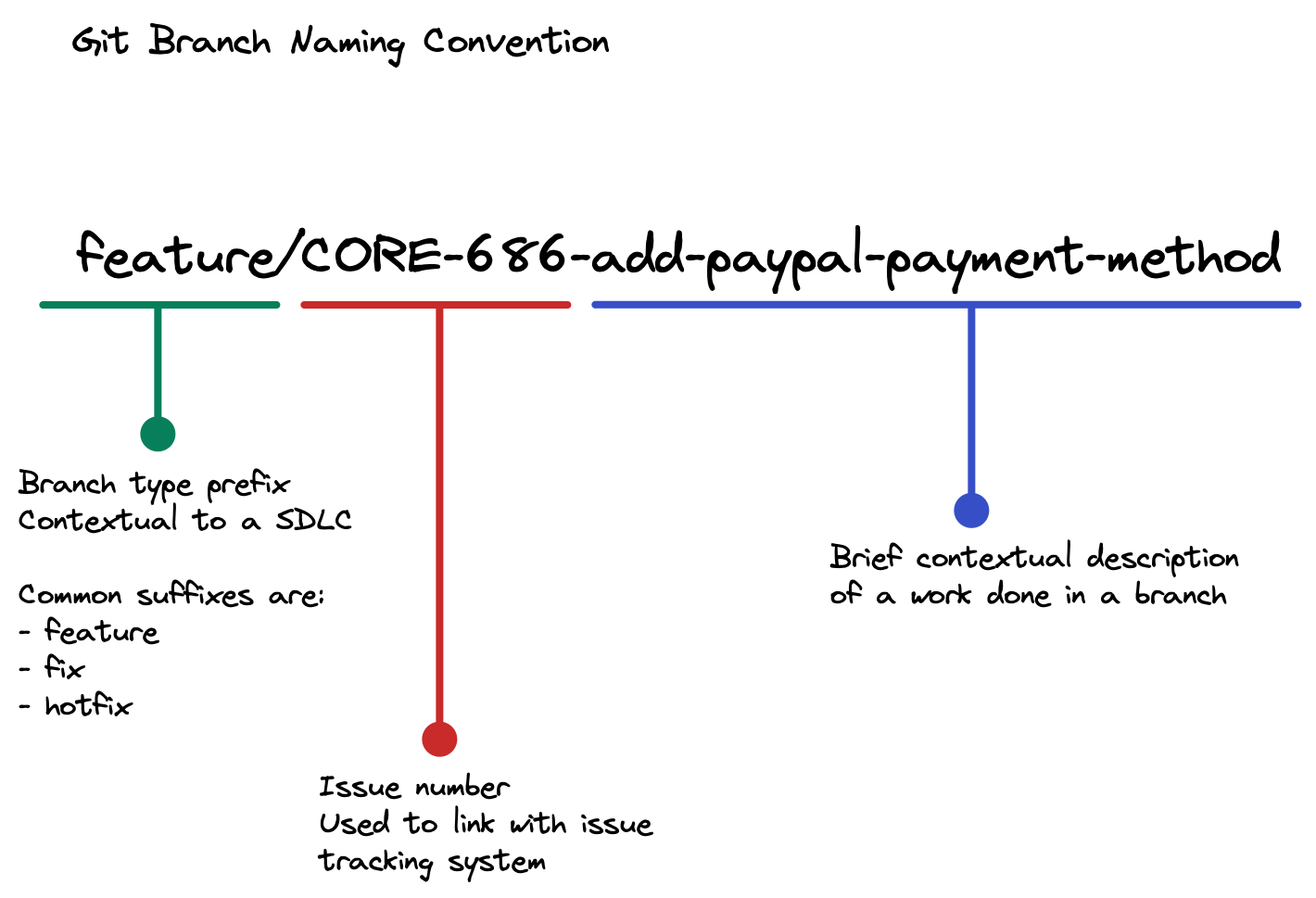
In many professional environments, an issue tracker ID (like from Jira or GitHub Issues) is also included. This directly links the code to the planned work.
2. The Power of Atomic Commits
Just as important as well-named branches are well-crafted commits. The most fundamental best practice is to make atomic commits.
An atomic commit contains a single, complete, logical unit of change. It shouldn't bundle unrelated changes together. Why?
- Easier Code Reviews: Reviewers can focus on one specific change at a time.
- Simpler Debugging: If a bug is introduced,
git bisectcan pinpoint the exact commit that caused it. - Cleaner Reverts: If a feature needs to be undone, you can revert a single commit without affecting other changes.
Commits in Detail: Making Them Atomic, Crafting ...
To get a solid grasp of this concept, let's turn to the 'Commits in Detail' article from CodeSignal.
Please read the section 'Keeping Commits Atomic'. Pay close attention to the reasoning behind this practice and the example provided.
The difference between atomic and non-atomic commits is stark.

To create atomic commits, get in the habit of using git diff --staged before you commit to review exactly what you're including. If you've made multiple unrelated changes, use git add <file> selectively (or even git add -p for parts of a file) to stage and commit each logical change separately.
3. Crafting Meaningful Commit Messages
An atomic commit is only half the story; it needs a clear message that explains what it does and why. A popular standard for this is called Conventional Commits.
The structure is simple but powerful:type(optional-scope): subject
Let's dive into the specifics.
Git Branch Naming and Commit Best Practices — Cheatsheet
The 'Git Branch Naming and Commit Best Practices — Cheatsheet' and the 'Commits in Detail' articles both offer excellent guidance on writing effective commit messages. Let's combine their insights.
First, read section '2. Writing Meaningful Commits' from this cheatsheet. Note the list of commit types (feat, fix, docs, etc.) and the best practices.
Commits in Detail: Making Them Atomic, Crafting ...
Now, let's reinforce and expand on those ideas with the 'Commits in Detail' article.
Read the section 'Writing Effective Commit Messages'. The comparison table of good vs. bad messages is particularly useful for clarifying the rules.
Key Rules for Commit Messages:
-
Use the Imperative Mood: Write the subject line as if you're giving a command.
- Good:
feat: Add user login endpoint - Bad:
feat: Added user login endpointorfeat: Adds user login endpoint
- Good:
-
Specify the Type: Start with a type like
feat(new feature),fix(bug fix),docs,style,refactor,test, orchore(maintenance). This immediately tells everyone the nature of the change. -
Keep the Subject Concise: Aim for 50 characters or less. It should be a short, descriptive summary.
-
Explain the "Why" in the Body (If Needed): For more complex changes, add a blank line after the subject and write a more detailed explanation. Describe the problem you're solving or the reasoning behind your approach.
Test your understanding!
You've just fixed a bug where the application crashes if a user enters a negative number into the quantity field on the shopping cart page. You also updated the README file with new installation instructions.
How would you best represent this work according to the principles of atomic commits and conventional commit messages?
Show answer
The best practice is to create two separate, atomic commits:
Commit 1:fix(cart): Prevent crash on negative quantity input
Commit 2:docs: Update installation instructions in README
This separates the bug fix from the documentation update, making the history clean and each change independently trackable and revertible. A single commit like chore: Fix bug and update docs would be a non-atomic anti-pattern.
4. A Practical Tool: git commit --amend
Sometimes you make a commit and immediately realize you made a typo in the message or forgot to include a small change. Instead of creating a new commit like "fix typo", you can fix the previous one using git commit --amend. This command is essential for maintaining a clean, atomic history.
Commits in Detail: Making Them Atomic, Crafting ...
The 'Commits in Detail' article explains how and when to use git commit --amend safely.
Read the sections 'Including a Commit Message Body' and 'Using "git commit --amend" to Fix Mistakes'. Pay special attention to the critical warning about when not to use this command.
The key takeaway is crucial: Only use git commit --amend on commits that you have not yet pushed to a shared remote repository. Amending a commit rewrites its history. If you do this to a commit that others have already pulled, you will cause significant problems for your team.
Conclusion
In this lesson, you've learned the fundamental best practices that separate a novice Git user from a professional. Adhering to these conventions will make you a more effective collaborator and is a core skill in any modern DevOps team.
Key Takeaways:
- Conventional Branch Naming: Use a
type/descriptionformat (e.g.,feature/add-oauth) to make branch purposes clear and enable automation. - Atomic Commits: Each commit should represent a single, complete logical change. This simplifies reviews, debugging, and reverts.
- Conventional Commit Messages: Follow the
type(scope): subjectformat. Write subjects in the imperative mood and keep them short. Use the body to explain the "why" for complex changes. - Use
git commit --amendwisely: Use it to fix your most recent, unpushed commit to avoid cluttering history, but never on shared commits.
In our next lesson, we will put these skills into practice. You'll plan a simple project by creating a repository and defining development tasks using GitHub Issues, then implement a feature using a full feature-branch workflow.