Hello! Welcome to the first lesson in our new module, "Advanced Git and Collaborative Workflows."
In the previous modules, you've mastered the fundamentals of creating branches, making commits, and collaborating through pull requests. We ended by learning how to safely navigate your repository's history, even from a "detached HEAD" state. Now, we'll address one of the most common and important scenarios in team development: what to do when your work and the main project have moved forward on different paths.
Today's learning outcome is to resolve divergent branches using different strategies like merge and rebase. You will learn how these two powerful commands work, the profound impact they have on your project's history, and most importantly, when to use each one in a professional DevOps workflow.
1. The Core Problem: Divergent Branches
Imagine you start working on a new feature. You create a branch called feature/new-login from the main branch. While you're busy coding, another developer finishes a critical bug fix and merges it into main.
At this point, your feature/new-login branch and the main branch have both received new commits since they were last in sync. They have diverged. Your branch doesn't have the bug fix, and main doesn't have your new feature work.
To complete your feature, you need to bring the changes from main (the bug fix) into your feature/new-login branch. Git provides two primary ways to do this: git merge and git rebase.
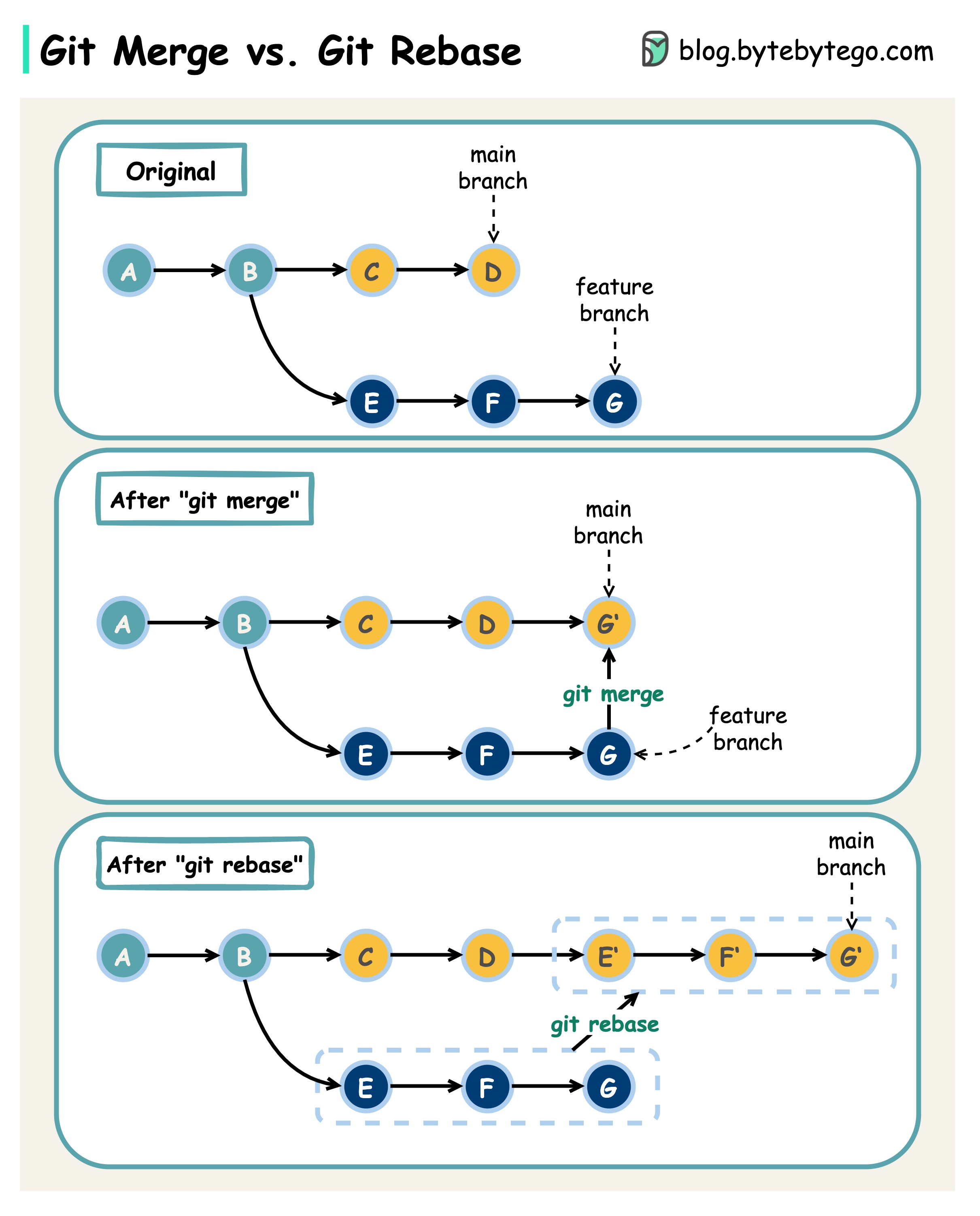
2. Strategy 1: git merge — The Traceable Path
Merging is the most straightforward strategy. When you are on your feature branch, you run git merge main.
Git performs a three-way merge. It looks at three commits:
- The tip of your current branch (
feature/new-login). - The tip of the target branch (
main). - Their last common ancestor.
It then combines the changes and creates a new merge commit on your feature branch. This special commit has two parents, one from each of the divergent histories, tying them back together.
To understand the mechanics and implications of merging, let's turn to a comprehensive guide from Atlassian.
Merging vs. Rebasing | Atlassian Git Tutorial
The following article, 'Merging vs. Rebasing' from Atlassian, provides an excellent conceptual overview of both strategies. We will start with the merge option.
Please read the sections 'Conceptual overview' and 'The merge option'. Pay close attention to the diagram showing the new merge commit and the resulting forked history.
Key Characteristics of git merge:
- Non-destructive: It preserves the histories of both branches exactly as they were. Nothing is rewritten.
- Traceable: The merge commit serves as an explicit record that an integration of branches occurred. This can be valuable for auditing and understanding the project timeline.
- "Noisy" History: Its main drawback is that if your
mainbranch is very active, your feature branch will be filled with many merge commits. This can make the project history look complex and "cluttered," sometimes making it difficult to understand the linear story of the project's development.

3. Strategy 2: git rebase — The Clean Path
Rebasing offers a different way to integrate changes. Instead of creating a merge commit, git rebase rewrites your project history.
When you are on your feature branch and run git rebase main, Git does the following:
- Finds the common ancestor of your branch and
main. - Temporarily saves the commits you made on your feature branch.
- Resets your feature branch to be identical to the
mainbranch. - Re-applies your saved commits, one by one, on top of the
mainbranch's latest commit.
The end result is a perfectly linear history. It looks as if you had created your branch from the main branch's latest commit all along.
Let's return to the Atlassian article to see how this works.
Merging vs. Rebasing | Atlassian Git Tutorial
Now let's explore the alternative approach within the same Atlassian article.
Focus on the section 'The rebase option'. Compare the diagram here to the one for the merge option. Notice how the commits from the feature branch are moved and their commit hashes would change.
Key Characteristics of git rebase:
- Clean History: The primary benefit is a simple, linear commit history that is easy to read and understand.
- History Rewriting: This is also its biggest danger. Because it creates new commits, the original commits are discarded. This is a destructive action.
- Loses Context: You can't easily see when upstream changes from
mainwere incorporated into the feature branch.
4. The Golden Rule of Rebasing
Because rebase rewrites history, it is a powerful but dangerous tool. This leads to the single most important rule you must follow.
Merging vs. Rebasing | Atlassian Git Tutorial
Understanding when not to rebase is more important than knowing how to rebase. This section of the Atlassian article is critical.
Read the section 'The golden rule of rebasing'. It explains why you should never rebase a public or shared branch.
The Golden Rule: Never rebase a branch that other people are working on.
If you rebase a branch that you've pushed and others have pulled (like main, develop, or a shared feature branch), you are rewriting history that others have based their work on. When they try to pull your rebased changes, Git will see two different histories for the same branch, leading to confusion and complicated recovery steps for the whole team.
Rebasing is for your local cleanup. It's for tidying up your own commits on your own feature branch before you share your work with others.
Test your understanding!
You have been working on a branch feature/A. Meanwhile, your colleague pushed their completed work to the main branch. You now want to incorporate their changes from main into your local feature/A branch. No one else has a copy of your feature/A branch.
Which strategy should you use and why?
Show answer
You should use git rebase main.
Since you are the only person with the feature/A branch, it is considered a private branch. Rebasing will move your work to the tip of main, giving you a clean, linear history. This makes it easier to see your changes in context with the latest project updates and will result in a cleaner merge when you eventually create a pull request.
5. Workflow Recommendations
So, how do we apply this in a real-world DevOps workflow? The best practice is to use a combination of both rebase and merge.
The following article walks through a practical example and summarizes the pros and cons of each approach.
Git Merge VS (Scary) Git Rebase
This article, 'Git Merge VS (Scary) Git Rebase', provides a practical scenario and a good summary to solidify your understanding.
Skim through the practical examples in the 'Git Merge' and 'Git Rebase' sections to see the commands in action. Then, carefully read the 'Summary comparison between Git Merge and Git Rebase' section, which gives clear guidance on when to use each one.
Here is a standard professional workflow:
- While developing on your local feature branch: Periodically use
git rebase mainto incorporate the latest updates from the sharedmainbranch. This keeps your feature branch up-to-date and avoids a massive, complex merge later on. It also ensures your changes work with the latest code. - Before creating a pull request: You can optionally use interactive rebase (
git rebase -i main) to clean up your own local commit history. This lets you squash small "fixup" or "WIP" commits into larger, more meaningful ones, making your work easier for others to review. - When integrating your feature into
main: After your pull request is approved, you usegit merge. This final step is typically done via the "Merge" button on GitHub or a similar platform. This creates a merge commit on themainbranch, preserving the history of your reviewed feature and providing a clear audit trail of when the feature was integrated.
This hybrid approach gives you the best of both worlds: a clean, linear history within your feature development, and a robust, traceable history for the main project branch.
Conclusion
You now have a solid understanding of the two main strategies for integrating divergent branches in Git. This knowledge is fundamental to maintaining a clean and manageable project history, which is a hallmark of a professional development team.
Key Takeaways:
git mergeintegrates changes by creating a new merge commit. It's non-destructive and preserves history, but can lead to a cluttered log.git rebaseintegrates changes by rewriting history, placing your commits on top of the target branch. It creates a clean, linear history but is a destructive operation.- The Golden Rule: Never rebase a public or shared branch. Use rebase only to clean up your own local, unshared work.
- Professional Workflow: Use
rebaseto keep your local feature branch updated withmain. Usemergeto integrate a completed and reviewed feature branch intomain.
In our next lesson, we will look at another essential tool for managing your local workflow: git stash. You'll learn how to use it to temporarily save uncommitted work, allowing you to switch contexts quickly without having to make an incomplete commit.