Hello! Welcome to the next lesson in your DevOps journey.
In our last session, we mastered CIDR notation, learning how to define network sizes and allocate IP address ranges. We were working at the Internet Layer (Layer 3) of the OSI model, which handles addressing and routing. Now, we're moving one level up to the Transport Layer (Layer 4).
Today, our learning outcome is to differentiate between TCP and UDP protocols and their use cases. These two protocols are the workhorses of the Transport Layer, responsible for moving data between applications over the networks we've been learning to design. Understanding the trade-offs between them is a fundamental skill for any DevOps engineer, as it impacts application performance, reliability, and network design.
We will explore the core difference between TCP's reliability and UDP's speed, dive into the mechanisms that give each protocol its unique characteristics, and identify the real-world applications where each one shines.
The Fundamental Difference: A Connection vs. a Datagram
At the heart of the TCP vs. UDP debate is a single concept: TCP is connection-oriented, while UDP is connectionless.
Imagine you need to give a colleague a multi-page document.
- The TCP approach: You walk over to their desk, confirm they're ready to receive it ("Hey, can I give you this report?"), hand them the pages one by one in the correct order, and wait for them to confirm they have each page before giving them the next. It's slow but guarantees they receive the full, correct document.
- The UDP approach: You stand at your desk and throw the pages in their general direction. Most will probably make it, but some might get lost, and they'll likely arrive out of order. It's incredibly fast, but delivery isn't guaranteed.
This analogy captures the essence of the two protocols.
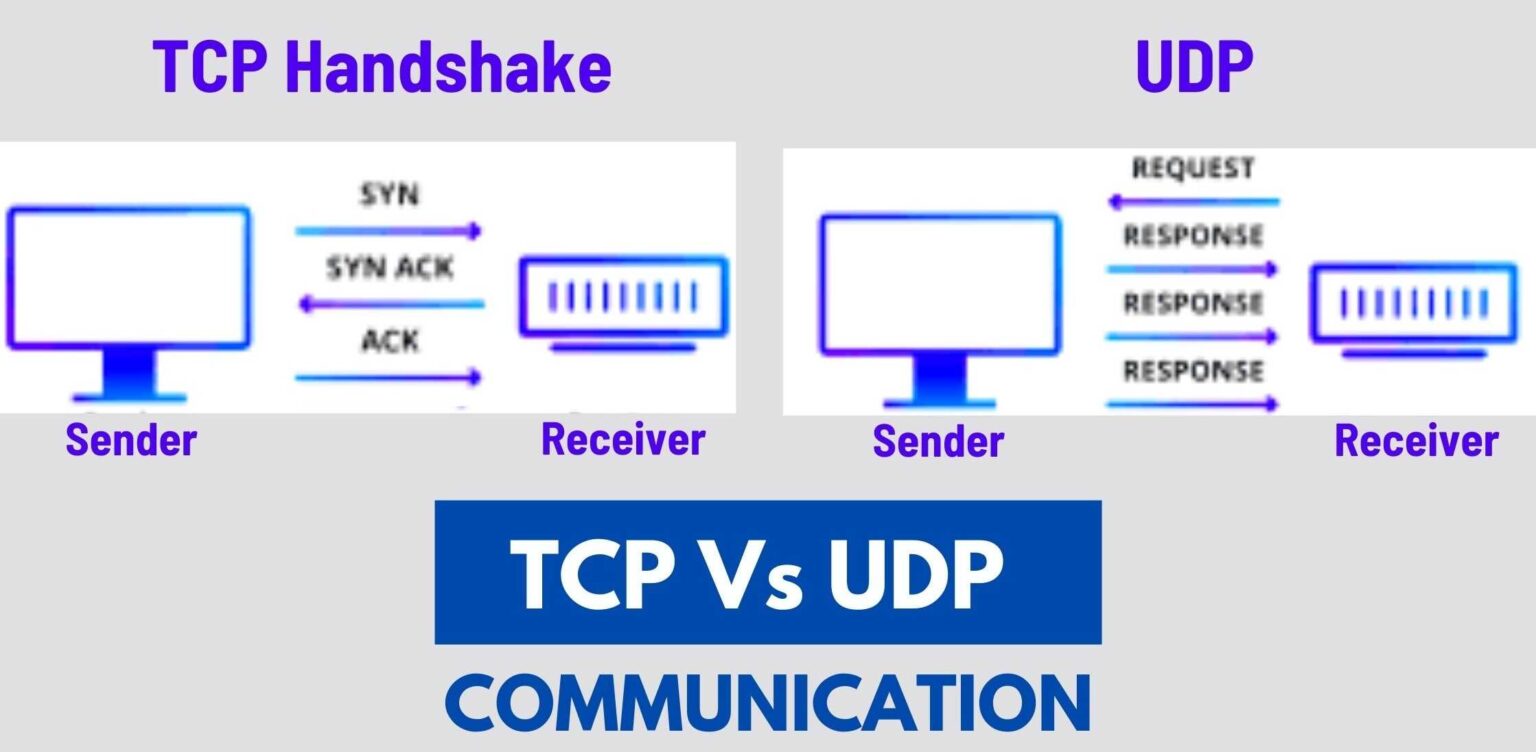
- TCP (Transmission Control Protocol) first establishes a formal connection using a process called the three-way handshake. This ensures both the sender and receiver are ready and synchronized before any data is sent.
- UDP (User Datagram Protocol) doesn't establish any connection. It simply packages data into a "datagram" and sends it out, hoping for the best. This is often called a "fire-and-forget" protocol.
The image below provides a clear visual of these two communication flows.
To get a solid overview of these differences, let's start with a foundational reading.
TCP vs UDP: Differences Between TCP & UDP Protocols
The article 'TCP vs UDP: Differences Between TCP & UDP Protocols' from Avast provides an excellent high-level comparison. It introduces the main differences and includes a helpful summary table.
Please read the introduction section 'TCP vs UDP: Differences between the protocols' and the sections 'How does TCP work?' and 'How does UDP work?'. Focus on the three-way handshake for TCP and the 'fire-and-forget' nature of UDP.
A Deeper Look at TCP: The Reliable Workhorse
TCP's reliability isn't just about the initial handshake. It's a suite of features designed to ensure data integrity from start to finish. This makes it the default choice for applications where every bit of data is critical.
The following resource provides a more detailed breakdown of TCP's core features.
TCP vs UDP: Understanding the Key Differences
Let's explore the mechanisms that make TCP so robust. This article, 'TCP vs UDP: Understanding the Key Differences', goes into great detail on the features of TCP.
Please read the section 'Core Features of Transmission Control Protocol (TCP)'. As you read, focus on understanding these key concepts: Reliable Data Transmission: How sequence numbers, acknowledgements (ACKs), and retransmissions work together. Ordered Data Delivery: Why data arrives in the correct sequence. Flow Control: How TCP prevents a fast sender from overwhelming a slow receiver. Congestion Control: How TCP acts as a 'good citizen' to avoid overwhelming the network.
Common Use Cases for TCP
Because of its reliability, TCP is the foundation for many of the internet services you use daily:
- Web Browsing (HTTP/HTTPS): You need the entire HTML, CSS, and JavaScript files to render a webpage correctly. Missing a chunk would break the site.
- Email (SMTP, IMAP/POP3): You can't have parts of an email message go missing.
- File Transfers (FTP, SCP): A transferred file must be identical to the original. A single corrupted bit can render the entire file useless.
- Secure Shell (SSH): When you're managing a server remotely, every command you type must arrive correctly and in order.
A Deeper Look at UDP: Built for Speed
UDP achieves its speed by stripping away all of TCP's reliability overhead. There is no connection setup, no acknowledgements, no reordering, and no flow control.
Let's use the same resource to explore the characteristics of UDP.
TCP vs UDP: Understanding the Key Differences
Now, let's look at the other side of the coin. This section details the simple yet powerful features of UDP.
Please read the section 'Basic Characteristics of User Datagram Protocol (UDP)'. Focus on these key concepts: Connectionless Communication: The 'fire-and-forget' model. Unreliable but Fast: The trade-off between speed and guaranteed delivery. No Flow or Congestion Control: UDP sends data at the application's desired rate, regardless of network conditions. Support for Multicast and Broadcast: A key feature TCP lacks.
Common Use Cases for UDP
UDP is the protocol of choice for applications where speed and low latency are more important than perfect reliability.
- Live Streaming and Video Conferencing (VoIP): If a packet of video data is lost, it's better to have a momentary glitch (a few pixelated frames) than to pause the entire stream to wait for a retransmission.
- Online Gaming: The game needs to know your current position right now. Receiving an old position update a few seconds later is useless. It's better to drop the old packet and just use the next one that arrives.
- DNS (Domain Name System): DNS lookups are simple, small queries. The overhead of setting up a TCP connection is unnecessary. If the UDP request is lost, the client simply times out and sends it again.
Test your understanding!
You are tasked with choosing a protocol for two new services:
- A financial transaction service that processes credit card payments.
- A real-time server monitoring service that sends CPU and memory metrics every second to a dashboard.
Which protocol would you choose for each service, and why?
Show answer
-
Financial Transaction Service: You must use TCP. Data integrity is paramount. A lost or corrupted packet could mean a failed or incorrect transaction. TCP's guarantees of delivery, order, and error-checking are non-negotiable here.
-
Real-time Monitoring Service: You should use UDP. For this use case, speed and low overhead are key. If a single metrics packet is lost, it's not a disaster; the dashboard will simply miss one data point and update correctly on the next one. Using UDP avoids the connection overhead of TCP and ensures the most recent data arrives as quickly as possible.
TCP vs. UDP: A Visual Summary
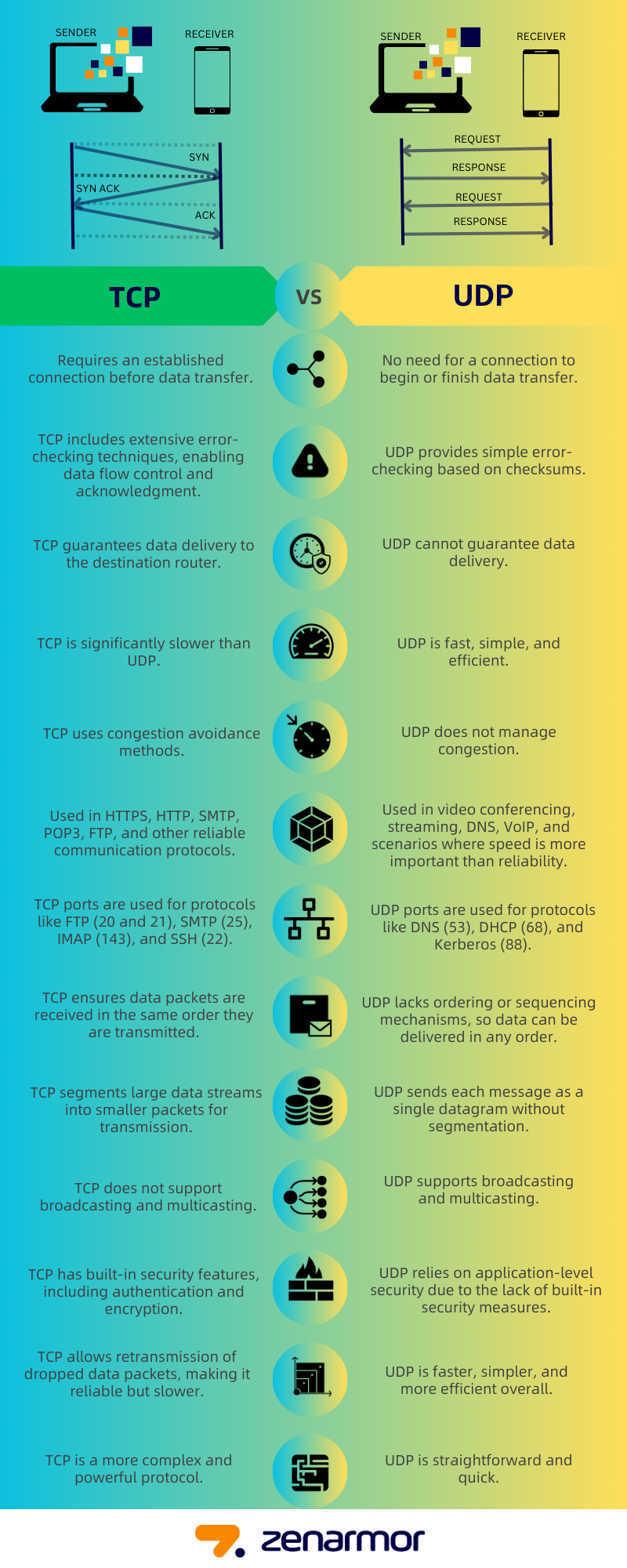
This infographic provides an excellent side-by-side comparison of the two protocols, summarizing everything we've discussed.
Conclusion
You now understand the fundamental differences between TCP and UDP, the two most important protocols at the Transport Layer. This knowledge is not just theoretical; it directly informs how you build, deploy, and troubleshoot applications. When a service is slow, is it because of TCP's overhead? When data seems to be missing, is it because it's running over UDP? These are the questions you are now equipped to ask.
Key Takeaways:
- TCP (Transmission Control Protocol) is connection-oriented, reliable, and ordered. It uses a three-way handshake, acknowledgements, and flow control to guarantee data integrity. It's best for applications where accuracy is critical, like web browsing, email, and file transfers.
- UDP (User Datagram Protocol) is connectionless, fast, and unreliable (best-effort). It has minimal overhead, making it ideal for latency-sensitive applications that can tolerate some data loss, like live streaming, online gaming, and DNS.
- The choice between TCP and UDP is a fundamental trade-off between reliability and speed.
In our next lesson, we will get our hands dirty with some essential network diagnostic tools. We'll learn how to use ping and traceroute to diagnose basic network connectivity and routing issues, applying our knowledge of how data packets travel across networks.