Hello! Welcome back to your course on DevOps foundations.
In our last lesson, we dove into the binary math behind networking. We learned how to use a full subnet mask (like 255.255.255.0) to calculate a network's starting address, its broadcast address, and the range of usable IPs. This was crucial for understanding how networks are structured at a low level.
Today, we build directly on that knowledge. Our goal is to use CIDR notation to define network sizes and allocate IP address ranges. We'll move away from manual binary calculations and embrace the modern, efficient shorthand that you will use every day as a DevOps engineer, especially when designing cloud infrastructure in AWS, Azure, or GCP.
From Subnet Masks to CIDR Notation
Let's start by solidifying the connection between what we learned last time (subnet masks) and today's topic (CIDR).
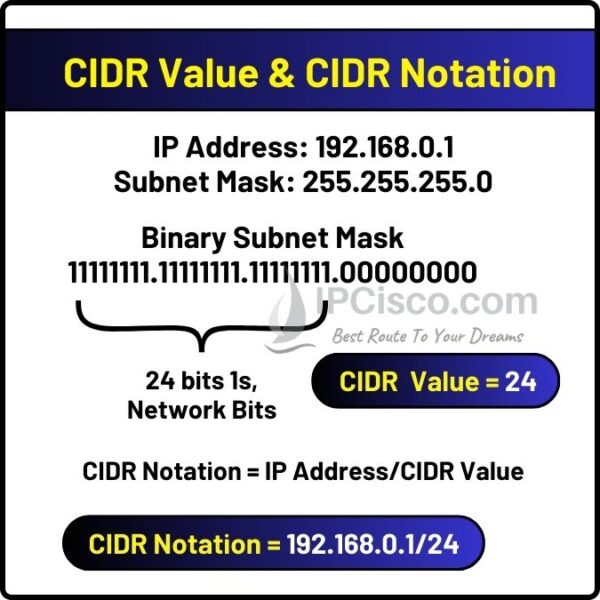
A subnet mask, like 255.255.255.0, is just a series of 1s followed by 0s in binary.11111111.11111111.11111111.00000000
CIDR (Classless Inter-Domain Routing) notation is simply a more concise way to represent this. Instead of writing out the whole mask, we just count the number of 1s (the network bits) and put that number after a slash (/).
For 255.255.255.0, there are 24 ones, so its CIDR notation is /24.
The following reading provides an excellent introduction to why CIDR was developed and how to decode its simple structure.
CIDR Notation Explained: Complete Guide to IP Address ...
This article, 'CIDR Notation Explained', does a great job of introducing the core concept of CIDR. It uses a helpful analogy to explain the network and host portions of an address.
Please read the first two main sections, 'What is CIDR Notation? Let’s DECODE That Slash!' and 'The Math Behind CIDR Notation'. Focus on understanding the IP address/prefix length format and how the prefix divides the 32 bits of an IPv4 address.
As the article highlights, the CIDR prefix tells you exactly where the line is drawn between the network portion and the host portion of an IP address.

Defining Network Sizes with CIDR
The real power of CIDR notation is how quickly it allows you to determine the size of a network. The logic follows directly from our work in the previous lesson:
- An IPv4 address has 32 bits in total.
- The CIDR prefix, let's call it
n, tells you the number of network bits. - The remaining bits are for hosts. The number of host bits,
h, is32 - n. - The total number of IP addresses in the network is
2^h. - Since the first (network) and last (broadcast) addresses are reserved, the number of usable addresses for your devices is
2^h - 2.
Let's put this into practice.
Example: A /27 Network
- Prefix
n= 27 - Host bits
h= 32 - 27 = 5 - Total IPs = 2^5 = 32
- Usable IPs = 32 - 2 = 30
This simple calculation is fundamental to network planning.
The article we looked at earlier has a great table of common CIDR blocks and their typical uses. This is the kind of information that becomes second nature with practice.
CIDR Notation Explained: Complete Guide to IP Address ...
Let's return to the 'CIDR Notation Explained' article to see a practical overview of common network sizes.
Read the section titled 'Common CIDR Blocks - SIZE MATTERS!' and review the table. Pay special attention to the 'CRITICAL PATTERN ALERT' mentioned right after the table. This is a very common point of confusion for beginners.
The key takeaway is a counter-intuitive but critical rule:
A larger CIDR prefix number means a smaller network.
- A
/16network is large (65,534 usable IPs). - A
/24network is smaller (254 usable IPs). - A
/29network is very small (6 usable IPs).
Test your understanding!
A cloud provider has allocated a subnet with a /22 prefix for your new Kubernetes cluster. How many usable IP addresses are available for your pods and services within this subnet?
Show answer
- Prefix
n: 22 - Host bits
h: 32 - 22 = 10 - Total IPs: 2^10 = 1024
- Usable IPs: 1024 - 2 = 1022
Allocating IP Address Ranges (Subnetting)
Now for the most practical application of this knowledge: subnetting. This is the process of taking a large IP address block and "carving it up" into smaller, logical sub-networks. In your DevOps role, you'll do this to create separate, isolated networks for different environments (dev, staging, prod) or different application tiers (web, application, database).
This process is sometimes called "borrowing bits." When you take a large network and create smaller subnets, you are "borrowing" bits from the host portion and re-assigning them to the network portion, which makes the network prefix longer.
The following resource provides a perfect, step-by-step guide for this exact scenario.
Subnetting: A Dev's Guide to Networks
This 'Developer's Guide to Networks' provides an excellent, structured walkthrough of how to perform subnetting based on a set of requirements—a core task in network design.
Please read the section 'How to Subnet: A Step-by-Step Guide for Developers'. Follow the scenario of planning a network for Dev, Staging, and Prod environments. Focus on the logic of 'borrowing bits' to meet the requirements for the number of subnets and hosts.
Let's summarize the excellent example from the article.
Scenario:
- Given: A single network block
192.168.10.0/24. This gives us 8 host bits (254 usable IPs). - Goal: Create at least 5 isolated subnets for different teams/environments.
Process:
-
Determine Subnet Bits: To get at least 5 subnets, we need to find the power of 2 that is >= 5.
2^2 = 4(not enough)2^3 = 8(perfect, this gives us 8 possible subnets)- So, we need to "borrow" 3 bits for our subnets.
-
Calculate the New Prefix: We started with a
/24and borrowed 3 bits.- New prefix = 24 + 3 = /27.
- All our new, smaller subnets will be
/27networks.
-
Calculate New Subnet Size: A
/27network has32 - 27 = 5host bits.- Number of usable hosts per subnet =
2^5 - 2 = 30. This is enough for the teams in the example.
- Number of usable hosts per subnet =
-
List the Subnets: The "block size" or increment for a
/27network is 32 (since2^5 = 32). So, the network addresses will increment by 32 in the last octet.- Subnet 1:
192.168.10.0/27(Range: 192.168.10.1 - 192.168.10.30) - Subnet 2:
192.168.10.32/27(Range: 192.168.10.33 - 192.168.10.62) - Subnet 3:
192.168.10.64/27(Range: 192.168.10.65 - 192.168.10.94) - ...and so on, up to
192.168.10.224/27.
- Subnet 1:
This is the fundamental process you will use when defining a VPC in AWS and creating public and private subnets within it.
Conclusion
You have now connected the low-level binary math of subnetting to the high-level, practical application of CIDR notation. This skill allows you to quickly understand network diagrams, plan cloud infrastructure, and configure security rules with precision and confidence.
Key Takeaways:
- CIDR notation (
/n) is the modern standard for defining a network's size and boundaries by specifying the number of network bits. - The number of usable hosts in a network is
2^(32-n) - 2. - A larger prefix number (e.g.,
/29) corresponds to fewer host bits and therefore a smaller network. - Subnetting is the process of taking a large CIDR block and dividing it into multiple, smaller CIDR blocks to organize and secure a network.
In our next lesson, we will move up the OSI model from addressing (Layer 3) to transport (Layer 4). We'll explore the critical differences between the two main protocols that move data across these networks: TCP and UDP, and learn when to use each.