Hello! Welcome back to our journey into Python for DevOps.
In our last lesson, we built the foundation for writing Python scripts. We learned how to store single pieces of information in variables using basic data types (str, int, float, bool) and how to control the logic of our scripts with if statements and loops.
Today, we'll move beyond single data points and explore how Python handles collections of data. In DevOps, you rarely deal with just one server, one log entry, or one configuration setting. You manage lists of servers, process structured data from APIs (like JSON), and handle sets of configuration rules. This is where Python's built-in data structures become essential.
Today's Learning Outcome: By the end of this lesson, you will be able to use Python lists, dictionaries, sets, and tuples to organize and manipulate data. We will explore what makes each of these unique and learn when to use them for common DevOps tasks.
1. An Overview of Python's Data Structures
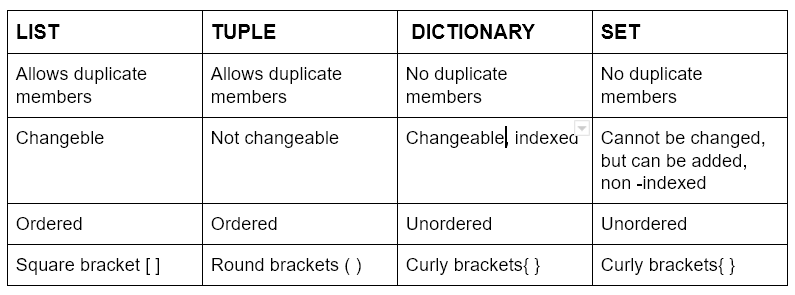
Python offers four primary built-in data structures for holding collections of items. They are differentiated by a few key properties: whether they are ordered, whether they can be changed (mutable), and whether they allow duplicate members.
This table gives a great high-level summary. We will refer back to it as we explore each one.
2. Lists: Your Go-To for Flexible Collections
A list is an ordered and mutable collection of items. Think of it as your primary, all-purpose container. Because they are ordered, items stay in the position you put them in. Because they are mutable, you can add, remove, or change items after the list is created.
When to use a list:
- A list of hostnames to iterate over.
- A sequence of steps in an automated task.
- Storing log lines read from a file.
The syntax for a list uses square brackets [].
# A list of servers to deploy an application to
servers = ["web-01", "web-02", "db-01", "app-01"]
To get a practical feel for how to work with lists, the following video provides an excellent walkthrough of the most common operations.
Python Tutorial for Beginners 4: Lists, Tuples, and Sets
This video from Corey Schafer's renowned Python series will guide you through creating and manipulating lists. It covers everything from accessing items to sorting them.
Watch the video from the beginning until 18:01. Focus on the following concepts: Creation and Access (0:00 - 5:16): How to create a list, get its length with len(), and access items using indices (e.g., servers[0]) and slices (e.g., servers[0:2]). Modifying (5:16 - 10:02): How to add items with .append() and .insert(), and remove items with .remove() and .pop(). Sorting (10:02 - 13:18): The difference between .sort() (which modifies the list in-place) and the sorted() function (which returns a new, sorted list). Finding Items (13:18 - 18:01): Using .index() to find an item's position, the in operator to check for existence, and for loops to iterate over all items.
Key List Operations Summary
Here is a quick recap of the most important list methods for DevOps tasks:
# A list of packages to install
packages = ["nginx", "ufw", "python3-pip"]
print(f"Initial list: {packages}")

# Add a package to the end
packages.append("docker-ce")
print(f"After append: {packages}") # ['nginx', 'ufw', 'python3-pip', 'docker-ce']

# Access the first package
print(f"First package: {packages[0]}") # nginx

# Check if a package is already in the list
if "ufw" in packages:
    print("ufw is already in the list.")

# Remove a specific package
packages.remove("ufw")
print(f"After removing ufw: {packages}") # ['nginx', 'python3-pip', 'docker-ce']

# Get the number of packages
print(f"There are {len(packages)} packages to install.")

# Loop through the packages and print them
print("\nFinal package list:")
for pkg in packages:
    print(f"- {pkg}")
3. Tuples: Immutable and Reliable
A tuple is an ordered but immutable collection. Once you create a tuple, you cannot change its contents. This makes them predictable and safe for data that should not be modified accidentally.
When to use a tuple:
- Storing a server's IP address and port, like
('10.1.2.3', 443). - As a key in a dictionary (we'll see this next), since lists can't be keys.
- Returning multiple fixed values from a function.
The syntax for a tuple uses parentheses ().
# A tuple representing a database connection configuration
db_config = ("192.168.1.100", "5432", "postgres_user", "password")
Watch this short segment to understand the key difference between lists and tuples.
Python Tutorial for Beginners 4: Lists, Tuples, and Sets
Corey Schafer now explains tuples and their defining characteristic: immutability. Pay close attention to the TypeError that occurs when you try to modify one.
Watch the segment from 20:02 to 23:30. Notice how tuples are created and what happens when you attempt to change an item.
The main takeaway is that if you try to change an item in a tuple, Python will raise an error, protecting your data from unintended changes.
# This will cause a TypeError!
# db_config[0] = "127.0.0.1"
Test your understanding!
You are writing a script and need to store two pieces of information:
- A list of administrator usernames that you might need to add or remove from over time.
- The fixed RGB color code for an "ERROR" message, which is always red
(255, 0, 0).
Which data structure—list or tuple—would you use for each?
Show answer
- Administrator usernames: Use a list. The collection of users is expected to change, so you need a mutable structure.
- RGB color code: Use a tuple. The values
(255, 0, 0)are fixed and represent a single entity (the color red). An immutable structure prevents this from being accidentally changed.
4. Dictionaries: Structured Key-Value Data
A dictionary is a mutable collection of key-value pairs. It's not ordered by a numerical index but by unique keys. This is arguably the most important data structure for modern DevOps and automation, as it maps directly to formats like JSON and YAML.
When to use a dictionary:
- Representing a server's configuration (
'hostname': 'web-01','ram': '8GB'). - Storing data returned from a REST API.
- Defining environment variables for a container.
The syntax for a dictionary uses curly braces {} with key: value pairs.
server_config = {
    "hostname": "app-server-01",
    "ip_address": "172.16.10.25",
    "os": "Ubuntu 22.04",
    "is_active": True,
    "cpu_cores": 4
}
The following video provides a concise and clear explanation of dictionaries and their operations.
Python: Data Structures - Lists, Tuples, Sets & Dictionaries tutorial
This tutorial covers Python's dictionary data structure, explaining how to create dictionaries and perform basic operations like accessing, adding, and iterating over items.
Watch the section on dictionaries from 15:55 to 18:44. Focus on: The key: value syntax. How to access a value using its key (e.g., server_config['hostname']). How to add a new key-value pair or change an existing one. How to loop through keys, or both keys and values using .items().
Key Dictionary Operations Summary
# Accessing a value by its key
print(f"The OS is: {server_config['os']}") # Ubuntu 22.04

# Adding a new key-value pair
server_config['location'] = 'us-east-1'
print(f"Added location: {server_config['location']}")

# Modifying an existing value
server_config['is_active'] = False
print(f"Is server active? {server_config['is_active']}")

# Looping through the dictionary
print("\nServer Configuration:")
for key, value in server_config.items():
    print(f"- {key}: {value}")
5. Sets: Unique and Unordered Collections
A set is a mutable and unordered collection of unique items. Its two main superpowers are automatically removing duplicates and performing high-speed mathematical set operations (like union, intersection, and difference).
When to use a set:
- To get a unique list of IP addresses from a log file full of duplicates.
- To compare the required packages for an application with the packages already installed on a system.
- For very fast checks to see if an item exists in a large collection.
The syntax for a set uses curly braces {}.
# A set of required ports for a web server
required_ports = {80, 443, 22}

# Duplicates are automatically removed
test_set = {1, 2, 2, 3, 3, 3}
print(test_set) # Output: {1, 2, 3}
This next video segment demonstrates the power of sets for ensuring uniqueness and comparing collections.
Python Tutorial for Beginners 4: Lists, Tuples, and Sets
Let's return to Corey Schafer's video to learn about sets. He clearly explains how they handle duplicates and demonstrates the powerful intersection, difference, and union methods.
Watch from 23:30 to 27:18. Pay attention to: How sets automatically discard duplicate values. intersection(): to find items that exist in both sets. difference(): to find items that exist in one set but not the other. union(): to combine both sets into one (with no duplicates).
Practical Exercise: Server Port Analysis
Imagine you have two servers, and you need to know which network ports are common to both.
Task:
- Define two sets,
server1_portsandserver2_ports, with the port numbers below. - Use a set operation to find the ports that are present on both servers.
- Print the result.
server1_ports:{22, 80, 443, 3306}server2_ports:{22, 8080, 443}
Show solution
This is a perfect use case for set intersection.
server1_ports = {22, 80, 443, 3306}
server2_ports = {22, 8080, 443}

# Find the common ports using the intersection method
common_ports = server1_ports.intersection(server2_ports)

# You can also use the & operator, which is a common shortcut
# common_ports = server1_ports & server2_ports

print(f"Common ports: {common_ports}")

# Expected Output: Common ports: {22, 443}
# (Note: the order in the output may vary since sets are unordered)
Conclusion
You've just learned about four incredibly powerful tools for organizing data in your Python scripts. Understanding the difference between them is key to writing clean, efficient, and readable code.
Key Takeaways:
- List
[]: The default choice. Ordered and mutable. Use for any collection of items where order matters and contents might change. - Tuple
(): "Immutable list." Ordered and unchangeable. Use for fixed data that should not be altered, like coordinates or configuration constants. - Dictionary
{}: Key-value pairs. Mutable. Use for structured data, like API responses or defining an object's properties. - Set
{}: Unique items. Mutable and unordered. Use for removing duplicates and performing comparisons (intersection, union, difference).
Next Up
You now have the tools to structure data. In our next lesson, we will learn how to organize our code by defining and using functions. This will allow us to create reusable, modular blocks of logic. We will also cover how to handle potential problems in our scripts using exception and error handling.