Hello! Welcome to the next lesson in your Python for DevOps journey.
In our last lesson, we explored Python's powerful data structures—lists, tuples, dictionaries, and sets. You learned how to organize and manage collections of data, which is essential for handling things like server lists, configuration data, and unique log entries.
Today, we shift our focus from organizing data to organizing code. As you write more complex automation scripts, you'll find yourself repeating the same logic. Functions allow you to package that logic into reusable, named blocks, making your scripts cleaner, easier to debug, and more powerful. This principle is a cornerstone of effective software development and automation engineering.
Today's Learning Outcome: By the end of this lesson, you will be able to define and use functions with parameters and return values in Python.
1. What are Functions and Why Use Them?
A function is a named, reusable block of code that performs a specific task. You've already used built-in functions like print() and len(). Now, you'll learn to create your own.
The main reason to use functions is to keep your code DRY—Don't Repeat Yourself. If you find yourself copying and pasting the same lines of code in multiple places, that's a perfect opportunity to create a function.
This video provides an excellent practical example of why avoiding repetition is so important.
Python Tutorial for Beginners 8: Functions
Watch this segment from Corey Schafer's Python tutorial. He clearly demonstrates a scenario where code is repeated and then refactors it into a function, highlighting the benefits of the DRY principle.
Watch the video from 1:41 to 4:11. Pay attention to how updating the code in one single function is much more efficient and less error-prone than changing it in multiple places.
By centralizing your logic in a function, you only need to update it in one place, and the change will apply everywhere the function is called.
2. The Anatomy of a Python Function
Defining a function in Python has a specific structure.

Let's watch a video that walks through creating and calling your first simple function.
Python Functions | Python Tutorial for Absolute Beginners #1
This video from Programming with Mosh will show you the basic syntax for defining a function using the def keyword and how to call it.
Watch the first part of the video from 0:03 to 2:34. You'll see how to define a function and the importance of indentation to define the function's body.
Here's the basic structure in action:
# Function definition
def display_welcome_message():
    """
    This is a docstring. It explains what the function does.
    It's a good practice to include one in every function you write.
    """
    print("Welcome to the automated deployment script.")
    print("Please ensure you have the correct permissions.")

# Calling the function
print("Starting the script...")
display_welcome_message()
print("Script finished.")
3. Passing Information: Parameters and Arguments
Functions become truly powerful when you can pass information into them. This is done using parameters and arguments.
- Parameter: A variable name listed in the function definition. It's a placeholder.
- Argument: The actual value that is sent to the function when it is called.
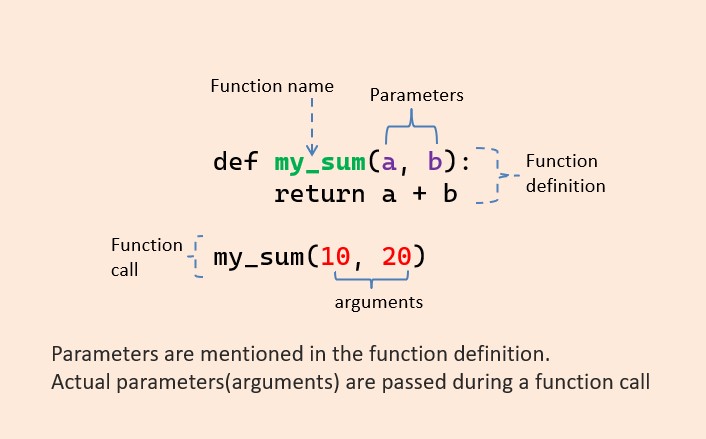
Let's see this in action.
Python Functions | Python Tutorial for Absolute Beginners #1
This next segment from the same video clearly explains the difference between parameters and arguments and shows how to use them to make a function more dynamic.
Watch from 2:34 to 4:43. Notice how the greet function is made more versatile by accepting a first_name and last_name.
Here's a DevOps-related example:
# 'hostname' and 'ip_address' are parameters
def add_host_to_inventory(hostname, ip_address):
    print(f"Adding {hostname} with IP {ip_address} to the inventory.")

# "web-01" and "192.168.1.10" are arguments
add_host_to_inventory("web-01", "192.168.1.10")
add_host_to_inventory("db-01", "192.168.1.20")
Test your understanding!
Consider the following code snippet:
def create_user(username, shell="/bin/bash"):
    print(f"Creating user {username} with shell {shell}.")

create_user("jdoe")
Identify the parameters and the arguments.
Show answer
- Parameters:
usernameandshell. They are the placeholders in the function definition. - Arguments:
"jdoe". This is the actual value passed to theusernameparameter when the function is called. Theshellparameter uses its default value.
4. Getting Information Back: The return Statement
Some functions perform an action (like print), while others calculate a value and send it back. The return keyword is used to exit a function and pass a value back to where it was called.
If a function doesn't have a return statement, it implicitly returns a special value called None.
Python Functions | Python Tutorial for Absolute Beginners #1
Let's explore the crucial difference between a function that prints a value and one that returns it. This video also explains what None is.
Watch from 4:43 to 8:38. Focus on: The two types of functions: one that performs a task and one that returns a value. Why returning a value is more flexible (you can print it, save it to a file, etc.). What happens when you try to get the result from a function that only prints (it returns None).
Capturing and Using a Return Value
You can store the value a function returns in a variable to use it later.
def get_fqdn(hostname, domain):
    """
    Takes a hostname and a domain and returns the
    Fully Qualified Domain Name (FQDN).
    """
    return f"{hostname}.{domain}"

# Call the function and store the result
fqdn_web = get_fqdn("web-01", "devops.local")
fqdn_db = get_fqdn("db-01", "devops.local")

print(f"The web server is reachable at: {fqdn_web}")
print(f"The database server is reachable at: {fqdn_db}")
Returning Multiple Values
A Python function can return multiple values. When you do this, Python automatically packs them into a tuple.
def get_server_details():
    # In a real script, this might come from a config file or API
    return "app-01", "10.0.5.15", "Ubuntu 22.04"

# You can capture the tuple
server_info = get_server_details()
print(server_info)  # Output: ('app-01', '10.0.5.15', 'Ubuntu 22.04')

# Or you can "unpack" the tuple into separate variables
hostname, ip, os = get_server_details()
print(f"Hostname: {hostname}, OS: {os}") # Output: Hostname: app-01, OS: Ubuntu 22.04
5. Flexible Function Calls
Python provides a few ways to make your function calls more flexible and readable.
Keyword Arguments
You can pass arguments by explicitly naming the parameter. This makes the order irrelevant and improves code clarity, especially for functions with many parameters.
Default Parameters
You can assign a default value to a parameter in the function definition. This makes the parameter optional. Any required (positional) parameters must be listed before optional (default) parameters.
Python Functions | Python Tutorial for Absolute Beginners #1
This final clip explains how to use keyword arguments for readability and how to set default parameters to make them optional.
Watch from 10:02 to 12:38. This is a short but important segment showing you how to write more robust and user-friendly functions.
Here's an example combining both:
def configure_service(service_name, start_on_boot=True, state="running"):
    """Configures a system service."""
    print(f"Configuring service: {service_name}")
    print(f"  - State: {state}")
    print(f"  - Start on boot: {start_on_boot}")

# Call with positional argument and defaults
configure_service("nginx")

print("-" * 20)

# Call with keyword arguments to override defaults
# The order of keyword arguments doesn't matter
configure_service(service_name="prometheus", state="restarted")
6. A Note on Variable Scope
It's critical to understand where your variables live.
- Local Scope: Variables created inside a function (including its parameters) are local to that function. They only exist while the function is running and cannot be accessed from outside.
- Global Scope: Variables created outside of any function are global. They can be accessed from anywhere in your script.
It is considered a very bad practice to modify a global variable from inside a function. Doing so can create confusing side effects and bugs that are hard to trace, as one function might unexpectedly change a value that another function relies on.
Python Functions | Python Tutorial for Absolute Beginners #1
This is one of the most important concepts for writing reliable code. This video explains variable scope and gives a strong warning about the dangers of modifying global variables.
Watch from 19:11 to 24:29. Absorb the difference between local and global variables and the advice to avoid modifying global variables inside functions.
The safe way: Pass data into functions via parameters and get data out via return statements.
Practical Exercise: Log Line Parser
Let's combine what you've learned about functions and the dictionaries from our last lesson. In DevOps, you often need to parse log files to extract useful information.
Task:
Write a function called parse_log_line that takes a single log line string as a parameter. The log line format is LEVEL:EVENT:key1=value1,key2=value2,....
Your function should:
- Parse the string.
- Return a dictionary containing the
level,event, and any key-value pairs.
Example:
- Input:
"INFO:user_login:user=admin,ip=192.168.1.100" - Expected Output (Return Value):
{'level': 'INFO', 'event': 'user_login', 'user': 'admin', 'ip': '192.168.1.100'}
Try to solve this yourself first.
Show solution
def parse_log_line(log_line):
    """
    Parses a log line string and returns a dictionary of its components.
    Format: "LEVEL:EVENT:key1=value1,key2=value2"
    """
    # Create the dictionary that we will return
    log_data = {}

    # Split the line into the main parts
    parts = log_line.split(':', 2) # Split a maximum of 2 times

    log_data['level'] = parts[0]
    log_data['event'] = parts[1]

    # The rest of the string contains the key-value pairs
    details_str = parts[2]

    # Split the details into individual pairs
    pairs = details_str.split(',')

    # Loop through each pair, split it by '=', and add to the dictionary
    for pair in pairs:
        key, value = pair.split('=')
        log_data[key] = value

    return log_data

# --- Testing the function ---
log_entry = "INFO:user_login:user=admin,ip=192.168.1.100"
parsed_data = parse_log_line(log_entry)
print(parsed_data)

log_entry_2 = "ERROR:db_connection_failed:host=db-01"
parsed_data_2 = parse_log_line(log_entry_2)
print(parsed_data_2)
Conclusion
Congratulations! You've just mastered one of the most fundamental building blocks of programming. By using functions, you can write automation scripts that are modular, reusable, and far easier to maintain.
Key Takeaways:
- Functions are reusable blocks of code defined with the
defkeyword. They help you follow the DRY (Don't Repeat Yourself) principle. - Parameters are the placeholders in a function's definition, while arguments are the actual values you pass in when you call it.
- The
returnstatement sends a value back from a function. This is more flexible than just printing, as the result can be stored and reused. - Keyword arguments (
name="value") and default parameters make your functions more readable and versatile. - Variables inside a function are local. Avoid modifying global variables from within functions to prevent bugs and side effects.
Next Up
You can now write organized, modular code. But what happens when things go wrong—a file isn't found, a network connection fails, or a user provides bad input? In our next lesson, you will learn how to handle exceptions and errors gracefully, making your scripts robust and reliable.