Hello! Welcome to the first lesson in our new module, Python for DevOps Engineers.
In the previous modules, you've mastered the Linux command line and built powerful automation scripts using Bash. While Bash is excellent for orchestrating command-line tools, you'll often encounter tasks that require more complex logic, data manipulation, or interaction with web services. This is where Python shines.
Python's clear syntax, extensive libraries, and strong support for structured data (like JSON and YAML) have made it the go-to language for cloud automation, API interaction, and modern configuration management. It complements your Bash skills perfectly, giving you a more versatile and powerful toolkit.
In our last lesson, we built a robust health-checking script in Bash. As we move through this Python module, think about how you could rebuild that script in Python—you'll soon see how Python can make handling API responses and complex logic even more straightforward.
Today's Learning Outcome: By the end of this lesson, you will be able to write Python scripts using variables, data types, and control flow structures. This is the foundational first step into the world of Python programming.
1. Getting Started: Your First Python Script
Before we dive in, ensure you have Python installed. If not, you can download it from python.org. As a DevOps engineer, you're likely familiar with installing software, but the "How to Install Python 3" guide in the resource A Practical Python Tutorial for Beginners is a good reference if you need it.
Let's create our first script. Open a text editor, create a file named hello.py, and add the following line:
print("Hello, DevOps World!")
Save the file. Now, open your terminal, navigate to the directory where you saved the file, and run it with the command:
python3 hello.py
You should see Hello, DevOps World! printed to your console. The print() function is the primary way to display output in Python, similar to echo in Bash.
2. Storing Information: Variables and Data Types
Just like in Bash, we use variables to store information that we can use and reuse in our scripts. Think of a variable as a labeled container for a value.
Unlike Bash, where almost everything is treated as a string, Python has distinct data types. This allows you to work with numbers, text, and other kinds of information more intuitively.
The following video provides an excellent introduction to variables and the four most common basic data types.
Python variables for beginners ❎
Watch this video from the Bro Code channel to get a clear, concise introduction to Python variables and the fundamental data types. It covers how to create variables and explains integers, floats, strings, and booleans.
Watch the video from the beginning to the end (00:00 - 12:41). Pay attention to: The concept of a variable as a 'reusable container'. The four basic data types: int, float, str, and bool. The use of f-strings for printing variables, as this is the modern standard. The difference between assignment (=) and using a variable. The syntax for multi-assignment.
Key Concepts from the Video
Let's summarize the essential data types you just saw:
- String (
str): A sequence of text, enclosed in single (') or double (") quotes. Used for names, file paths, messages, etc.hostname = "server-01"
- Integer (
int): A whole number, without a decimal point. Used for counts, IDs, status codes, etc.cpu_cores = 8
- Float (
float): A number with a decimal point. Used for measurements like temperature or financial data.load_average = 1.25
- Boolean (
bool): Can only be one of two values:TrueorFalse(note the capital letters). Essential for checks and conditions.is_service_running = True
This diagram provides a nice visual overview of how these data types are categorized in Python.
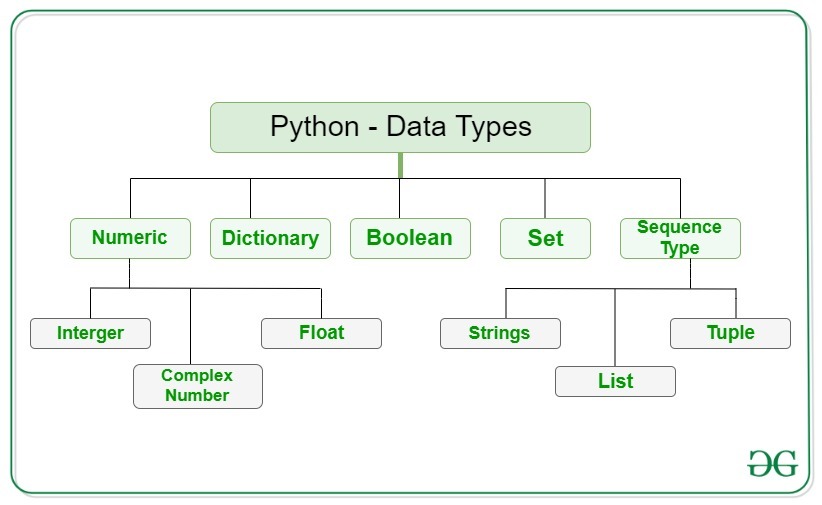
Python is dynamically typed, which means you don't have to declare the type of a variable. Python infers the type from the value you assign to it.
# Python knows 'port' is an integer
port = 8080

# Python knows 'status' is a string
status = "running"
Test your understanding!
You are writing a script to check a server's status. You need to store the following information:
- The server's IP address:
"192.168.1.10" - The number of active connections:
150 - The memory usage percentage:
75.4 - Whether the firewall is active:
True
What data type would you use for each variable?
Show answer
- IP address (
"192.168.1.10"):str(String). Even though it contains numbers, it's a piece of text. - Active connections (
150):int(Integer). It's a whole number. - Memory usage (
75.4):float(Float). It's a number with a decimal. - Firewall status (
True):bool(Boolean). It's a true/false condition.
3. Making Decisions: Control Flow Structures
Writing a script isn't just about executing commands one after another. Control flow statements allow you to control the order of execution, making your scripts dynamic and intelligent. They let you execute code conditionally (decision) or repeatedly (repetition).
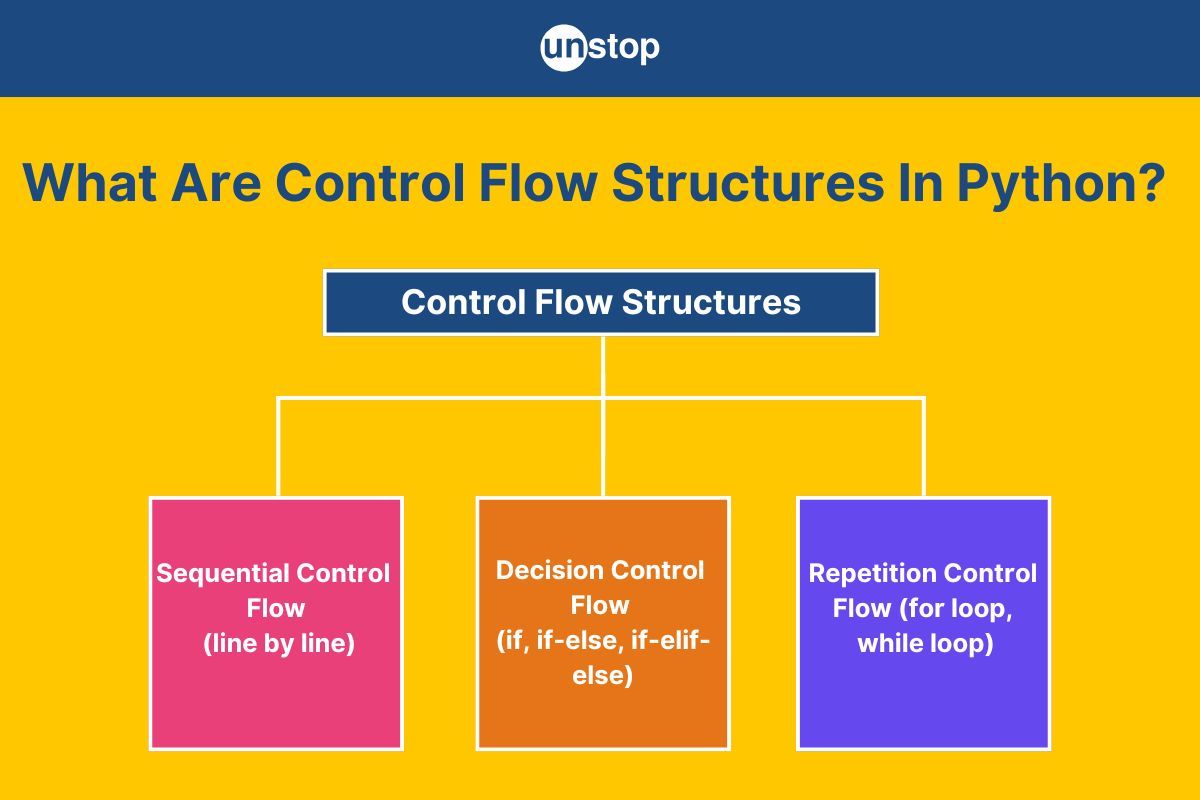
Conditional Statements (if, elif, else)
Conditional statements allow your script to make decisions. The if statement checks if a condition is true and executes a block of code only if it is. You can provide alternative paths with elif (else if) and else.
This is the Python equivalent of the if/then/else/fi structure you mastered in Bash.
If statements in Python are easy (if, elif, else) 🤔
This video, also from Bro Code, clearly explains how to use if, elif, and else to control the flow of your Python script. It's a fundamental concept for making your code responsive to different situations.
Watch the video from the beginning up to 08:00. Focus on: The basic syntax of an if statement and the importance of indentation. How to add an else block for when the condition is false. How to check multiple conditions with elif. The difference between the assignment operator (=) and the equality comparison operator (==). How boolean variables can be used directly as conditions.
A key takeaway is Python's use of indentation (whitespace at the beginning of a line) to define code blocks. Where Bash uses then and fi, Python uses a colon (:) followed by an indented block.
# A simple DevOps example
cpu_usage = 85

if cpu_usage > 90:
    print("ALERT: High CPU usage!")
elif cpu_usage > 75:
    print("WARNING: CPU usage is getting high.")
else:
    print("OK: CPU usage is normal.")

# This will print: WARNING: CPU usage is getting high.
Repetition / Loops (for and while)
Loops are used to execute a block of code multiple times. This is incredibly useful for repetitive tasks, like processing a list of servers or reading lines from a log file.
Python has two main types of loops:
forloop: Executes a code block for each item in a sequence (like a list of servers or a range of numbers).whileloop: Executes a code block as long as a specified condition remains true.
A Practical Python Tutorial for Beginners
To learn about loops, let's turn to a concise written tutorial. The 'Control Flow' section of this DigitalOcean guide provides clear and simple examples of for and while loops.
Read the subsection titled 'Loops' under the 'Control Flow' heading. Note the examples for both the for loop and the while loop.
Here's a quick summary:
-
Use a
forloop when you know how many times you want to iterate. For example, to ping 5 servers.# The range(5) function generates numbers from 0 to 4 for i in range(5): print(f"Pinging server #{i+1}...") -
Use a
whileloop when you want to loop until a condition changes. For example, to wait for a service to start.# A simple countdown seconds_left = 5 while seconds_left > 0: print(f"{seconds_left}...") seconds_left = seconds_left - 1 # Decrement the counter print("Go!")
4. Practical Application: Your First Python Scripts
Now, let's combine these concepts to solve a few simple problems. Try to write the code for these exercises yourself before looking at the solution.
Exercise 1: Calculate the multiplication and sum of two numbers
From pynative.com
Task: Given two integer numbers, return their product if the product is equal to or lower than 1000. Otherwise, return their sum.
Given 1:
number1 = 20number2 = 30- Expected Output:
The result is 600
Given 2:
number1 = 40number2 = 30- Expected Output:
The result is 70
Show solution
This exercise combines variables, arithmetic operators, and an if-else control structure.
def multiplication_or_sum(num1, num2):
    # Calculate the product of the two numbers
    product = num1 * num2

    # Check if the product is less than or equal to 1000
    if product <= 1000:
        return product
    else:
        # If the product is greater than 1000, return the sum
        return num1 + num2

# First condition
result = multiplication_or_sum(20, 30)
print("The result is", result)

# Second condition
result = multiplication_or_sum(40, 30)
print("The result is", result)
(This code is adapted from Exercise 1 on pynative.com)
Exercise 2: Display numbers divisible by 5 from a list
From pynative.com
Task: You are given a list of numbers. Write a program to iterate through the list and display only the numbers that are divisible by 5.
Given: num_list = [10, 20, 33, 46, 55]
Expected Output:
10
20
55
Hint: The modulo operator (%) gives you the remainder of a division. num % 5 == 0 is true if num is perfectly divisible by 5.
Show answer
This exercise uses a for loop to iterate through a list and an if statement to check a condition for each item.
num_list = [10, 20, 33, 46, 55]
print("Given list is:", num_list)
print('Divisible by 5:')

for num in num_list:
    if num % 5 == 0:
        print(num)
(This code is adapted from Exercise 6 on pynative.com)
Conclusion
Great work today! You've taken your first and most important step into using Python for automation. You've moved from the command-centric world of Bash to the data-centric world of a general-purpose programming language.
Key Takeaways:
- Python scripts are run using the
python3interpreter. - Variables store data, and Python uses data types like
str,int,float, andboolto understand what kind of data it's working with. - Control flow statements direct the logic of your script:
if/elif/elsestatements make decisions based on conditions.forloops repeat actions for a known number of items.whileloops repeat actions until a condition is no longer true.
- Indentation is a critical part of Python's syntax for defining code blocks.
Next Up
You now have the fundamental building blocks. In our next lesson, we will explore some of Python's more powerful data structures: lists and dictionaries. These are essential for managing collections of data, such as a list of servers or the JSON response from an API. We will also learn how to create reusable blocks of code with functions.