Hello! Welcome back to our series on Django authentication.
In the previous lesson, we saw how to use the @login_required decorator to easily protect your function-based views. This is a crucial first step in securing your application. But what about Class-Based Views (CBVs), which are central to writing scalable and reusable Django code?
Today's learning outcome is to protect class-based views using the LoginRequiredMixin. You'll learn the CBV equivalent of the @login_required decorator, a pattern that leverages your Python knowledge of classes and inheritance to achieve the same goal in a way that is idiomatic to CBVs.
From Decorators to Mixins: A Shift in Approach
For function-based views, decorators are a natural fit. They wrap a function and modify its behavior. For class-based views, the equivalent pattern is a mixin. A mixin is a special kind of class that provides a specific piece of functionality to other classes through multiple inheritance.
Django provides the LoginRequiredMixin for this exact purpose. It handles the authentication check for you before the view's main logic is ever executed.
The basic implementation is straightforward. You import the mixin and add it to your view's list of parent classes.
# some_app/views.py
from django.contrib.auth.mixins import LoginRequiredMixin
from django.views.generic import ListView
from .models import Post

class PostListView(LoginRequiredMixin, ListView):
    model = Post
    template_name = 'posts/post_list.html'
    # ... other view configurations
Crucial Detail: The LoginRequiredMixin must be the first class listed in the inheritance chain (the "leftmost" class). This is due to Python's Method Resolution Order (MRO). The mixin needs to run its dispatch method to check for authentication before the main view's dispatch method is called. Placing it first ensures it intercepts the request correctly.
How LoginRequiredMixin Works
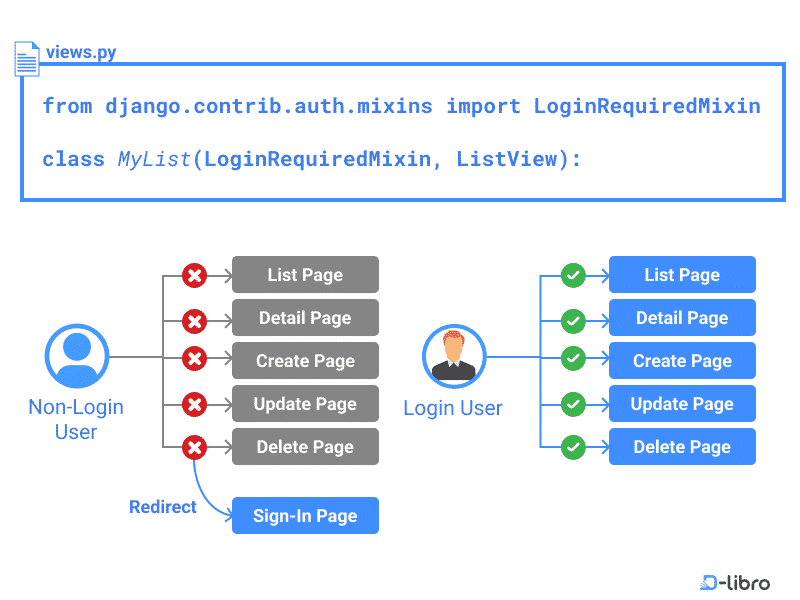
By default, the LoginRequiredMixin behaves exactly like the @login_required decorator:
- It checks if
request.user.is_authenticatedisTrue. - If the user is not authenticated, it redirects them to the login URL defined in your project's
settings.py(i.e.,LOGIN_URL). - Just like before, it includes the
nextquery parameter in the URL so the user can be redirected back to their original destination after logging in.
The following diagram provides a great visual summary of this process.
To get a concise summary of how to apply this mixin, the Mozilla Developer Network (MDN) guide is an excellent resource.
Django Tutorial Part 8: User authentication and permissions
The Mozilla Developer Network (MDN) provides a clear, practical explanation of how to use LoginRequiredMixin. This section will reinforce the basic concept.
Read the section titled 'Testing in views', focusing on the part that discusses class-based views and LoginRequiredMixin. Note the similarity in behavior to the @login_required decorator you learned about in the last lesson.
Customizing the Mixin's Behavior
Like its decorator counterpart, LoginRequiredMixin can be customized by setting attributes on your view class. These attributes are inherited from a base class called AccessMixin. The two most common are:
login_url: Overrides the globalLOGIN_URLsetting for this specific view.redirect_field_name: Changes the name of thenextquery parameter.
More interestingly, there's another attribute that offers different functionality:
raise_exception: This boolean attribute changes what happens when an unauthenticated user tries to access the view.False(default): Redirects the user to the login page (HTTP 302 Redirect). This is ideal for a standard website experience.True: Raises aPermissionDeniedexception, which results in an HTTP 403 Forbidden error page. This is often more appropriate for REST APIs, where a server-side redirect doesn't make sense for an API client.
Here is how you might use these attributes:
class SecretDataView(LoginRequiredMixin, ListView):
    # This view will return a 403 error if the user is not logged in,
    # which is useful for an API endpoint.
    raise_exception = True

    # ... other view logic
The official Django documentation provides the definitive reference on these options.
Using the Django authentication system
For a deeper understanding of the available customizations, let's look at the official Django documentation. It explains the mixin itself and the underlying AccessMixin that provides these configuration options.
First, read the subsection titled 'The LoginRequiredMixin mixin'. Then, skim the section just below it, 'Redirecting unauthorized requests in class-based views', which describes the AccessMixin. Focus on understanding the purpose of the attributes login_url, redirect_field_name, and especially raise_exception.
Practical Application and Demonstration
Let's see this in action. The following short video demonstrates applying LoginRequiredMixin to several CBVs (CreatePost, UpdatePost, etc.) and shows the resulting behavior when a logged-out user tries to access them.
Python Django Tutorial #12: Django permissions, Django login required mixin | Django blog project
To see this in action, watch this short video clip. The presenter applies the LoginRequiredMixin to several class-based views and then tests the result.
Watch from 04:39 to 07:06. Observe how the mixin is added to multiple views and how the raise_exception=True setting results in a '403 Forbidden' error for a logged-out user.
A common use case for LoginRequiredMixin is a view that displays data specific to the logged-in user. For example, a "My Posts" or "My Orders" page. In such a view, you not only restrict access but also filter the data based on self.request.user.
Here's a practical example based on the MDN tutorial for a view that shows books loaned to the current user.
# catalog/views.py

from django.contrib.auth.mixins import LoginRequiredMixin
from django.views.generic import ListView
from .models import BookInstance

class LoanedBooksByUserListView(LoginRequiredMixin, ListView):
    """Generic class-based view listing books on loan to current user."""
    model = BookInstance
    template_name = 'catalog/bookinstance_list_borrowed_user.html'

    def get_queryset(self):
        # The key step: filter the queryset to only include objects
        # belonging to the currently logged-in user.
        return (
            BookInstance.objects.filter(borrower=self.request.user)
            .filter(status__exact='o')
            .order_by('due_back')
        )
In this example, the LoginRequiredMixin guarantees that self.request.user will always be an authenticated user instance, so we can safely use it to filter our database query in get_queryset.
Test your understanding!
You are building a blog and have a class-based view PostCreateView that inherits from django.views.generic.edit.CreateView. This view allows users to create new blog posts.
- How would you modify
PostCreateViewto ensure only logged-in users can create a post? - By default, what happens if an anonymous user tries to access the "create post" URL?
- How would you change the view's behavior to return an HTTP 403 Forbidden error instead of redirecting?
Show answer
-
You would import
LoginRequiredMixinand add it as the first parent class to yourPostCreateView.from django.contrib.auth.mixins import LoginRequiredMixin from django.views.generic.edit import CreateView from .models import Post class PostCreateView(LoginRequiredMixin, CreateView): model = Post fields = ['title', 'content'] success_url = '/blog/' -
By default, the user would be redirected to the URL specified in
settings.LOGIN_URL(e.g.,/accounts/login/). The URL they were trying to visit would be added as anextquery parameter. -
You would set the
raise_exceptionattribute on the view toTrue.class PostCreateView(LoginRequiredMixin, CreateView): raise_exception = True # This is the change model = Post fields = ['title', 'content'] success_url = '/blog/'
Conclusion
You've now mastered the standard way to protect class-based views in Django. By using LoginRequiredMixin, you can write secure, clean, and reusable code that seamlessly integrates with Django's authentication system.
Key Takeaways:
LoginRequiredMixinis the idiomatic way to require authentication for Class-Based Views.- It must be the first class in the inheritance list to function correctly.
- By default, it redirects unauthenticated users to the login page, just like the
@login_requireddecorator. - You can customize its behavior by setting attributes like
login_urlorraise_exceptionto show a 403 error instead of redirecting.
Preview of the Next Lesson:
Authentication (knowing who the user is) is only half the story. The other half is authorization (knowing what a user is allowed to do). In our next lesson, we will explore Django's permissions framework and learn how to restrict access to views based on user permissions using tools like @permission_required and PermissionRequiredMixin.