Hello! Welcome back to our Django course.
In our last lesson, you mastered the Django Template Language (DTL), learning how to use tags like {% for %} and {% if %} to add logic, and filters to format data. This gave you fine-grained control over individual templates. However, if you look at most websites, you'll notice many elements are the same across all pages: the header, the navigation bar, the footer. Copying and pasting this code into every single template file would be incredibly inefficient and a nightmare to maintain.
This approach violates a core principle of software development that you're likely familiar with from your programming experience: Don't Repeat Yourself (DRY).
This lesson introduces Django's elegant solution to this problem: template inheritance. We will learn how to create a base "skeleton" template that contains all the common site elements. Other "child" templates will then inherit from this base, filling in only the parts that are unique to them. This is the key to building scalable and maintainable frontends in Django.
By the end of this lesson, you will be able to implement template inheritance using the {% extends %} and {% block %} tags to create reusable and efficient template structures.
The Core Concept: Inheritance in Templates
Template inheritance in Django works much like class inheritance in object-oriented programming. You define a parent template (a "base class") with a structure and several "blocks" (placeholders, like methods you can override). You then create child templates that "extend" the parent and fill in or override those blocks with their specific content.
The two main tags that make this possible are:
{% extends 'base.html' %}: This must be the very first tag in a child template. It tells the Django template engine which parent template it should inherit from.{% block <name> %}...{% endblock %}: This tag defines a block that a child template can override. You'll place these in your base template to mark the sections that will change from page to page (e.g., the main content, the page title).
The following image provides a fantastic visual overview of this process.
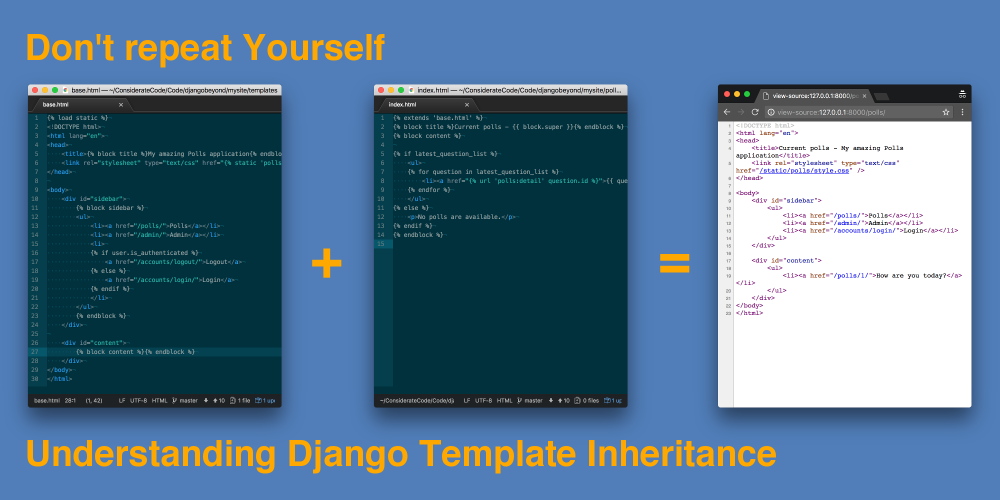
To get a definitive understanding of this feature, the best place to start is the official Django documentation.
The official Django documentation provides the most accurate and comprehensive explanation of template inheritance. It walks through a clear example of a base skeleton template and a child template that extends it.
Please read the section titled 'Template inheritance'. Pay close attention to the base.html example and the corresponding child template. Note how the {% block %} tags in the base are replaced by the content from the child, and how the sidebar block (which wasn't overridden) uses the default content from the parent template.
Practical Walkthrough: Building a Base Template
Now that you understand the theory, let's see it in action. We'll walk through the process of creating a base.html file and modifying an existing page to inherit from it.
Let's assume you have a project structure where your templates are in a top-level templates directory, which you configured in your settings.py.
-
Create
base.html: Inside yourtemplatesdirectory, create a new file namedbase.html. This file will contain the main HTML structure for your entire site. -
Define Blocks: In
base.html, you'll add the boilerplate HTML (<!DOCTYPE>,<html>,<head>,<body>) and define blocks for the parts that will change. A common setup includes a block for the title and a block for the main content.<!-- templates/base.html --> <!DOCTYPE html> <html lang="en"> <head> <meta charset="UTF-8"> <title>{% block title %}My Awesome Site{% endblock %}</title> </head> <body> <header> <h1>My Site</h1> <nav> <a href="/">Home</a> | <a href="/about/">About</a> </nav> </header> <main> {% block content %} <!-- Page-specific content will go here --> {% endblock %} </main> <footer> <p>© 2024 My Awesome Site</p> </footer> </body> </html>Notice that the
titleblock has default content ("My Awesome Site"). If a child template doesn't override it, this default will be used. Thecontentblock is empty, waiting to be filled. -
Extend in a Child Template: Now, let's modify a page, say
index.html, to use this base template. Remove all the boilerplate HTML and wrap the unique content in the corresponding block.<!-- templates/index.html --> {% extends 'base.html' %} {% block title %}Welcome Home - My Awesome Site{% endblock %} {% block content %} <h2>Homepage</h2> <p>This is the main content for the homepage.</p> {% endblock %}
The following video provides a clear, practical demonstration of these steps.
Django Base Template | Django Project | djblogger | 23
This video from Very Academy offers a great step-by-step walkthrough. It demonstrates creating a base.html file and using extends and block to make a child template inherit from it, which is exactly what we're learning.
Watch from 00:33 to 13:17. Pay attention to: The explanation of the DRY (Don't Repeat Yourself) principle (00:33). The creation of the base.html file and its population with a standard HTML skeleton (01:23). Using {% extends %} in the child template to inherit from the base (06:31). Defining {% block %} placeholders in base.html for both the main content and the page title (08:45). How these blocks are overridden in the child template (09:40).
Test your understanding!
You are given the base.html file from our example above.
Your task is to create a new template file, about.html, that does the following:
- Extends
base.html. - Sets the page title to "About Us".
- Provides content for the
contentblock that includes an<h2>heading with the text "About Our Company" and a paragraph<p>with some text about the company.
Write the complete code for about.html.
Show answer
<!-- templates/about.html -->
{% extends 'base.html' %}

{% block title %}About Us{% endblock %}

{% block content %}
    <h2>About Our Company</h2>
    <p>We are a company dedicated to making awesome Django applications.</p>
{% endblock %}
This solution correctly uses {% extends %} as the first line and then defines the title and content blocks to provide the specific content for the "About" page, while inheriting the header and footer from base.html.
Advanced Technique: Adding to a Block with {{ block.super }}
Sometimes you don't want to completely replace the content of a parent's block, but rather add to it. For this, Django provides a special variable: {{ block.super }}. When used inside a block, it renders the content of the parent's block at that location.
This is very useful for things like adding page-specific CSS classes or prepending a title.
Example: Adding a CSS class
In base.html:
<body class="{% block body_class %}base-layout{% endblock %}">
    ...
</body>
In homepage.html:
{% extends 'base.html' %}

{% block body_class %}{{ block.super }} homepage-specific{% endblock %}
The rendered <body> tag for the homepage will be: <body class="base-layout homepage-specific">.
The following article has another excellent and very common use case: prepending a specific page title to a general site title.
Don't repeat Yourself - Understanding Django Template ...
The article 'Don't repeat Yourself' from Considerate Code clearly explains how to use {{ block.super }}. This is a powerful technique for enhancing parent blocks instead of just replacing them.
Read the section 'Re-using block content with {{ block.super }}'. The example demonstrates how to create a more descriptive page title (e.g., 'Current polls - My amazing Polls application') by combining the child's title with the parent's title via {{ block.super }}.
Conclusion
You have now learned one of the most powerful and time-saving features of Django's templating engine. By embracing template inheritance, you can create websites that are significantly easier to build, maintain, and update.
Key Takeaways:
- The DRY Principle: Template inheritance is Django's primary tool for avoiding repeated code in your templates.
{% extends %}is Key: This tag, placed at the very top of a child template, establishes the parent-child relationship.{% block %}Defines Placeholders: Use blocks in your base template to define sections that child templates can override.{{ block.super }}Adds, Not Replaces: Use this variable to include the parent block's content within a child block, allowing you to augment rather than completely overwrite it.
In this lesson, we created a consistent layout. In the next lesson, "Configure and manage static files (CSS, JS, images) for development," we will learn how to add styling and interactivity to this layout. You'll see how having a single base.html makes it incredibly simple to link to your CSS and JavaScript files across your entire project.