Hello! Welcome back to our Django journey.
In the last lesson, we successfully passed a context dictionary from a view to a template. We saw how to send data like strings, numbers, and even a Python list to our HTML. However, when we rendered the list, it just appeared as a plain string representation (['Item 1', 'Item 2', 'Item 3']), which isn't very useful for building a real user interface.
This lesson bridges that gap. We will dive into the Django Template Language (DTL), the engine that makes your templates truly dynamic. You'll learn how to use DTL tags to implement logic like loops and conditionals, and filters to format your data for presentation. This will allow you to take the data from your views and display it exactly how you want.
By the end of this lesson, you will be able to control the rendering of your templates using common DTL tags like {% for %}, {% if %}, and {% url %}, and apply filters to format your variables.
The Anatomy of the Django Template Language
Before we start coding, let's look at the basic building blocks of DTL. It consists of four main components:
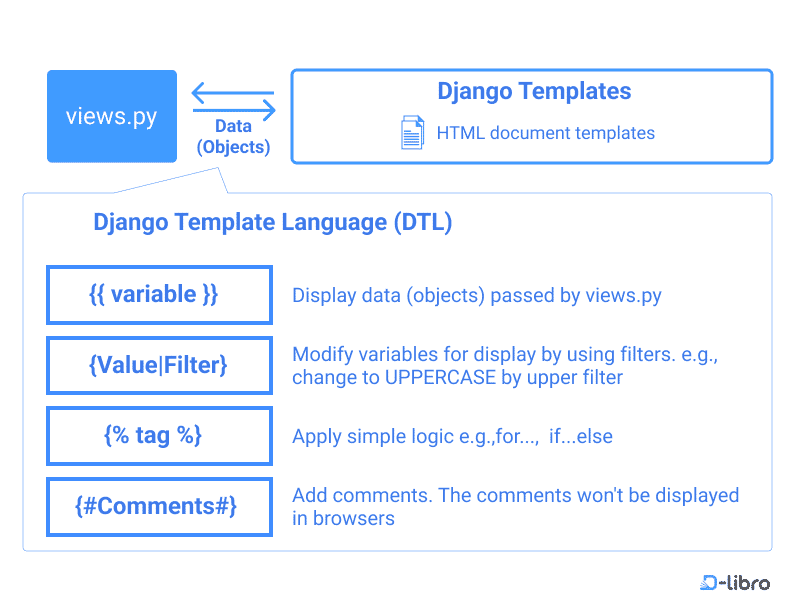
1. Template Tags: Adding Logic to Your Templates
Template tags provide the logic and control flow inside your templates. The syntax {% tag_name %} will feel familiar to control structures in Python. Django processes these tags when rendering the template and executes the instruction.

Let's explore the most fundamental tags.
The {% for %} Tag: Looping Through Data
Remember that item_list we passed to the template in our last lesson? The {% for %} tag is how you iterate over it to create a proper list in HTML.
Syntax:
<ul>
    {% for item in item_list %}
        <li>{{ item }}</li>
    {% endfor %}
</ul>
This is directly analogous to Python's for item in item_list:. The loop is opened with {% for ... %} and must be closed with {% endfor %}.
The following video provides a practical demonstration of using a for loop to iterate over data related to a database object.
Django - Detail Pages & the {% url %} template tag!
Watch this segment from the 'Django - Detail Pages & the {% url %} template tag!' video by BugBytes to see the for loop in action.
Watch from 02:11 to 04:07. The video demonstrates looping through a choice_set (a list of related objects). Notice how for choice in question.choice_set.all is used to iterate and {{ choice.choice_text }} is used to access an attribute of each object in the loop.
Helpful Loop Variables
Inside a for loop block, DTL gives you access to a special forloop object with useful attributes about the state of the loop:
| Variable | Description |
|---|---|
forloop.counter |
The current iteration (1-indexed) |
forloop.counter0 |
The current iteration (0-indexed) |
forloop.first |
True if this is the first iteration |
forloop.last |
True if this is the last iteration |
forloop.revcounter |
The number of iterations from the end (1-indexed) |
For example, you could add a special CSS class to the first item in a list:
{% for item in item_list %}
    <li class="{% if forloop.first %}first-item{% endif %}">{{ item }}</li>
{% endfor %}
The {% if %}, {% elif %}, and {% else %} Tags: Conditional Logic
Just like in Python, you can control which parts of your template are rendered using conditional statements. This is perfect for showing or hiding elements based on the context data.
The syntax is intuitive:
{% if user.is_authenticated %}
    <p>Welcome, {{ user.username }}!</p>
{% elif user.is_guest %}
    <p>Welcome, Guest!</p>
{% else %}
    <p><a href="/login/">Please log in.</a></p>
{% endif %}
Like the for loop, an if block must be closed with {% endif %}. You can use boolean operators like and, or, and not, as well as comparison operators like ==, >, <.
A common task is handling an empty list. The for tag has a convenient built-in clause for this, {% empty %}.
Django - Detail Pages & the {% url %} template tag!
Let's return to the BugBytes video to see two ways of handling an empty list: first using {% empty %} and then with an {% if %} tag.
Watch from 10:58 to 13:31. This clip shows how to provide a fallback message when a for loop has nothing to iterate over. Pay attention to both the {% empty %} tag and the alternative {% if ... %} with a .count() check.
The {% url %} Tag: Dynamic and Robust URLs
Hardcoding URLs in your templates (e.g., <a href="/polls/3/">) is fragile. If you ever change the URL structure in your urls.py, you have to hunt down and fix every instance in your templates. The {% url %} tag solves this problem.
It generates a URL by looking up a named URL pattern in your urls.py.
Example:
In polls/urls.py:
path('<int:question_id>/', views.detail, name='detail'),
In your template:
<a href="{% url 'detail' question.id %}">View Question</a>
Django will see name='detail', find the corresponding path, substitute question.id for <int:question_id>, and render the correct URL (e.g., /polls/3/).
This next video explains this critical concept and also introduces namespacing, which is essential for projects with multiple apps.
Django - Detail Pages & the {% url %} template tag!
This is the most important part of the BugBytes video. It explains why the {% url %} tag is a best practice and how to use it with namespacing to avoid conflicts.
Watch from 05:05 to 10:58. Focus on: The problem with hardcoded URLs. How {% url 'name' argument %} works. How adding an app_name variable in urls.py lets you use namespaced URLs like {% url 'polls:detail' %} to prevent name collisions between apps.
Test your understanding!
Imagine you have a context variable products, which is a list of product dictionaries. Each dictionary has keys: name (string), price (float), and in_stock (boolean).
Write a DTL snippet that:
- Loops through the
productslist. - For each product, displays its name in an
<li>element. - Only displays products where
in_stockisTrue. - If the entire
productslist is empty, it should display a single<li>with the text "No products available."
Show answer
<ul>
    {% for product in products %}
        {% if product.in_stock %}
            <li>{{ product.name }} - ${{ product.price }}</li>
        {% endif %}
    {% empty %}
        <li>No products available.</li>
    {% endfor %}
</ul>
This solution combines a for loop with a nested if condition and uses the empty clause for the fallback case.
2. Template Filters: Formatting Your Data
While tags create logic, filters transform the output of your variables. The syntax uses a pipe character |, which should feel familiar if you've used command-line pipes in a shell.
Syntax: {{ variable|filter_name }} or {{ variable|filter_name:"argument" }}
Let's watch a video that introduces filters and demonstrates some of the most common ones.
Try DJANGO Tutorial - 20 - Template Tags and Filters
This video from CodingEntrepreneurs provides an excellent, fast-paced overview of what filters are and how to use them for various formatting tasks.
Watch from 01:00 to 05:37. This will cover: The basic filter syntax. Text formatting filters like capfirst, upper, title, and slugify. The crucial safe filter for rendering HTML content. The truncatechars and strip_tags filters. The concept of chaining multiple filters together.
Here's a summary of some useful filters. The official Django documentation, which we'll link to, has the complete list.
| Filter | Description | Example | Result |
|---|---|---|---|
date |
Formats a datetime object. |
{{ post.pub_date | date:"Y-m-d" }} |
2023-10-27 |
length |
Returns the length of a list or string. | {{ comments | length }} |
5 |
truncatewords |
Truncates a string after a number of words. | {{ my_text | truncatewords:10 }} |
This is a long text... |
lower / upper |
Converts string to lowercase or uppercase. | {{ 'Hello World' | lower }} |
hello world |
pluralize |
Adds a suffix (default 's') if the value is not 1. | {{ num_items }} item{{ num_items | pluralize }} |
1 item, 2 items |
safe |
Marks a string as safe for HTML rendering (disables escaping). | {{ html_content | safe }} |
Renders the actual HTML |
For a comprehensive guide and a complete list of all built-in tags and filters, the official Django documentation is the ultimate resource.
Built-in template tags and filters
The Django documentation is your best friend. This page serves as a complete reference for all built-in tags and filters. It's a great resource to bookmark for future use.
You don't need to read this entire document now. Just skim the 'Built-in tag reference' and 'Built-in filter reference' sections to see the variety of tools available. Notice the detailed explanations for tags like if, for, url and filters like date and pluralize.
A Note on Logic: Templates vs. Views
DTL is powerful, but it's intentionally limited. It is designed for presentation logic, not business logic.
- Good use of DTL: Looping through a list, checking if a user is logged in, formatting a date.
- Bad use of DTL: Performing complex calculations, making database queries, processing API responses.
As a rule of thumb, prepare your data in the view. The view should do all the heavy lifting and pass a clean, easy-to-use context to the template. The template should then focus only on how to display that data.
Conclusion
You've now added the core of the Django Template Language to your toolkit. You can move beyond simply displaying variables and start controlling the structure and format of your rendered pages.
Key Takeaways:
- Tags
{% ... %}control logic: Use{% for %}to iterate,{% if %}for conditionals, and{% url %}for creating robust links. Remember to close your blocks with{% endfor %}and{% endif %}. - Filters
|format output: Use filters likedate,length,truncatewords, andupperto change how your variables are displayed. - Chain filters for more power: You can apply multiple filters sequentially, like
{{ variable|striptags|truncatewords:50 }}. - Keep logic separated: Do complex data processing in the view. Use the template for presentation logic only.
In this lesson, we worked inside a single template file. In the real world, websites have many repeated elements like headers, footers, and sidebars. In our next lesson, we will explore template inheritance using the {% extends %} and {% block %} tags. This powerful feature will allow you to create a base layout and reuse it across your entire site, making your code much more efficient and maintainable.