Hello! Welcome back to our Django course.
In our last lesson, you did a great job refactoring your API views for the Task model into a single TaskViewSet. By combining GenericViewSet with several mixin classes, you grouped all the related logic into one place, making your code much more organized and adhering to the DRY (Don't Repeat Yourself) principle. However, you still had to write out a long list of mixins and manually bind the ViewSet to URLs.
Today, we'll take simplification to the next level. The learning goal is to use a ModelViewSet to quickly generate a full set of CRUD endpoints. You will see how Django REST Framework allows you to create a complete, production-ready API for a model with an astonishingly small amount of code.
The Power of ModelViewSet
In the last lesson, your TaskViewSet looked like this:
class TaskViewSet(mixins.CreateModelMixin,
                  mixins.RetrieveModelMixin,
                  mixins.UpdateModelMixin,
                  mixins.DestroyModelMixin,
                  mixins.ListModelMixin,
                  viewsets.GenericViewSet):
    queryset = Task.objects.all()
    serializer_class = TaskSerializer
That list of mixins is quite explicit. It defines every action the viewset should handle. What if there was a class that already included all of them for you? That's precisely what ModelViewSet does.
The ModelViewSet class inherits from GenericAPIView and bundles together the implementations for all standard CRUD actions: .list(), .retrieve(), .create(), .update(), .partial_update(), and .destroy().
The official DRF documentation provides a concise explanation of ModelViewSet and its capabilities. This will give you a clear, authoritative definition.
In this resource, please read the section titled ModelViewSet and its accompanying Example. Focus on the list of actions it provides by default and how little code is needed in the example.
As you can see from the documentation, ModelViewSet is the highest level of abstraction for standard CRUD interfaces. It's designed for maximum efficiency. Let's revisit the diagram from our last lesson to see where it fits.
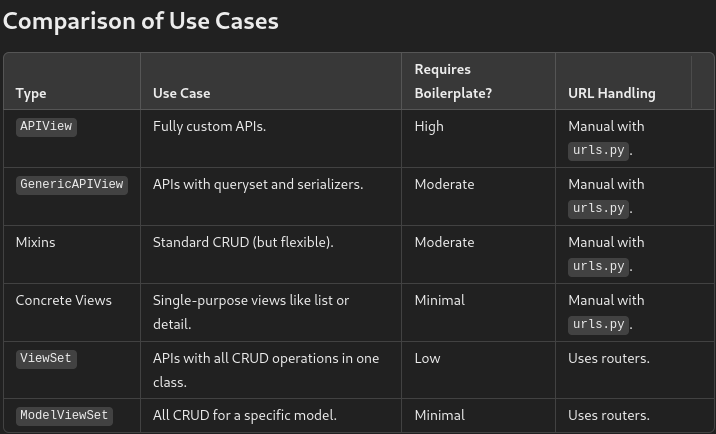
Refactoring Your TaskViewSet
Now, let's apply this knowledge and refactor the TaskViewSet from the previous lesson. The change is incredibly simple. We replace the GenericViewSet and the long list of mixins with a single parent class: viewsets.ModelViewSet.
Your new views.py:
# api/views.py
from rest_framework import viewsets
from .models import Task
from .serializers import TaskSerializer

class TaskViewSet(viewsets.ModelViewSet):
    """
    A simple ViewSet for viewing and editing tasks.
    This viewset automatically provides `list`, `create`, `retrieve`,
    `update` and `destroy` actions.
    """
    queryset = Task.objects.all()
    serializer_class = TaskSerializer
That's it. Those three lines of meaningful code (class, queryset, serializer_class) provide the exact same functionality as our more verbose GenericViewSet implementation. This is the power and elegance of DRF's abstractions at work.
Viewsets & Routers in Django REST Framework
This video provides a great walkthrough of the concepts we've just discussed, showing the refactoring from more complex views down to the simple and powerful ModelViewSet.
Please watch from the beginning to 02:36 to get an introduction to ViewSets and ModelViewSet. Then, watch from 03:42 to 04:29 to see a live demonstration of refactoring to a ModelViewSet, which is exactly what we just did. Finally, watch the summary from 11:43 to 13:10, which recaps how ModelViewSet provides all the necessary actions automatically.
Automating URL Configuration with Routers
We have our ultra-concise TaskViewSet, but how do we connect it to our project's URLs? In the last lesson, we did this manually:
# The 'old' manual way in urls.py
task_list = TaskViewSet.as_view({'get': 'list', 'post': 'create'})
task_detail = TaskViewSet.as_view(...)

urlpatterns = [
    path('tasks/', task_list, name='task-list'),
    path('tasks/<int:pk>/', task_detail, name='task-detail'),
]
This still works, but it feels repetitive, especially since the ModelViewSet and router combination is designed to eliminate this very boilerplate. DRF provides a Router class that automatically generates the URL patterns for a ViewSet.
The most common router is the DefaultRouter. It not only creates the routes for the standard list, create, retrieve, update, and destroy actions but also generates a root API view that shows hyperlinks to all your registered resources.
Let's replace our manual URL configuration with a router.
Your new urls.py:
# api/urls.py
from django.urls import path, include
from rest_framework.routers import DefaultRouter
from .views import TaskViewSet

# 1. Create a router instance
router = DefaultRouter()

# 2. Register the ViewSet with the router
# The router will generate URLs for the TaskViewSet.
# The 'tasks' string is the URL prefix for this resource.
router.register(r'tasks', TaskViewSet, basename='task')

# 3. The API URLs are now determined automatically by the router.
# We include the router-generated URLs in our urlpatterns.
urlpatterns = [
    path('', include(router.urls)),
]
With this setup, the router automatically generates the following URL patterns for you:
GET /api/tasks/: Maps to the.list()action.POST /api/api/tasks/: Maps to the.create()action.GET /api/tasks/{pk}/: Maps to the.retrieve()action.PUT /api/tasks/{pk}/: Maps to the.update()action.PATCH /api/tasks/{pk}/: Maps to the.partial_update()action.DELETE /api/tasks/{pk}/: Maps to the.destroy()action.
This combination of ModelViewSet and DefaultRouter is the quintessential DRF pattern for rapidly building RESTful APIs.
Django REST Framework Tutorial to Build APIs Fast
This article provides another clear, practical example of combining a ModelViewSet with a Router.
Read the sections 'Refactoring to a ModelViewSet' and 'Automating URLs with Routers'. The code examples are very clean and reinforce the two-step process we just covered: creating the ModelViewSet and then registering it with a Router.
To see it all working together, let's watch the final part of the BugBytes video.
Viewsets & Routers in Django REST Framework
This part of the video demonstrates setting up the router and then shows the final result in the browsable API. You'll see all the endpoints we've discussed in action.
Watch from 04:29 to 05:27 to see how the router is configured in urls.py. Then, continue from 08:05 to 10:58 to see a demonstration of the automatically generated endpoints: listing, creating, retrieving, updating, and deleting objects, all through the ModelViewSet and Router.
Test your understanding!
Imagine you have a Project model and a corresponding ProjectSerializer. Your task is to create a full set of CRUD API endpoints for projects at the URL prefix /api/projects/.
Write the necessary code for both views.py and your app's urls.py.
Show answer
This requires creating a ModelViewSet and registering it with a DefaultRouter.
1. In api/views.py:
You would create a ProjectViewSet that inherits from viewsets.ModelViewSet and specifies the queryset and serializer_class.
# api/views.py
from rest_framework import viewsets
from .models import Project
from .serializers import ProjectSerializer

class ProjectViewSet(viewsets.ModelViewSet):
    queryset = Project.objects.all()
    serializer_class = ProjectSerializer
2. In api/urls.py:
You would register this new ProjectViewSet with your router. If you already have a router for the TaskViewSet, you just add another registration to it.
# api/urls.py
from django.urls import path, include
from rest_framework.routers import DefaultRouter
from .views import TaskViewSet, ProjectViewSet # Import the new ViewSet

router = DefaultRouter()
router.register(r'tasks', TaskViewSet, basename='task')
router.register(r'projects', ProjectViewSet, basename='project') # Register the new ViewSet

urlpatterns = [
    path('', include(router.urls)),
]
That's all it takes! The router would now serve both the /api/tasks/ and /api/projects/ endpoints with full CRUD functionality.
Conclusion
Congratulations! You have now mastered one of the most powerful and efficient patterns in Django REST Framework. By leveraging ModelViewSet, you can create a complete and conventional REST API for any of your models with just a handful of lines of code.
Key Takeaways:
ModelViewSetis a high-level class that provides a default implementation for a full set of CRUD actions (list,create,retrieve,update,destroy).- It combines the functionality of
GenericViewSetand all the common model mixins, drastically reducing boilerplate code. - To implement a
ModelViewSet, you typically only need to define thequerysetandserializer_classattributes. Routers, particularlyDefaultRouter, automate the process of URL generation forViewSets, ensuring your API follows RESTful conventions without manual configuration.
Preview of the Next Lesson:
Today, we used a Router to quickly get our ModelViewSet working. In the next lesson, we will dive deeper into this topic. You will learn how to use a Router to automatically generate URL patterns for a ViewSet, exploring the differences between SimpleRouter and DefaultRouter, and understanding how to use the basename argument correctly when the router can't infer it automatically.