Hello! In our last lesson, you successfully refactored your API views into a ModelViewSet, creating a full suite of CRUD endpoints with very little code. We also took a quick look at DefaultRouter to get those endpoints wired up and working.
Today, we're going to dive deep into that "magic" part. The goal of this lesson is to master how to use a 'Router' to automatically generate URL patterns for a ViewSet. We'll move beyond just using the router and start to understand exactly how it works, what it generates, and how you can configure it to fit your needs. This knowledge is crucial for building clean, consistent, and scalable APIs with DRF.
The Problem: Manual URL Wiring
Let's first remember the problem that routers solve. In the lesson before last, after creating a ViewSet, we had to manually bind each HTTP method to a specific action in our urls.py file.
# The manual way of binding a ViewSet
from .views import TaskViewSet

task_list = TaskViewSet.as_view({
    'get': 'list',
    'post': 'create'
})

task_detail = TaskViewSet.as_view({
    'get': 'retrieve',
    'put': 'update',
    'patch': 'partial_update',
    'delete': 'destroy'
})

urlpatterns = [
    path('tasks/', task_list, name='task-list'),
    path('tasks/<int:pk>/', task_detail, name='task-detail'),
]
While this works, it's verbose and repetitive. For every ViewSet, you would have to write similar boilerplate code. This is where routers come in.
The official DRF documentation has a section that perfectly illustrates this transition from manual binding to using a router. Start by reading the section that shows the 'old' way, which we want to avoid.
Please read the section titled Binding ViewSets to URLs explicitly. This will serve as a concrete reminder of the manual work that routers are designed to eliminate.
How Routers Automate URL Generation
Routers inspect your ViewSet and automatically generate the URL patterns for you, following RESTful conventions. The entire manual process we just reviewed can be replaced with just a few lines of code.
Now, read the next section in that same documentation page to see the solution.
This section shows the modern, efficient way to wire up your ViewSet.
Now, read the section titled Using Routers. Pay close attention to the DefaultRouter, the router.register() method, and how router.urls is included in urlpatterns.
As you can see, the process involves three main steps:
- Import a router class, like
DefaultRouter. - Instantiate the router.
- Register your
ViewSets with the router instance. - Include the router's generated URLs in your project's
urlpatterns.
The core of this process is the router.register() method. Let's examine its arguments.
The official API guide on Routers provides a detailed breakdown of the register() method and its arguments. This is essential reading for understanding how to configure your routes.
Read the sections titled Routers and Usage. Focus on the two mandatory arguments to register() (prefix and viewset) and the optional basename argument. Note the explanation of when you must provide a basename.
So, the key takeaways are:
prefix: The URL fragment for the resource (e.g.,r'tasks').viewset: TheViewSetclass itself (e.g.,TaskViewSet).basename: The base for the generated URL names (e.g.,'task'). This becomes crucial if DRF can't automatically figure it out from yourviewset.querysetattribute. Your experience with Python classes and attributes should make the concept ofviewset.querysetquite clear.
Types of Routers: SimpleRouter vs. DefaultRouter
DRF provides two main router classes out of the box.
-
SimpleRouter: This is the basic option. It generates the standard routes forlist,create,retrieve,update,partial_update, anddestroyactions. -
DefaultRouter: This router includes everything fromSimpleRouterbut adds two helpful features for development:- It automatically creates an API root view that lists hyperlinks to all registered resources. This is the browsable landing page you saw when you ran the server in the last lesson.
- It adds support for optional format suffixes (e.g.,
/tasks.json), allowing clients to explicitly request a specific format.
The following video walks through this entire process, from refactoring to a ModelViewSet (a quick review for you) to registering it with a DefaultRouter and inspecting the results.
Viewsets & Routers in Django REST Framework
This video provides a fantastic practical demonstration of everything we've just discussed, showing how a DefaultRouter is implemented and what it produces.
Please watch from 02:16 to 07:58. This covers: Refactoring to a ModelViewSet (review). Importing and using DefaultRouter to register the ViewSet in urls.py. An explanation, referencing the DRF docs, of the URL patterns that the router automatically creates for you.
What Exactly Gets Generated?
The router's job is to map HTTP methods and URL patterns to the actions on your ViewSet. The table below illustrates this mapping for a resource registered with the prefix 'tasks' and basename 'task'.

When you register multiple ViewSets, the DefaultRouter's API root view becomes particularly useful, providing a single entry point to your entire API.
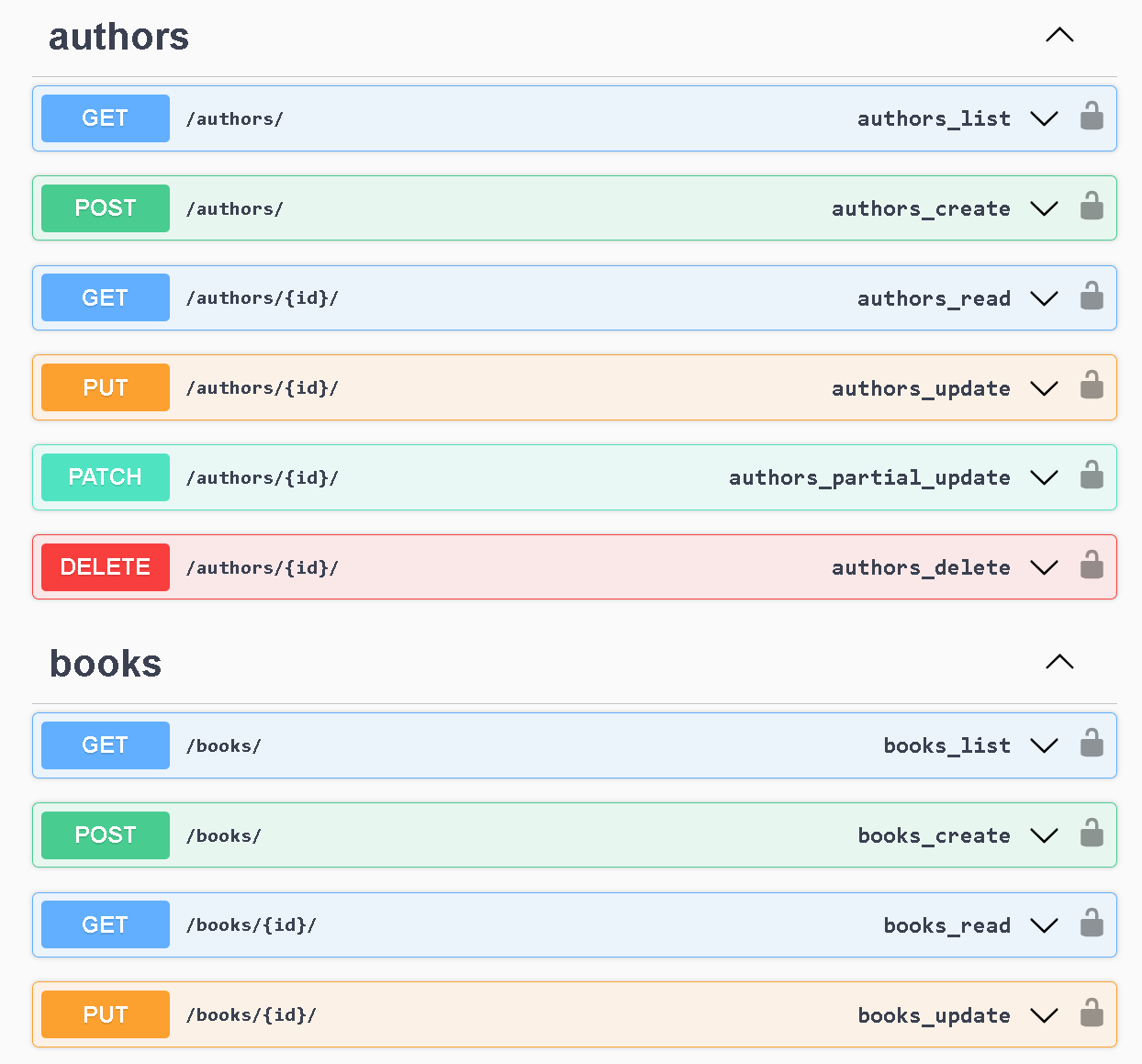
Test your understanding!
You have two ViewSets: ProductViewSet and CategoryViewSet. You need to register them with a DefaultRouter in your api/urls.py file.
- The products API should be available at the
/products/URL prefix. - The categories API should be available at the
/categories/URL prefix.
Write the complete code for api/urls.py to achieve this. What specific URL would you use to get a list of all categories?
Show answer
Here is the correct code for api/urls.py:
from django.urls import path, include
from rest_framework.routers import DefaultRouter
from .views import ProductViewSet, CategoryViewSet

# 1. Create a router instance
router = DefaultRouter()

# 2. Register both ViewSets
router.register(r'products', ProductViewSet, basename='product')
router.register(r'categories', CategoryViewSet, basename='category')

# 3. Include the router's URLs
urlpatterns = [
    path('', include(router.urls)),
]
To get a list of all categories, you would make a GET request to /categories/ (assuming your API is mounted at the root). The router maps GET requests on the root of a registered prefix to the .list() action of the ViewSet.
Conclusion
You've now uncovered the mechanism behind DRF's automatic URL routing. This powerful feature saves you from writing repetitive code and ensures your API's URL structure is consistent and follows best practices.
Key Takeaways:
- Routers automate URL generation for
ViewSets, mapping HTTP methods and URL patterns to actions likelist,create, andretrieve. - The process involves instantiating a router, registering your ViewSets with
router.register(prefix, viewset, basename), and includingrouter.urlsin your URL configuration. SimpleRouterprovides the basic CRUD routes.DefaultRouterextendsSimpleRouterby adding a helpful API root view and support for format suffixes, making it ideal for development.
Preview of the Next Lesson:
So far, we've focused on the standard CRUD actions that ModelViewSet and routers handle automatically. But what if you need a custom endpoint for a specific model, like "publish a blog post" or "change a user's password"? In our next lesson, we will learn how to add custom actions to ViewSets using the @action decorator, and you'll see how routers automatically create URLs for these custom actions too