Hello! Welcome back to our course on the Django framework.
In the last two lessons, you built a complete RESTful API for a Task resource. You used ListCreateAPIView to handle listing all tasks and creating new ones, and RetrieveUpdateDestroyAPIView to handle the details of a single task. This is a solid and common pattern, but it has a slight drawback. You may have noticed that both of your view classes, TaskListCreateView and TaskRetrieveUpdateDestroyView, contain the exact same queryset and serializer_class attributes.
This repetition goes against a core software engineering principle you're likely familiar with: DRY (Don't Repeat Yourself). Having two separate classes to manage a single resource can feel a bit disconnected.
Today, we'll address this by refactoring our code. Your learning goal is to refactor your API views into a ViewSet to group related logic for a resource. This will allow us to consolidate all the logic for our Task model into a single, cohesive class, making our code cleaner and more maintainable.
What is a ViewSet?
At its core, a ViewSet is a type of class-based view in DRF designed to group together the logic for a set of related views. The key conceptual shift is that a ViewSet does not provide method handlers for HTTP verbs like .get() or .post(). Instead, it provides actions like .list(), .create(), .retrieve(), and .update().
These actions are then mapped to HTTP methods when we wire up our URLs. For example, a GET request might be mapped to the .list() action (for a collection) or the .retrieve() action (for a single item).
First, let's get a clear definition from the official DRF documentation.
Please read the introduction section of the official DRF documentation on ViewSets. Focus on this key distinction: a ViewSet provides actions (like .list() and .create()) instead of method handlers (like .get() or .post()).
The primary advantages of this approach are combining repeated logic and simplifying URL configuration (which we'll explore fully in a future lesson).
Django Rest Framework Series - Viewsets and Routers with React Front-end Example - Part-4
This video reinforces the concept and discusses the practical problems that ViewSets solve, especially as projects grow larger.
Watch from 01:09 to 04:36. The presenter highlights the challenges of code repetition and managing numerous endpoints, framing ViewSets as an elegant solution. This directly addresses the code duplication we observed in our own project.
Refactoring to a GenericViewSet
So, how do we perform this refactoring? We could inherit from viewsets.ViewSet and manually write out the logic for each action (list, create, etc.), but that would be reinventing the wheel.
A more effective approach, and a natural extension of what you've already learned, is to use viewsets.GenericViewSet combined with the mixin classes you are already familiar with (ListModelMixin, CreateModelMixin, etc.).
Remember this hierarchy? GenericViewSet sits at a similar level to GenericAPIView, providing the core functionality (get_queryset, get_object) but no actions by default. We add the actions we need by including the appropriate mixins.
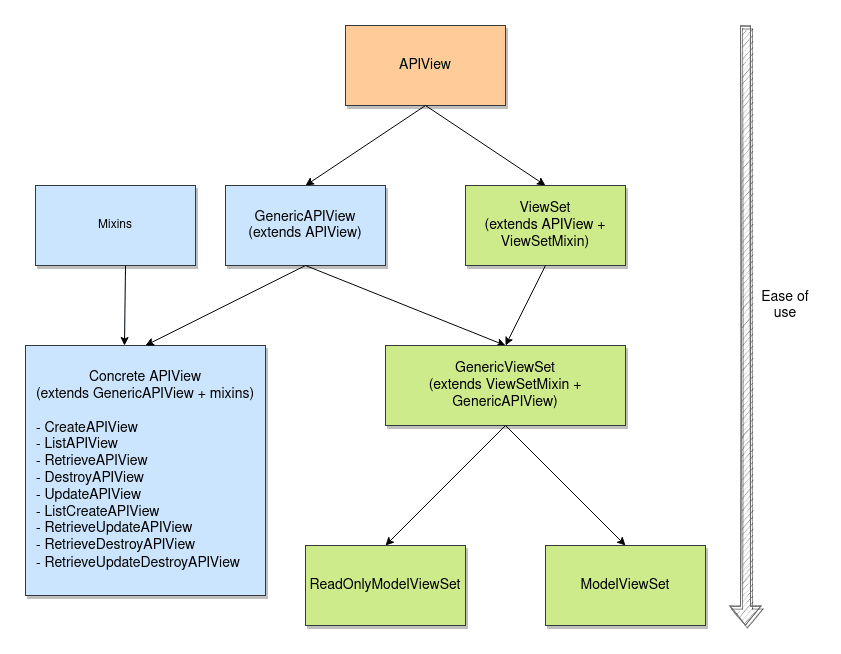
Let's refactor our two Task views into a single TaskViewSet.
Before (in views.py):
# The 'old' way with two separate classes
from rest_framework import generics

class TaskListCreateView(generics.ListCreateAPIView):
    queryset = Task.objects.all()
    serializer_class = TaskSerializer

class TaskRetrieveUpdateDestroyView(generics.RetrieveUpdateDestroyAPIView):
    queryset = Task.objects.all()
    serializer_class = TaskSerializer
    lookup_field = 'pk'
After (in views.py):
We can combine all of this into a single class.
# The 'new' way with a single ViewSet
from rest_framework import viewsets, mixins

class TaskViewSet(mixins.CreateModelMixin,
                  mixins.RetrieveModelMixin,
                  mixins.UpdateModelMixin,
                  mixins.DestroyModelMixin,
                  mixins.ListModelMixin,
                  viewsets.GenericViewSet):
    """
    A viewset that provides default `create()`, `retrieve()`, `update()`,
    `partial_update()`, `destroy()` and `list()` actions.
    """
    queryset = Task.objects.all()
    serializer_class = TaskSerializer
    lookup_field = 'pk'
Look at that! We have a single class that encapsulates all the logic for our Task resource. The queryset and serializer_class attributes are now defined in only one place. We've successfully refactored our views and grouped the related logic.
Binding the ViewSet to URLs
A ViewSet class isn't a complete view on its own. We need to explicitly tell Django how to route requests to the correct actions. We do this in our urls.py file using the .as_view() method, but with a twist. We pass it a dictionary that maps HTTP methods to our action names.
Since our TaskViewSet handles both collection-level actions (list, create) and detail-level actions (retrieve, update, destroy), we will need two URL patterns, just like before. The difference is that both patterns will point to the same TaskViewSet.
Here is how you would wire it up in your app's urls.py:
# urls.py
from django.urls import path
from .views import TaskViewSet

# We explicitly bind HTTP methods to actions for each URL.
task_list = TaskViewSet.as_view({
    'get': 'list',
    'post': 'create'
})

task_detail = TaskViewSet.as_view({
    'get': 'retrieve',
    'put': 'update',
    'patch': 'partial_update',
    'delete': 'destroy'
})

urlpatterns = [
    path('tasks/', task_list, name='task-list'),
    path('tasks/<int:pk>/', task_detail, name='task-detail'),
]
This is the most explicit way to use a ViewSet, and it clearly demonstrates the mapping between HTTP verbs and ViewSet actions. GET requests to /api/tasks/ are routed to the .list() action, POST requests to the same URL go to the .create() action, and so on.
Tutorial 6: ViewSets & Routers
The DRF documentation provides a clear example of this explicit binding process.
Read the subsections 'Refactoring to use ViewSets' and 'Binding ViewSets to URLs explicitly'. This part of the tutorial walks through the exact process we just completed: refactoring multiple views into a single ViewSet and then creating concrete views from it in the URLconf using .as_view().
Test your understanding!
You've created a GenericViewSet for a Comment model. You only want to allow users to list all comments and retrieve a single comment. You do not want to allow creating, updating, or deleting comments via this endpoint.
How would you define the CommentViewSet class and how would you configure urls.py?
Show answer
You would only include the mixins for the actions you want to support.
1. In views.py:
You would inherit from GenericViewSet and only mix in ListModelMixin and RetrieveModelMixin.
# views.py
from rest_framework import viewsets, mixins
from .models import Comment
from .serializers import CommentSerializer

class CommentViewSet(mixins.ListModelMixin,
                     mixins.RetrieveModelMixin,
                     viewsets.GenericViewSet):
    queryset = Comment.objects.all()
    serializer_class = CommentSerializer
2. In urls.py:
You would create the views using .as_view() and only map the get method for each.
# urls.py
from django.urls import path
from .views import CommentViewSet

comment_list = CommentViewSet.as_view({'get': 'list'})
comment_detail = CommentViewSet.as_view({'get': 'retrieve'})

urlpatterns = [
    path('comments/', comment_list, name='comment-list'),
    path('comments/<int:pk>/', comment_detail, name='comment-detail'),
]
This demonstrates the flexibility of GenericViewSet—you can compose exactly the set of behaviors you need.
Conclusion
You have successfully taken a significant step toward writing more professional and maintainable DRF code. By refactoring your separate views into a single ViewSet, you have grouped related logic, reduced code duplication, and made the overall structure of your API clearer.
Key Takeaways:
- A
ViewSetis a class that groups related view logic for a single resource. ViewSets use actions (e.g.,list,retrieve) instead of direct HTTP method handlers (e.g.,get,put).- Refactoring to a
GenericViewSetwith mixins allows you to combine the logic fromListCreateAPIViewandRetrieveUpdateDestroyAPIViewinto one class, following the DRY principle. - To make a
ViewSetwork, you must explicitly bind HTTP methods to actions in yoururls.pyusing the.as_view()method with a dictionary.
Preview of the Next Lesson:
Our current TaskViewSet is already a big improvement. But DRF offers an even more concise way to achieve the same result. In the next lesson, we will explore the ModelViewSet class. You will see how it can provide a full CRUD implementation with just three lines of code. Following that, we will learn about Routers, which can automate the URL binding process we did manually today, making our code even cleaner.